
Pairing & Usage: Jbl Quantum TWS Air Earphones User Guide
Content
JBL Quantum TWS Air Earphones Product Manual
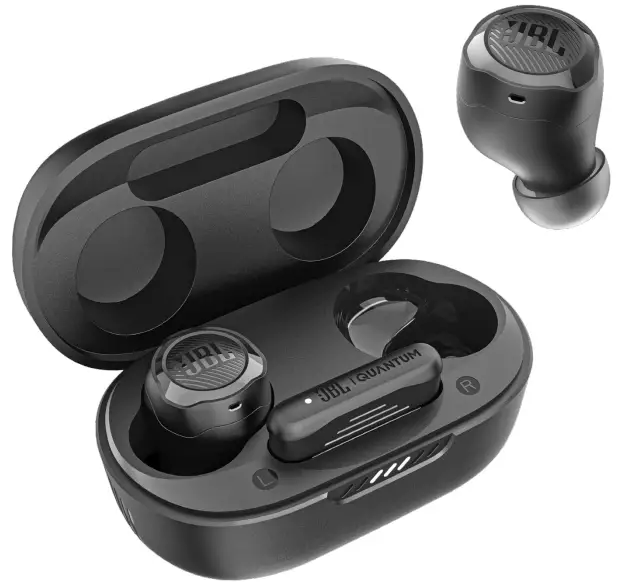
Introduction
The JBL Quantum TWS Air earphones are true wireless gaming earbuds designed to deliver immersive, low-latency audio for gamers and on-the-go users who demand both performance and convenience. Engineered by JBL, a leader in professional audio, these earbuds stand out with their dual connectivity—simultaneous 2.4GHz wireless (via included USB-C dongle) and Bluetooth 5.2—ensuring seamless switching between gaming and everyday calls.
Key benefits include JBL QuantumSURROUND sound for a cinematic, 360-degree audio experience (PC only), Smart Ambient technology that lets you stay aware of your surroundings, and crystal-clear communication powered by four beamforming microphones. The ergonomic, oval-shaped design offers lasting comfort, while the IPX4 water resistance makes them durable enough for active lifestyles. With up to 8 hours of playtime and an additional 16 hours from the charging case, the JBL Quantum TWS Air earphones are built for marathon gaming sessions and extended daily use.
Ideal for gamers, remote workers, and multimedia enthusiasts, these earbuds are compatible with PCs, smartphones, tablets, and even the Nintendo Switch™. The estimated price range is $100–$120, making them a competitive option in the true wireless gaming earbuds market[8]. They are widely available from major electronics retailers and online stores.
Experience immersive gaming, crystal-clear calls, and all-day comfort—all in one compact, wireless package with the JBL Quantum TWS Air earphones.
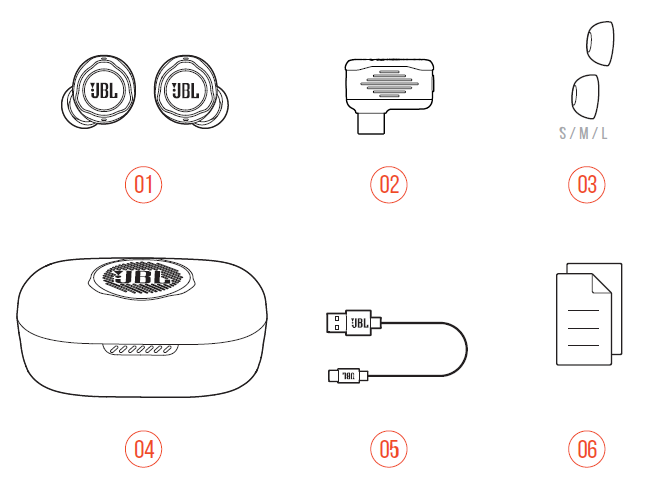
What’s in the box
- JBL Quantum TWS Air earbuds
- 2.4GHz USB wireless dongle (USB-C)
- Silicone ear tips
- Charging case
- USB charging cable (USB-A to USB-C)
- QSG, warranty card, and safety sheet
PRODUCT OVERVIEW
Controls on earbuds
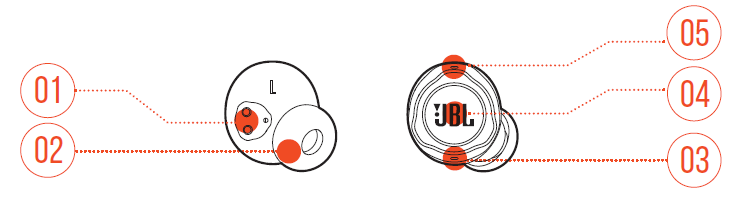
- Charging pin
- Replaceable silicone ear tip 03 Microphone
- Touch control
- LED indicator
Controls on the charging case
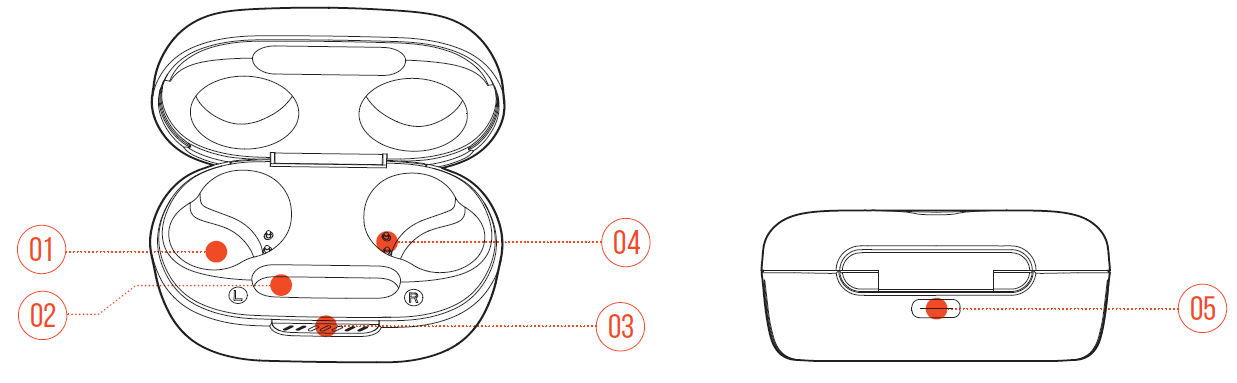
- Earbud holder
- Dongle holder
- LED indicator
- Charging pin
- Charging port
Controls on 2.4GHz USB wireless dongle
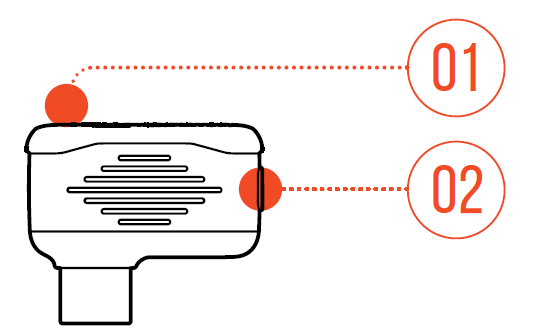
- Pairing button: Hold for more than 5 seconds to enter 2.4GHz wireless pairing mode.
- LED indicator: Indicates the status of the 2.4GHz wireless connection.
Specifications
- Model: QUANTUM TWS AIR
- Driver size: 6.8 mm/0.268" Dynamic Driver
- Power supply: 5 V 1 A
- Earbud: 4.4 g per pc (8.8 g combined)/ 0.0097 lbs per pc (0.0194 lbs combined)
- Dongle: 2.6 g / 0.0057 lbs
- Charging case: 35.4 g / 0.078 lbs
- Earbud battery type: Lithium-ion polymer (50 mAh/3.85 V)
- Charging case battery type: Lithium-ion polymer (330 mAh/3.7 V)
- Charging time: 2 hrs from empty
- Music playtime with BT on: Up to 8 hrs
- Music playtime with 2.4GHz on: Up to 5 hrs
- Talk time with BT on: Up to 4 hrs
- Talk time with 2.4GHz on: Up to 4 hrs
- Frequency response: 20 Hz - 20 kHz
- Impedance: 16 ohms
- Sensitivity: 98 dB SPL@1 kHz
- Maximum SPL: 94 dB SPL
- Microphone sensitivity: -38 dBV/Pa@1 kHz
- Bluetooth version: 5.2
- Bluetooth profile version: A2DP V1.4, AVRCP V1.6.2, HFP V1.8
- Bluetooth transmitter frequency range: 2.4 GHz - 2.4835 GHz
- Bluetooth transmitter power: <9 dBm (EIRP)
- Bluetooth transmitter modulation: GFSK, π/4-DQPSK, 8-DPSK
- 2.4GHz Wireless transmitter frequency range: 2.4 GHz - 2.4835 GHz
- 2.4GHz Wireless transmitter power: <10 dBm (EIRP)
- 2.4GHz Wireless transmitter modulation: GFSK, π/4-DQPSK
- Maximum operation temperature: 45°C
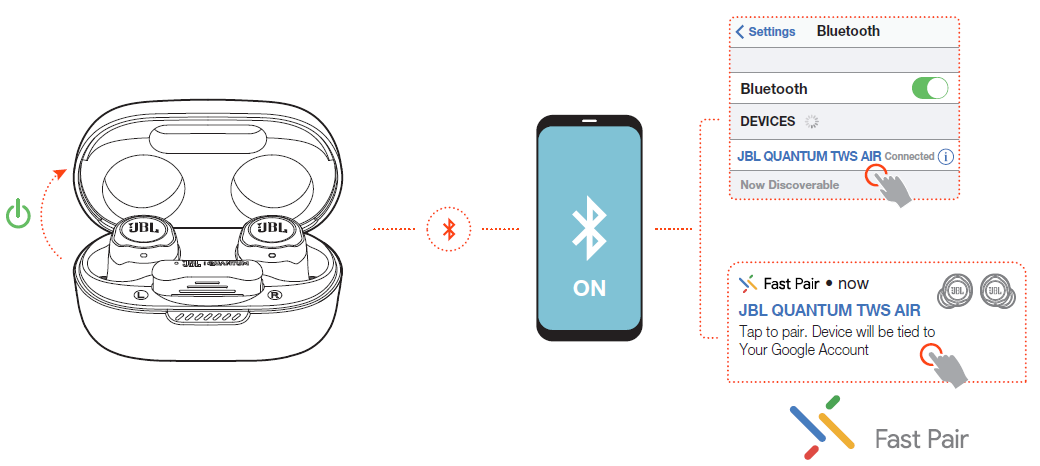
Power on & connect via Bluetooth
Additional features
Sidetone
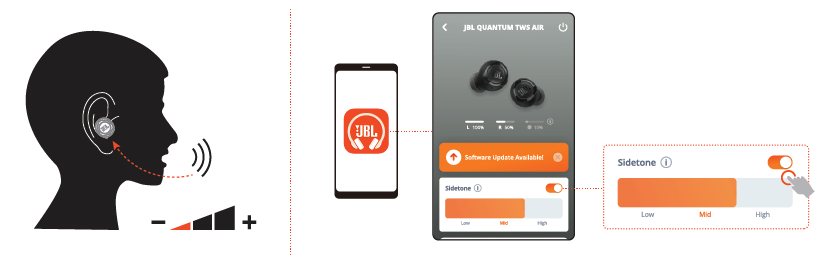
On the app, you can adjust the volume of your own voice that you can hear during a call.
Connecting to a new Bluetooth device
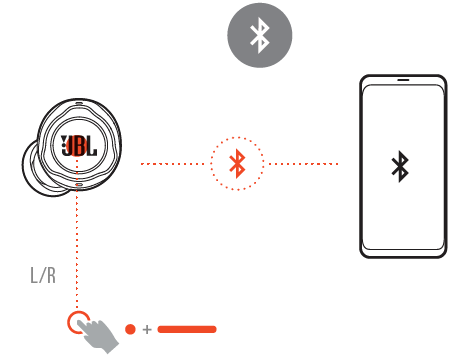
- Take out both earbuds from the charging case.
- Tap and then hold the touch area on either earbud for five seconds.
The earbuds enter Bluetooth pairing mode. - Repeat the Bluetooth pairing procedures for connection to a new Bluetooth device (See “Power on & connect via Bluetooth”).
Factory reset
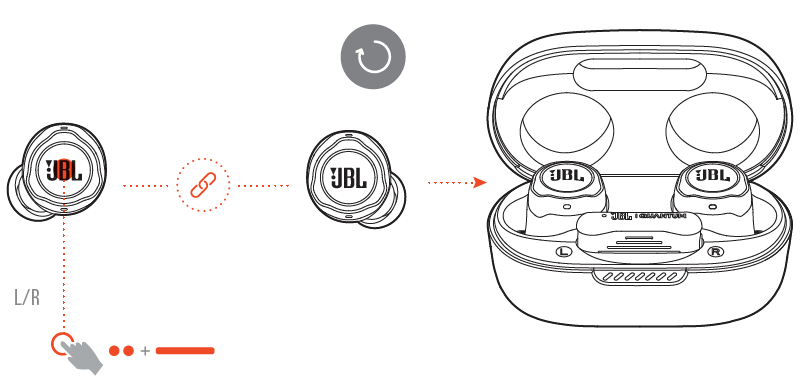
- Take out both earbuds from the charging case.
- Double-tap and then hold the touch area on either earbud for five seconds.
- The LEDs on both earbuds flash blue twice quickly.
- You can hear “Power off“ from the earbuds.
To power on again, put the earbuds back into the charging case and then open the lid.
Power off
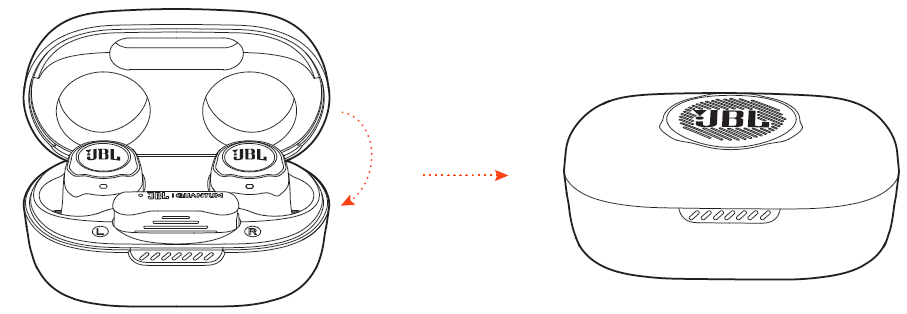
To power off, put the earbuds into the charging case and close the lid.
Troubleshooting Common Issues with JBL Quantum TWS Air Earphones
Even premium devices like the JBL Quantum TWS Air earphones can encounter issues. Below are common problems, solutions, and tips to keep your earbuds performing at their best.
If you have problems using this product, check the following points before you request service.
No power
- Put the earbuds back into the charging case, close the lid, and then open the lid to power on again.
- Recharge the earbuds (see ”Charging”).
2.4Ghz pairing failed between the earbuds and the 2.4 GHz USB wireless dongle
- Move the earbuds closer to the dongle. If the issue remains, pair the earbuds with the dongle again manually (see ”To pair manually”).
No sound or poor sound
- Make sure you have chosen JBL Quantum TWS Air as the default device in the game sound settings of your PC, Mac, or gaming console device.
- Adjust volume on your PC, Mac, or gaming console device.
- You may experience obvious sound quality degradation when using the earbuds near a USB 3.0-enabled device. This is not a malfunction. Use an extension USB dock instead to keep the dongle as far from the USB 3.0 port as possible.
In a 2.4GHz wireless connection:
- Make sure the earbuds and 2.4GHz wireless dongle are paired and connected successfully.
- The USB-A or USB-C ports on some gaming console devices may be incompatible with JBL Quantum TWS Air. This is not a malfunction.
In Bluetooth connection:
- The volume control on the earbuds (customizable on the JBL Headphones app) does not work for the Bluetooth-connected device. This is not a malfunction.
- Keep away from sources of radio interference, such as microwaves or wireless routers.
UNABLE TO RECHARGE MY EARBUDS
- Recharge the charging case.
- Clean the charging pins on the earbuds and in the charging case (see “Cleaning the product”).
My voice cannot be heard by my teammates.
- Make sure you have chosen JBL Quantum TWS Air as the default device in the chat sound settings of your PC, Mac, or gaming console device.
- Make sure the microphone is not muted.
No response or malfunction of the earbuds
- Restore factory settings (see “Factory reset”).
- Put the earbuds back into the charging case and close the lid. Wait for 10 seconds to finish the hardware reboot before opening the lid to power on the earbuds again.
My earbuds fall off easily.
- Try a pair of silicone ear tips that best fit your ear size. Adjust the earbud positions in your ears for the best fit (see “How to wear”).
Preventive Measures
Keep your JBL Quantum TWS Air earphones and case clean and dry. Regularly update firmware through the JBL Headphones app. Store the earbuds in their case when not in use to preserve battery life.
Warranty and Support
JBL offers a 1-year limited warranty on parts and labor. For further assistance, contact JBL support via their website or call 800-336-4525[8]. Always keep your purchase receipt for warranty claims.
Pros & Cons of JBL Quantum TWS Air Earphones
Pros
- Dual Connectivity: Switch seamlessly between 2.4GHz wireless for gaming and Bluetooth for calls and music, a rare feature in true wireless earbuds.
- Low-Latency Gaming Audio: Enjoy lag-free sound critical for competitive gaming, thanks to the dedicated wireless dongle.
- Immersive Sound: JBL QuantumSURROUND and 6.8mm drivers deliver rich, spatial audio on PC.
- Comfort and Durability: Ergonomic, lightweight design with IPX4 water resistance for all-day comfort and reliability.
- Long Battery Life: Up to 8 hours of playtime, plus 16 additional hours from the charging case.
- Clear Communication: Four beamforming microphones ensure your voice is heard clearly during calls and in-game chat.
- Smart Ambient and TalkThru: Stay aware of your surroundings without removing the earbuds, ideal for gaming and commuting.
Cons
- Surround Sound Limited to PC: QuantumSURROUND is only available on PC with JBL QuantumENGINE software.
- No Active Noise Cancellation: While Smart Ambient is useful, the lack of ANC may disappoint some users in noisy environments.
- Touch Controls Can Be Sensitive: Accidental touches may occur during adjustment or intense gaming sessions.
- Case Bulk: The charging case is larger than some competitors', partly due to the integrated dongle storage.
- No Wireless Charging: Only wired charging is supported.
Overall, the JBL Quantum TWS Air earphones offer excellent value for gamers and multitaskers seeking versatile, high-performance wireless audio. Compared to alternatives, they stand out with dual connectivity and gaming-focused features, though audiophiles may prefer dedicated music earbuds with ANC.
Customer Reviews and Feedback
Users consistently praise the JBL Quantum TWS Air earphones for their seamless dual connectivity, clear microphone quality, and comfortable fit—even during long sessions. Many highlight the convenience of switching between gaming and calls without missing a beat, and the immersive sound quality for both games and music.
Common praises include the long battery life, robust build, and effective Smart Ambient feature. However, some users note the lack of active noise cancellation and the larger case size as minor drawbacks. A few mention occasional connectivity hiccups, though these are often resolved with a reset or firmware update.
Star ratings typically range from 4 to 4.5 out of 5, reflecting strong satisfaction among gamers and commuters alike. Testimonials often recommend these earbuds for anyone seeking a versatile, gaming-ready wireless audio solution. Purchase recommendations emphasize checking compatibility with your devices, especially for surround sound features.
Frequently mentioned issues include the need for occasional resets and the desire for ANC. For most users, the JBL Quantum TWS Air earphones deliver on their promise of immersive, lag-free audio and reliable connectivity.
Faqs
How do I set up my JBL Quantum TWS Air Earphones for PC gaming with the 2.4GHz wireless connection?
What should I do if my JBL Quantum TWS Air Earphones won't connect via Bluetooth to my smartphone?
Can I use JBL Quantum TWS Air Earphones with Nintendo Switch or PlayStation consoles?
How does the dual source switching feature work on JBL Quantum TWS Air Earphones?
What are the best practices for maintaining and cleaning JBL Quantum TWS Air Earphones?
How do I enable and customize surround sound effects on JBL Quantum TWS Air Earphones?
What are the reasons my JBL Quantum TWS Air Earphones might have microphone issues during calls or gaming?
How long is the battery life of JBL Quantum TWS Air Earphones and what is the recommended charging method?
Tags
More jbl manuals
- Pairing & Usage: Jbl Soundgear Sense Earphones User Manual
- Usage & Pairing: Jbl Quantum 360X Wireless for XBOX Headphones User Manual
- Setup & Pairing: Jbl Tour One M2 Headphone User Manual
- Pairing: Jbl Quantum 360P Console Wireless Headphones Setup Guide
- Pairing & Usage: Jbl Tour Pro 2 Earphones User Manual
- Pairing : Jbl Live Flex 3 Earphones User Manual
Leave a Comment