
Setup & Pairing: Jbl Tour One M2 Headphone User Manual
Content
JBL Tour One M2 Headphone
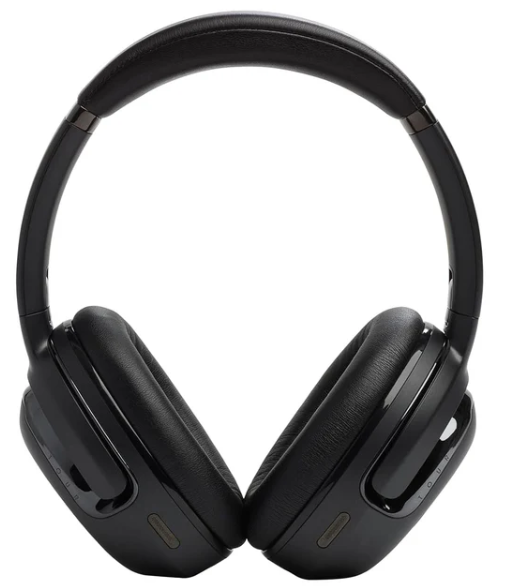
Introduction
The JBL Tour One M2 Headphone is a high-performance wireless over-ear headphone designed for users who demand superior sound quality, comfort, and advanced noise-cancelling features. This model builds on the success of its predecessor with True Adaptive Noise Cancelling technology that automatically adjusts to your surroundings in real-time, minimizing distractions whether you are commuting, working, or relaxing. With JBL’s legendary Hi-Res certified Pro Sound and immersive spatial audio, the Tour One M2 delivers rich, detailed sound from deep bass to clear highs, making it ideal for audiophiles, professionals, and casual listeners alike.
Key benefits include an impressive battery life of up to 50 hours on a single charge, support for Bluetooth 5.3 with fast pairing via Google and Microsoft Swift Pair, and intelligent features like Smart Ambient mode and Smart Talk, which pause music automatically when you speak. The headphones also incorporate 4-mic superior call technology with voice control, ensuring clear phone conversations even in noisy environments. With its durable yet lightweight design weighing just 272 grams, plus the convenience of multipoint connection and compatibility with the JBL Headphones app for personalized sound tuning, the Tour One M2 is tailored for daily use in any setting.
The JBL Tour One M2 Headphone is typically priced around €299 (approx. $300-$350), available through JBL’s official website, authorized retailers, and major online marketplaces. It is an excellent choice for professionals working remotely, travelers, and music enthusiasts seeking premium wireless headphones with adaptive noise cancellation and customizable audio profiles.
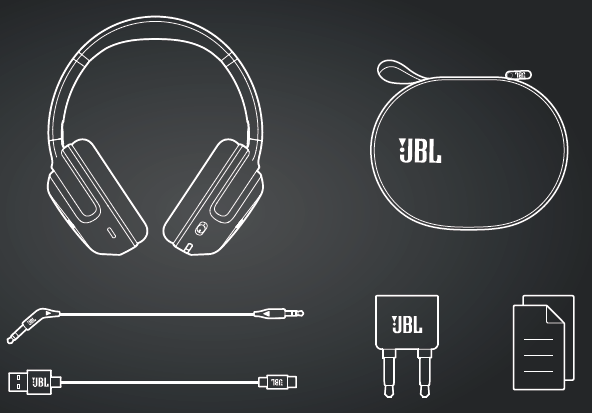
WHAT’S IN THE BOX
Specification
- Model: TOUR ONE M2
- Driver size: 40 mm/ 1.58" Dynamic Driver
- Power supply: 5 V 1.5 A
- Weight: 278 g/ 0.6 lbs
- Battery type: Li-ion battery (920 mAh/ 3.7 V)
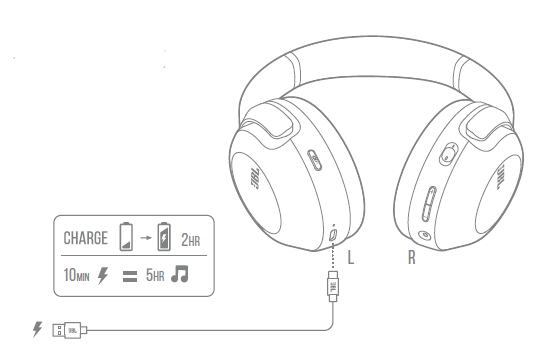
- Charging time: 2 hrs from empty
- Music playtime with BT on and ANC off: Up to 50 hrs
- Music playtime with BT on and ANC on: Up to 30 hrs
- Talk time with ANC off: Up to 30 hrs
- Talk time with ANC on: Up to 21 hrs
- Frequency response (Passive): 10 Hz - 40 kHz
- Frequency response (Active): 10 Hz - 22 kHz
- Impedance: 32 ohms
- Sensitivity: 117 dB SPL@1 kHz
- Maximum SPL: 93 dB
- Microphone sensitivity: -38 dBV/Pa@1 kHz
- Bluetooth version: 5.3
- Bluetooth profile version: A2DP 1.3.2, AVRCP 1.6.2, HFP 1.7.2
- Bluetooth transmitter frequency range: 2400 MHz – 2483.5 MHz
- Bluetooth transmitter power: <4 dBm
- Bluetooth transmitter modulation: GFSK , π/4-DQPSK, 8DPSK
- Maximum operation temperature: 45 °C
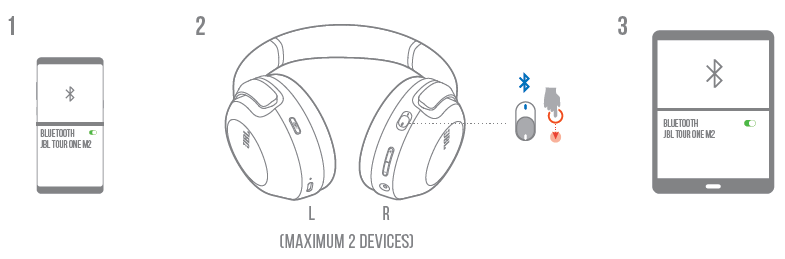
MULTI-POINT CONNECTION
Charging
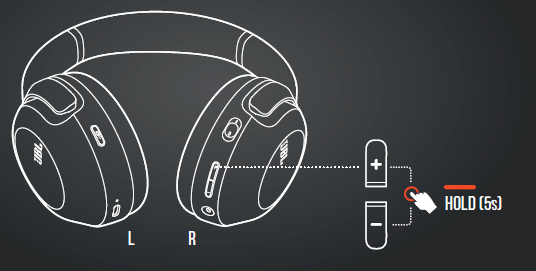
FACTORY RESET
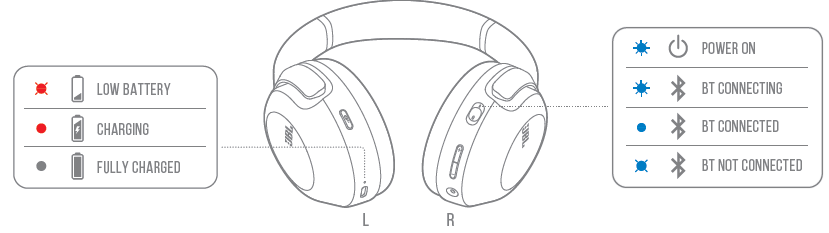
Led behaviors
Troubleshooting Guide for JBL Tour One M2 Headphones
Common issues users may encounter with the JBL Tour One M2 Headphone include Bluetooth connectivity drops, audio playback problems, and microphonemalfunctionsn during calls. To resolve pairing issues, ensure the headphones are in Bluetooth pairing mode by holding the power button for 2 seconds,s and confirm the device is not connected to another source. Resetting the headphones by powering off and on can also help.
If active noise cancelling (ANC) is not working properly, updating the firmware via the JBL Headphones app and toggling ANC modes can restore function. For audio distortion or low volume, verify the headphone battery level, check cable connections if using wired mode, and adjust volume settings on both the headphone and the connected device.
Error codes are typically communicated via LED signals; consult the user manual for specific LED patterns. Preventive maintenance includes regularly charging the battery, keeping headphones clean and dry, and avoiding exposure to extreme temperatures.
The JBL Tour One M2 comes with a standard manufacturer's warranty, and JBL offers customer support through their official website and authorized service centers. For assistance, users can contact JBL support by phone or email, or access the comprehensive online FAQ and product manuals.
Pros & Cons of JBL Tour One M2 Headphones
- Pros:
- Exceptional True Adaptive Noise Cancelling with 4 noise-sensing microphones for real-time environment tuning.
- Long battery life of up to 50 hours of wireless playback, ideal for all-day use.
- Hi-Res certified JBL Pro Sound delivering rich, immersive audio with spatial sound capabilities.
- Smart Talk and VoiceAware features allow seamless conversations without removing headphones.
- Bluetooth 5.3 ensures stable wireless connectivity and supports multipoint pairing.
- Customizable audio profile through the JBL Headphones app with Personi-Fi 2.0 hearing test.
- Cons:
- Lack of support for premium Bluetooth codecs like LDAC or aptX HD may limit hi-res wireless audio potential.
- Spatial audio can sometimes cause metallic or warped sound quality during music playback for certain users.
- Price point (€299) is on the higher side compared to some competitors offering similar features.
- The app’s hearing test results lack a detailed explanation, which some users may find unclear.
- Value for Money: The JBL Tour One M2 offers a strong balance of advanced ANC, sound quality, and comfort, positioning it well for mid to high-end headphone buyers, though alternatives like Sony WH-1000XM5 or Bose 700 may offer additional codec support or slightly better ANC performance.
Customer Reviews and Feedback on JBL Tour One M2 Headphones
Users consistently praise the JBL Tour One M2 Headphone for its comfort during long listening sessions and impressive noise cancellation that adapts well to changing environments. Many highlight the clear call quality enabled by the 4-mic system and appreciate the Smart Talk feature that pauses music automatically when speaking. The long battery life and ease of wireless pairing are also frequently noted as strong positives, often earning the headphones 4 to 4.5-star ratings out of 5.
Common complaints include occasional Bluetooth instability and a desire for more advanced codec support for higher-fidelity wireless audio. Some users report that the spatial audio feature can degrade music quality, preferring to disable it for music listening. Despite these minor drawbacks, the majority recommend the JBL Tour One M2 for daily commuting, remote work, and casual music enjoyment due to its overall performance and feature set.
Faqs
How do I set up the JBL Tour One M2 Headphone for the first time with my smartphone?
What should I do if my JBL Tour One M2 Headphone is not connecting via Bluetooth?
How does the True Adaptive Noise Cancelling feature work on the JBL Tour One M2 Headphone?
Can I use the JBL Tour One M2 Headphone for hands-free voice calls and voice assistant control?
What devices are compatible with the JBL Tour One M2 Headphone and are there any special requirements?
How can I optimize battery life on my JBL Tour One M2 Headphone?
What maintenance and care tips should I follow for the JBL Tour One M2 Headphone?
Why does the touch control on JBL Tour One M2 Headphone sometimes pause music unintentionally, and how can I fix it?
More jbl manuals
- Pairing & Usage: Jbl Tour Pro 2 Earphones User Manual
- Pairing & Usage: Jbl Soundgear Sense Earphones User Manual
- How to Pair: Jbl Live 770NC Headphones User Manual
- Pairing & Usage: Jbl Quantum TWS Air Earphones User Guide
- How to Setup: Jbl Speaker Bar 1300MK2 User Guide
- Usage & Pairing: Jbl Quantum 360X Wireless for XBOX Headphones User Manual
Leave a Comment