
How to Use: Jbl PartyBox 520 Speakers Setup Guide
Content
JBL PartyBox 520 Speakers
Introduction
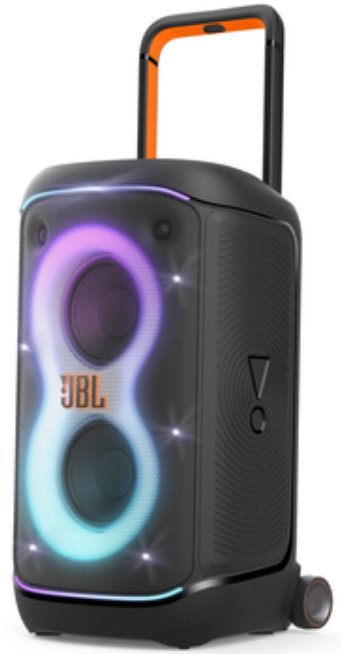
The JBL PartyBox 520 Speakers redefine portable party audio with a powerful combination of dynamic sound and immersive lighting effects. Designed to set the perfect mood for any gathering, these speakers offer JBL’s largest and boldest sound output yet, powered by advanced AI Sound Boost technology that optimizes audio in real-time for deep bass and crystal-clear treble. Built with portability in mind, the PartyBox 520 features a rugged telescopic handle and wide, sturdy wheels, making it effortless to roll the party anywhere — from backyard barbecues to poolside events or large indoor celebrations.
With up to 15 hours of continuous playtime on a single charge and an IPX4 splashproof rating, the speaker is engineered to withstand the unpredictability of lively events. The device supports multi-speaker connection using JBL’s Auracast™ technology, allowing users to seamlessly link multiple PartyBox 520 units or other Auracast-enabled JBL speakers for an amplified, venue-filling sound experience. Whether you are a casual listener, a karaoke enthusiast, or a professional DJ, this speaker supports easy connectivity with two XLR inputs for microphones, guitars, or DJ consoles.
Targeted at music lovers who demand high-quality, portable sound with vibrant visuals, the JBL PartyBox 520 is ideal for parties, events, and outdoor gatherings. It is typically priced in the range of $650 to $700, available globally through JBL’s official website and leading electronics retailers. Its balance of portability, power, and smart features makes it a standout choice in the competitive landscape of party speakers.
WHAT’S IN THE BOX
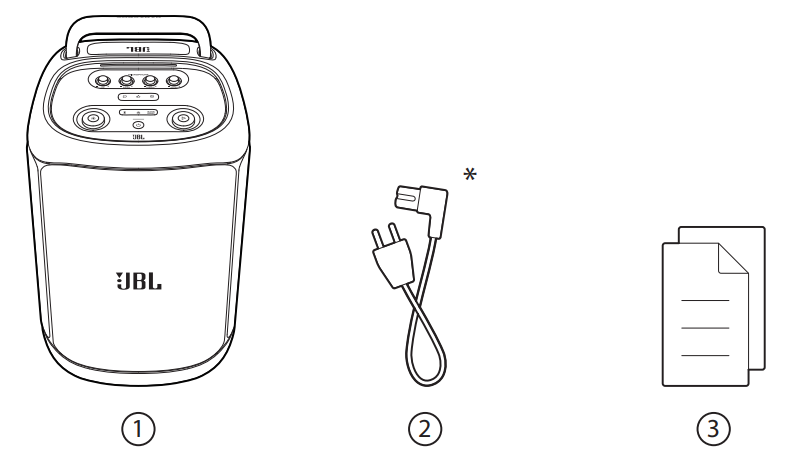
- Main unit
- Power cord*
- Quick Start Guide, Safety Sheet, Warranty Card
*Power cord quantity and plug type vary by region.
USING YOUR PARTYBOX
Notes
- Only one sound source can be played at a time.
- Starting playback from another source will always interrupt the current source.
Bluetooth connection
You can use the speaker with your Bluetooth-enabled smartphone or tablet.
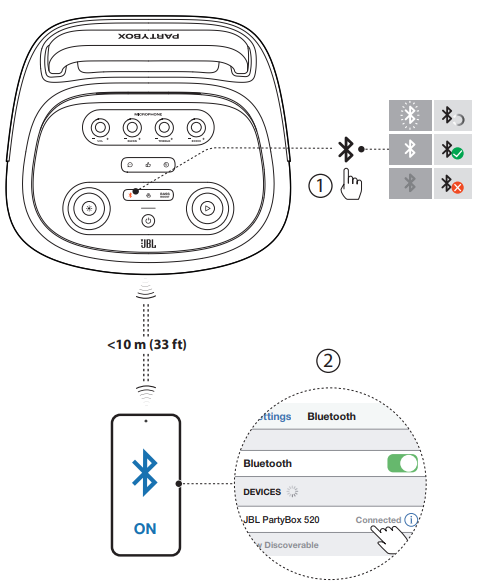
- Press
 on the speaker to enter Bluetooth pairing mode
 - Choose JBL PartyBox 520 on your Bluetooth device to connect.
- Once successfully connected, you can stream audio from your Bluetooth device to this speaker.
Notes
- This speaker supports multi-point connection. You can pair a second Bluetooth device without disconnecting the first one.
- Enter “0000” if a PIN code is requested for connection to a Bluetooth device.
- Bluetooth performance can be affected by the distance between this product and your Bluetooth device and the environment of operation.
To terminate the Bluetooth-enabled device:
- Turn off this speaker, or
- Disable Bluetooth on your device.
To reconnect the Bluetooth-enabled device:
- When you turn on this speaker next time, it tries to reconnect the last connected device automatically.
- If not, manually select JBL PartyBox 520 on your Bluetooth device to connect.
USB connection
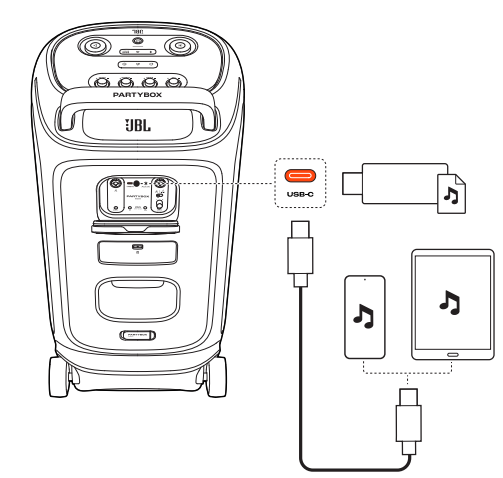
- Connect the speaker with a PC, tablet, or other mobile devices for audio playback and recording (microphone and guitar/line-in input only).
- Plug a USB storage device that contains playable audio content into the USB-C port of the speaker (not for the Ethe MEA region).
- The speaker switches to the USB source automatically.
- Audio playback will start automatically.
- Tip:
- The speaker plays audio files on the USB storage device from the root folder to the last level of subfolders in alphabetical sequence. Up to 8 levels of subfolders are supported.
Supported audio formats
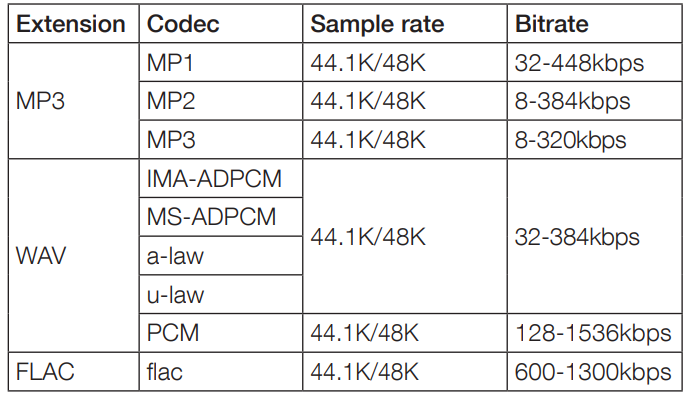
Recording audio to a USB storage device
- Hold simultaneously for more than 2 seconds to start recording (microphone and guitar input only).
When the recording starts, the LED flashes white once.
 - Repeat step 1 to stop recording.
When recording stops, theLED flashes white twice.
Music control
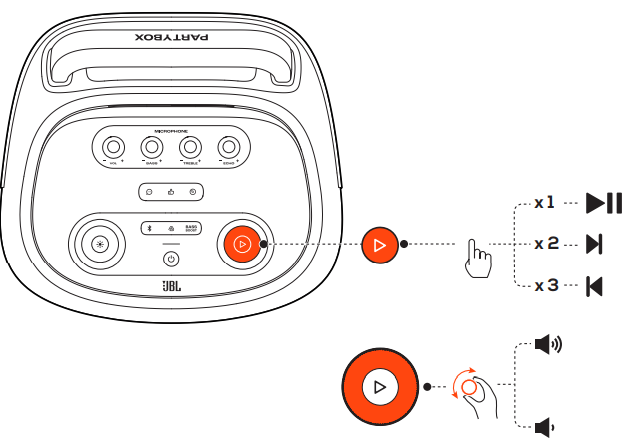
- Press
 once to pause or resume playback.
 - Press twice to skip to the next track.
- Press three times to skip to the previous track.
- Rotate the volume knob clockwise or counterclockwise to increase or decrease the main volume.
- Press to enhance the bass level: level 1, level 2, or off.
Note:
The skip operation is unavailable in AUX mode
AUX connection
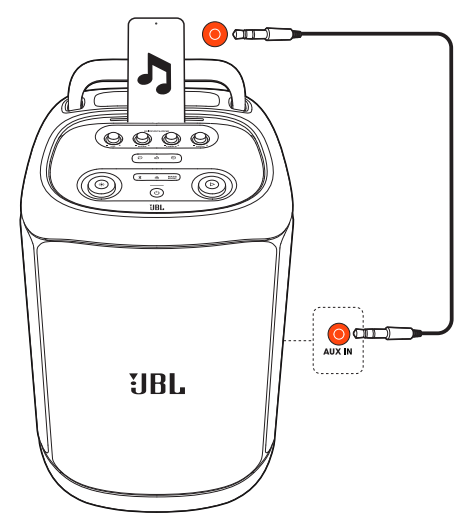
- Connect an external audio device to the speaker through a 3.5 mm audio cable (not supplied).
The speaker switches to the AUX source automatically. - Start audio playback on the external device.
Mixing sound with a microphone and or guitar / line-in device
By using a microphone or an electric guitar / line-in device, such as a DJ mixer (not supplied), you can mix sound with an audio source.
Notes:
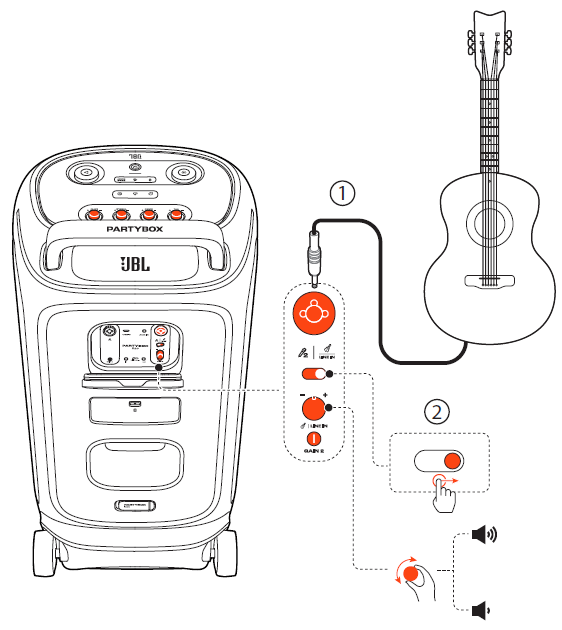
- Always set the volume of the guitar / line-in device or microphone to the minimum level before connection/disconnection.
- Always disconnect the guitar / line-in device or microphone when you are not using it.
Connecting a microphone
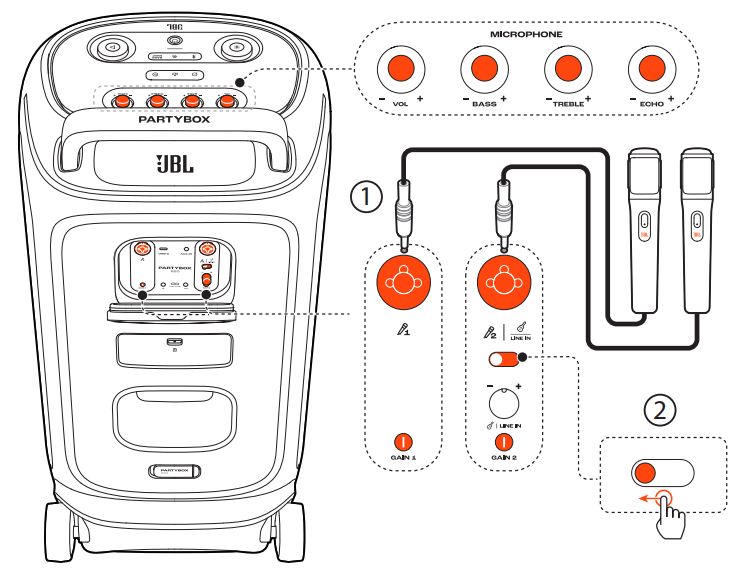
- Connect a microphone to the
 or socket.
 - When connecting a microphone to the socket, switch the slider accordingly.
Connecting a guitar
- Connect a guitar to the socket.
- Switch the slider accordingly.
Connecting a line-in device
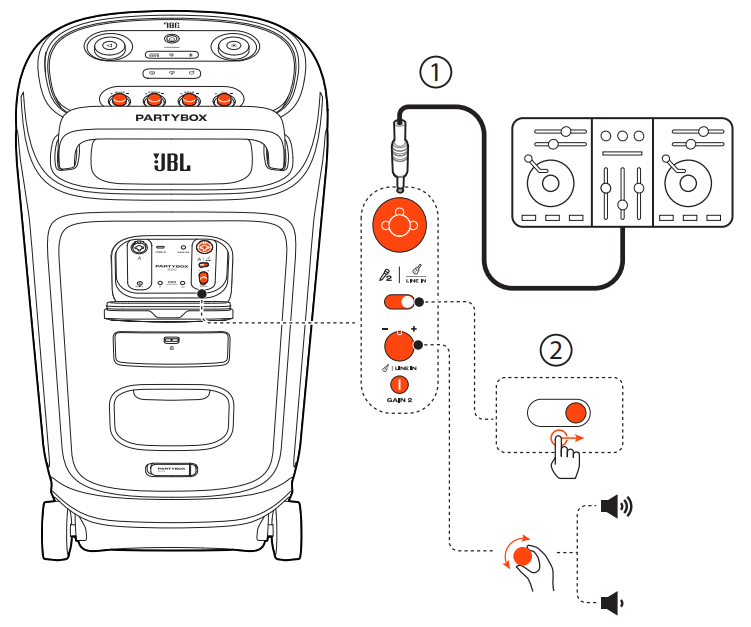
Connect a line-in device, such as a DJ mixer, to the socket.
- Switch the slider accordingly.
Mixing sound
- Sing through the microphone or play the guitar / line-in device.
- To adjust the volume of the audio source, rotate the volume knob on the top panel clockwise or counterclockwise.
- To adjust the volume of the microphone, rotate the - VOL + knob on the top panel. To adjust the volume of the guitar /line-in device, rotate the - + volume knob on the back panel.
- To adjust the gain of the microphone or guitar, rotate the

- GAIN 1 or GAIN 2 control on the back pane,l respectively.
- To adjust the echo, treble, and bass levels of the microphone, rotate the - ECHO +, - TREBLE +, and- BASS + knobs on the top panel, el respectively. ely
SPECIFICATIONS
- Transducer: 2 x 7.5 inch (208 mm) woofers, 2 x 1 inch (25 mm) dome tweeters
- Output power: 400 W RMS (IEC60268)
- Power input: 100 – 240 V ~ 50 / 60 Hz
- Frequency response: 40 Hz – 20 kHz
- Signal-to-noise ratio: > 80 dB
- Battery type: JBL BATTERY 600, Li-ion 99.02 Wh (equivalent to 21.6 V / 4584 mAh)
- Battery charge time: 3 hours (Speaker off mode)
- Music play time: up to 15 hours (varies by volume level and audio content)• Cable type: AC power cable (type varies by region)
- Cable length: 2.0 m / 6.6 ft
- USB-C charge out: PDO (5 V / 3 A, 9 V / 3 A, 15 V / 2 A, 20 V / 1.5 A), PPS (5 - 11 V / 2.7 A, 5 - 16 V / 1.85 A)
- USB format: FAT16, FAT32
- Bluetooth® version: 5.4
- Bluetooth® profile: A2DP V1.4, AVRCP V1.6
- Bluetooth® transmitter frequency range:2.4 GHz – 2.4835 GHz
- Bluetooth® transmitter power: ≤ 18 dBm (EIRP)
- Bluetooth® transmitter modulation: GFSK, π/4 DQPSK, 8DPSK
- Supported formats (not for EMEA region):.MP3, .WAV, .FLAC
- Input sensitivity:
- Aux-In: 250 mV RMS (3.5 mm connector)
- Mic-In: 20 mV RMS
- Guitar/Line-In: 100 mV RMS
- Bluetooth/USB input: -12 dBFS
- Product dimensions (W x H x D): 415 x 769 x 369 mm / 16.34” x 30.28” x 14.53”
- Net weight: 25.5 kg / 56.2 lbs
- Packaging dimensions (W x H x D): 489 x 854 x 480 mm / 19.25” x 33.62” x 18.9”
- Gross weight: 29.4 kg / 64.8 lbs
- Hours of battery playtime are only a reference and may vary depending on music content and battery aging after numerous charging and discharging cycles. It’s achievable with a predefined music source, light show, and bass boost switched off, volume level at 18, and Bluetooth streaming source.
TROUBLESHOOTING
Caution:
- Never try to repair the product by yourself. If you have any problems while using this product, check the following points before you request service.
System
The speaker will not turn on.
- Ensure that the speaker battery is not drained. If not, use the AC power instead.
No response from some buttons/knobss
- The product may be in demo mode. In demo mode, all the input sources and buttons, except / / and the volume and light pattern knobs, are disabled. With AC power connected, hold and simultaneously for more than 10 seconds to exit.
- The top panel may be locked. In this case, all buttons /knobs on the top panel, except for, are disabled. Access the JBL PARTYBOX app to unlock it.
Sound
No sound from the speaker.
- Ensure that the speaker is powered on.
- Adjust volume.
- Ensure that a sound source is active and not muted.
Bluetooth
A device cannot connect to the speaker.
- Ensure that the Bluetooth function of the device is enabled.
- The speaker is already connected with another Bluetooth device. Hold the speaker for more than 10 seconds to disconnect and pair with a new device.
Poor audio quality from a connected Bluetooth device
- The Bluetooth reception is poor. Move the device closer to the speaker, or remove any obstacle between the device and the speaker
Pros & Cons of JBL PartyBox 520 Speakers
Advantages
- Powerful Sound Performance: Equipped with dual 7.5-inch woofers and 1-inch tweeters, it delivers deep bass and clear highs, ideal for bass-heavy genres like hip-hop or EDM.
- Long Battery Life: Up to 15 hours of playback ensures non-stop music for extended parties without frequent charging interruptions.
- Portability & Durability: Telescopic handle and wide wheels provide easy transport, while the IPX4 splashproof design protects against spills and splashes.
- Advanced Connectivity: Bluetooth 5.4 with LE audio, Auracast™ multi-speaker pairing, and two XLR inputs provide versatile connection options for mics, guitars, and DJ gear.
- Vibrant Lightshow: The futuristic, customizable light effects enhance the party atmosphere and sync with the music.
Disadvantages
- Battery Life Varies: Battery duration can drop significantly when using light effects or bass boost at high volumes.
- Weight and Size: While portable, the speaker is relatively large and heavy compared to smaller party speakers, which may limit casual mobility.
- Lighting Features Not Fully Advanced: Lacks floor lights seen in higher-end models like the PartyBox Ultimate, which some DJs might miss.
- Price Point: Higher cost compared to smaller JBL PartyBox models, which may not suit users with modest budgets.
Compared to alternatives such as the JBL PartyBox Stage 320 or the larger, non-battery PartyBox 710, the 520 strikes a mid-range balance of portability, power, and price, making it highly versatile for both casual and more serious party needs.
Customer Reviews & Feedback on JBL PartyBox 520 Speakers
Users consistently praise the JBL PartyBox 520 Speakers for their robust sound quality and dynamic bass response, often highlighting the clarity in vocals and the immersive lightshow as key features. Many note the convenience of the telescopic handle and wheels, making transportation simple. The most common compliments revolve around the speaker’s ability to energize large gatherings with loud, distortion-free audio.
On the other hand, some customers mention that the battery life shortens noticeably when using the light effects or bass boost at higher volume levels, which can be a drawback for all-night events without access to power. A few users also wished for more advanced lighting features like floor lights, which are present in more premium models. Despite these minor issues, the overall star rating averages around 4.5 out of 5, with many reviewers recommending the speaker for anyone looking to host vibrant parties or outdoor events.
Buyers appreciate the value for money considering its features and sound quality, especially when compared to other portable party speakers in the $600+ price range. The easy-to-use JBL PartyBox app for customizing sound and light settings is frequently cited as a positive aspect, enhancing user experience.
Faqs
How do I set up the jbl PartyBox 520 Speakers for the first time?
What should I do if the jbl PartyBox 520 Speakers are not connecting via Bluetooth?
Can I connect multiple jbl PartyBox 520 Speakers for a bigger sound experience?
How do the sound effect buttons on the jbl PartyBox 520 Speakers work?
Are the jbl PartyBox 520 Speakers compatible with guitars or DJ consoles?
How long does the battery last on the jbl PartyBox 520 Speakers and how do I recharge them?
What are the best practices to maintain and care for my jbl PartyBox 520 Speakers?
How can I optimize the sound and lighting effects on the jbl PartyBox 520 Speakers for different party settings?
Tags
More jbl manuals
Leave a Comment