
Setup & Features: Jbl PRX825 Dual 15" Two-Way Full-Range Main System with Wi-Fi User Manual
Content
jbl PRX825 Dual 15" Two-Way Full-Range Main System with Wi-Fi Overview
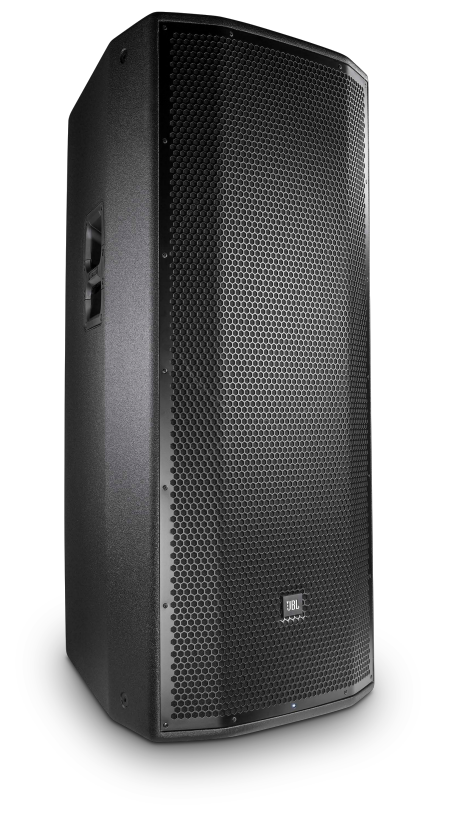
The jbl PRX825 Dual 15" Two-Way Full-Range Main System with Wi-Fi is a self-powered professional loudspeaker designed for high-output live sound, portable PA use, and installed applications that demand strong low-end response and wide coverage. Built around dual 15-inch woofers, a 1.5-inch compression driver, and a high-efficiency Class D amplifier, it delivers powerful full-range performance for bands, DJs, houses of worship, event venues, and rental companies. Its built-in Wi-Fi and PRX Connect app support make it especially appealing for users who want remote control over EQ, delay, and system monitoring without walking back to the cabinet during a show.
Key benefits include 138 dB peak output, flexible analog inputs, and preset voicing options that help the speaker adapt to different environments quickly. The enclosure is rugged, portable for its class, and engineered for dependable operation at high SPL levels. The jbl PRX825 Dual 15" Two-Way Full-Range Main System with Wi-Fi remains a strong choice for users who want a serious main PA speaker with modern wireless control and pro-grade sound. Estimated pricing typically falls in the mid-to-high professional speaker range, with current market availability often around $1,400 to $1,700 per speaker depending on region, condition, and seller. It is commonly available through pro audio retailers, online marketplaces, and used gear listings.
Specifications for JBL PRX825 Dual 15-Inch Wi-Fi Full-Range PA Speaker
- System type: Self-powered, dual 15", two-way, bass-reflex design
- Amplification: 1500 W total output, 750 W x 2 Class D amplification
- Maximum SPL: 138 dB peak
- Frequency response: 46 Hz to 17 kHz at ±3 dB in normal mode; boost mode available for extended low-end voicing
- Frequency range: Approximately 42 Hz to 18.5 kHz in normal mode, with low-frequency extension in boost mode
- Inputs: 2 balanced XLR / 1/4-inch combo inputs and 2 unbalanced RCA inputs
- Wireless control: Built-in Wi-Fi with PRX Connect mobile app support
- Processing: User-selectable normal and boost presets, plus advanced EQ and delay control through the app
- Typical use: Main PA, DJ sound, live bands, corporate audio, worship, and portable event reinforcement
Compared with compact single-woofer PA speakers, this model offers greater bass authority and higher output, making it more suitable for larger rooms and outdoor events. Compared with smaller systems in the same class, it provides stronger low-frequency impact, though it is bulkier and heavier than many 12-inch alternatives.
How to Set Up the JBL PRX825 Wi-Fi Powered Speaker
Place the speaker on a stable surface, tripod stand, or proper pole mount rated for its weight and size. Connect audio sources using the XLR/1/4-inch inputs for balanced signals or RCA for consumer gear. Power the unit with the correct AC supply and confirm that the speaker is switched off before connecting cables. If using wireless control, install the PRX Connect app on a compatible mobile device, power on the speaker, and place it into access point mode by holding the Connect button until the LED flashes slowly. Then join the speaker’s Wi-Fi network from your device and complete setup in the app.
After connection, assign the system name, venue name, and make basic EQ or delay adjustments as needed. For stereo or multi-speaker systems, repeat the process for each cabinet and verify all units are visible in the app. Safety precautions matter: do not block ventilation, avoid moisture exposure, and never attempt to lift or mount the cabinet without proper assistance. If audio is distorted, lower the input gain before increasing output levels. If Wi-Fi pairing fails, reset the wireless connection, confirm the speaker is in access point mode, and try again from close range.
Troubleshooting JBL PRX825 Speaker Problems and Fixes
- No sound output: Check AC power, source output, cable integrity, input selection, and channel gain settings.
- Distortion at high volume: Reduce input level, confirm the source is not clipping, and use the correct preset for the venue.
- Wi-Fi app connection fails: Re-enter access point mode, move closer to the speaker, and reconnect through the device Wi-Fi menu.
- Weak bass response: Verify the voicing preset, speaker placement, and polarity, and avoid placing the cabinet too close to boundary reflections unless reinforced bass is desired.
- Intermittent sound: Inspect cables, power source stability, and source device output.
This product does not commonly use consumer-style error codes, but status LEDs and app alerts can indicate network, limiter, or protection behavior. Preventive care includes keeping firmware and control software current when available, allowing proper ventilation, and avoiding prolonged clipping. Warranty terms vary by seller and region, so buyers should confirm coverage before purchase. For help, contact authorized JBL Professional support, the retailer that sold the unit, or the local Harman/JBL service channel listed in the product documentation.
Pros and Cons of the JBL PRX825 Dual 15-Inch Main System
Pros
- Very high output for a portable powered speaker, with 138 dB peak SPL.
- Dual 15-inch drivers deliver strong low-end punch without needing a sub for many applications.
- Built-in Wi-Fi and app control make tuning easier during live events.
- Flexible input options support microphones, mixers, and playback devices.
- Excellent fit for DJs, bands, and medium-to-large venues needing a full-range main system.
Cons
- Large and heavy compared with 12-inch powered speakers.
- Not the best choice for users prioritizing maximum portability.
- Older wireless-control design may feel less modern than newer networked systems.
- Overkill for small rooms where a compact speaker would be more efficient.
- Requires careful setup to get the best balance between low-end power and vocal clarity.
For value, the speaker is strongest when used in applications that truly benefit from its output and bass response. Compared with smaller alternatives, it costs more and weighs more, but it also replaces the need for extra subs in some setups.
Customer Reviews of the JBL PRX825 Wi-Fi PA Speaker
User feedback is generally positive, with many owners praising the speaker’s clean output, strong bass, and dependable performance in live environments. Typical ratings cluster around 4.5 out of 5 stars among pro-audio buyers who value loud, full-range sound. One common comment is that the cabinet sounds “big” for a single-box solution and works well for DJs and live bands. Another frequent compliment is the convenience of wireless control for quick EQ adjustments during a show.
Common complaints focus on weight, size, and the learning curve for app-based setup. Some users also mention that the speaker is best paired with proper gain staging and a subwoofer for larger bass-heavy events. Overall, the jbl PRX825 Dual 15" Two-Way Full-Range Main System with Wi-Fi is a solid purchase for buyers who want powerful output, flexible control, and proven pro audio performance. It is less ideal for casual users who need something lightweight and simple, but highly recommended for serious mobile sound applications.
Faqs
How do I set up the jbl PRX825 Dual 15" Two-Way Full-Range Main System with Wi-Fi for the first time?
What should I do if my jbl PRX825 Dual 15" Two-Way Full-Range Main System with Wi-Fi has low sound output?
Can I use the jbl PRX825 Dual 15" Two-Way Full-Range Main System with Wi-Fi with a mixer, microphone, or DJ controller?
Why does the jbl PRX825 Dual 15" Two-Way Full-Range Main System with Wi-Fi start feeding back, and how can I stop it?
What Wi-Fi features should I expect from the jbl PRX825 Dual 15" Two-Way Full-Range Main System with Wi-Fi?
How can I optimize the sound quality of the jbl PRX825 Dual 15" Two-Way Full-Range Main System with Wi-Fi in a large room?
What are the best maintenance steps for the jbl PRX825 Dual 15" Two-Way Full-Range Main System with Wi-Fi?
How do I troubleshoot distorted audio on the jbl PRX825 Dual 15" Two-Way Full-Range Main System with Wi-Fi?
More jbl manuals
- How to Use: Jbl Quantum 350 Wireless Gaming Headset User Manual
- How to Use: Jbl IRX100 Series Portable Powered PA Loudspeakers User Manual
- Specifications & Features: Jbl Bar 300 Soundbar User Manual
- Setup & Features: Jbl TT350 Classic - Turntable Owner Manual
- Jbl EON-208P Portable PA Speakers User Manual
- How to Pair: Jbl Cinema SB510 Speakers User Manual
Leave a Comment