
Specifications & Features: Jbl Bar 300 Soundbar User Manual
Content
JBL Bar 300 Soundbar: Compact Dolby Atmos Sound for Everyday Home Entertainment
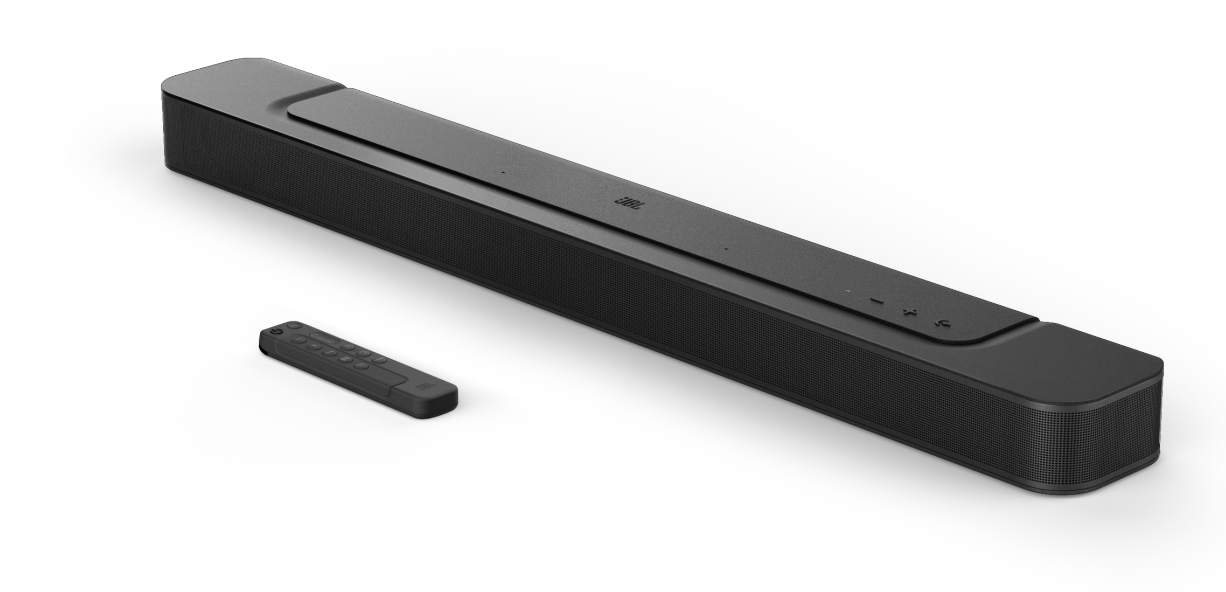
The JBL Bar 300 Soundbar is a compact all-in-one home audio solution designed for users who want big-room sound without the complexity of a separate subwoofer or rear speakers. It combines 5.0-channel output, Dolby Atmos support, and JBL’s MultiBeam technology to create a wider, more immersive listening experience from a single unit. For movie nights, streaming, gaming, and everyday TV viewing, this soundbar delivers clearer dialogue, punchier effects, and a more cinematic soundstage than most built-in TV speakers.
One of the biggest advantages of the JBL Bar 300 Soundbar is its balance of simplicity and performance. It is easy to place, wall-mountable, and built with wireless features such as Bluetooth and Wi-Fi for flexible playback. It also supports popular streaming ecosystems, making it a strong fit for modern smart homes. The integrated voice-enhancement features are especially useful for users who often struggle to hear dialogue in action scenes or quiet shows.
This model is aimed at apartment owners, bedroom setups, small living rooms, and anyone who wants a clean, uncluttered audio upgrade. Typical pricing generally falls in the mid-range soundbar category, often around $300 to $400 depending on region and retailer availability. It is widely available through major electronics stores and online marketplaces, with occasional discounts during seasonal sales.
Specifications: JBL Bar 300 Soundbar Technical Details and Key Features
- Sound system: 5.0-channel all-in-one soundbar
- Total output power: 260W
- Drivers: 4 racetrack mid/bass drivers and 2 tweeters
- Audio formats: Dolby Atmos support
- Surround technology: JBL MultiBeam for virtual surround sound
- Connectivity: HDMI eARC, HDMI input, optical input, Bluetooth, Wi-Fi
- Streaming support: Works with major wireless audio platforms and voice assistants
- Dimensions: approximately 82 cm wide, 5.6 cm high, 10.3 cm deep
- Weight: about 2.5 kg
- Design: compact, wall-mountable, all-in-one chassis
- No separate subwoofer included
- USB port included for service use
In performance terms, the JBL Bar 300 Soundbar is best understood as a compact Atmos soundbar built for clear, room-filling sound rather than maximum bass output. Compared with larger soundbars that include wireless subwoofers, it trades deep low-end impact for a cleaner footprint and simpler setup. Against similarly priced models, it stands out for its Dolby Atmos support, wireless streaming flexibility, and strong all-in-one convenience.
Detailed Description: How the JBL Bar 300 Soundbar Works in Real Homes
The JBL Bar 300 Soundbar uses its multiple internal drivers and virtual surround processing to project sound outward and upward, creating a more spacious audio image. Instead of relying on a separate subwoofer or rear satellites, the unit uses JBL’s processing to simulate surround effects from a single bar. This makes it particularly useful for users who want a neat setup under a TV without multiple cables or extra hardware.
In real-world use, it performs well for streaming movies, sports broadcasts, and gaming sessions where dialogue clarity matters. The built-in dialogue enhancement features help voices remain more intelligible during busy scenes. Its compact build and restrained design make it suitable for modern TV stands, bedroom consoles, and wall-mounted installations.
The construction feels practical and durable, with a low-profile cabinet that is easy to position without blocking the screen. The finish is clean and modern, matching most contemporary televisions. User experience is generally positive for people who value convenience, quick connection, and a simple interface. It is especially appealing to buyers who want better sound than a TV can deliver but do not want a full surround system.
Setup Guide: How to Install and Connect the JBL Bar 300 Soundbar
Setting up the JBL Bar 300 Soundbar is straightforward. Place it directly in front of your TV or mount it beneath the display, making sure the front grille is unobstructed. Connect the soundbar to the TV using HDMI eARC for the best audio quality and easiest control. If HDMI eARC is unavailable, use the optical input as an alternative.
- Unbox the soundbar, power cable, remote control, and mounting accessories.
- Position the unit on a stable surface or wall mount it securely.
- Connect HDMI eARC from the soundbar to the TV’s compatible HDMI port.
- Switch the TV audio output to HDMI ARC/eARC or optical, depending on your connection.
- Power on the soundbar and complete the initial pairing through the remote or app if supported.
- Enable Bluetooth or Wi-Fi for music streaming and smart-device playback.
- Adjust bass, volume, and dialogue settings to match your room.
For safety, keep the soundbar away from water, heat sources, and blocked ventilation areas. Do not overload wall mounts, and avoid sharp bends in cables. If sound is missing, confirm the TV output format and cable connection before changing settings.
Troubleshooting: Common JBL Bar 300 Soundbar Problems and Fixes
Most issues with the JBL Bar 300 Soundbar are easy to solve. If there is no sound, check that the TV is set to the correct audio output and that HDMI eARC or optical cables are firmly connected. If dialogue sounds faint, increase the center or voice-enhancement setting if available. If Bluetooth streaming drops, move the source device closer and reduce interference from other wireless products.
- No audio: Verify TV audio output, input selection, and cable integrity.
- Delayed sound: Use HDMI eARC and disable extra TV audio processing.
- Weak bass: Reposition the soundbar and confirm audio mode settings.
- Bluetooth pairing failure: Reset Bluetooth on both devices and reconnect.
- Remote not responding: Replace batteries and clear obstructions.
If a reset does not resolve the issue, consult the user manual or factory reset the unit before contacting support. Preventive care includes regular firmware updates, stable cabling, and keeping the soundbar dust-free. Warranty coverage and customer support are typically available through the retailer or JBL service channels, and users should keep proof of purchase for claims and repairs.
Pros & Cons: JBL Bar 300 Soundbar Value, Features, and Alternatives
Pros
- Compact all-in-one design makes it easy to fit in small spaces.
- Dolby Atmos and MultiBeam improve the sense of width and height in movies.
- Wireless connectivity adds convenient music streaming options.
- Simple setup is ideal for users who want plug-and-play home theater sound.
- Strong value for buyers who want better TV audio without a separate subwoofer.
Cons
- No separate subwoofer, so deep bass is more limited than larger systems.
- Best suited to smaller or medium rooms rather than large entertainment spaces.
- Not the most powerful option if maximum cinematic impact is the goal.
- Competing models in the same price range may offer stronger bass with included subs.
Overall, the JBL Bar 300 Soundbar offers excellent convenience and a polished feature set for its size. It is a smart buy for people prioritizing ease of use, modern connectivity, and space-saving design over heavy low-end output.
Customer Reviews: What Users Say About the JBL Bar 300 Soundbar
Customer feedback for the JBL Bar 300 Soundbar is generally positive, with many users praising its clear dialogue, compact design, and easy setup. Common ratings often land around 4 out of 5 stars, especially among buyers who wanted a simple upgrade from TV speakers. One typical user comment is: “Great sound for the size, and the setup took only a few minutes.”
Frequent praise includes strong mids, good wireless connectivity, and a clean design that fits well under modern TVs. The most common complaints focus on bass depth and the fact that it does not include a separate subwoofer. Some users also note that room size affects how immersive the virtual surround effect feels. For buyers who want a tidy, affordable, feature-rich soundbar, the JBL Bar 300 Soundbar is often recommended as a practical everyday choice.
Faqs
How do I set up the jbl Bar 300 Soundbar for the first time with my TV?
Why is my jbl Bar 300 Soundbar not producing sound even though it is connected?
What devices are compatible with the jbl Bar 300 Soundbar for Bluetooth and TV audio?
How can I improve dialogue clarity on the jbl Bar 300 Soundbar during movies and shows?
Why does the jbl Bar 300 Soundbar sometimes delay audio when watching TV?
Does the jbl Bar 300 Soundbar need a subwoofer, or is it good on its own?
How do I update firmware on the jbl Bar 300 Soundbar and why is it important?
What is the best way to clean and maintain the jbl Bar 300 Soundbar?
More jbl manuals
- Jbl EON-208P Portable PA Speakers User Manual
- How to Use: Jbl Quantum 350 Wireless Gaming Headset User Manual
- Jbl Charge-5 Portable Waterproof Speaker User Manual
- Setup & Features: Jbl PRX825 Dual 15" Two-Way Full-Range Main System with Wi-Fi User Manual
- Jbl Harman-Series Cinema SB550 User Manual
- How to Use: Jbl IRX100 Series Portable Powered PA Loudspeakers User Manual
Leave a Comment