
How to Use: Jbl Quantum 350 Wireless Gaming Headset User Manual
Content
JBL Quantum 350 Wireless Gaming Headset Manual
Introduction
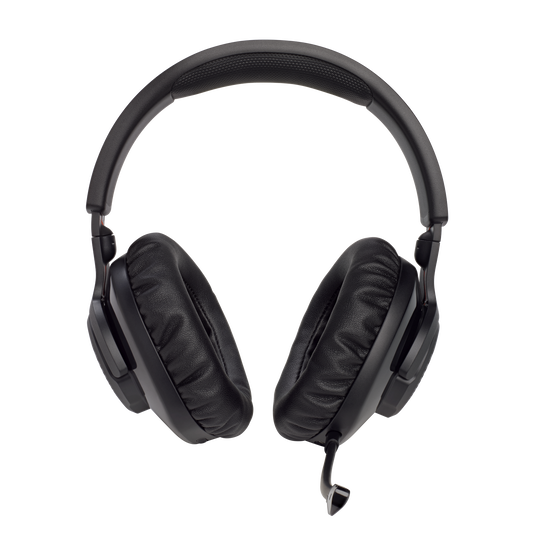
The JBL Quantum 350 Wireless Gaming Headset is a lightweight, 2.4 GHz wireless gaming headset built for players who want reliable latency-free audio, clear voice chat, and comfortable all-day wear. Designed for PC gamers, it also suits users who need a simple plug-and-play headset for long sessions, competitive multiplayer, streaming, and casual entertainment. With 40 mm dynamic drivers, JBL QuantumSOUND Signature tuning, and a detachable boom microphone, it delivers an immersive gaming experience that balances directional detail with punchy bass.
One of its strongest selling points is the wireless USB dongle connection, which offers a fast, stable setup without the hassle of Bluetooth pairing delays. The headset’s lightweight 252 g build, memory foam ear cushions, and up to 22 hours of battery life make it practical for extended play. It also supports quick charging, reaching a full charge in about 2 hours. For users who want a straightforward gaming headset without moving into premium pricing, the JBL Quantum 350 Wireless Gaming Headset is a smart value option.
In current retail markets, the headset generally falls in the budget-to-midrange category, with pricing commonly around $60 to $90 depending on region, retailer, and promotions. Availability is broad through JBL’s official store and major electronics retailers, making it easy to find in black and other standard finishes.
Specifications
- Driver size: 40 mm dynamic drivers for gaming audio and strong positional cues.
- Frequency response: 20 Hz to 20 kHz for standard full-range playback.
- Microphone frequency response: 100 Hz to 10 kHz for clear voice pickup.
- Sensitivity: 115 dB SPL at 1 kHz for efficient output.
- Impedance: 32 ohms, making it easy to drive with the included wireless adapter.
- Wireless connection: 2.4 GHz USB wireless via dongle for low-latency gaming.
- Battery life: Up to 22 hours of playback per charge.
- Charging time: About 2 hours from empty.
- Microphone: Detachable, omnidirectional boom mic for game chat and calls.
- Weight: 252 g for lightweight comfort.
Compared with similar wireless gaming headsets in this price class, the JBL Quantum 350 Wireless Gaming Headset stands out for its low-latency dongle connection and lightweight build. It is less feature-heavy than premium models with Bluetooth multipoint or advanced active noise cancellation, but it offers stronger simplicity and better gaming-first focus than many general-purpose wireless headsets.
Setup Guide: How to Connect the JBL Quantum 350 Wireless Gaming Headset
1. Fully charge the headset before first use with the included USB-C charging cable.
2. Insert the USB wireless dongle into your PC or compatible gaming device.
3. Turn on the headset using the power control until the status indicator activates.
4. Wait a few seconds for the headset and dongle to pair automatically.
5. Select the headset as the default input and output device in your operating system or game settings.
6. Adjust chat and game audio balance using system controls or compatible software if available.
7. Attach the detachable microphone securely for voice chat and remove it when listening only.
For best performance, keep the dongle within a short range and avoid blocking it with metal surfaces or dense obstacles. If audio cuts out, reconnect the dongle, restart the headset, and confirm the device is selected in sound settings. Safety precautions include avoiding exposure to excessive heat, not overcharging for long periods, and keeping the headset dry. Do not use high volume levels for extended sessions, as prolonged listening can affect hearing comfort.
Troubleshooting Common JBL Quantum 350 Wireless Headset Issues
If the headset does not power on, recharge it for at least 15 to 20 minutes and try again. If the dongle is not recognized, move it to another USB port and test on a different device. If game audio works but microphone input fails, check that the boom mic is firmly attached and that the system input device is set correctly.
If you hear distortion or dropouts, reduce wireless interference by moving closer to the dongle and disconnecting unused USB devices nearby. If the headset pairs but sound is delayed or unstable, restart both the headset and the host device. There are no common user-facing error codes for this model; most issues are solved by power cycling, re-seating the dongle, or updating device drivers on the host PC.
Preventive care helps avoid most problems. Keep the battery charged, store the headset in a cool place, and clean the ear pads and microphone area regularly. Warranty coverage and support options typically depend on the retailer and region, but JBL generally offers product support through its official customer service channels, online help resources, and authorized service partners. For help, contact the retailer where purchased or JBL customer support in your region through the official support portal.
Pros & Cons of the JBL Quantum 350 Wireless Gaming Headset
Pros
- Low-latency 2.4 GHz wireless connection is ideal for gaming and voice chat.
- Lightweight 252 g design improves comfort during long sessions.
- Up to 22 hours of battery life offers strong daily usability.
- Detachable microphone adds flexibility for gaming and media use.
- Simple plug-and-play setup is beginner-friendly and reliable.
- Good value for money compared with many premium wireless gaming headsets.
Cons
- No Bluetooth support limits use with phones and tablets.
- Features are more basic than higher-end competing headsets.
- Sound tuning is gaming-focused rather than audiophile-neutral.
- Microphone quality is solid for chat but not studio-level for streaming.
- Best experience is on PC, so cross-platform flexibility is limited.
For buyers comparing options, this model is better suited to players who want dependable wireless gaming audio at a reasonable cost rather than users who need premium extras. Against alternatives in the same bracket, the JBL Quantum 350 Wireless Gaming Headset offers a stronger balance of comfort, battery life, and straightforward wireless performance.
Customer Reviews and Real-World Feedback
Average user sentiment for the JBL Quantum 350 Wireless Gaming Headset is generally positive, with many buyers rating it around 4 out of 5 stars. Players often praise the easy setup, comfortable fit, and stable wireless performance during long gaming sessions. Several users also like the detachable microphone and the headset’s lightweight feel.
Common complaints include the lack of Bluetooth, the absence of advanced features found in more expensive headsets, and occasional concerns about microphone clarity in noisy rooms. A typical testimonial reads, “Great battery life and very comfortable for marathon gaming, but I wish it had Bluetooth.” Another common sentiment is, “Excellent value if you want a simple wireless headset for PC gaming.”
This headset is a strong recommendation for budget-conscious gamers, students, and casual streamers who want dependable wireless audio without unnecessary complexity. Users who need multi-device support or premium sound customization may want to compare it with higher-tier JBL Quantum models or competing wireless gaming headsets.
Faqs
How do I set up jbl Quantum 350 Wireless Gaming Headset for the first time on PC?
Why is my jbl Quantum 350 Wireless Gaming Headset not connecting to the USB dongle?
Can the jbl Quantum 350 Wireless Gaming Headset work with PS5, Nintendo Switch, or other consoles?
How do I improve microphone quality on jbl Quantum 350 Wireless Gaming Headset during gaming chats?
What should I do if the jbl Quantum 350 Wireless Gaming Headset has low volume or weak bass?
How long does the battery last on jbl Quantum 350 Wireless Gaming Headset and how can I extend it?
Is jbl Quantum 350 Wireless Gaming Headset comfortable for long gaming sessions?
How should I clean and maintain jbl Quantum 350 Wireless Gaming Headset to keep it working well?
More jbl manuals
- Specifications & Features: Jbl Bar 300 Soundbar User Manual
- Setup & Features: Jbl PRX825 Dual 15" Two-Way Full-Range Main System with Wi-Fi User Manual
- Jbl EON-208P Portable PA Speakers User Manual
- How to Use: Jbl IRX100 Series Portable Powered PA Loudspeakers User Manual
- Jbl Charge-5 Portable Waterproof Speaker User Manual
- Setup & Features: Jbl TT350 Classic - Turntable Owner Manual
Leave a Comment