
Jbl EON-208P Portable PA Speakers User Manual
Content
JBL EON-208P Portable PA Speakers: Complete Product Manual and Review
Introduction
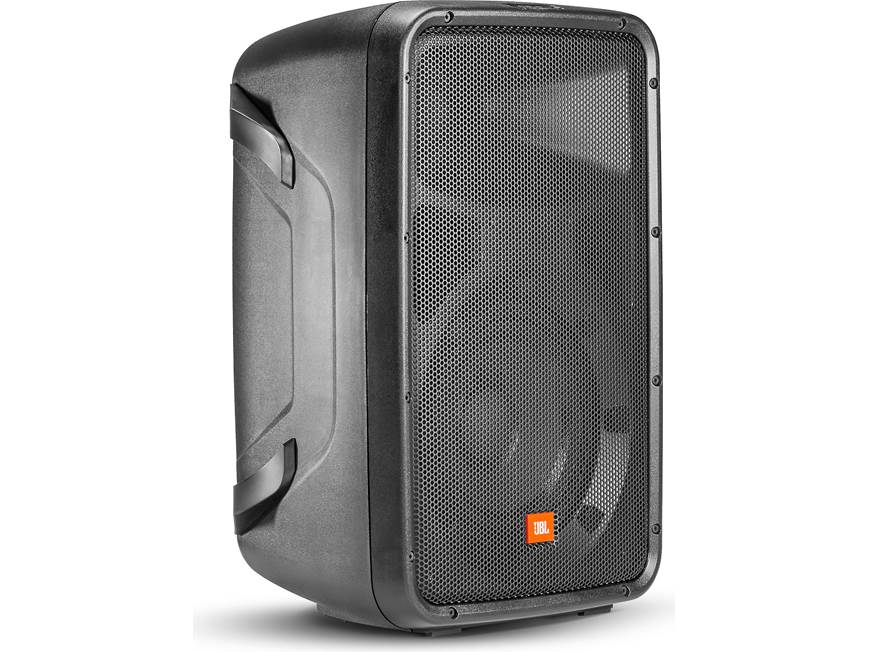
The jbl EON-208P Portable PA Speakers are a compact all-in-one PA system designed for users who need fast setup, clear vocal projection, and reliable portable sound reinforcement. This portable PA package combines two 8-inch two-way speakers with an integrated 8-channel mixer and a 300W Class D amplifier, making it a practical choice for small events, presentations, live music, classrooms, houses of worship, and mobile performers.
One of the biggest advantages of the jbl EON-208P Portable PA Speakers is convenience. The system is built for transport, with a carry-friendly form factor and a lightweight design for its class. It supports microphones, instruments, and line-level devices, so users can connect vocals, acoustic guitars, keyboards, and playback devices without carrying separate gear. Built-in Bluetooth support, multiple input options, and onboard EQ controls make it easy to adapt to different venues and performance styles.
Other standout benefits include a maximum peak output of 121 dB, wide 100° x 60° coverage, and a frequency response tuned for speech and music clarity. In the current market, the estimated price range is typically around $750 to $1,100 USD depending on retailer, availability, and promotions. It is widely available through major audio retailers and online marketplaces, though stock can vary by region. For buyers seeking a portable PA system that balances power, flexibility, and straightforward operation, this model remains a strong option.
Troubleshooting: Common JBL EON-208P Problems and Fixes
If the system does not power on, check the AC outlet, power cable, and voltage setting before assuming a hardware fault. The unit supports both 100-120V and 220-240V operation, so make sure the local mains voltage matches the input setting.
- No sound: Confirm the master volume, channel gain, and speaker connections are active. Test with a known-good microphone or playback source.
- Distortion or clipping: Lower the input gain and channel volume. Avoid running all inputs at maximum, especially with loud microphones or boosted EQ.
- Bluetooth pairing issues: Remove old pairings, restart the speaker system, and reconnect from a fresh device search.
- Hum or noise: Use balanced connections where possible and keep audio cables away from power cables.
- Weak output: Verify that the channel is set correctly for mic, line, or instrument use.
There are no widely used consumer error codes displayed on the unit, so troubleshooting is usually done through signal checks and control verification. Preventive care includes storing the speakers in a dry environment, avoiding overload, and keeping connectors clean. JBL professional loudspeaker products are covered by limited warranty terms that vary by component, and service support is available through JBL customer service. For assistance, contact JBL Incorporated, Attn: Customer Service Department, 8500 Balboa Boulevard, P.O. Box 2200, Northridge, California 91329, or call (818) 893-8411.
Pros and Cons of JBL EON-208P Portable PA Speakers
Pros
- Portable all-in-one design: Easy to carry and set up for small events, rehearsals, and mobile presentations.
- Versatile connectivity: Supports microphones, guitars, keyboards, RCA sources, and Bluetooth playback.
- Clear vocal performance: The 8-inch two-way speakers deliver strong speech intelligibility and solid midrange.
- Built-in mixer: Reduces the need for external equipment, which is ideal for beginners and traveling users.
- Good value for mobile users: It can replace several separate components in one purchase, which helps justify the price.
Cons
- Limited low-end output: Like most compact PA systems, it does not deliver deep bass for larger music venues without a subwoofer.
- Control layout can be tight: Some users find the mic/line switching and front-panel labeling less intuitive at a glance.
- Not ideal for large crowds: Better suited to small and medium rooms than big outdoor events.
- Alternative options: Buyers needing more bass or more power may prefer larger powered PA systems or a setup with separate speakers and mixer.
Overall, the jbl EON-208P Portable PA Speakers offer strong value for users who prioritize portability and simplicity over maximum output. Compared with basic budget PA kits, it feels more refined and professional, but higher-powered systems will outperform it in very large spaces.
Customer Reviews: What Buyers Say About JBL EON-208P
User feedback is generally positive, with many owners rating the system around 4 to 5 stars for portability, ease of setup, and clear sound. A common praise is that it delivers surprisingly full performance for a compact portable PA system, especially for vocals and speech.
Typical positive comments include: “Great sound for small gigs,” “Very easy to carry and set up,” and “Perfect for church announcements and karaoke nights.” On the other hand, some buyers mention that the mixer controls can feel cramped and that the low-end response is not as strong as a system with a subwoofer.
- Average sentiment: 4.5/5 stars among many retail review listings.
- Most praised: Portability, sound clarity, and all-in-one design.
- Most mentioned complaint: Limited bass and compact control layout.
For buyers who need a dependable portable PA speaker package for small venues, classrooms, worship spaces, or solo performances, the jbl EON-208P Portable PA Speakers are an easy recommendation.
Faqs
How do I set up jbl EON-208P Portable PA Speakers for the first time?
Why is my jbl EON-208P Portable PA Speakers system producing feedback, and how can I stop it?
Can jbl EON-208P Portable PA Speakers connect to a phone, laptop, or tablet for music playback?
What should I do if jbl EON-208P Portable PA Speakers has power but no sound?
How do I get the best sound quality from jbl EON-208P Portable PA Speakers in a small venue?
What types of microphones and instruments work best with jbl EON-208P Portable PA Speakers?
How should I transport and store jbl EON-208P Portable PA Speakers to prevent damage?
How often should I clean and maintain jbl EON-208P Portable PA Speakers for reliable performance?
Tags
More jbl manuals
- Jbl Charge-5 Portable Waterproof Speaker User Manual
- Specifications & Features: Jbl Bar 300 Soundbar User Manual
- Jbl Harman-Series Cinema SB550 User Manual
- How to Use: Jbl Quantum 350 Wireless Gaming Headset User Manual
- Jbl Tuner Portable Bluetooth Speaker User Manual
- Setup & Features: Jbl PRX825 Dual 15" Two-Way Full-Range Main System with Wi-Fi User Manual
Leave a Comment