
Jbl FLIP-3 Bluetooth Portable Speaker User Manual
Content
JBL Flip 3 Bluetooth Portable Speaker Manual: Overview, Features, and Buying Guide
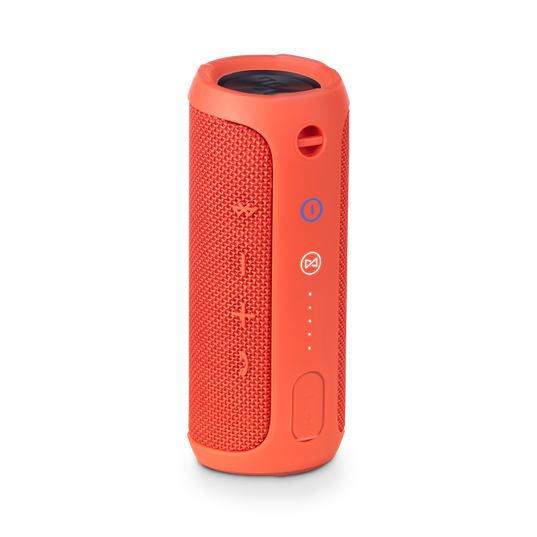
The JBL Flip 3 Bluetooth Portable Speaker is a compact, travel-friendly wireless speaker designed for everyday listening at home, outdoors, and on the go. Known for its balanced stereo sound, splash-resistant build, and long battery life, it remains a popular choice for users who want a simple portable speaker with strong volume for its size. With Bluetooth 4.1 connectivity, a built-in 3000 mAh rechargeable battery, and up to 10 hours of playback, the JBL Flip 3 Bluetooth Portable Speaker delivers dependable performance for casual music streaming, podcasts, phone calls, and small gatherings.
This speaker is a strong fit for students, commuters, travelers, and anyone who wants a rugged Bluetooth speaker for poolside use, picnics, bedroom listening, or outdoor activities. Its dual 40 mm drivers and 16 W stereo output help produce clear mids and punchy sound, while the compact cylindrical design makes it easy to pack in a backpack or tote bag. The splashproof housing adds peace of mind for light rain or accidental spills, making it practical for active lifestyles. In 2026, the JBL Flip 3 Bluetooth Portable Speaker is typically found in the budget-to-midrange category, with prices varying by region, retailer, color, and condition. In many markets, it is often available through online marketplaces, electronics stores, and refurbished listings, with estimated pricing generally ranging from about $40 to $100 depending on availability.
How to Use the JBL Flip 3 Bluetooth Portable Speaker
Quick Start Guide for Daily Use
- Charge the speaker fully before first use for best battery performance.
- Press the power button until the speaker turns on.
- Enable Bluetooth on your phone, tablet, or laptop.
- Select the speaker from the available device list.
- Play audio and adjust volume from either the speaker or your device.
Best Practices for Better Sound
- Keep the speaker on a stable surface for stronger bass response.
- Avoid blocking the passive radiator areas for clearer output.
- Use moderate volume to extend battery life and reduce distortion.
- Store it dry after outdoor use, especially after exposure to moisture.
Troubleshooting JBL Flip 3 Bluetooth Portable Speaker Issues
Common problems with the JBL Flip 3 Bluetooth Portable Speaker usually relate to pairing, charging, or audio playback. If the speaker will not pair, turn Bluetooth off and on again, forget the device in your phone’s settings, and re-pair from scratch. If there is no sound, confirm that volume is raised on both the speaker and source device, and check whether the speaker is connected to the correct phone or tablet. If charging is slow or inconsistent, try a different micro-USB cable, a standard 5V power adapter, and a clean charging port. The speaker does not commonly show detailed numeric error codes, so most issues are resolved through reset and reconnection steps rather than code-based fixes.
To reduce future problems, keep the speaker away from extreme heat, rinse off dirt carefully only when appropriate for the splashproof design, and avoid forcing connectors into the charging port. If the unit still fails to power on or hold a charge, contact JBL support or the retailer where it was purchased. Warranty coverage depends on region and seller policy, but JBL products are commonly covered through Harman support channels. For help, use JBL’s official customer support website, authorized service centers, or the retailer’s warranty desk for repair, replacement, or accessory guidance.
Pros and Cons of the JBL Flip 3 Bluetooth Portable Speaker
Pros
- Compact and easy to carry, making it ideal for travel and outdoor use.
- Up to 10 hours of playtime is practical for a full day of casual listening.
- Bluetooth 4.1 provides stable wireless pairing for phones and tablets.
- Splashproof construction adds confidence near water, patios, and pools.
- Strong value for money when found at a discounted price or refurbished.
Cons
- No modern USB-C charging, which feels dated compared with newer portable speakers.
- Battery life and sound quality depend heavily on volume level and content type.
- Not fully waterproof in the same class as newer rugged alternatives.
- No built-in voice assistant or advanced app features.
- Older Bluetooth technology and design mean newer models may offer better range and convenience.
Compared with newer Bluetooth speakers, the JBL Flip 3 Bluetooth Portable Speaker is best for buyers who want reliable sound and portability at a lower cost. It competes well on simplicity and durability, but newer alternatives often win on charging speed, waterproof rating, and smart features.
Customer Reviews of the JBL Flip 3 Bluetooth Portable Speaker
Customer feedback for the JBL Flip 3 Bluetooth Portable Speaker is generally positive, with many users giving it around 4 out of 5 stars for portability, sound clarity, and everyday reliability. Buyers often praise the strong volume for its size, easy Bluetooth pairing, and durable build for outdoor listening. A common testimonial theme is that it “sounds bigger than it looks,” especially for podcasts, pop music, and casual gatherings.
Frequent complaints focus on the aging charging standard, limited bass compared with larger speakers, and battery wear in older units. Some users also mention that splash resistance is helpful, but they still avoid heavy water exposure. Overall, it is a solid purchase recommendation for budget-conscious shoppers who want a compact wireless speaker and can accept older hardware in exchange for proven performance. For best results, buyers should prefer listings with clear battery condition details and seller warranty coverage.
Frequently Asked Questions About JBL Flip 3 Bluetooth Portable Speaker
Is the JBL Flip 3 good for outdoor use?
Yes, the speaker is well suited for outdoor use thanks to its compact build, wireless connectivity, and splashproof design.
How long does the battery last?
The rechargeable battery can provide up to 10 hours of playback, depending on volume and audio content.
Is the JBL Flip 3 fully waterproof?
It is splashproof rather than fully waterproof, so it is best protected from heavy water exposure.
What kind of sound does it deliver?
It delivers stereo sound with clear mids, energetic volume, and balanced everyday performance for a compact portable speaker.
Faqs
How do I set up jbl FLIP-3 Bluetooth Portable Speaker for the first time?
Why is my jbl FLIP-3 Bluetooth Portable Speaker not pairing with my phone?
What should I do when the jbl FLIP-3 Bluetooth Portable Speaker has no sound?
Can the jbl FLIP-3 Bluetooth Portable Speaker connect to a laptop or smart TV?
How can I improve battery life on the jbl FLIP-3 Bluetooth Portable Speaker?
Does the jbl FLIP-3 Bluetooth Portable Speaker support hands-free calling?
How do I clean and maintain the jbl FLIP-3 Bluetooth Portable Speaker safely?
What is the best way to reset the jbl FLIP-3 Bluetooth Portable Speaker when troubleshooting?
More jbl manuals
Leave a Comment