
Setup: Jlab Go Party Bluetooth Speaker User Manual
Content
JLab Go Party Bluetooth Speaker
Introduction
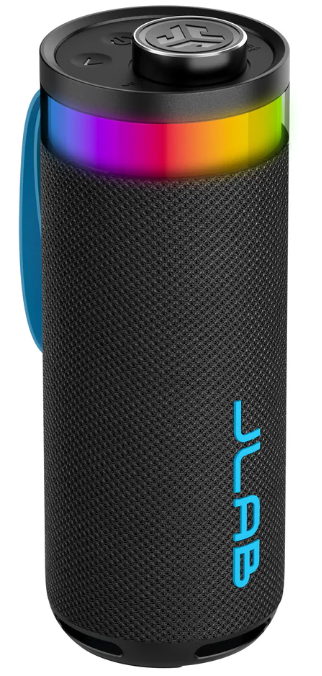
The JLab Go Party Bluetooth Speaker is designed to elevate any gathering with its impressive audio capabilities and customizable features. This portable, waterproof speaker combines dual 2" full-range drivers and dual 2" passive woofers to deliver rich, deep bass and crystal-clear highs across a frequency range of 80 Hz to 18 kHz. With a waterproof rating of IPX6, it's perfect for outdoor events like pool parties or beach trips. The speaker includes a built-in microphone for hands-free calls and features customizable RGB lighting, allowing users to set the mood for any occasion. The JLab app allows for further customization of sound profiles and lighting effects.
Targeted at party enthusiasts and those who enjoy outdoor events, the JLab Go Party Speaker is ideal for creating immersive experiences. With a price range of around $29.88, it offers excellent value for its features. The speaker is widely available online at retailers like Walmart and Micro Center.
Specifications of the JLab Go Party Bluetooth Speaker
Here are the key specifications and features of the JLab Go Party Speaker:
- Audio Specifications: - Dual 2" full-range drivers - Dual 2" passive woofers - Frequency Response: 80 Hz - 18 kHz - Power Output: 10 watts
- Power and Battery: - Battery Life: Up to 16 hours without RGB lighting, 8+ hours with RGB lighting - Battery Type: 4000 mAh Li-Ion
- Connectivity and Features: - Bluetooth 5.3 - IPX6 Waterproof Rating - Built-in Microphone - RGB Lighting - LabSync for connecting up to 100 speakers
- Physical Specifications: - Dimensions: Approximately 3.07" L x 3.07" D x 8.19" H - Weight: 660g
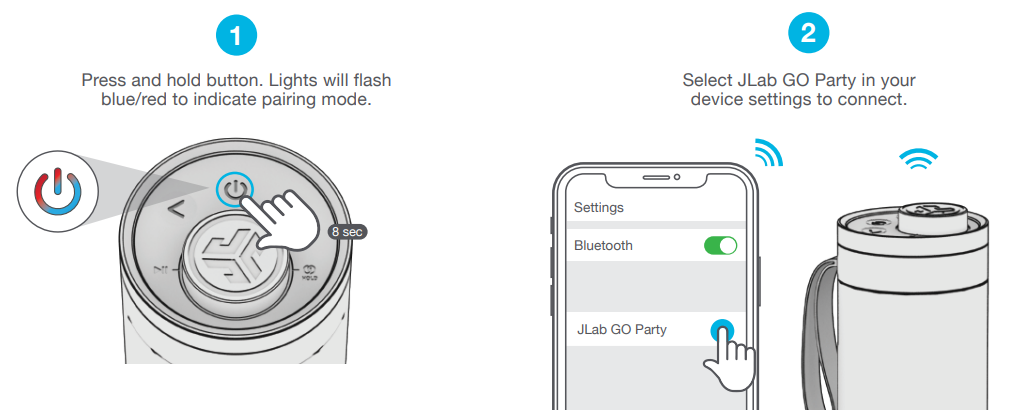
PAIR UP
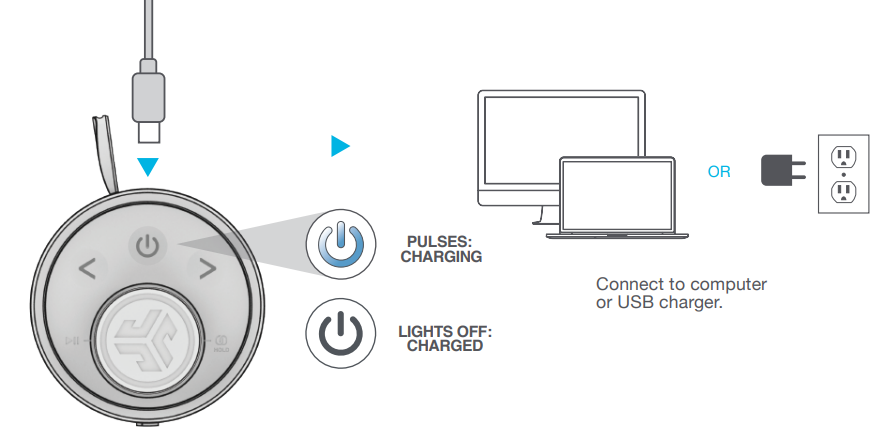
GET CHARGED
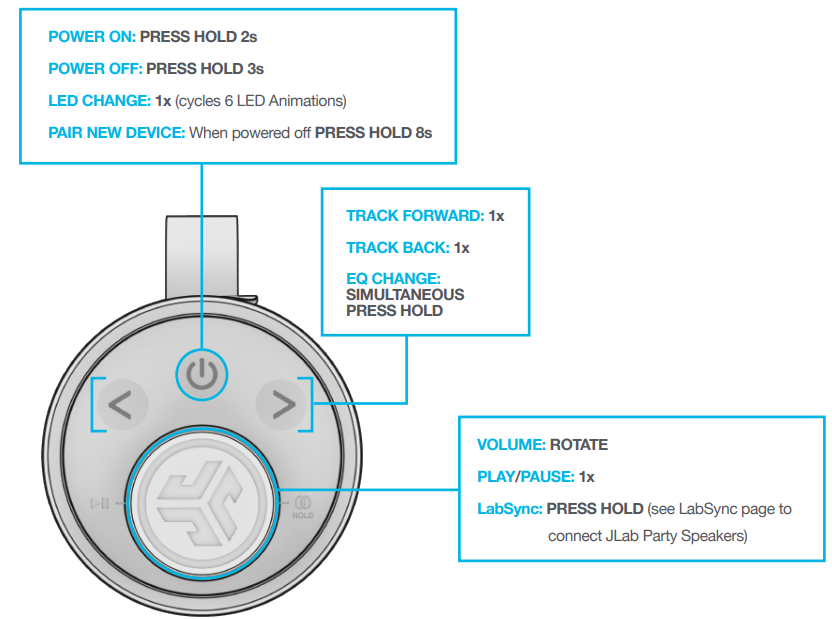
GO AHEAD, PRESS THE BUTTON
QUICK TIPS:
- GO Party is set to Eco-Mode by default. Lights will turn off when the battery is less than 25% to conserve power.
- Turning off the lights will significantly improve playtime.
- GO Party will auto power off if no media is playing for 30 minutes.
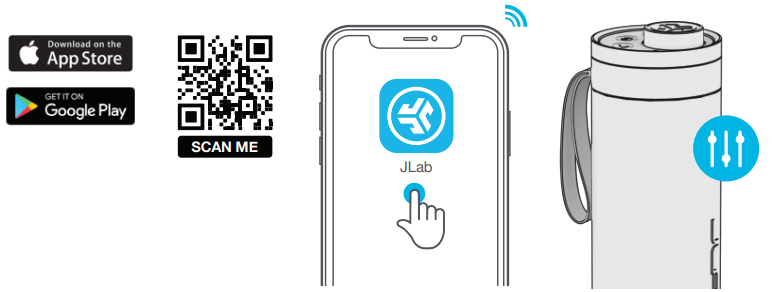
- Download the JLab App to adjust the default settings.
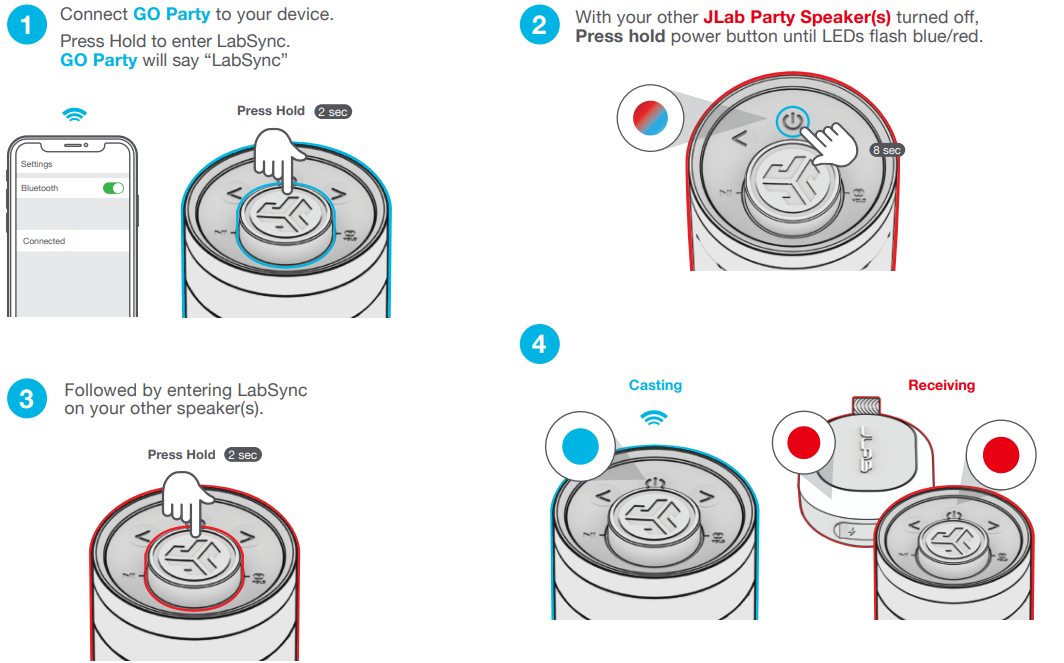
- LabSync works with all JLab Pop Party, GO Party, JBuds Party, and Epic Party speakers.
LabSync (CAST TO OTHER JLAB PARTY SPEAKERS)
DOWNLOAD THE APP
Customize the Sound, Lights, and Features.
Troubleshooting the JLab Go Party Bluetooth Speaker
Here are some common issues and solutions for the JLab Go Party Speaker:
- Bluetooth Connection Issues: - Ensure the speaker is in pairing mode (LED flashes red and blue). - Restart both devices and try reconnecting.
- Sound Distortion: - Check for water exposure and ensure the gasket is properly secured. - Use the JLab app to adjust EQ settings.
- Charging Issues: - Use a compatible USB-C cable. - Ensure the charging port is clean and free of debris.
For additional support, visit JLab's help center or contact their support team via phone or email. The speaker comes with a 1-year limited warranty on parts and labor.
YOUR WARRANTY
All warranty claims are subject to JLab authorization , and at our sole discretion. Retain your proof of purchase to ensure warranty coverage.
CONTACT US
Reach out to us at support@jlab.com or visit jlab.com/contact
Pros and Cons of the JLab Go Party Bluetooth Speaker
Here's a balanced assessment of the JLab Go Party Speaker:
Pros
- Portability and Waterproofing: Lightweight and IPX6 waterproof, making it perfect for outdoor events.
- Customizable Features: RGB lighting and sound profiles via the JLab app.
- LabSync Technology: Connect up to 100 speakers for a synchronized audio experience.
- Value for Money: Offers excellent features at a competitive price.
Cons
- Battery Life with RGB Lighting: Reduced playtime when RGB lights are activated.
- Limited Bass Depth: While it provides deep bass, it may not match larger speakers.
- No Carrying Case Included: Users may need to purchase a separate case for protection.
Customer Reviews of the JLab Go Party Bluetooth Speaker
Customers have praised the JLab Go Party Speaker for its portability, sound quality, and value. Many users enjoy the customizable RGB lighting and LabSync feature, which allows for a seamless party experience. Some users mention that the battery life with RGB lighting could be improved, but overall, the speaker receives high ratings for its performance and features. On platforms like Walmart, it has a rating of 4.8 out of 5 stars.
For those looking for a fun and portable speaker for outdoor or indoor events, the JLab Go Party Bluetooth Speaker is a solid choice. It offers a unique blend of sound quality, customization options, and affordability.
Faqs
How do I set up the jlab Go Party Bluetooth Speaker for the first time?
What can I do if my jlab Go Party Bluetooth Speaker is not connecting to Bluetooth devices?
How do I use LabSync to connect multiple jlab Go Party Bluetooth Speakers together?
Can I customize the sound and lighting on the jlab Go Party Bluetooth Speaker?
Is the jlab Go Party Bluetooth Speaker waterproof and suitable for outdoor use?
How long does the battery last on the jlab Go Party Bluetooth Speaker with and without RGB lighting?
How do I maintain and clean my jlab Go Party Bluetooth Speaker to ensure longevity?
Does the jlab Go Party Bluetooth Speaker support hands-free phone calls?
More jlab manuals
- Setup & Pairing: Jlab Pop Party Bluetooth Speaker User Manual
- Setup & Pairing: Jlab Jbuds Party Bluetooth Speaker User Manual
- Setup & Pairing: Jlab Epic Party Bluetooth Speaker User Manual
- Setup & Pairing: Jlab Go Pop+ Earbuds User Manual
- Setup: Jlab Epic Sport ANC 3 Earbuds User Manual
- Setup & Pairing: Jlab Go Tones+ Earbuds User Manual
Leave a Comment