
Setup & Pairing: Jlab Jbuds Party Bluetooth Speaker User Manual
Content
JLab JBuds Party Bluetooth Speaker
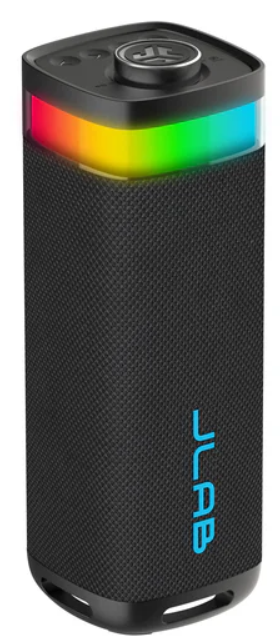
Introduction
The JLab JBuds Party Bluetooth Speaker is a powerhouse of sound designed to bring the party anywhere, anytime. This portable speaker boasts 30 watts of power, delivering room-shaking sound with its dual 2.5” full-frequency drivers and 2” passive woofers. It features a robust IP56 waterproof rating, making it perfect for outdoor use, whether at the beach or by the pool. With customizable RGB lighting and EQ settings via the JLab App, you can personalize your sound and light experience to match any mood or environment. The JBuds Party Speaker is ideal for music lovers looking for a reliable, portable sound system that can connect up to 100 speakers via LabSync for an immersive audio experience.
The JLab JBuds Party Speaker is priced around $69.99 and is available at major retailers like Best Buy and Walmart, as well as on JLab's official website. It caters to a wide range of users, from those hosting backyard BBQs to those enjoying beach parties or relaxing at home. Whether you're looking for a speaker for a small gathering or a large event, the JBuds Party offers versatility and quality sound.
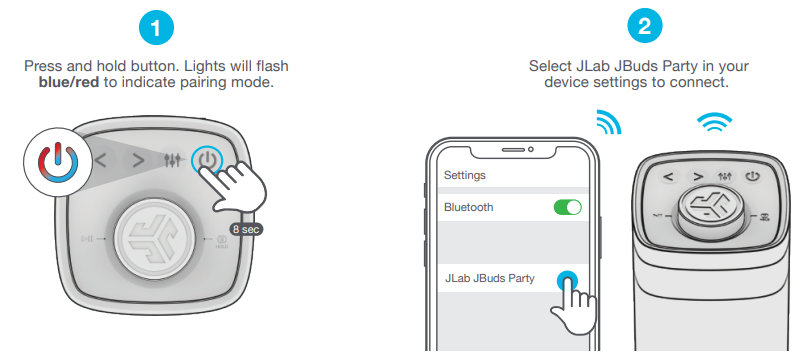
PAIR UP
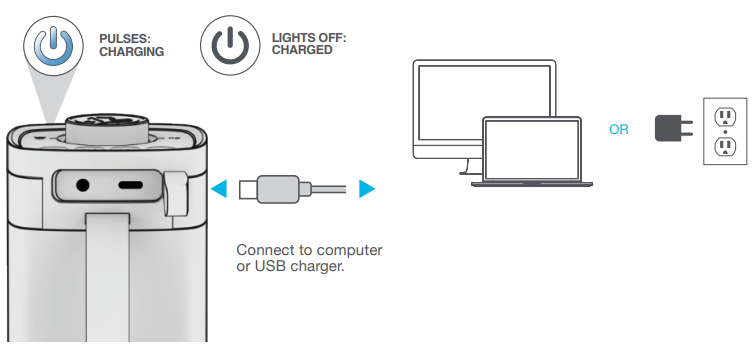
GET CHARGED
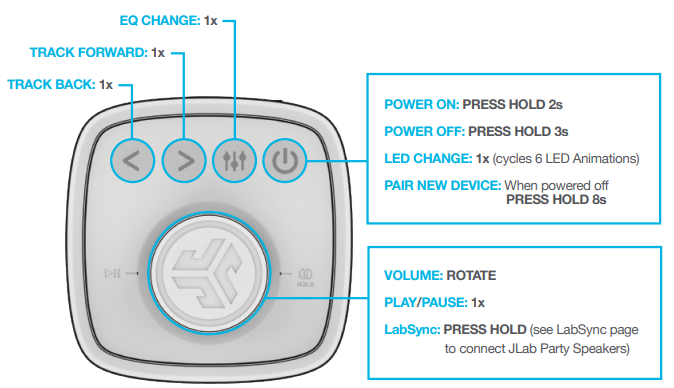
GO AHEAD, PRESS THE BUTTON
QUICK TIPS:
- JBuds Party is set to Eco-Mode by default. Lights will turn off when battery is less than 25% to conserve power.
- Turning off the lights will significantly improve playtime.
- JBuds Party will auto power off if no media is playing for 30 minutes.
- Download the JLab App to adjust the default settings.
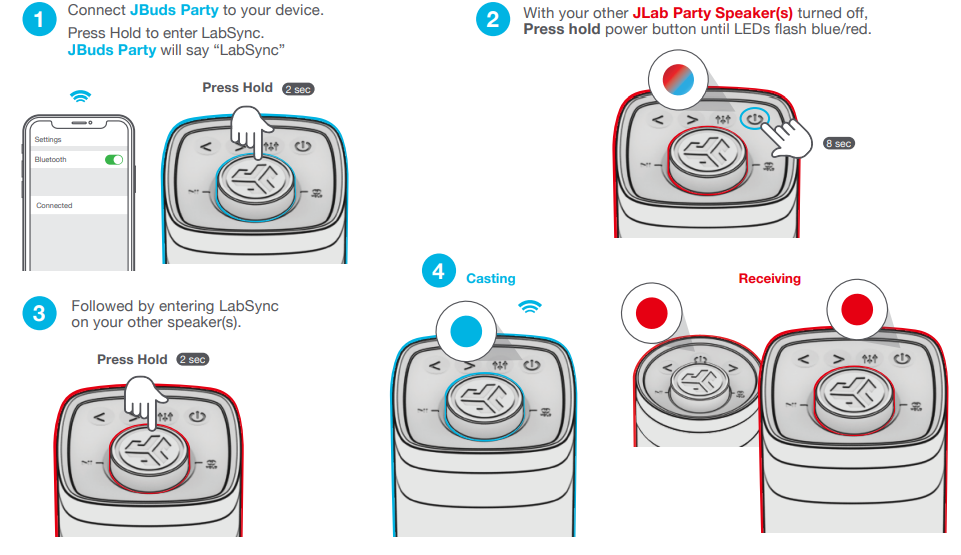
- LabSync works with all JLab Pop Party, GO Party, JBuds Party, and Epic Party speakers.
LabSync
(CAST TO OTHER JLAB PARTY SPEAKERS)
Specifications
Here are the key specifications of the JLab JBuds Party Bluetooth Speaker:
- Power Output: 30 watts
- Drivers: 2 x 2.5” full-frequency drivers, 2 x 2” passive woofers
- Frequency Response: 60 Hz – 20 kHz
- Playtime: Up to 12 hours (10+ hours with RGB lighting)
- Connectivity: Bluetooth 5.3, 3.5mm AUX input, USB-C charging
- Water Resistance: IP56 rating
- Dimensions: 3.35" L x 4.13" D x 9.76" H, 1330g
- LabSync: Connects up to 100 speakers for synchronized sound and lighting
Compared to similar Bluetooth speakers, the JBuds Party offers a unique combination of portability, waterproofing, and customizable lighting, making it an excellent choice for those seeking a versatile party speaker.
Troubleshooting
Here are some common issues and solutions for the JLab JBuds Party Bluetooth Speaker:
- No Sound: Check that the speaker is turned on and paired to a device.
- Distorted Sound: Ensure proper EQ settings and check for interference from other devices.
- RGB Lighting Issues: Use the JLab App to reset lighting settings or update the app.
- Connection Issues: Restart the speaker and device, then try reconnecting via Bluetooth.
For further assistance, JLab offers a comprehensive warranty and support options. You can contact JLab customer service through their official website or by visiting a local retailer.
Pros & Cons
Pros:
- Portable and Waterproof: IP56 rating makes it suitable for outdoor use.
- Customizable Sound and Lighting: EQ settings and RGB lighting via the JLab App.
- Massive Sound Capability: Connect up to 100 speakers with LabSync.
- Long Playtime: Up to 12 hours of continuous music.
Cons:
- RGB Lighting Reduces Playtime: Playtime decreases to 10+ hours with lighting on.
- Weight: At 1330g, it may be heavier than some other portable speakers.
Overall, the JBuds Party offers great value for its price, providing a versatile and powerful sound experience that is hard to match in its class.
Customer Reviews
Users have praised the JLab JBuds Party Bluetooth Speaker for its powerful sound, portability, and customizable features. Some have noted that the RGB lighting is a fun addition, but it slightly reduces playtime. Overall, the speaker receives high ratings for its performance and value.
For those considering purchasing, the JBuds Party is an excellent choice for outdoor enthusiasts and party hosts alike. It is highly recommended for its versatility and quality sound.
Faqs
How do I set up my jlab Jbuds Party Bluetooth Speaker for the first time?
What should I do if the jlab Jbuds Party Bluetooth Speaker is not pairing with my phone?
Can the jlab Jbuds Party Bluetooth Speaker be used outdoors in rainy conditions?
How do I connect multiple jlab Jbuds Party Bluetooth Speakers for a bigger sound?
What are the key sound features of the jlab Jbuds Party Bluetooth Speaker?
How do I customize the RGB lighting on my jlab Jbuds Party Bluetooth Speaker?
How long does the battery last on the jlab Jbuds Party Bluetooth Speaker and how do I charge it?
What maintenance steps can help extend the life of my jlab Jbuds Party Bluetooth Speaker?
More jlab manuals
- Setup: Jlab Go Party Bluetooth Speaker User Manual
- Setup & Pairing: Jlab Go Pop+ Earbuds User Manual
- Setup & Pairing: Jlab Pop Party Bluetooth Speaker User Manual
- Setup & Pairing: Jlab Go Tones+ Earbuds User Manual
- Setup & Pairing: Jlab Epic Party Bluetooth Speaker User Manual
- Setup & Pairing: Jlab Go Sport+ Earbuds User Manual
Leave a Comment