
Setup & Pairing: Jlab Go Tones+ Earbuds User Manual
Content
JLab Go Tones+ Earbuds
Introduction
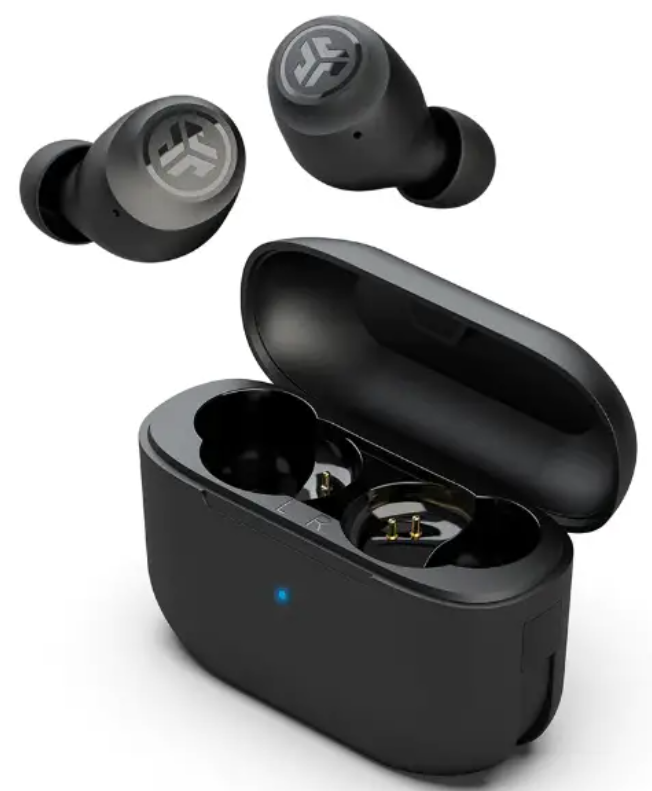
The JLab Go Tones+ Earbuds are a testament to innovation in true wireless audio technology, offering a perfect blend of style, comfort, and advanced features. These earbuds are designed to complement your lifestyle, providing up to 9+ hours of playtime per charge and an additional 26+ hours with the slim charging case, totaling 35+ hours of Bluetooth playtime. The JLab Go Tones+ are ideal for those seeking versatile, long-lasting earbuds that also support Google Fast Pair for effortless Android device pairing and location tracking.
Targeted at individuals who value convenience and sound quality, these earbuds are perfect for commuters, fitness enthusiasts, and anyone looking to upgrade their audio experience. With a price range of approximately $24.88 to $24.99, they offer excellent value for money. The earbuds are available for purchase through various online retailers, including Walmart and JLab's official website.
BLUETOOTH PAIRING
ADDING NEW / ADDITIONAL BLUETOOTH DEVICES:
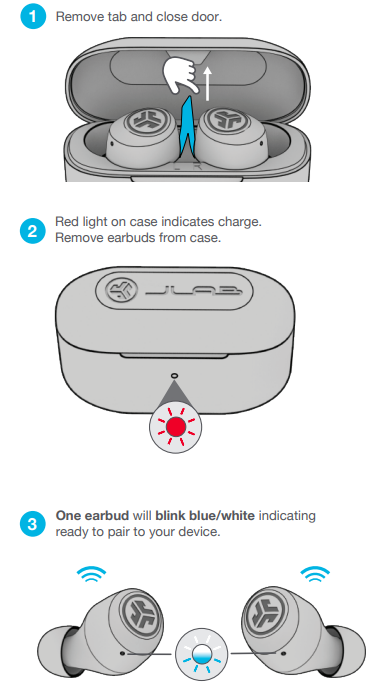
- Turn OFF Bluetooth from any previously connected device. Turn ON Bluetooth on the new device.
- Take earbuds out of the case.
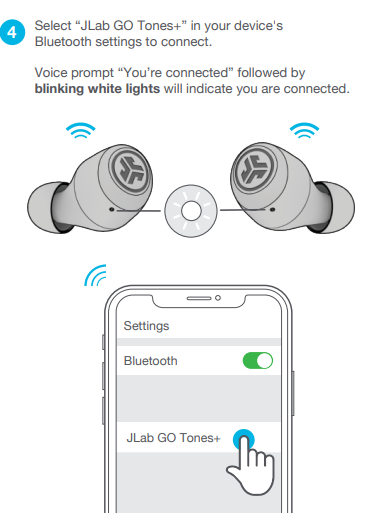
- Earbuds will automatically enter Bluetooth Pairing.
- Select “JLab GO Tones+” in device settings to connect.
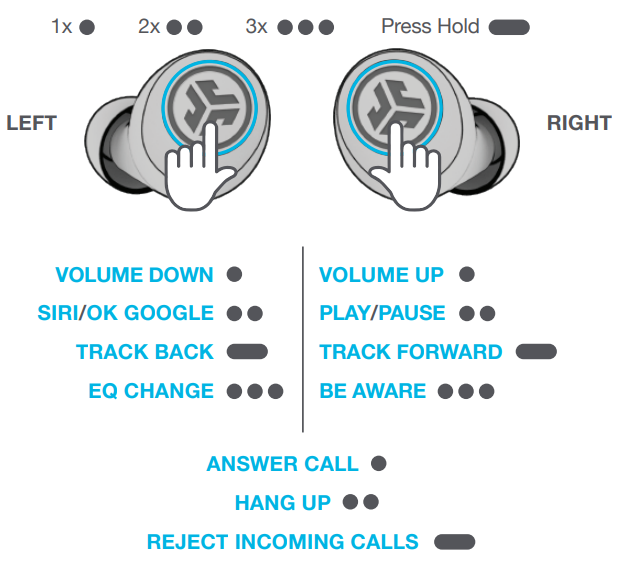
BUTTON FUNCTIONS
CHARGING EARBUDS
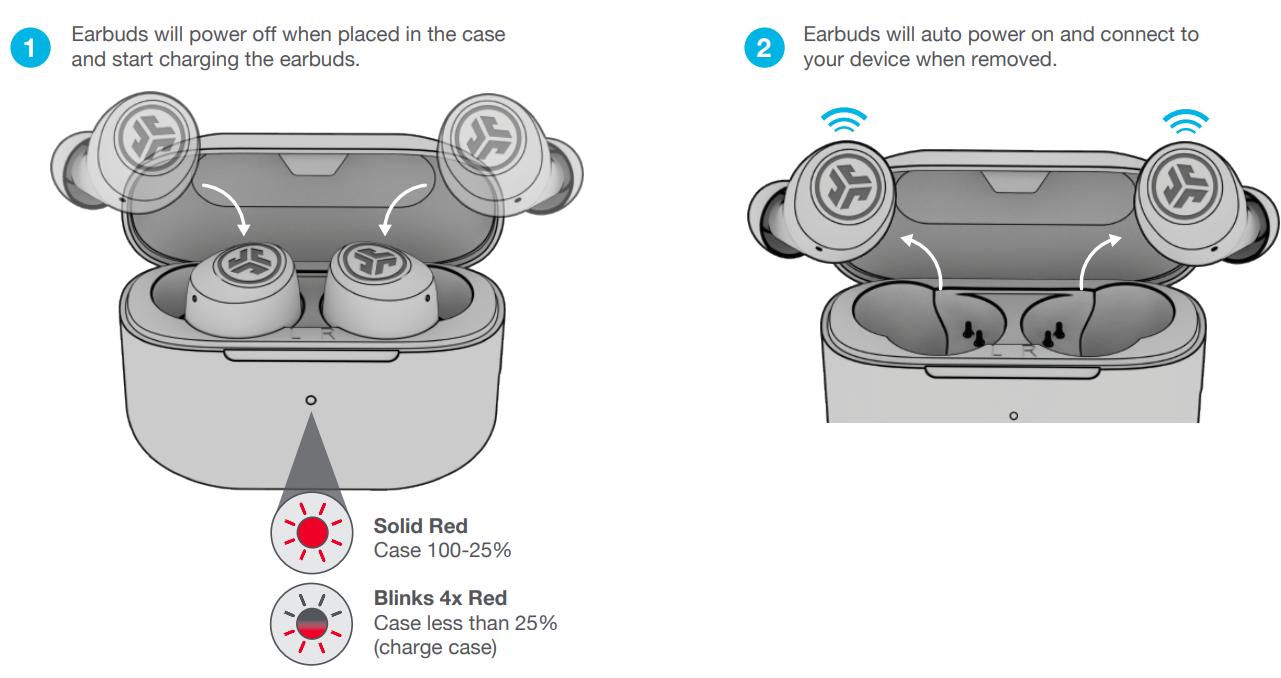
CHARGING CASE
Connect the GO Tones+ into a computer or USB-C 5V 1A (or less) output device.

TROUBLESHOOTING
Connection failure or earbuds disconnected from each other (Manual Reset)
- Keep the earbuds in the charging case and forget “JLab GO Tones+” from your Bluetooth device settings.
- Quick tap 7x on one earbud in charging case. Earbud blinks blue 4 times.
- Quick tap 7x on other earbud in charging case. Earbud blinks blue 4 times.
- Take both earbuds out of the charging case.
One earbud will be solid white and other will blink blue/white indicating ready to pair to your device.
Specifications of JLab Go Tones+ Earbuds
Here are the key specifications and features of the JLab Go Tones+ Earbuds:
- Battery Life: Up to 9+ hours per earbud charge, with an additional 26+ hours from the charging case.
- Charging Speed: Quick recharge with 10 minutes providing 1 hour of playtime.
- Connectivity: Bluetooth connectivity with Dual Connect feature for independent or paired use.
- Comfort: Compact design with three sets of gel ear tips for a secure fit.
- Sound Customization: Compatible with the JLab App for sound adjustments and EQ presets.
- Additional Features: Be Aware Mode for ambient noise, Google Fast Pair for easy pairing.
Compared to similar true wireless earbuds on the market, the JLab Go Tones+ stand out with their extended battery life, customizable sound settings, and compact design.
Pros and Cons of JLab Go Tones+ Earbuds
Pros
- Long Battery Life: Offers extended playtime with both earbuds and the charging case.
- Customizable Sound: Compatible with the JLab App for sound adjustments and EQ presets.
- Comfortable Fit: Compact design with multiple ear tip sizes for a secure fit.
- Value for Money: Priced competitively with excellent features.
Cons
- No Active Noise Cancellation: Lacks active noise cancellation for a more immersive experience.
- Dependence on App: Full feature utilization requires the JLab App.
Customer Reviews of JLab Go Tones+ Earbuds
Customers have praised the JLab Go Tones+ for their comfortable fit, long battery life, and customizable sound options. With a rating of 4.4 out of 5 stars from over 513 reviews, users appreciate the value for money these earbuds offer. Common praises include the earbuds' ability to stay connected and provide clear sound quality. However, some users have noted that the earbuds could benefit from active noise cancellation for a more immersive listening experience.
For those looking for a reliable and feature-rich true wireless earbud experience without breaking the bank, the JLab Go Tones+ are a solid choice.
Faqs
How do I set up my jlab Go Tones+ Earbuds for the first time?
What should I do if my jlab Go Tones+ Earbuds are not connecting or syncing properly?
Can I use just one jlab Go Tones+ Earbud independently for calls or music?
How does Be Aware Mode work on jlab Go Tones+ Earbuds and when should I use it?
Are the jlab Go Tones+ Earbuds compatible with both Android and iOS devices?
How long does the battery last on jlab Go Tones+ Earbuds and how quickly can they recharge?
What are the recommended steps to clean and maintain my jlab Go Tones+ Earbuds for optimal performance?
How can I customize the sound and controls on my jlab Go Tones+ Earbuds?
More jlab manuals
- Setup & Pairing: Jlab Go Pop+ Earbuds User Manual
- Setup & Pairing: Jlab Go Sport+ Earbuds User Manual
- Setup & Pairing: Jlab Jbuds Party Bluetooth Speaker User Manual
- Setup & Pairing: Jlab Epic Talk USB Microphone User Manual
- Setup: Jlab Go Party Bluetooth Speaker User Manual
- Pairing & Setup: Jlab Jbuds Talk USB Microphone User Manual
Leave a Comment