
Setup & Pairing: Jlab Go Sport+ Earbuds User Manual
Content
Jlab Go Sport+ Earbuds
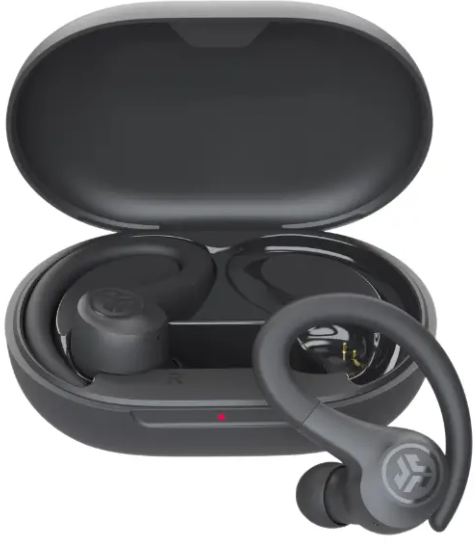
Introduction
The JLab Go Sport+ Earbuds are designed to deliver a robust and immersive audio experience for active users who demand durability and performance from their wireless earbuds. These true wireless sport earbuds combine a compact, ergonomic design with advanced features tailored for workouts, running, and everyday wear. With an IP55 rating, they offer resistance against sweat and dirt, making them ideal for high-intensity training sessions and outdoor activities.
Featuring a secure over-ear hook design and multiple gel tip sizes, the JLab Go Sport+ Earbuds ensure a comfortable and stable fit for all ear sizes, minimizing distractions during physical activities. The earbuds provide an extensive battery life of up to 35+ hours total playtime, including 9 hours per charge and additional recharges via the compact USB-C charging case. Users benefit from customizable sound profiles through the JLab App, including EQ presets like Signature, Balanced, and Bass Boost, enabling a personalized listening experience.
Targeted primarily at fitness enthusiasts, commuters, and casual listeners seeking reliable and affordable true wireless earbuds, the Go Sport+ blends convenience and sound quality. Retailing at an estimated price of around $29.99, these earbuds offer exceptional value for money and broad availability through major online and retail stores.
Specifications of JLab Go Sport+ Earbuds.
- Audio Drivers: 6mm dynamic drivers delivering clear sound with balanced bass
- Bluetooth Version: 5.3 with SBC and AAC codec support for stable and efficient connectivity
- Microphones: Dual MEMS microphones with 1-mic environmental noise canceling (ENC) and DNS algorithm for clear calls
- Battery Life: 9 hours per earbud playback, plus 26+ hours via charging case; total 35+ hours
- Charging: Integrated USB-C cable; charging case capacity 380mAh; full charge in under 2 hours
- Fit and Comfort: Smallest sport fit ever with ergonomic over-ear hooks and three gel tip sizes
- IP Rating: IP55 sweat and dust resistant, suitable for intense workouts and outdoor use
- Latency: <200ms in movie mode for synced audio-visual experience
- App Support: JLab App enables custom controls, EQ3 sound presets, Be Aware ambient mode, and safe hearing features
- Dimensions & Weight: Earbuds weigh 13.1g total; charging case dimensions 3.23" x 2.33" x 1.2"
Compared to other entry-level sport earbuds, the JBL Go Sport+ offers superior battery life, more extensive app customization, and a secure fit with over-ear hooks, outperforming many similarly priced models that lack waterproofing or extended playback.
BLUETOOTH PAIRING
Take the earbuds out of the case and remove stickers. Place it back in the case and close the door.
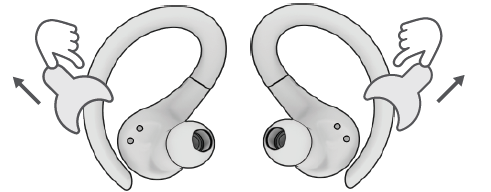
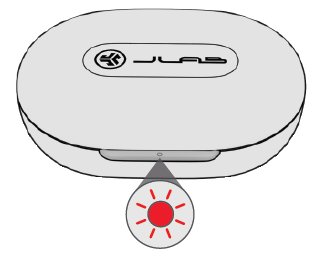
Red light on the case indicates a charge. Remove earbuds from case.
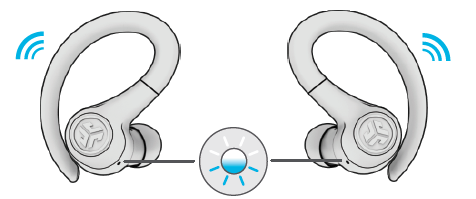
One earbud will blink blue/white, indicating 3 ready to pair to your device.
Select “JLab GO Sport+” in your device's Bluetooth settings to connect.
Voice prompt “Bluetooth connected” followed by blinking white lights will indicate you are connected.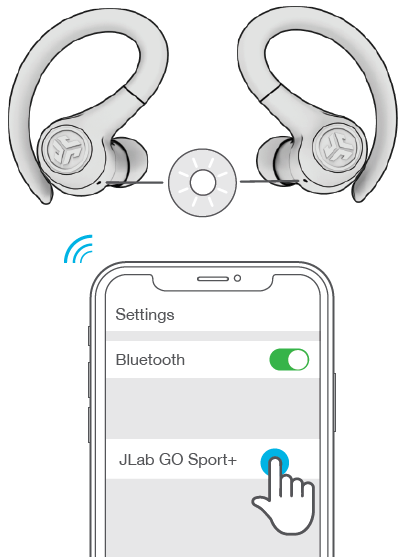
ADDING NEW / ADDITIONAL BLUETOOTH DEVICES:
- Turn OFF Bluetooth on any previously connected device. Turn ON Bluetooth on the new device.
- Take the earbuds out of the case.
- Earbuds will automatically enter Bluetooth Pairing.
- Select “JLab GO Sport+” in device settings to connect.
BUTTON FUNCTIONS
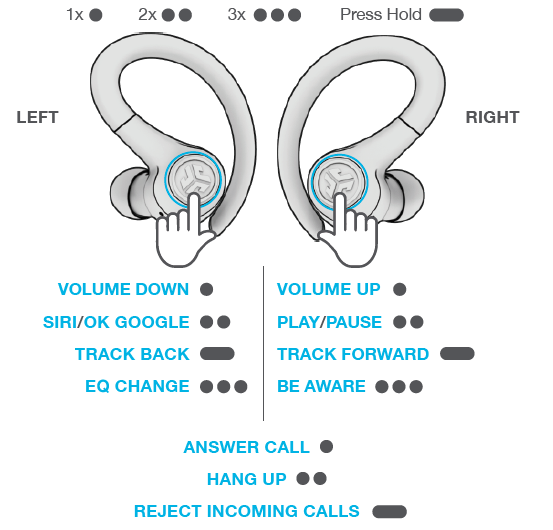
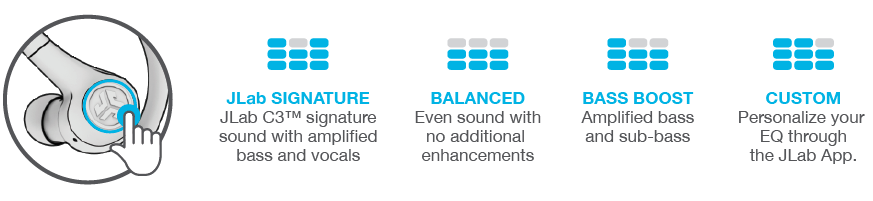
CUSTOM EQ3 SOUND MODES
Tap either the right or left earbud 3 times for different EQ settings (GO Sport+ will cycle through 4 EQ settings).
CHARGING EARBUDS
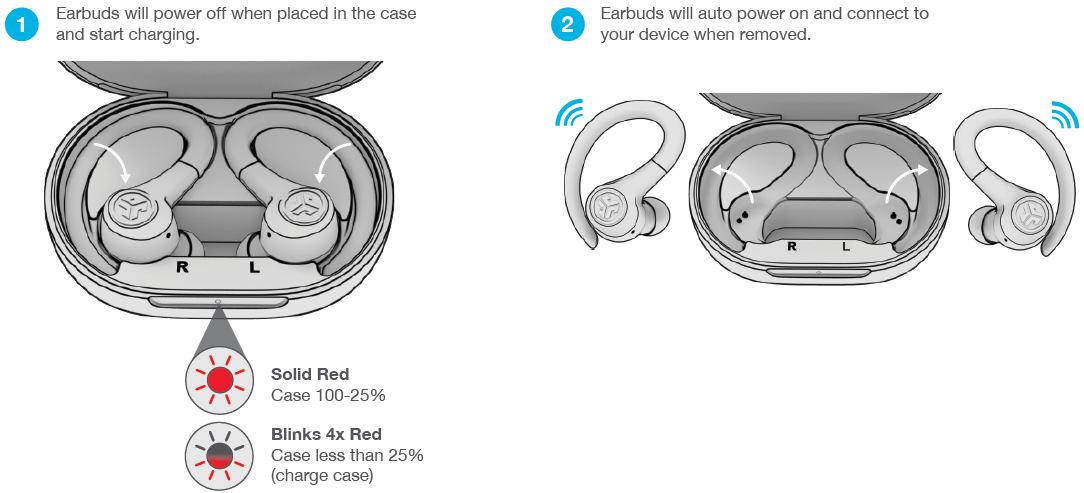
CHARGING CASE
Connect the GO Sport+ into a computer or USB-C 5V 1A (or less) output device.

FITTING
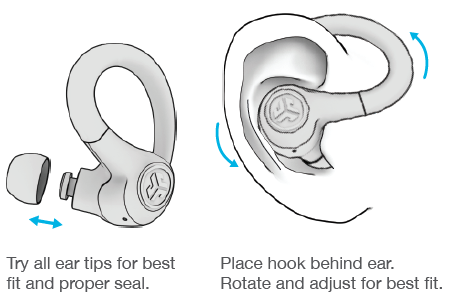
TROUBLESHOOTING
Connection failure or earbuds disconnected from each other (Manual Reset)
- Keep the earbuds in the charging case and forget “JLab GO Sport+” from your Bluetooth device settings.
- Quick tap 7x on one earbud in the charging case. The earbud blinks blue 4 times.
- Quick tap 7x on the other earbud in the charging case. The earbud blinks blue 4 times.
- Take both earbuds out of the charging case.
One earbud will be solid white, and the other will blink blue/white, indicating ready to pair to your device.
Instructional videos at: JLAB.COM/SUPPORT/GOSPORTPLUS
CAUTIONS
- Avoid extreme heat, cold, and humidity.
- Avoid dropping or crushing the earbuds.
- Wax may build up in the earbud tips, lowering the sound quality.
Carefully remove the wax with a cotton swab or other small tool to improve the sound quality.
- If you experience discomfort or pain, try lowering the volume or discontinuing use temporarily.
- If you experience regular discomfort while using this product, discontinue use and consult your physician.
- We recommend you treat your earbuds as you would a nice pair of sunglasses and keep them in a safe location when not in use.
Pros & Cons of JLab Go Sport+ Earbuds
Pros
- Long Battery Life: Delivers up to 35 hours total, reducing frequent charging interruptions during workouts.
- Secure & Comfortable Fit: Over-ear hooks and multiple gel tips ensure earbuds stay in place even during vigorous exercise.
- IP55 Sweat Resistance: Protects against sweat and dust, ideal for gym sessions and outdoor use.
- Custom Sound Profiles: JLab App offers EQ presets and customization for a tailored audio experience.
- Affordable Price: Excellent value at around $30, making it accessible for budget-conscious buyers.
Cons
- Basic Noise Isolation: While the Be Aware ambient mode aids safety, noise isolation is moderate compared to premium earbuds.
- Latency in Music Mode: Slightly higher latency (>200ms) may affect audio sync in some scenarios.
- Limited Advanced Features: No active noise cancellation or wireless charging, which some competitors offer.
Overall, the JLab Go Sport+ Earbuds strike a practical balance between price, performance, and durability, making them an exceptional choice for active users who prioritize battery life and fit over premium features.
Customer Reviews of jlab Go Sport+ Earbuds.
Users commonly praise the JLabb Go Sport+ Earbuds for their impressive battery longevity, secure fit during workouts, and ease of use with auto-connect and touch controls. Many highlight the value for money, noting sound quality that exceeds expectations at this price point. Typical star ratings average around 4 out of 5 stars.
Frequent compliments include the comfort of the over-ear hooks and the convenience of the Be Aware ambient mode for outdoor safety. However, some users mention occasional Bluetooth dropouts and moderate sound latency during video streaming. A few reviews note that the earbuds may feel slightly bulky for very small ears, despite multiple gel tip sizes.
Most customers recommend the JLab Go Sport+ as a reliable workout companion and budget-friendly wireless earbuds option, especially for those who want a durable fit and customizable audio without paying a premium.
Faqs
How do I set up jlab Go Sport+ Earbuds for the first time?
What should I do if jlab Go Sport+ Earbuds are not pairing properly?
Can I use jlab Go Sport+ Earbuds with my Android device?
How often should I maintain jlab Go Sport+ Earbuds?
What are the key audio features of jlab Go Sport+ Earbuds?
How do I optimize battery performance for jlab Go Sport+ Earbuds?
Can I customize the sound settings on jlab Go Sport+ Earbuds?
How do I troubleshoot connection issues with jlab Go Sport+ Earbuds?
More jlab manuals
- Setup & Pairing: Jlab Go Tones+ Earbuds User Manual
- Setup & Pairing: Jlab Epic Talk USB Microphone User Manual
- Setup & Pairing: Jlab Go Pop+ Earbuds User Manual
- Pairing & Setup: Jlab Jbuds Talk USB Microphone User Manual
- Setup & Pairing: Jlab Jbuds Party Bluetooth Speaker User Manual
- Setup & Pairing: Jlab Jbuds Pods Earbuds User Manual
Leave a Comment