
Setup & Pairing: Jlab Jbuds Pods Earbuds User Manual
Content
JLab Jbuds Pods Earbuds
Introduction
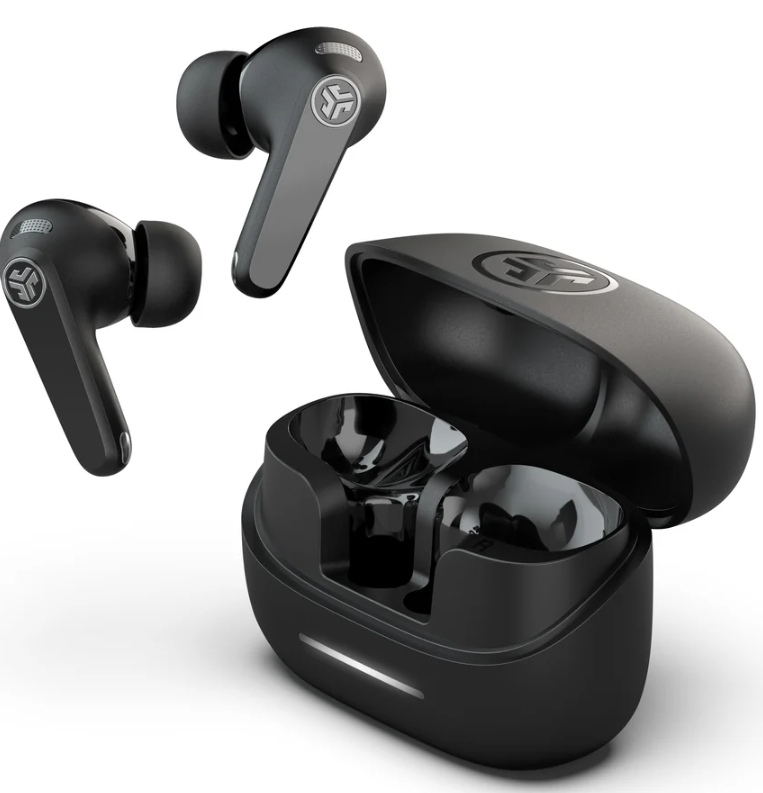
The jlab Jbuds Pods Earbuds represent a remarkable blend of high-quality audio performance and long-lasting battery life, designed to elevate your everyday listening experience. These true wireless earbuds come equipped with hybrid active noise cancellation (ANC), Lab spatial audio technology, and six dedicated microphones, enabling crystal-clear calls and immersive sound. With an ergonomic stem design, they provide a secure and comfortable fit suitable for workouts, commuting, or marathon listening sessions.
One standout feature of the Jbuds Pods is their incredible battery life, delivering over 56 hours of total playtime with the charging case, and up to 10 hours on a single earbud charge. Additionally, they support both USB-C and wireless charging for convenience. Their IP55 rating offers sweat and splash resistance, making them ideal for fitness enthusiasts and daily use alike.
Targeted towards music lovers, professionals, and active users who seek premium features at an affordable price, the Jbuds Pods are priced competitively around $49.99 to $59.99 and are widely available through JLab's official website, Amazon, and major retailers such as Best Buy and Walmart. Whether for casual listening, calls, or immersive spatial audio experiences, these earbuds cater to various use cases without compromising quality or value.
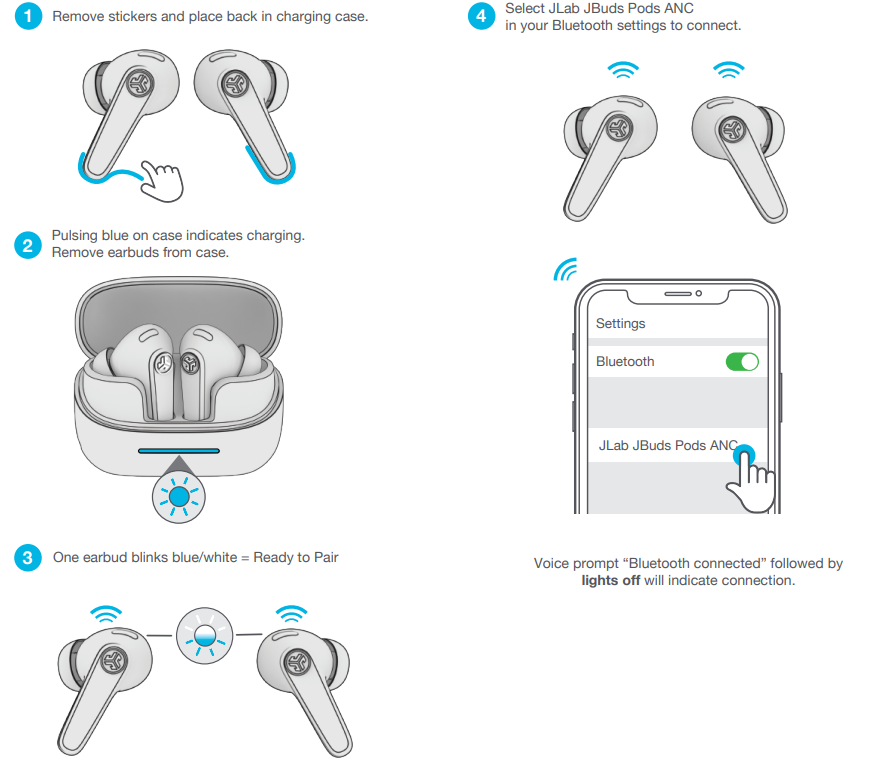
PAIR UP
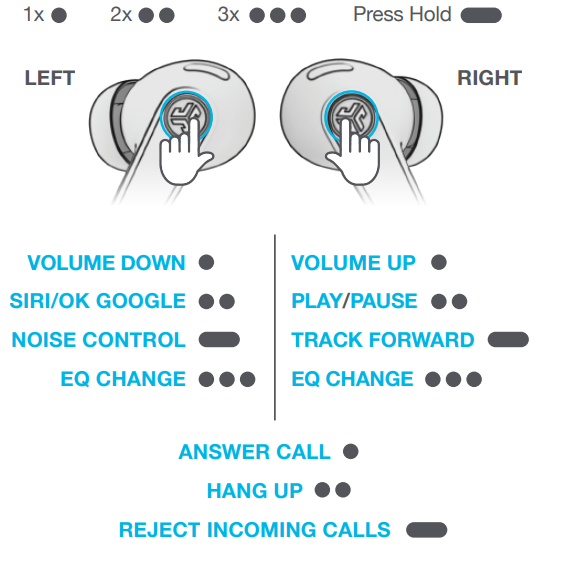
GO AHEAD, PRESS THE BUTTON
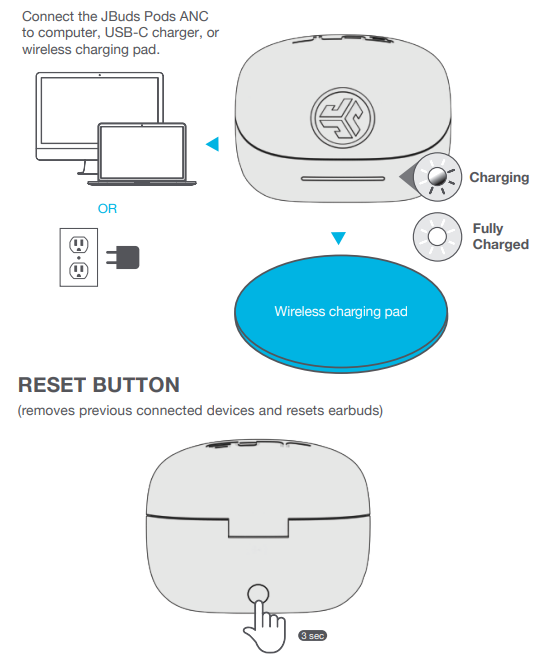
GET CHARGED (EARBUDS)
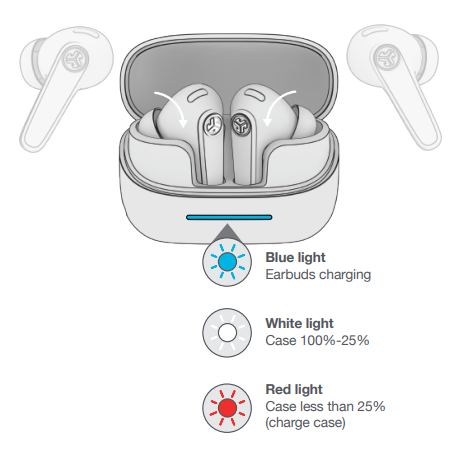
GET CHARGED (CASE)
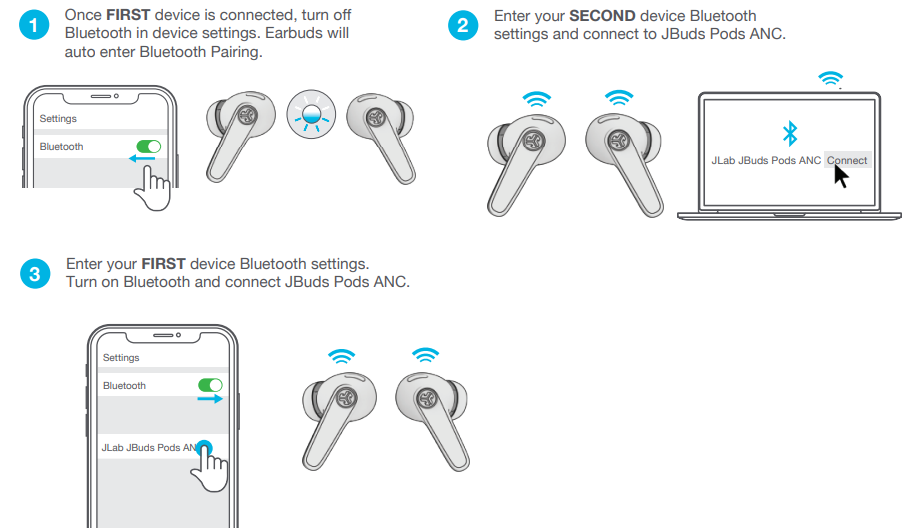
MULTIPOINT
Specifications of jlab Jbuds Pods Earbuds
- Sound Technology: Hybrid Active Noise Cancelling (ANC) with Be Aware mode
- Audio Drivers: 11mm drivers delivering Lab Quality Sound and immersive Lab Spatial Audio
- Battery Life: 10 hours per earbud, 56+ hours total with charging case; supports wireless and USB-C charging
- Microphones: Six dedicated microphones for noise-cancelling calls and voice clarity
- Connectivity: Bluetooth 5.2 with multipoint connectivity (connect to two devices simultaneously), Google Fast Pair technology for Android
- Water Resistance: IP55 sweat and splashproof rating, great for workouts and outdoor use
- Controls: Touch controls on ergonomic stems, designed to avoid accidental triggers
- Compatibility: Compatible with iOS and Android devices; customizable sound via JLab App
Compared to similar earbuds in the budget true wireless category, such as JLab's own JBuds ANC 3 or other brands around the $60 price point, the Jbuds Pods excel with their extended 56+ hours playback and six-microphone setup, which is superior to many competitors offering 30-40 hours total playtime and fewer microphones.
Common Troubleshooting for jlab Jbuds Pods Earbuds
- Issue: Earbuds won’t pair with device.
Solution: Ensure earbuds are charged, enable Bluetooth on your device, and reset earbuds by placing them in the case and holding the reset button for 10 seconds. - Issue: One earbud has no sound.
Solution: Check if both earbuds are connected. If not, place them in the charging case to reset, then reconnect. Clean earbud contacts if necessary. - Issue: Poor call quality or microphone issues.
Solution: Use in a quiet environment, update firmware via the JLab app, and ensure microphones are not blocked or dirty. - Issue: Battery drains quickly.
Solution: Disable ANC or Be Aware mode if not needed, reduce volume, and fully charge both earbuds and case regularly.
Preventive measures include storing earbuds in their case after use, avoiding exposure to extreme temperatures, and keeping the charging contacts clean. The jlab Jbuds Pods Earbuds come with a 2-year warranty and 30-day return policy through JLab’s official channels. For support, customers can contact JLab customer service via their website or phone support.
Pros & Cons of jlab Jbuds Pods Earbuds
- Pros:
- Exceptional battery life with 56+ hours total playtime, far exceeding many competitors
- Effective hybrid active noise cancelling for immersive listening and noise reduction
- Clear, high-quality calls aided by six microphones and advanced noise filtering
- IP55 water resistance making them suitable for workouts and outdoor activities
- Affordable price point ($49.99–$59.99) with premium features
- Customizable sound profiles through the JLab app
- Cons:
- Lack of advanced audio codecs such as aptX or LDAC, which affects audiophile-grade sound quality
- No wear detection sensor to auto-pause music when removing earbuds
- Touch controls can occasionally be sensitive, requiring adjustment of fit
Customer Reviews of jlab Jbuds Pods Earbuds
Users consistently praise the jlab Jbuds Pods Earbuds for their long battery life and effective noise cancellation, rating them an average of 4.5 out of 5 stars on major retail sites. Many highlight the comfortable stem design and exceptional call quality as standout features. Common compliments include the immersive Lab Spatial Audio experience and reliable Bluetooth multipoint connectivity.
Some customers mention minor issues such as occasional touch control sensitivity and the absence of some high-end codecs, but most agree these drawbacks are outweighed by the overall value and performance. Users recommend these earbuds for budget-conscious buyers seeking marathon use earbuds with strong noise cancellation and clear communication capabilities.
Faqs
How do I set up my jlab Jbuds Pods Earbuds for the first time?
What should I do if my jlab Jbuds Pods Earbuds won’t connect or pair with my device?
Can I use jlab Jbuds Pods Earbuds with both Android and iOS devices?
How can I customize sound settings and controls on my jlab Jbuds Pods Earbuds?
What should I do if only one earbud of my jlab Jbuds Pods Earbuds is working or connecting?
How do I maintain and clean my jlab Jbuds Pods Earbuds to ensure optimal performance?
What is the battery life of the jlab Jbuds Pods Earbuds and how do I maximize it?
How can I reset my jlab Jbuds Pods Earbuds if they are not functioning correctly?
More jlab manuals
- Pairing & Setup: Jlab Jbuds Talk USB Microphone User Manual
- Setup: Jlab Epic Open Sport Earbuds User Manual
- Setup & Pairing: Jlab Epic Talk USB Microphone User Manual
- Setup: Jlab Go Air Tones Earbuds User Manual
- Setup & Pairing: Jlab Go Sport+ Earbuds User Manual
- Setup: Jlab Jbuds ANC Earbuds User Manual
Leave a Comment