
Setup: Jlab Jbuds ANC Earbuds User Manual
Content
JBuds ANC Earbuds
Introduction
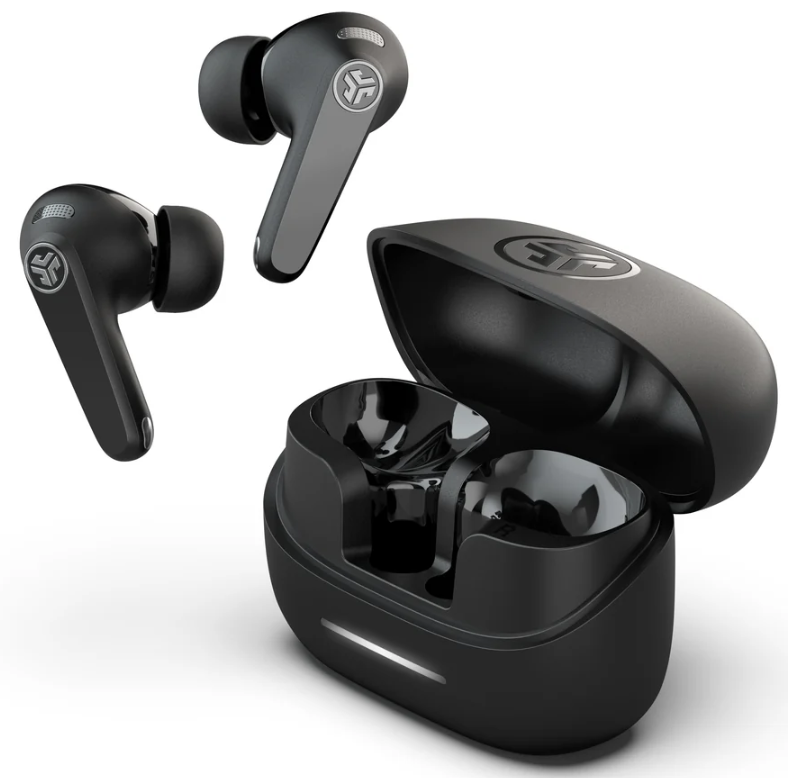
Experience immersive audio with the JLab JBuds ANC Earbuds, your gateway to premium sound, active noise cancellation, and exceptional value. Designed for everyday listeners, commuters, and fitness enthusiasts, these true wireless earbuds deliver powerful performance in a sleek, modern package. With three customizable noise control modes—ANC On, ANC Off, and Be Aware—you can block out distractions or stay aware of your surroundings at the touch of a button. Whether you’re working out, traveling, or simply enjoying music, the JLab JBuds ANC Earbuds adapt to your needs with ease.
Key benefits include hybrid active noise cancellation, up to 42+ hours of total playtime (9+ hours in the earbuds, 33+ in the case), and Bluetooth multipoint connectivity for seamless switching between devices like smartphones, laptops, and tablets. The JLab app further enhances your experience, letting you customize EQ settings, touch controls, and receive firmware updates. With IP55 splash and sweat resistance, these earbuds are built for active lifestyles and unpredictable weather.
Priced competitively around $59.99, the JLab JBuds ANC Earbuds offer a compelling alternative to higher-priced competitors, making advanced features accessible to a broader audience[4]. Available at major retailers and online, they are ideal for students, professionals, and anyone seeking reliable, feature-rich wireless earbuds without breaking the bank.
PAIR UP
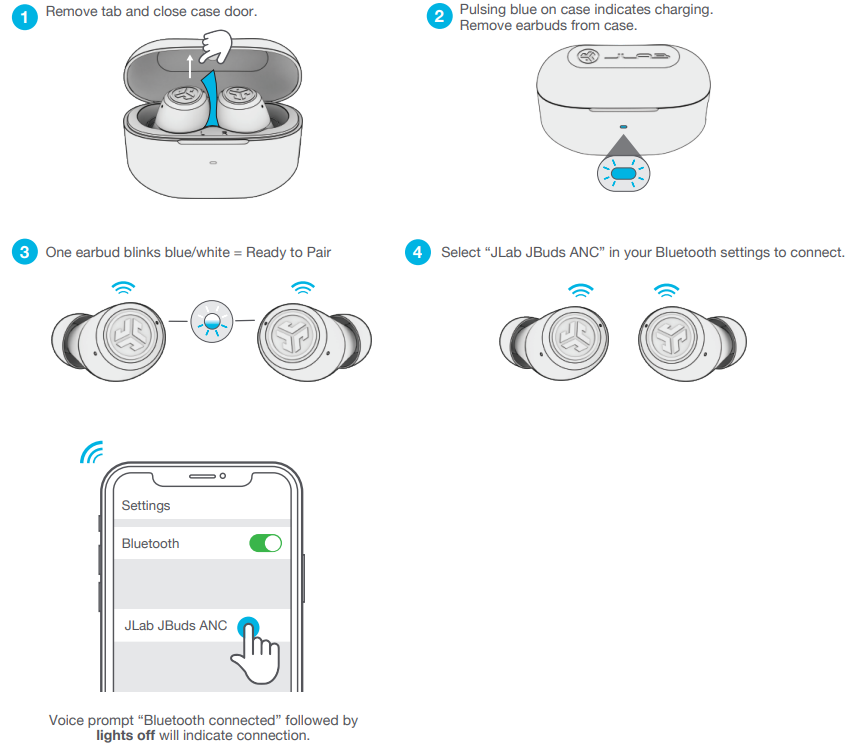
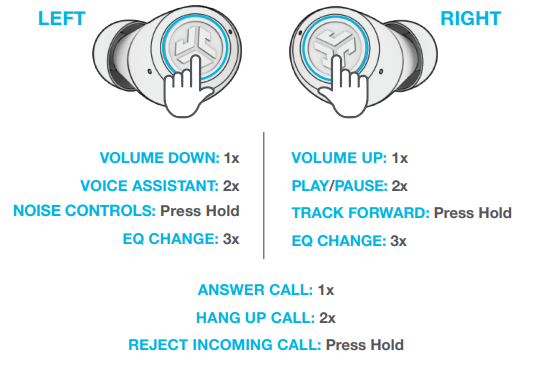
GO AHEAD, PRESS THE BUTTON
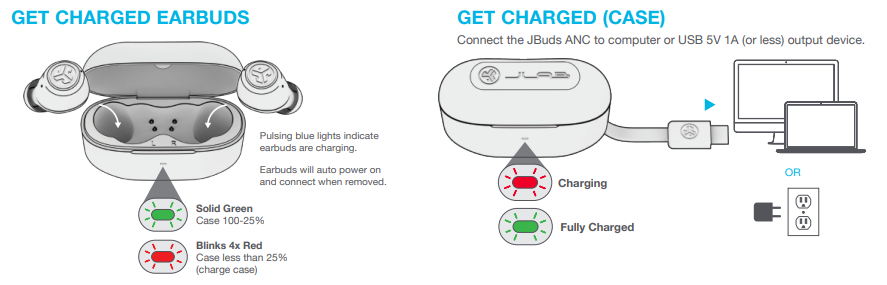
GET CHARGED EARBUDS
GET CHARGED (CASE)
Connect the JBuds ANC to a computer or USB 5V 1A (or less) output device.
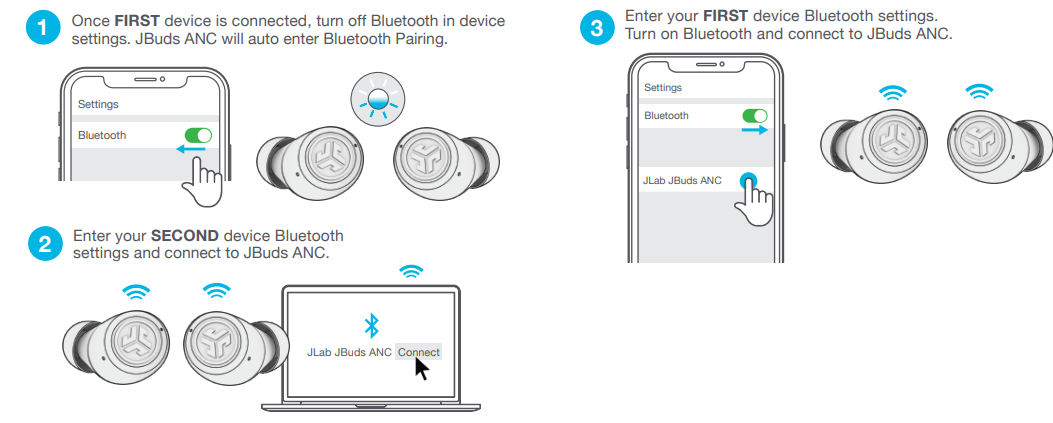
MULTIPOINT
TROUBLESHOOTING
BLUETOOTH OR EARBUD CONNECTION FAILURE
(MANUAL RESET)
- Keep the earbuds in the charging case and forget “JLab JBuds ANC” from your Bluetooth device settings.
- Quick tap 7x on one earbud in charging case. Earbud blinks blue 4 times.
- Quick tap 7x on other earbud in charging case. Earbud blinks blue 4 times.
- Take both earbuds out of the charging case. One earbud will be solid white, and the the other will blink blue/white indicating ready to pair to your device.
Specifications
- Audio: 12mm dynamic drivers, neodymium magnet; frequency response: 20Hz–20kHz; impedance: 28Ω; output: 104±3dB
- Active Noise Cancellation: Hybrid ANC with three modes (ANC On, ANC Off, Be Aware); adjustable via JLab app
- Battery Life: Up to 42+ hours total playtime (9+ hours in earbuds, 33+ hours in charging case); 34+ hours with ANC enabled
- Charging: USB-C charging; quick charge: 15 minutes for 1 hour of use; earbud charge time: under 2 hours; case charge time: under 2.5 hours
- Connectivity: Bluetooth 5.2 with multipoint pairing; range: 30+ feet; Google Fast Pair for Android devices
- Microphones: Dual microphones per earbud for clear calls and noise cancellation
- Durability: IP55 sweat, splash, and dust resistance
- Controls: Touch-sensitive controls for music, calls, and ANC modes; customizable via JLab app
- Fit: Three gel tip sizes and cush fins for secure, comfortable fit; optional cloud foam tips available
- Weight: 5g per earbud; 55g charging case
- Warranty: 2-year manufacturer’s warranty
Compared to similar models, the JLab JBuds ANC Earbuds stand out for their hybrid ANC, long battery life, and multipoint connectivity—features often found only in more expensive competitors. Their combination of affordability, durability, and customization options makes them a strong choice for budget-conscious audiophiles.
Pros & Cons
Strengths
- Exceptional Value: Delivers premium features like hybrid ANC and multipoint Bluetooth at a fraction of the cost of leading brands.
- Long Battery Life: Up to 42+ hours of playtime ensures all-day use without frequent recharging.
- Customizable Sound: Three EQ presets (JLab Signature, Balanced, Bass Boost) and app-based customization cater to diverse listening preferences.
- Comfortable, Secure Fit: Multiple ear tip options and cush fins provide a snug fit for workouts and daily use.
- Durability: IP55 rating means resistance to sweat, rain, and dust—ideal for active users.
- Bluetooth Multipoint: Seamlessly switch between two devices, enhancing productivity and convenience.
Areas for Improvement
- ANC Performance: While effective for the price, noise cancellation may not match premium brands in very noisy environments.
- App Experience: The JLab app is functional but lacks some advanced features found in competitor apps.
- Build Quality: Plastic construction feels durable but less premium compared to metal or glass-finish rivals.
- Call Quality: Microphones perform well in quiet settings but can struggle in windy or very loud conditions.
For the price, the JLab JBuds ANC Earbuds offer outstanding value, especially for users seeking reliable ANC, long battery life, and multipoint connectivity without a premium price tag.
Customer Reviews
User feedback for the JLab JBuds ANC Earbuds highlights several consistent themes. Many praise the impressive battery life, comfortable fit, and effective noise cancellation for the price, often awarding 4 to 4.5 out of 5 stars. Customers appreciate the easy Bluetooth pairing, especially with Google Fast Pair for Android devices, and the convenience of multipoint connectivity for switching between phone and laptop.
Common compliments include the customizable sound profiles, durable build, and sweat resistance, making them a favorite among gym-goers and commuters. Some users note the ANC is sufficient for daily use but not as powerful as top-tier models. A few criticisms mention occasional connectivity drops in crowded areas and a desire for even more advanced app features.
Overall, the JLab JBuds ANC Earbuds are recommended for budget-conscious buyers who want reliable performance, long battery life, and effective ANC in a compact, user-friendly package. They are especially suitable for students, professionals, and fitness enthusiasts who need versatile, everyday wireless earbuds.
Faqs
How do I set up my jlab Jbuds ANC Earbuds for the first time?
What should I do if my jlab Jbuds ANC Earbuds are not working properly?
Can I use jlab Jbuds ANC Earbuds with multiple devices?
How often should I maintain my jlab Jbuds ANC Earbuds?
What are the key features that make jlab Jbuds ANC Earbuds different?
How do I optimize the audio performance of my jlab Jbuds ANC Earbuds?
Are jlab Jbuds ANC Earbuds compatible with all Bluetooth devices?
How do I reset my jlab Jbuds ANC Earbuds if they are not connecting?
More jlab manuals
Leave a Comment