
Setup: Jlab Go Air Pop Earbuds User Manual
Content
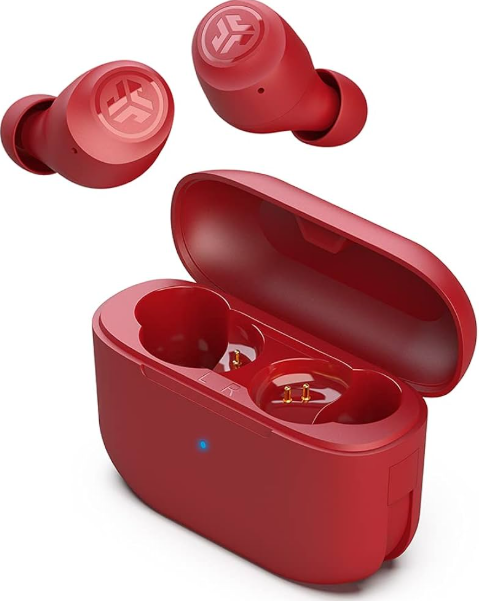
jlab Go Air Pop Earbuds
Introduction
The jlab Go Air Pop Earbuds offer an impressive combination of compact design, reliable performance, and user-friendly features, making them an excellent choice for everyday wireless audio. These earbuds provide a total playtime of over 32 hours, with 8+ hours of battery life on a single charge and multiple recharges from a sleek charging case that fits easily in your pocket. Featuring a splash-proof IPX4 rating, they are suitable for active users who want earbuds that can endure sweat and light rain.
Equipped with 6mm dynamic drivers, these earbuds deliver clear, balanced sound with customizable EQ3 sound modes—Signature, Balanced, and Bass Boost—accessible directly via touch controls without needing an app. Their Bluetooth 5.1 connectivity ensures stable wireless performance within a 30+ feet range, while dual MEMS microphones support crystal-clear call quality and voice assistant activation. The jlab Go Air Pop earbuds are designed with comfort in mind, offering three sizes of gel tips for a secure fit for a wide variety of ear shapes.
Targeting commuters, fitness enthusiasts, and casual listeners looking for affordable, reliable true wireless earbuds, the Go Air Pop stands out for its combination of value and versatile features. Available in multiple colors and retailing in the price range of approximately $30 to $40, these earbuds offer competitive performance against more expensive alternatives. The package includes the earbuds, a charging case with an integrated USB-A charging cable, and a two-year warranty, reflecting JLab’s confidence in product durability.
Technical Specs
- Driver: 6 mm dynamic driver.
- Output (SPL): ~103 ±3 dB.
- Microphone: MEMS microphone, sensitivity approx -42 dB ± 3 dB.
- Frequency response: 20 Hz – 20 kHz.
- Impedance: 16 Ω
BLUETOOTH PAIRING
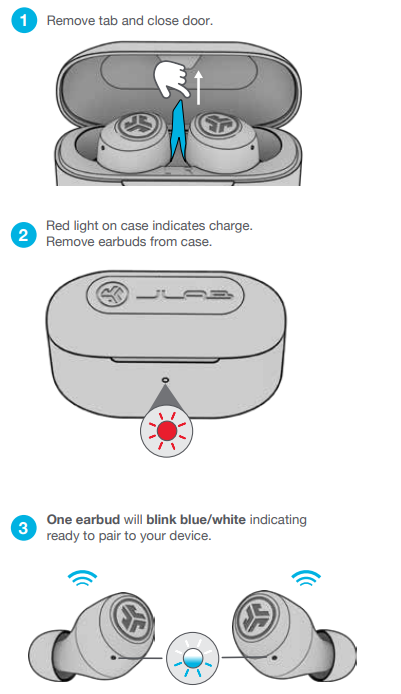
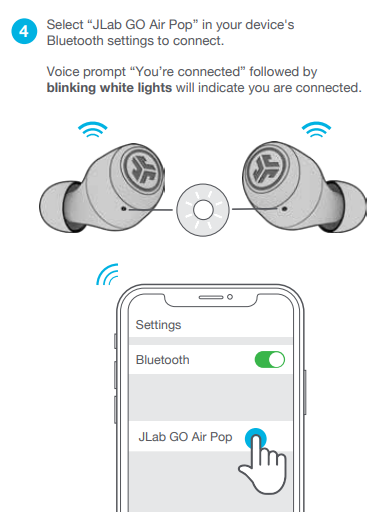
ADDING NEW / ADDITIONAL BLUETOOTH DEVICES:
- Turn OFF Bluetooth on any previously connected device.
- Turn ON Bluetooth on the the new device.
- Take the earbuds out of the case.
- Earbuds will automatically enter Bluetooth Pairing.
- Select “JLab GO Air Pop” in device settings to connect.
BUTTON FUNCTIONS
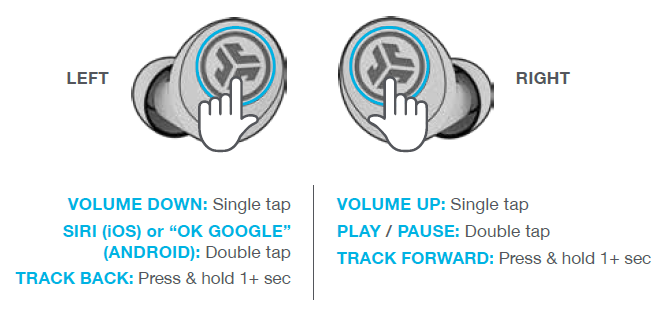
- ANSWER CALL: Single tap
- HANGUP: Double tap
- REJECT INCOMING CALLS: Press & hold 1+ sec EQ CHANGE: Triple tap
- VOICE PROMPTS
- “Hello”: Power ON
- “Ready to Pair”: GO Air Pop is ready to pair with a a Bluetooth device
- “Bluetooth Connected”: Earbud is connected to device “Battery Full”: 100-75%
- “Battery Medium”: 75-25%
- “Low Battery”: Less than 25%(When power decreases to 10%, “Low Battery” will play one time)
- “Goodbye”: Power OFF
CHARGING EARBUDS
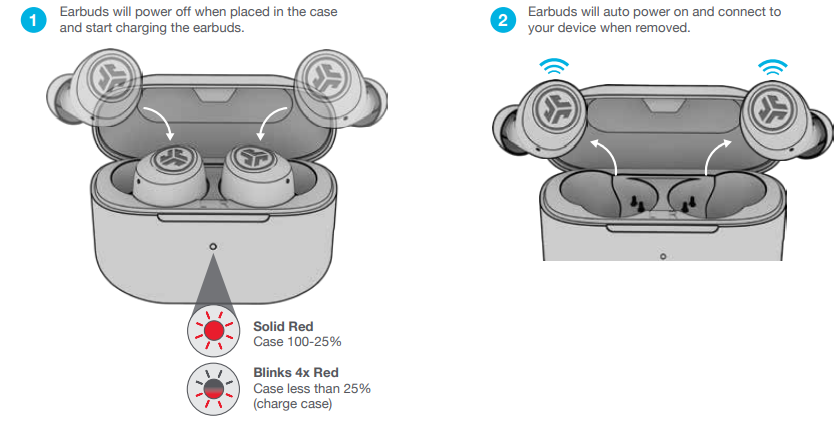
TROUBLESHOOTING
Connection failure or earbuds disconnected from each other (Manual Reset)
- Keep the earbuds in the charging case and forget “JLab GO Air Pop” from your Bluetooth device settings.
- Quick tap 7x on one earbud in the charging case. The earbud blinks blue 4 times.
- Quick tap 7x on the other earbud in the charging case. The earbud blinks blue 4 times.
- Take both earbuds out of the charging case.
- One earbud will be solid white, and the other will blink blue/white, indicating ready to pair to your device. Instructional videos
Pros & Cons of JLab Go Air Pop Earbuds
- Pros:
- Long battery life: 8+ hours per earbud and 32+ hours total with charging case, supporting quick 15-minute fast charge for 1 hour of use.
- Customizable sound: Three EQ3 sound modes selectable via touch control enhance the listening experience without needing an app.
- Compact, lightweight design: Earbuds are 15% smaller and 40% lighter with a slim case smaller than a credit card, ensuring portability and comfortable wear.
- IPX4 splash resistance: Suitable for sweat and minor water exposure, ideal for workouts and outdoor use.
- Dual connect feature: Use one or both earbuds independently, with clear call quality from built-in MEMS microphones.
- Affordable price: Offers great value against pricier true wireless options with comparable core features.
- Cons:
- Limited codec sthe thsupportrt: Only SBC codec, lacking advanced codecs like AAC or aptX, which may affect audio quality on some devices
- Basic noise isolation: IPX4 rating does not protect against heavy water exposure, and no active noise cancellation is available
- The charging case uses a USB-A cable instead of USB-C, which is less common in modern peripherals.
- Touch controls can be sensitive and may require adjustment for accurate tap recognition.
- No dedicated app control for the basic Go Air Pop model, though the GO POP+ version offers app customization
Customer Reviews and Feedback on jlab Go Air Pop Earbuds.
The jlab Go Air Pop Earbuds enjoy favorable user ratings, with many customers praising their excellent battery life and comfortable fit, especially noting how the earbuds remain secure during workouts and daily activities. Users appreciate the clear call quality enabled by dual MEMS microphones and the convenience of quick charging. The customizable EQ3 sound modes receive positive remarks for enhancing audio without extra software.
Common complaints include occasional issues with touch control sensitivity and the basic codec support, limiting sound fidelity for audiophiles. Some users mention the lack of active noise cancellation and the absence of USB-C charging as minor drawbacks. Overall, the earbuds hold a strong rating of around 4.5 stars out of 5 on major retail platforms, with recommendations highlighting their value for money and reliability as budget true wireless earbuds.
Many customers recommend the JLabGo Pop for those seeking affordable, splash-resistant wireless earbuds for casual listening, commutes, and fitness use, while suggesting that users with premium audio expectations might consider higher-end models.
Faqs
How do I set up and pair my jlab Go Air Pop Earbuds for the first time?
What should I do if my jlab Go Air Pop Earbuds are not charging properly?
How can I use the custom EQ3 sound modes on my jlab Go Air Pop Earbuds?
Are jlab Go Air Pop Earbuds compatible with both Android and Apple devices?
How can I improve the fit and sound quality of my jlab Go Air Pop Earbuds?
What should I do if only one jlab Go Air Pop Earbud connects or works?
How do I maintain and care for my jlab Go Air Pop Earbuds to ensure longevity?
What is the total battery life and charging time of the jlab Go Air Pop Earbuds?
More jlab manuals
Leave a Comment