
Pairing & Usage: Jlab Studio 2 Wireless Headphones User Manual
Content
JLab Studio 2 Wireless Headphones
Introduction
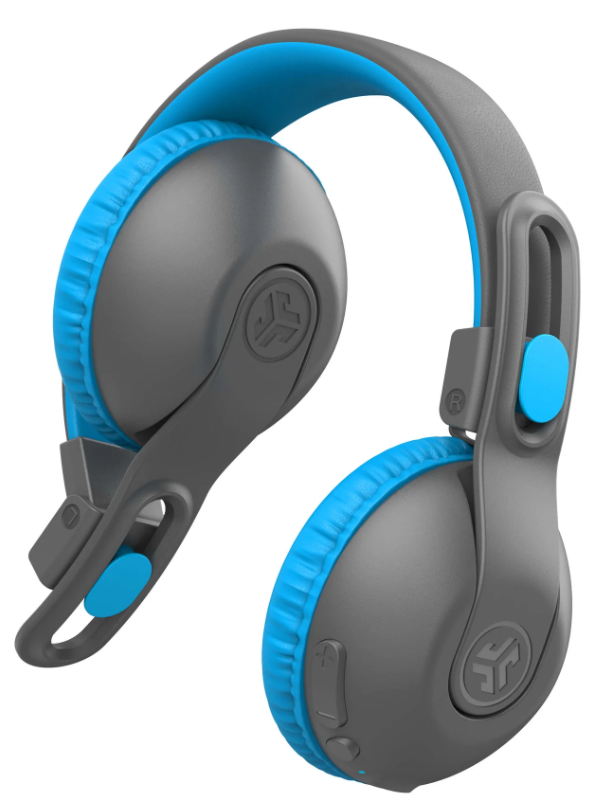
Experience studio-quality sound with the JLab Studio 2 Wireless Headphones, designed to deliver exceptional audio clarity and comfort. These sleek on-ear headphones offer customizable EQ4 sound modes, allowing you to tailor your listening experience. With 45+ hours of Bluetooth playtime, they are perfect for music enthusiasts and professionals alike. The luxurious Cloud Foam earcups ensure lasting comfort, making them ideal for extended use. Whether you're listening to music, podcasts, or taking calls, these headphones provide crystal-clear audio with dual noise-cancelling mics. The JLab App further enhances your experience by allowing you to customize sound settings and share audio with compatible JLab headphones.
Targeted at both adults and children, these headphones are versatile for various use cases, such as music streaming, video conferencing, and sharing with friends via LabShare Technology. Available at major retailers like Target and School Specialty, the estimated price range is between $30 to $40, offering excellent value for money.
Specifications of JLab Studio 2 Wireless Headphones
Below are the key specifications and features of the JLab Studio 2 Wireless Headphones:
- Bluetooth Playtime: 45+ hours
- Sound Modes: EQ4 customizable modes
- Ear Cushion Material: Leatherette with Cloud Foam
- Microphone: Built-in dual noise-cancelling mics
- Charging: USB-C with fast charging
- Connection Type: Wireless Bluetooth (Multipoint Technology)
- Weight: 0.5 pounds
- Warranty: 2-year limited warranty
In comparison to similar products, the JLab Studio 2 offers superior battery life and customization options, making it a competitive choice in the market.
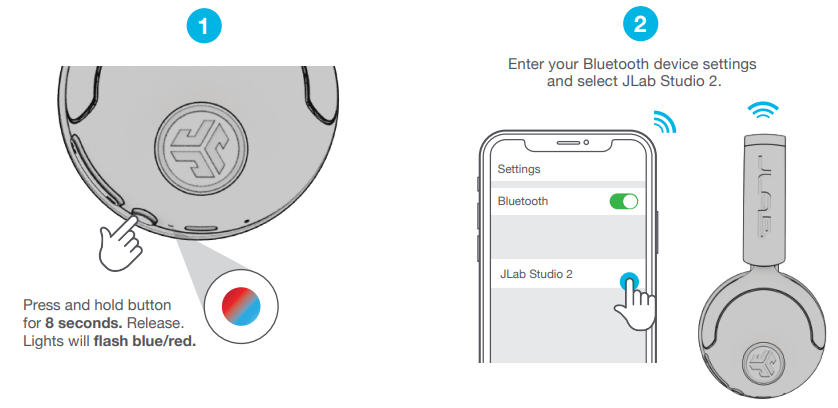
PAIRUP
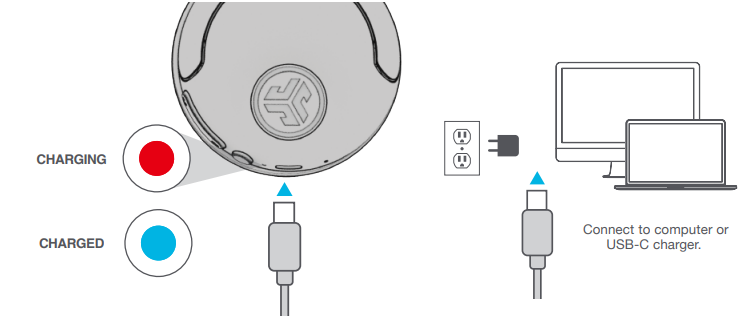
GET CHARGED
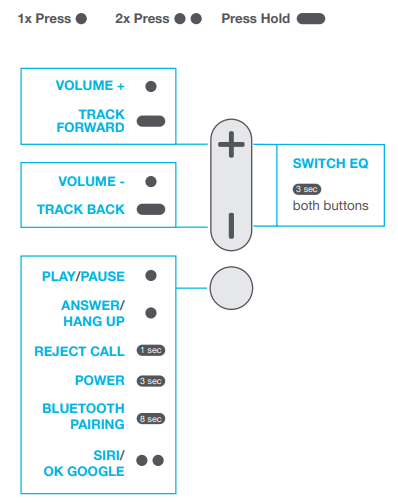
GO AHEAD, PRESS THE BUTTON
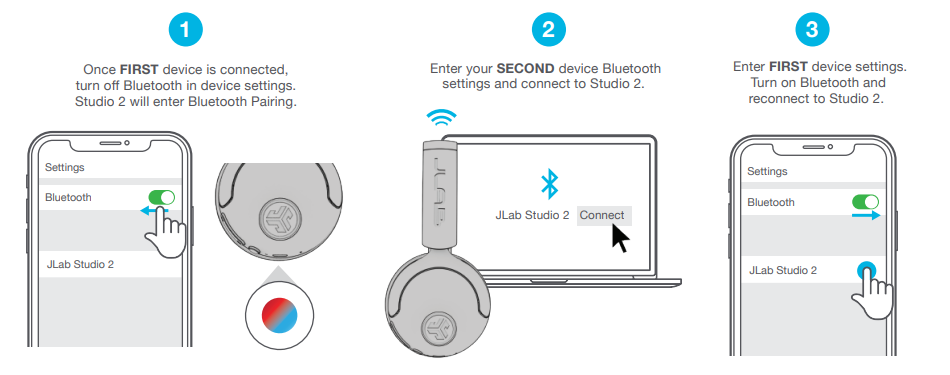
MULTIPOINT
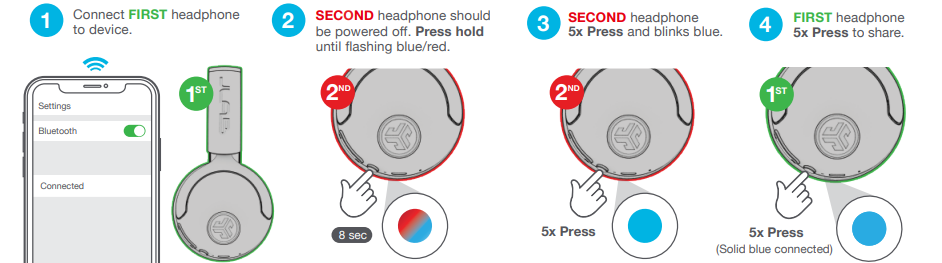
LabShare
(Share between two Studio 2 headphones)
Troubleshooting JLab Studio 2 Wireless Headphones
Here are common issues and solutions for the JLab Studio 2 Wireless Headphones:
- No Sound: Check Bluetooth connection and ensure headphones are properly paired. Restart headphones if necessary.
- Poor Call Quality: Ensure dual noise-cancelling mics are not obstructed. Adjust EQ settings for better audio clarity.
- Battery Life Issues: Update firmware via the JLab App or contact support.
- Warranty and Support: For any issues, contact Target Guest Services or refer to the manufacturer's 2-year warranty. Reach out to JLab support for additional assistance.
To prevent common issues, ensure regular software updates and proper maintenance of the headphones.
Pros & Cons of JLab Studio 2 Wireless Headphones
Pros
- Long Battery Life: Enjoy 45+ hours of playtime on a single charge.
- Customizable Sound: EQ4 sound modes allow for personalized listening experiences.
- Comfortable Design: Cloud Foam earcups provide lasting comfort.
- Value for Money: Affordable price with excellent features.
Cons
- No Active Noise Canceling: May not be suitable for noisy environments.
- Leatherette Material: Some users may prefer more premium materials.
Customer Reviews and Feedback
Users praise the JLab Studio 2 Wireless Headphones for their long battery life, customizable sound modes, and comfortable design. Common complaints include the lack of active noise canceling and the use of leatherette materials. Overall, these headphones are well-rated for their value and performance, with many users recommending them for everyday use.
Rating: 4.5/5 stars
Recommendation: Ideal for those seeking affordable, feature-rich wireless headphones with excellent sound quality.
Faqs
How do I set up JLab Studio 2 Wireless Headphones for the first time?
What should I do if JLab Studio 2 Wireless Headphones are not connecting via Bluetooth?
Can I use JLab Studio 2 Wireless Headphones with multiple devices simultaneously?
How do I maintain and clean JLab Studio 2 Wireless Headphones?
What are the key features that make JLab Studio 2 Wireless Headphones different?
Can I use JLab Studio 2 Wireless Headphones in noisy environments?
How often should I charge JLab Studio 2 Wireless Headphones?
Are JLab Studio 2 Wireless Headphones compatible with Google Fast Pair technology?
More jlab manuals
- Setup & Pairing: Jlab Go Lux ANC Headphone User Manual
- Pairing: Jlab Wireless Headphones User Manual
- Setup: Jlab Go Air Pop Earbuds User Manual
- Pairing & Setup: Jlab Jbuddies ANC Wireless Headphones User Manual
- Setup: Jlab Jbuds Mini Earbuds User Manual
- Setup & Pairing: Jlab Flex Open Earbuds User Manual
Leave a Comment