
Setup: Jlab Jbuds Mini Earbuds User Manual
Content
JLab Jbuds Mini Earbuds

Introduction
The JLab Jbuds Mini Earbuds are compact, true wireless earbuds designed for users seeking a lightweight, versatile audio solution without sacrificing sound quality. These earbuds stand out by offering a 50% smaller case and 30% smaller earbuds compared to standard models, making them exceptionally portable and comfortable for all-day wear. Ideal for on-the-go lifestyles, fitness enthusiasts, commuters, and casual listeners, they provide seamless Bluetooth multipoint connectivity, enabling simultaneous connection to two devices,, such as a smartphone and laptop.
One of the key benefits is the Be Aware™ audio feature, which lets you hear ambient sounds while enjoying your music, enhancing safety during outdoor activities. The earbuds come with an IP55 rating for sweat and dust resistance, ensuring durability in various environments. With up to 20 hours of total battery life through the charging case, users can enjoy extended playback without frequent recharging. JLab Jbuds Mini are available in several colors, including black and pink, usually priced in the affordable range of approximately $40 to $60, making them accessible for budget-conscious buyers seeking quality wireless earbuds.
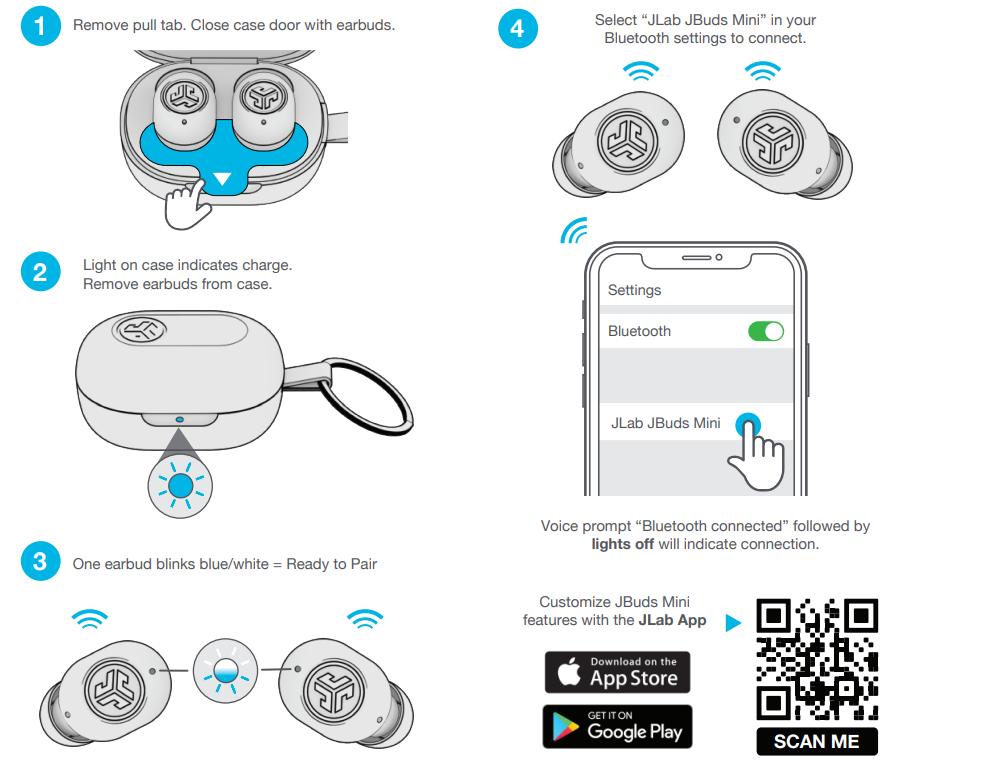
PAIR UP
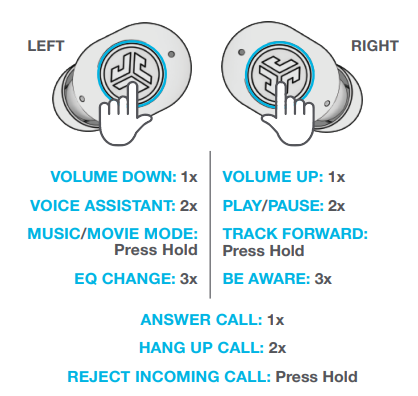
GO AHEAD, PRESS THE BUTTON
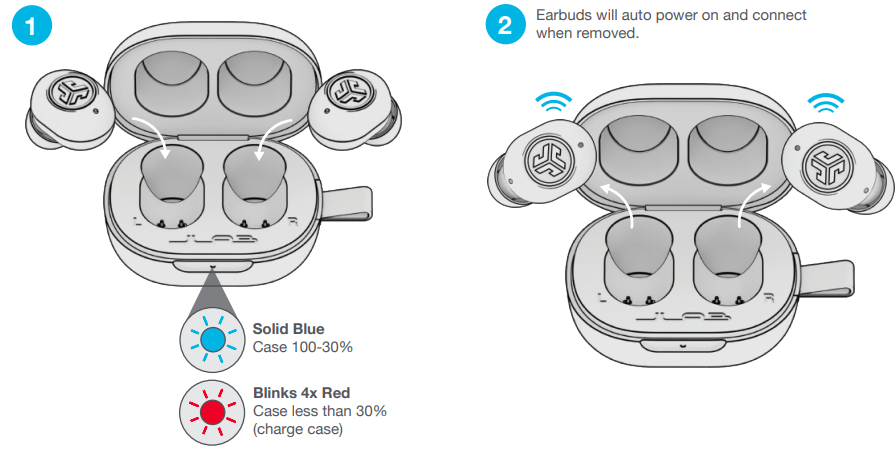
GET CHARGED (CASE)
.png)
GET CHARGED (EARBUDS)
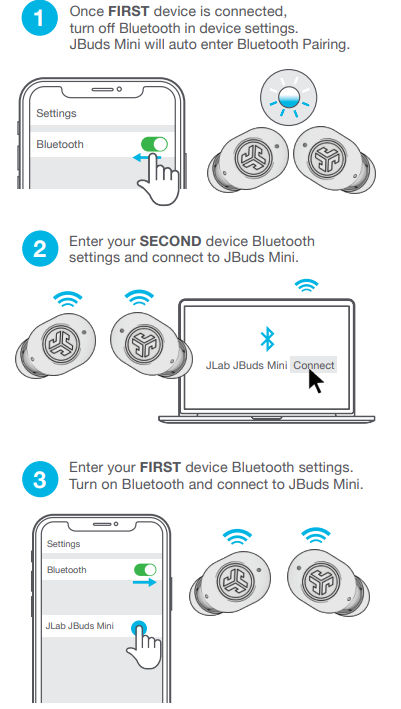
MULTIPOINT
TROUBLESHOOTING
CONNECTION FAILURE OR EARBUDS DISCONNECTED FROM EACH OTHER
(MANUAL RESET)
- Keep the earbuds in the charging case and forget “JLab JBuds Mini” from your Bluetooth device settings.
- Quick tap 7x on one earbud in the charging case.
The earbud blinks blue 4 times. - Quick tap 7x on the other earbud in the charging case.
The earbud blinks blue 4 times. - Take both earbuds out of the charging case.
One earbud will be solid white, and the other will blink blue/white, indicating ready to pair to your device.
Specifications of JLab Jbuds Mini True Wireless Earbuds
- Bluetooth Version: 5.2 for stable and efficient connectivity
- Multipoint Connectivity: Connect to two devices simultaneously (e.g., phone and laptop)
- Battery Life: Up to 5 hours per charge; total 20 hours with charging case
- IP Rating: IP55 sweat and dust resistance, suitable for workouts and outdoor use
- Audio Features: Three EQ modes (JLab Signature, Balanced, Bass Boost) plus customizable EQ via JLab app
- Microphone: MEMS noise-canceling microphones for clear calls even in noisy environments
- Controls: Capacitive touch controls on each earbud for volume, playback, voice assistant, and EQ switching
- Range: Bluetooth wireless range up to 30 feet (10 meters)
- Size & Weight: 30% smaller earbuds, 50% smaller charging case compared to previous generations
Compared to similar earbuds in the budget segment, the Jbuds Mini offer a combination of compact design, multipoint Bluetooth, and customizable sound through their dedicated app, features not always present in competing models like the Anker Soundcore Life P2 or Skullcandy Sesh.
Pros & Cons of JLab Jbuds Mini Earbuds
Pros
- Compact and Lightweight: Extremely portable with a smaller form factor, ideal for users who dislike bulky earbuds.
- Bluetooth Multipoint: Seamlessly switch between two devices without needing to disconnect or re-pair.
- Customizable Sound: Multiple EQ presets and a 10-band equalizer in the JLab app for tailored audio experiences.
- Durability: IP55 rating protects against sweat and dust, perfect for active lifestyles.
- Be Aware Audio: Allows ambient sound in for safety while jogging or walking outdoors.
Cons
- No Active Noise Cancellation: Lacks ANC, which some competing earbuds offer at a similar price.
- Modest Battery Life: 5 hours per charge is average; some rivals provide longer single-charge playback.
- Basic Call Quality: While calls are clear, the microphone performance may struggle in very noisy environments.
- App Dependency: Full customization requires installing the JLab app, which some users may find inconvenient.
Overall, the JLab Jbuds Mini delivers excellent value for money, especially for users prioritizing portability and multipoint connectivity over premium noise cancellation features.
Customer Reviews and Feedback on jlab Jbuds Mini Earbuds
The JLabbbJbuds Mini Earbuds enjoy a strong user rating of about 4.5 out of 5 stars across over 1,400 reviews, highlighting general satisfaction among buyers. Customers frequently praise the compact size and comfortable fit, which make these earbuds easy to wear for extended periods. Users also commend the Bluetooth multipoint feature and the convenience of switching between devices seamlessly.
Common praises include the effective Be Aware audio mode for outdoor safety and the decent sound quality with customizable EQ presets. However, some users mention that the battery life, while sufficient for daily use, falls short for long trips without charging. A few reviews note occasional connectivity drops and the lack of active noise cancellation as minor drawbacks.
Most customers recommend the JLab Jbuds Mini for those seeking affordable, reliable, and versatile true wireless earbuds, particularly for casual listening, workouts, and multitasking with multiple devices.
Faqs
How do I pair jlab Jbuds Mini Earbuds with my device for the first time?
Why is only one earbud of my jlab Jbuds Mini Earbuds working during calls or music?
How do I change the EQ settings or sound modes on jlab Jbuds Mini Earbuds?
Can I connect jlab Jbuds Mini Earbuds to two devices at once with Bluetooth Multipoint?
How do I check the battery status of my jlab Jbuds Mini Earbuds and charging case?
What should I do if my jlab Jbuds Mini Earbuds are not charging properly?
How do I use the ‘Be Aware’ mode on jlab Jbuds Mini Earbuds to hear my surroundings?
How do I clean and maintain my jlab Jbuds Mini Earbuds for optimal performance?
More jlab manuals
Leave a Comment