
Setup: Jlab Go Air Tones Earbuds User Manual
Content
JLab Go Air Tones Earbuds
Introduction
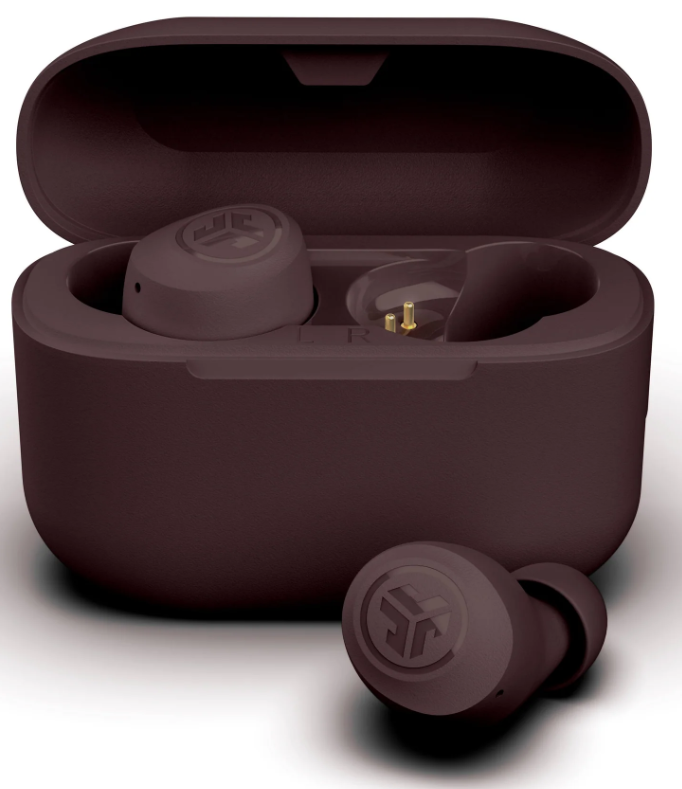
The JLab Go Air Tones Earbuds offer a unique blend of style, comfort, and performance designed for users seeking true wireless freedom with a subtle aesthetic. Unlike traditional earbuds that stand out with bold colors or flashy designs, these earbuds come in a curated range of neutral shades created in partnership with ORLY Color Labs to complement diverse skin tones, making them an ideal choice for fashion-conscious users who want their audio gear to blend naturally with their look.
Perfect for daily commuters, remote workers, fitness enthusiasts, and casual listeners, the Go Air Tones provide up to 32+ hours of total playtime with an 8+ hour battery life per earbud, plus a slim portable charging case that easily fits in pockets or bags. Their IPX4 sweat resistance and lightweight design ensure all-day comfort and durability, whether during workouts or everyday activities. The earbuds also support Bluetooth 5.1 with a reliable 30+ feet wireless range, enabling seamless connectivity to smartphones and other devices.
Priced competitively within the budget-friendly segment, typically around $25-$35, the Go Air Tones are widely available across major online and retail stores, making premium true wireless technology accessible to many users who prioritize style, convenience, and sound quality in their earbuds.
BLUETOOTH PAIRING
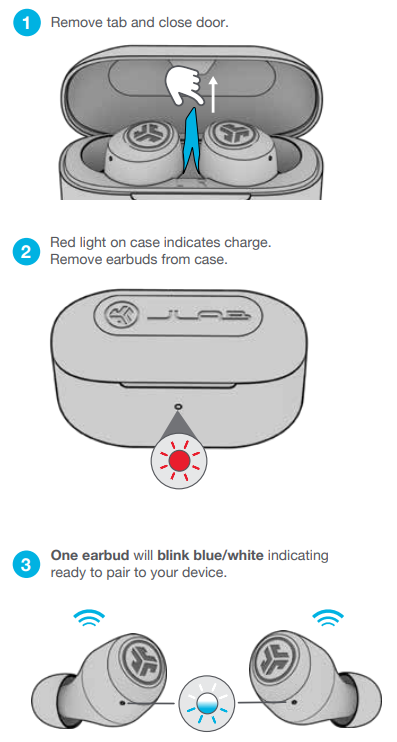
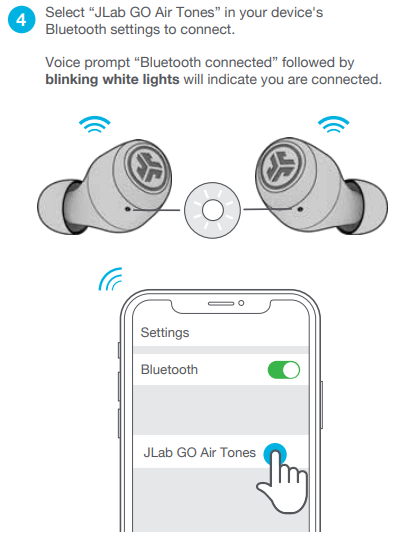
ADDING NEW / ADDITIONAL BLUETOOTH DEVICES:
- Turn OFF Bluetooth on any previously connected device. Turn ON Bluetooth on the new device.
- Take the earbuds out of the case.
- Earbuds will automatically enter Bluetooth Pairing.
- Select “JLab GO Air Tones” in device settings to connect.
BUTTON FUNCTIONS
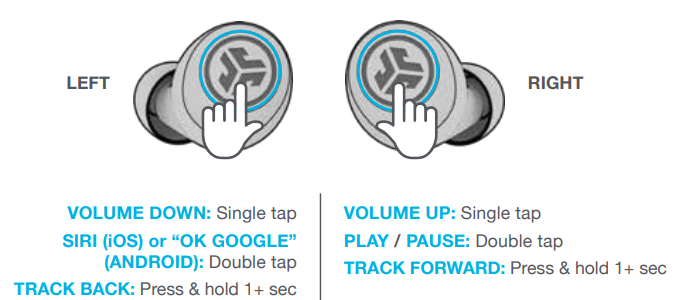
- ANSWER CALL: Single tap
- HANGUP: Double-tap
- REJECT INCOMING CALLS: Press & hold 1+ sec EQ CHANGE: Triple tap
VOICE PROMPTS
- “Hello”: Power ON
- “Ready to Pair”: GO Air Tones is ready to pair with a Bluetooth device
- “Bluetooth Connected”: Earbud is connected to device “Battery Full”: 100-75%
- “Battery Medium”: 75-25%
- “Low Battery”: Less than 25%(When power decreases to 10%, “Low Battery” will play one time)
- “Goodbye”: Power OFF
CHARGING EARBUDS
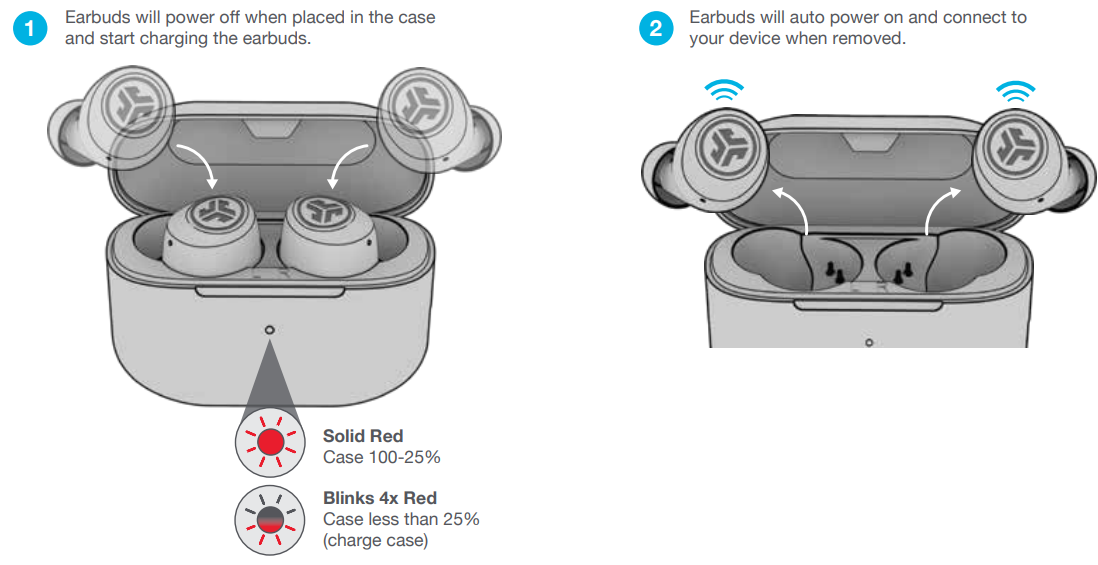
TROUBLESHOOTING
Connection failure or earbuds disconnected from each other (Manual Reset)
- Keep the earbuds in the charging case and forget “JLab GO Air Tones” from your Bluetooth device settings.
- Quick tap 7x on one earbud in the charging case. The earbud blinks blue 4 times.
- Quick tap 7x on the other earbud in the charging case. The earbud blinks blue 4 times.
- Take both earbuds out of the charging case.
- One earbud will be solid white, and the other will blink blue/white,, indicating ready to pair to your device.
Technical Specifications and Features of JLab Go Air Tones Earbuds
- Audio Driver: 6mm dynamic drivers delivering balanced sound with output of 103 ± 3 dB
- Frequency Response: 20Hz to 20kHz, providing clear highs and solid bass performance
- Microphone: Dual MEMS microphones with environmental noise cancellation and sensitivity of -42dB ± 3dB for clear calls
- Battery Life: 8+ hours per earbud, 32+ hours total with charging case; 2.2 hours charging time for earbuds and 2 hours for case
- Charging: Integrated USB-A cable in the case; quick charge feature delivers 1 hour of playback from just 15 minutes of charging
- Connectivity: Bluetooth 5.1 with SBC codec support, 30+ feet wireless range, and auto-connect feature
- Controls: Touch controls with three customizable EQ settings (Signature, Balanced, Bass Boost)
- Comfort & Fit: Includes 3 sets of gel ear tips (small, medium, large) for secure, customizable fit; lightweight earbuds at 3.7g each
- Durability: IPX4 sweat resistance rating for protection against moisture and light rain
- Warranty: 2-year limited warranty ensuring quality and support
Compared to similar models like the JLab Go Air, the Go Air Tones feature a smaller 6mm driver (versus 8mm), a slightly lighter design, and a focus on neutral colors rather than bold styles. They offer longer battery life (8 hours vs. 5 hours per earbud) and a slim charging case, making them a compelling option for users prioritizing both aesthetics and endurance.
Pros & Cons of JLab Go Air Tones Earbuds
- Pros:
- Attractive, skin-tone neutral color palette that blends naturally with diverse users
- Impressive battery life with 8+ hours per charge and 32+ total hours including charging case
- Lightweight and comfortable fit with multiple gel tip sizes included
- Touch controls and customizable EQ settings provide easy sound personalization
- IPX4 sweat-resistant rating suitable for workouts and outdoor activities
- Affordable price point providing great value for daily use
- Cons:
- Smaller 6mm drivers may provide less bass impact compared to larger drivers in competitors..
- No support for advanced Bluetooth codecs like aptX, limiting hi-res audio . The charging case uses a USB-A cable rather than a USB-C, which is becoming standard.
- IPX4 rating protects only against sweat/light splashes, not full water immersion
Customer Reviews and User Feedback on JLab Go Air Tones True Wireless Earbuds
Users commonly praise the JLabb Go Air Tones earbuds for their stylish, understated design that fits comfortably and discreetly during long listening sessions. Many appreciate the long battery life and quick charging capabilities, with multiple reviewers highlighting the earbuds’ ease of use and dependable Bluetooth connection.
Typical complaints mention the sound quality as decent but not exceptional, particularly noting that bass is present but not as powerful as in larger-driver models. Some users also report minor issues with touch control sensitivity and the absence of advanced noise cancellation features.
Overall, the earbuds receive favorable ratings averaging around 4 out of 5 stars, with recommendations for those seeking an affordable, neutral-tone option with solid battery life and comfortable fit rather than audiophile-grade sound. The product is highly recommended for casual listening, commuting, and fitness activities where style and battery endurance matter most.
Faqs
How do I set up my jlab Go Air Tones Earbuds for the first time?
What steps can I take if my jlab Go Air Tones Earbuds are not connecting to my phone?
Can I customize the sound settings on my jlab Go Air Tones Earbuds?
Are jlab Go Air Tones Earbuds compatible with all Bluetooth devices including Android and iOS?
How can I optimize battery life when using jlab Go Air Tones Earbuds?
What maintenance is required to keep jlab Go Air Tones Earbuds working properly?
How does the touch control on jlab Go Air Tones Earbuds work and what functions are available?
What should I do if only one earbud of my jlab Go Air Tones Earbuds is working?
More jlab manuals
Leave a Comment