
Pairing: Jlab Wireless Headphones User Manual
Content
Jlab Wireless Headphones
Introduction
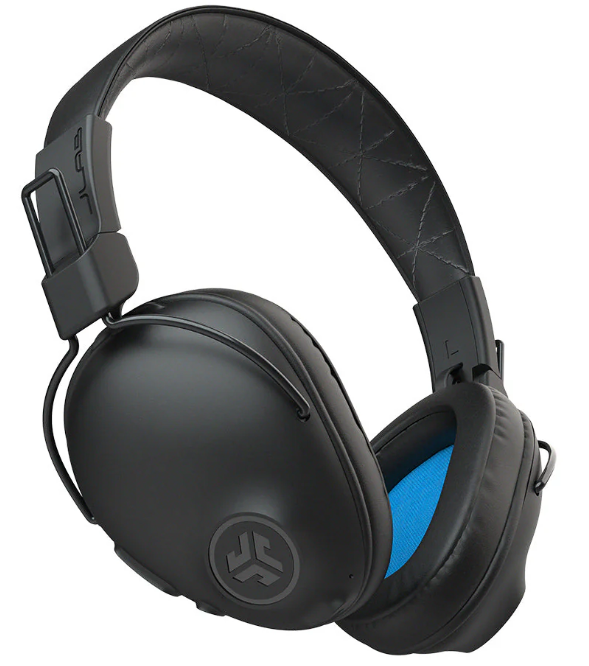
JLab Wireless Headphones deliver an exceptional blend of high-quality audio, innovative features, and affordable pricing, making them a standout choice in the competitive wireless headphone market. Designed for music enthusiasts, remote workers, fitness lovers, and everyday users, these headphones offer a versatile experience whether you're commuting, working out, or relaxing at home. Key benefits include customizable sound profiles via the JLab App, long-lasting battery life with up to 90+ hours of playtime on premium models, and advanced noise cancellation technologies such as Adaptive Active Noise Cancellation (ANC).
Unique selling points like Lab Spatial Audio with head tracking, cloud foam earcups for superior comfort, and wireless charging on certain models elevate the listening experience. JLab Wireless Headphones cater especially well to users seeking affordable yet feature-rich options with multi-platform compatibility, including iOS, Android, Windows, and Mac. Pricing varies by model, with entry-level earbuds like the GO POP+ available for around $30-$50, mid-range on-ear headphones priced near $30, and premium over-ear options like the Epic Lux Lab Edition priced upwards of $150 to $200. These headphones are widely available through major retailers like Best Buy and direct from JLab's official website.
Specifications of JLab Wireless Headphones
- Bluetooth Version: 5.3 to 5.4,, depending on model, ensuring stable wireless connections and up to 30+ feet range
- Audio Drivers: Ranges from 6mm dynamic drivers in earbuds to 32mm high-fidelity drivers in premium models
- Battery Life: From 35 hours total playtime in earbuds (e.g., GO POP+) to 90+ hours in Epic Lux Lab Edition over-ear headphones
- Noise Cancellation: Features include Advanced Adaptive ANC in higher-end models and Be Aware mode for situational awareness
- Controls: Touch controls and precision button controls for volume, playback, and ANC adjustments
- Sound Customization: EQ3 Sound presets (Signature, Balanced, Bass Boost) and full personalization via JLab App
- Additional Features: Google Fast Pair, wireless charging (premium models), IPX4 water resistance on earbuds
Compared to similar wireless headphones such as SteelSeries Arctis Nova Elite or other budget ANC headphones, JLab Wireless Headphones focus on delivering strong value with competitive sound quality, extended battery life, and user-friendly customization at a more accessible price point.
INSTRUCTIONS FOR USE
- Lower the volume on your audio device.
- Gently put headphones on your ears.
- Gradually raise the volume to a comfortable level.
- In order to block outside noise, position the headphones so they form a seal inside your ear.
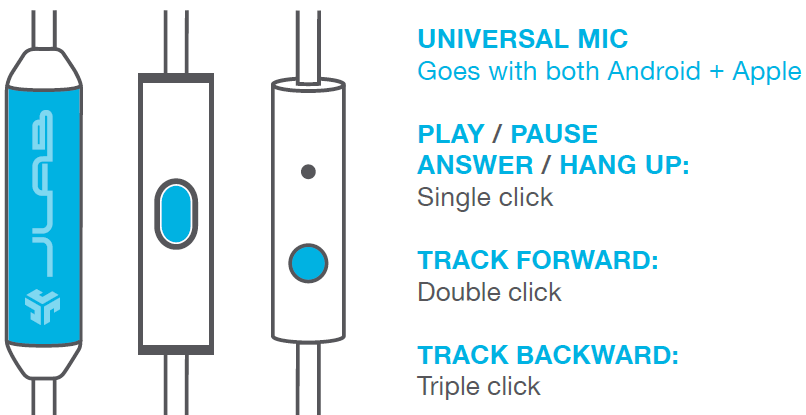
MICROPHONE MODELS + BUTTON FUNCTIONS
- UNIVERSAL MIC
Goes with both Android + Apple - PLAY / PAUSE ANSWER / HANG UP:
Single click - TRACK FORWARD:
Double click - TRACK BACKWARD:
Triple click
CAUTIONS
- Avoid getting moisture or liquids on the headphone cups.
- Avoid extreme heat, cold, and humidity.
- Avoid dropping or crushing headphones, stressing the cable by rapid pulling or extreme force, or bending the cable at a sharp angle.
- Wax may build up in headphone cups, lowering the sound quality. Carefully remove the wax with a cotton swab or other small tool to improve the sound quality.
- If you experience discomfort or pain, try lowering the volume or discontinuing use temporarily.
- If you experience regular discomfort while using this product, discontinue use and consult your physician.
- We recommend you treat your headphones as you would a nice pair of sunglasses and keep them in a safe location when not in use.
Shop products | Product alerts | Burn-in your headphones
JLab Audio + Burn-in Tool

Troubleshooting Common Issues with JLab Wireless Headphones
- Problem: Headphones won’t connect via Bluetooth
Solution: Ensure Bluetooth is enabled on your device, power cycle the headphones, and reset pairing by holding the power button for 10 seconds. Use Google Fast Pair if supported. - Problem: Audio dropout or low sound quality
Solution: Stay within 30 feet of the source; update firmware via JLab App; clear device Bluetooth cache. - Problem: The Microphone is not working during calls
Solution: Check device permissions, clean microphone openings, and ensure no external noise interference. - Error Codes: JLab headphones generally indicate issues by blinking LED patterns; refer to the user manual or JLab App for specific error diagnosis.
- Preventive Measures: Regular firmware updates through the JLab App, keep headphones dry, avoid extreme temperatures, and clean ear tips regularly.
JLab offers a 2-year limited warranty on most models, with customer support accessible via their official website and a dedicated support email for assistance.
We love that you are rocking JLab Audio! We take pride in our products and fully stand behind them.
YOUR WARRANTY
All warranty claims are subject to JLab Audio authorization and at our sole discretion. Retain your proof of purchase to ensure warranty coverage.
CONTACT US
Reach out to us at support@jlabaudio.com or visit jlabaudio.com/contact
Pros & Cons of JLab Wireless Headphones
- Pros:
- Affordable price range with excellent value for money
- Long battery life, especially in premium models (up to 90+ hours)
- Customizable sound profiles via JLab App and EQ3 presets
- Comfortable designs featuring Cloud Foam earcups in over-ear models
- Advanced features like Adaptive ANC and wireless charging on select headphones
- Cons:
- Mid-tier models may lack the premium build or ANC found in high-end competitors..
- Some users report minor connectivity drops in Bluetooth environments. The wireless charging feature is limited to flagship models.
- On-ear designs might not isolate noise as well as over-ear alternatives
Compared with alternatives such as SteelSeries Arctis Nova Elite or Bose QuietComfort, JLab Wireless Headphones deliver competitive sound quality and features but may trade off some premium materials and ultra-low latency performance for a more budget-friendly approach.
Customer Reviews and Feedback on JLab Wireless Headphones
Users consistently praise JLab Wireless Headphones for their solid battery life, sound customization options, and comfort, often awarding 4.5 out of 5 stars on retail platforms. Many appreciate the balance of affordable pricing and feature set, particularly highlighting models like the GO POP+ for active lifestyles and the Epic Lux Lab Edition for audiophile-level sound quality. Common complaints include occasional Bluetooth dropouts and fit issues for those with smaller ears on some over-ear models. Testimonials frequently recommend these headphones for daily use, workouts, and casual listening thanks to their durable build and user-friendly controls. Overall, the headphones receive high marks for value and versatility, making them a smart choice for a wide range of users.
Faqs
How do I set up jlab Wireless Headphones for the first time?
What should I do if my jlab Wireless Headphones aren't connecting properly?
Can I use jlab Wireless Headphones with both Android and iOS devices?
How often should I charge my jlab Wireless Headphones?
What are the key features that make jlab Wireless Headphones different?
How do I maintain my jlab Wireless Headphones for optimal performance?
What should I do if the audio quality is poor or distorted on my jlab Wireless Headphones?
Can I use jlab Wireless Headphones while they are charging?
More jlab manuals
- Pairing & Usage: Jlab Studio 2 Wireless Headphones User Manual
- Pairing & Setup: Jlab Jbuddies ANC Wireless Headphones User Manual
- Setup & Pairing: Jlab Go Lux ANC Headphone User Manual
- Setup & Pairing: Jlab Flex Open Earbuds User Manual
- Setup: Jlab Go Air Pop Earbuds User Manual
- Usage & Pairing: Jlab Jbuds Air Pro Earbuds User Manual
Leave a Comment