
Usage & Pairing: Jlab Jbuds Air Pro Earbuds User Manual
Content
JLab Jbuds Air Pro Earbuds
Introduction
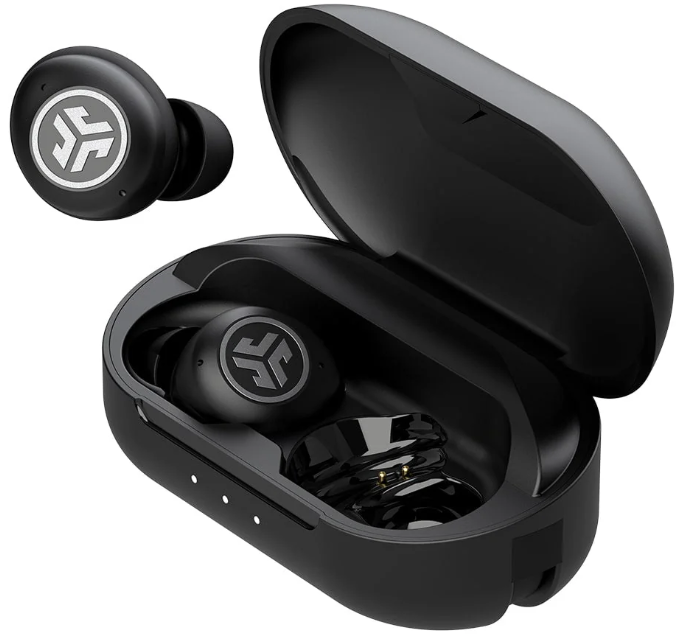
The JLab Jbuds Air Pro Earbuds are premium true wireless earbuds designed to deliver versatile audio performance for users on the go. These earbuds combine long battery life, Bluetooth multipoint connectivity, and a robust IP55 splash and sweat resistance rating, making them ideal companions for daily commutes, workouts, work calls, and entertainment. With a focus on convenience and sound customization, the JBuds Air Pro caters to active professionals, fitness enthusiasts, and casual listeners who demand flexibility without compromising on audio quality.
Key benefits include over 36 hours of total playback time with a quick charging case, multipoint Bluetooth to connect two devices simultaneously, and customizable EQ settings via the JLab app for a personalized listening experience. Additionally, features like touch controls, wear detect sensors, and a Be Aware audio mode enhance usability and safety by allowing outside sounds in when needed. Priced competitively around $59, these earbuds offer excellent value compared to higher-end competitors while addressing everyday listening needs with impressive durability and audio clarity.
Available through major online retailers and select brick-and-mortar stores, the jlab Jbuds Air Pro are a practical choice for users seeking affordable, reliable, and feature-packed true wireless earbuds suitable for work, play, and fitness activities.
Specifications and Key Features of JLab Jbuds Air Pro Earbuds
Technical Specifications
Audio
- Driver size: 6 mm dynamic driver.
- Frequency response: 20 Hz – 20 kHz.
- Impedance: 16 Ω.
- Sensitivity/output: approx. 98 ± 3 dB.
- Microphone: MEMS mic(s), sensitivity around -38 dB ± 3 dB.
Connectivity
- Bluetooth version: 5.1.
- Supported profiles: HSP/HFP/A2DP/AVRCP.
- Codecs: SBC (and AAC in some listings).
- Wireless range: ~30+ ft (~9 m) in typical conditions.
Battery & Charging
- Earbuds play time: up to approx. 9 hours per charge.
- Total play time with charging case: ~36 hours (9 hrs earbuds + ~27 hrs case) in many specs.
- Quick charge: about 15 minutes in case gives ~1 hour of use.
- Earbud battery: approx. 60 mAh (Li-polymer).
- Charging case battery: approx. 520 mAh (Li-polymer).
- Case charge time: ~2 hours. Earbuds charge time: ~1.5 hours.
- Charging via USB-A (cable built into case). No wireless charging.
Physical / Build
- IP rating: IP55 for earbuds (protection against dust & low-pressure water jets).
- Weight: earbuds + case around ~49.7 g combined in some specs. Individual earbuds ~5.3 g each in some listings.
- Dimensions (charging case): approx. 2.86″ length × 1.5″ width × 1.2″ height.
Other Features
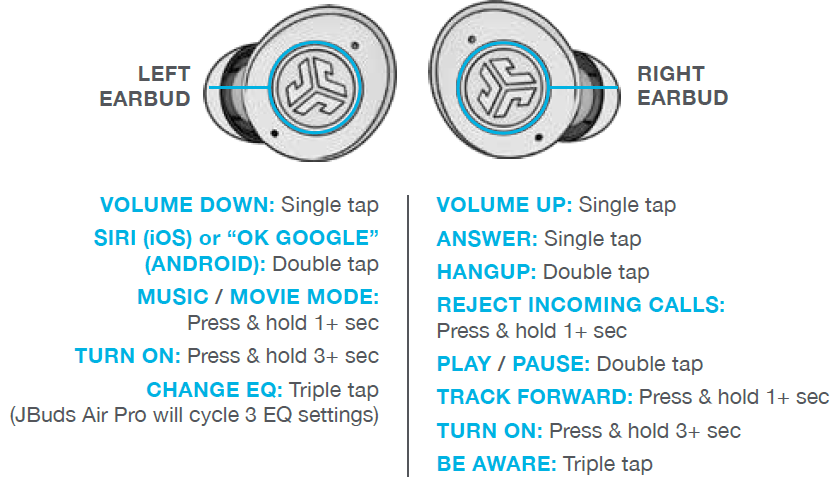
- Touch controls on earbuds for playback, volume, track change, and voice assistant.
- Tile-tracking compatibility: In some markets, the case/earbuds support tracking via Tile.
- No Active Noise Cancellation (ANC) listed for this model.
BLUETOOTH PAIRING
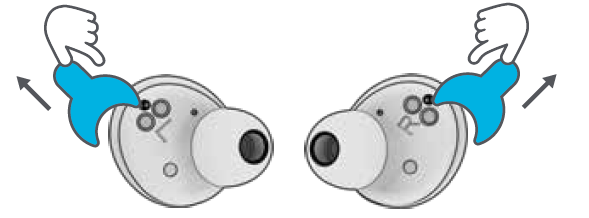
Take the earbuds out of the case and remove stickers. Place the earbuds back in the case and close the door.
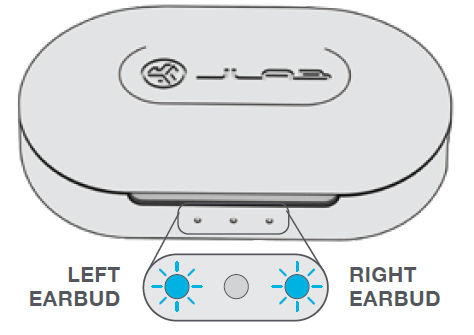
Blue lights on the case indicate charging. Remove earbuds from case.
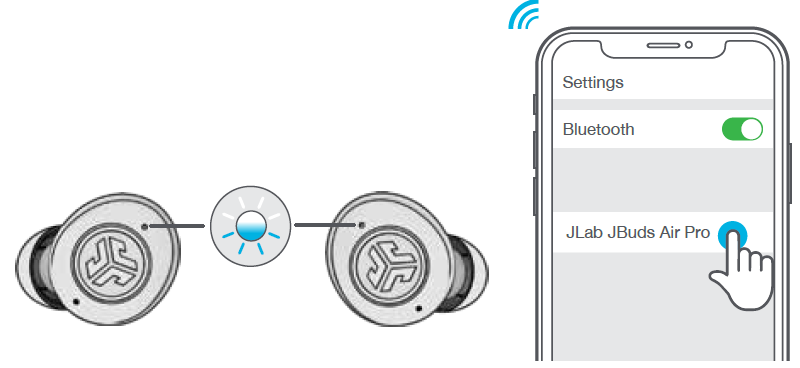
One earbud will blink blue/white ,, indicating ready to pair to your device . Select “JLab JBuds Air Pro” in your device's Bluetooth settings.
ADDING NEW / ADDITIONAL BLUETOOTH DEVICES:
Turn Bluetooth on any previously connected device. Turn ON Bluetooth on the new device.
Earbuds will automatically enter Bluetooth Pairing.
Select “JLab JBuds Air Pro” in the new device settings to connect.
BUTTON FUNCTIONS
VOICE PROMPTS
- “Ready to Pair”: JBuds Air Pro are ready to pair to a Bluetooth device
- “Battery Full”: 100-80%
- “Battery Medium”: 80-20%
- “Low Battery”: Less than 20%When power decreases to 10%, “Low Battery” will play
TURN OFF WITHOUT CHARGING CASE:
Turn off Bluetooth from device settings. Earbuds will power off after 3 minutes.
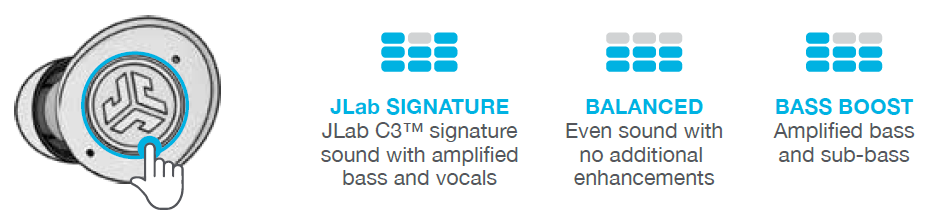
CUSTOM EQ3 SOUND MODES
Tap either the right or left earbud 3 times for different EQ settings (JBuds Air Pro will cycle through 3 EQ settings).
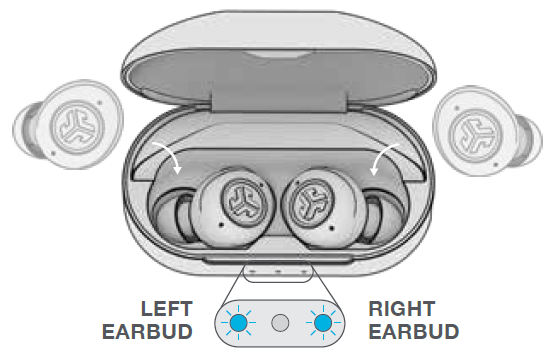
CHARGING EARBUDS
- Placing it in the charging case will auto power OFF and start charging.
- Blue lights will indicate earbuds are charging and will turn OFF when fully charged.
- Removing the earbuds will auto power ON and connect to the last device.
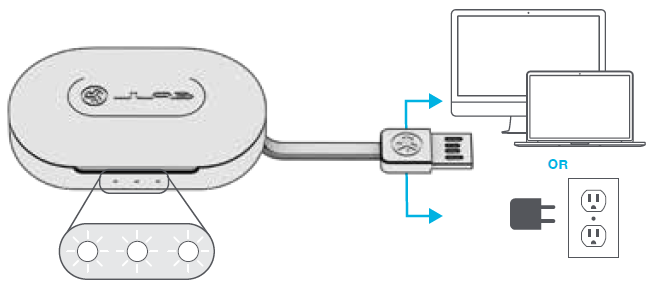
CHARGING CASE
- Connect the JBuds Air Pro to a computer or a USB 5V 1A (or less) output device.
- LEDs pulse white when charging and turn solid white when fully charged.
FITTING
DOWNLOAD THE APP
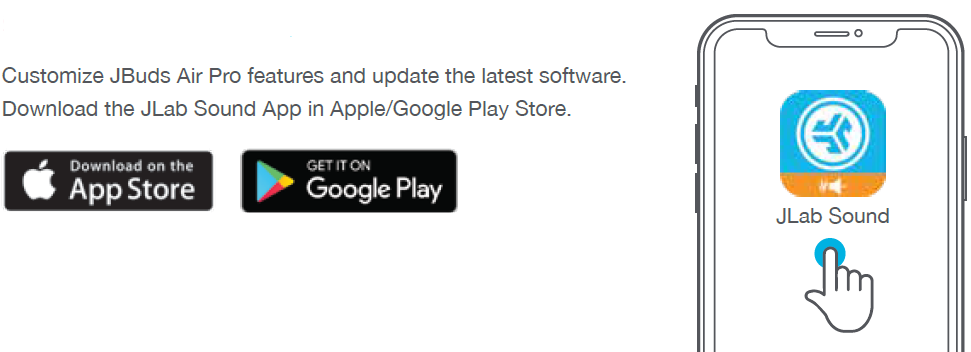
Customize JBuds Air Pro features and update the latest software. Download the JLab Sound App from the Apple/Google Play Store.
TROUBLESHOOTING
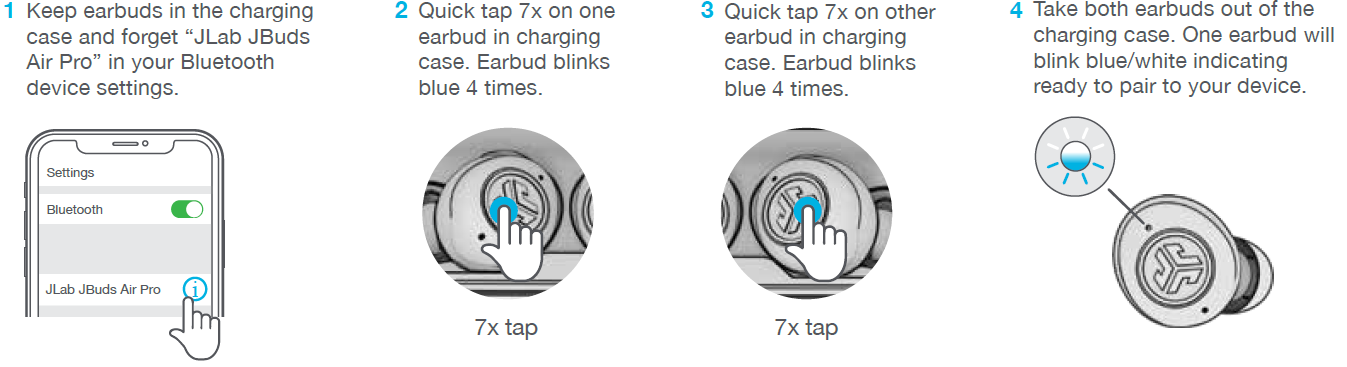
NO AUDIO IN ONE EARBUD OR EARBUDS DISCONNECTED (MANUAL RESET)
QUICK TIPS
- Either earbud can connect to your device and be used independently. Simply take out the earbud from the charging ca,,se and it will auto-connect.
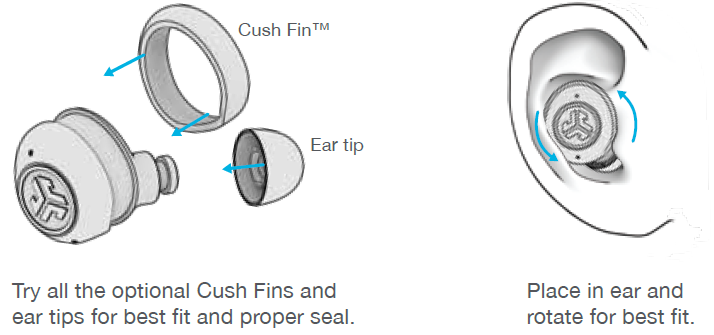
- Choosing the correct ear tip makes a significant improvement in audio quality due to a proper seal for the driver. Try all ear tips for best results.
CAUTIONS
- Avoid extreme heat, cold, and humidity.
- Avoid dropping or crushing the earbuds.
- Wax may build up in the earbud tips, lowering the sound quality.
- Carefully remove the wax with a cotton swab or other small tool to improve the sound quality.
- If you experience discomfort or pain, try lowering the volume or discontinuing use temporarily.
- If you experience regular discomfort while using this product, discontinue use and consult your physician.
- We recommend you treat your earbuds as you would a nice pair of sunglasses and keep them in a safe location when not in use.
Faqs
How do I set up my jlab Jbuds Air Pro Earbuds for the first time?
What should I do if my jlab Jbuds Air Pro Earbuds won’t connect or keep disconnecting?
How do I control volume and playback features on jlab Jbuds Air Pro Earbuds?
Can I use jlab Jbuds Air Pro Earbuds with multiple devices simultaneously?
What are the best practices to maintain and clean jlab Jbuds Air Pro Earbuds?
How do I activate and switch between different EQ modes on the jlab Jbuds Air Pro Earbuds?
What should I check if my jlab Jbuds Air Pro Earbuds are not charging properly?
Are jlab Jbuds Air Pro Earbuds compatible with voice assistants like Siri or Google Assistant?
More jlab manuals
- Setup & Pairing: Jlab Flex Open Earbuds User Manual
- Pairing & Usage: Jlab Work Buds User Manual
- Pairing & Setup: Jlab Jbuddies ANC Wireless Headphones User Manual
- Pairing & Usage: Jlab Epic Lux Lab Edition Headphones User Manual
- Pairing: Jlab Wireless Headphones User Manual
- Pairing & Setup: Jlab Jbuddies Pop Wireless Headphones User Manual
Leave a Comment