
Pairing & Usage: Jlab Work Buds User Manual
Content
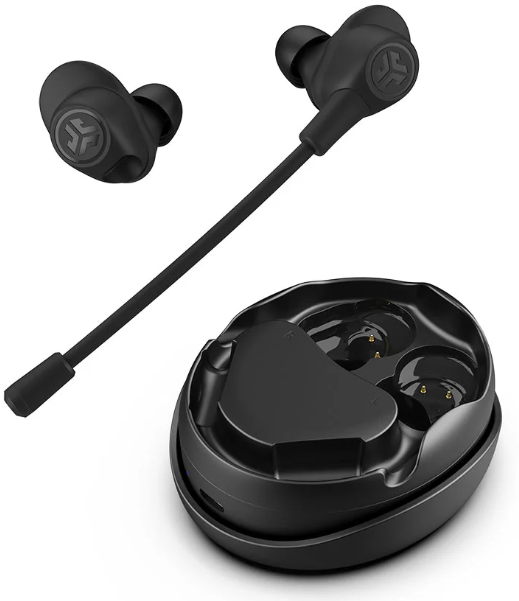
JLab Work Buds
Introduction
The JLab Work Buds are true wireless earbuds engineered for professionals who demand reliability, clarity, and flexibility in their audio gear. Designed to excel in back-to-back meetings, remote work, and multitasking environments, these in-ear headphones stand out with a detachable, noise-canceling boom microphone that can be attached to either earbud, ensuring optimal comfort and call quality for left- or right-handed users. With an impressive 55+ hours of total playtime (10+ hours per earbud), a convenient USB-C charging dock, and Bluetooth Multipoint connectivity, the JLab Work Buds keep you powered and connected throughout the workday.
Customization is central to the experience: the JLab App lets you personalize sound profiles, toggle between music and movie modes, and even activate a transparency mode (“Be Aware”) to stay alert to your surroundings. The earbuds are ideal for busy professionals, remote workers, and anyone who juggles multiple devices—thanks to seamless switching between computers, phones, and tablets.
The JLab Work Buds are typically priced between $95 and $110, making them a competitive option in the professional wireless earbuds market. They are widely available through electronics retailers and online stores, often with free shipping options. Whether you’re taking calls, joining video conferences, or enjoying music during breaks, the JLab Work Buds adapt to your workflow, delivering both performance and convenience.
Specifications: JLab Work Buds Technical Details
The JLab Work Buds pack a robust set of features tailored for professional use. Here’s a detailed breakdown of what’s inside the box and how these wireless earbuds perform compared to similar products:
- Battery Life: 55+ hours total playtime (10+ hours per earbud), with fast charge delivering 1.5 hours of use from just 10 minutes of charging.
- Charging: USB-C charging dock stores both earbuds and the detachable boom mic; no Qi wireless charging.
- Audio: 6mm dynamic drivers, 20Hz–20kHz frequency response, 101dB output, EQ3 customizable sound via JLab App.
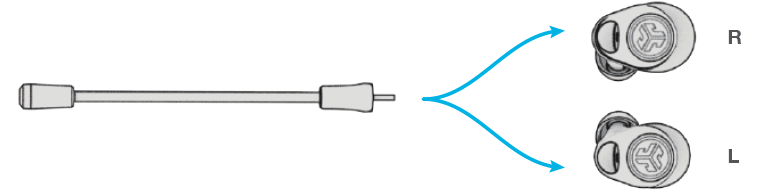
- Microphone: Noise-canceling detachable boom mic (fits either earbud), plus dual environmental noise-canceling (ENC) MEMS mics in each earbud.
- Connectivity: Bluetooth 5.3 with Multipoint support (connects to two devices simultaneously), 30+ foot range, SBC codec (no AAC).
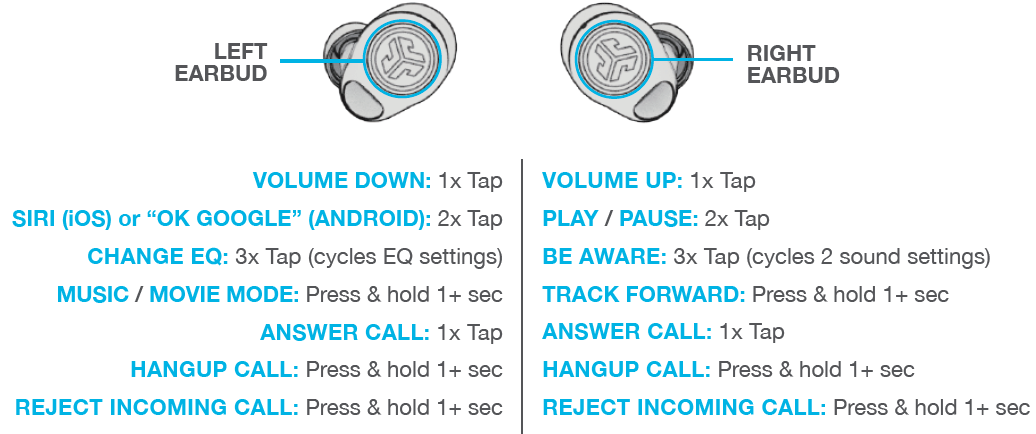
- Controls: Touch controls for volume, playback, calls, and voice assistant; customizable via JLab App.
- Included Accessories: Earbuds, charging case, detachable boom mic, USB-C cable, multiple ear tips, and Cush Fin sizes.
- Warranty: 2-year limited warranty.
Compared to alternatives like the JBuds Work (over-ear, 60+ hour battery, 40mm drivers), the JLab Work Buds offer greater portability, a unique boom mic option, and more flexible device switching—making them a better fit for on-the-go professionals who prioritize call quality and convenience.
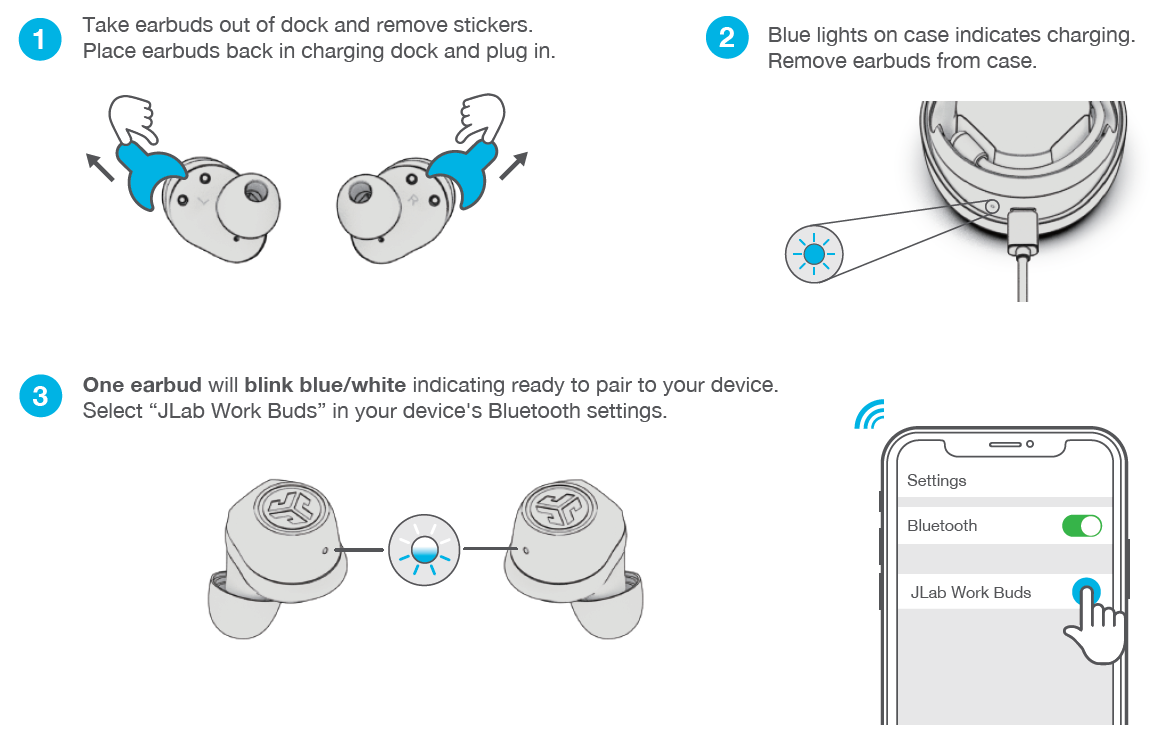
PAIR UP
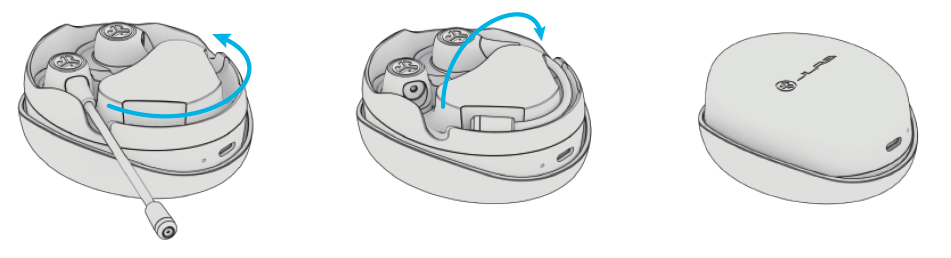
PICK A SIDE
Swap the boom mic into either earbud.
FIND YOUR FIT
ANY WHICH WAY
Leave the mic ready between calls or fold it up for travel. Flip the dock to secure the earbuds for travel.
GO AHEAD, PRESS THE BUTTON
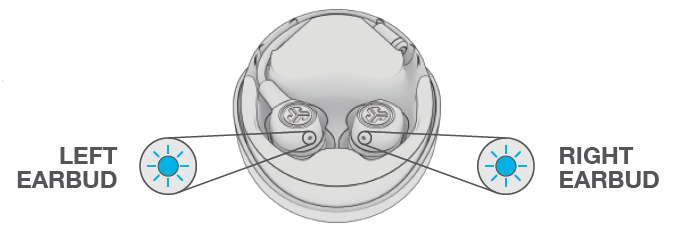
GET CHARGED (EARBUDS)
- Placing it in the charging dock will auto power OFF and start charging. Earbuds LEDs will pulse blue when charging and will turn OFF when fully charged.
- Removing the earbuds will auto power ON and connect to the last device. To turn off without case, disconnect Bluetooth from the device. Earbuds will power off after 3 minutes.
GET CHARGED (DOCK)
Connect the JLab Work Buds to a computer or a USB 5V 1A (or less) output device.
.png)
LED pulses blue when charging and turns solid blue when fully charged.
THE RIGHT SOUND FOR EVERY MOMENT
We get it, sound is personal. Choose your sound preferences from our EQ3 settings and customize your sound style to match exactly what you’re doing.
EQUALIZER MODES
QUICK TIPS
- Either earbud can connect to your device and be used independently. Simply take out the earbud from the charging case,, and it will auto-connect.
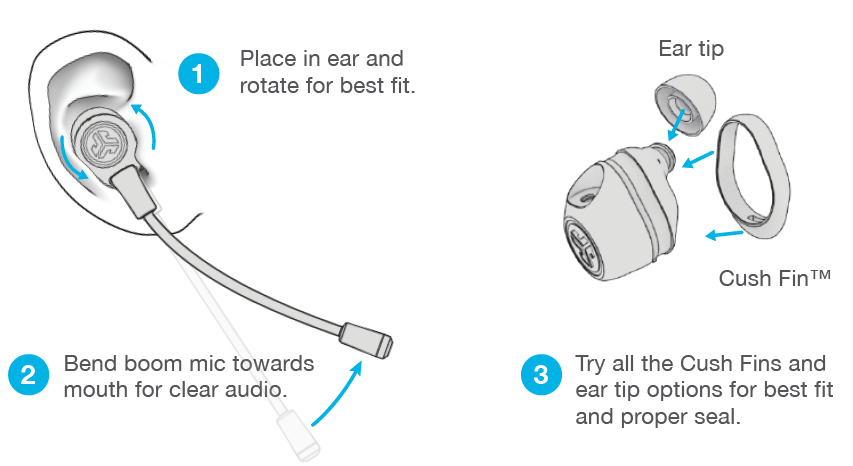
- Earbuds can be used with or without a boom mic, but the mic will improve the quality of your voice and reduce background sound in clear voice mode.
- Choosing the correct ear tip makes a significant improvement in audio quality due to a proper seal for the driver. Try all ear tips for best results.
VOICE PROMPTS
- “Ready to Pair”: Work Buds are ready to pair to a Bluetooth device.. “Battery Full”: 100-80%
- “Battery Medium”: 80-20%
- “Low Battery”: Less than 20%
When the power decreases to 10%, “Low Battery” will play
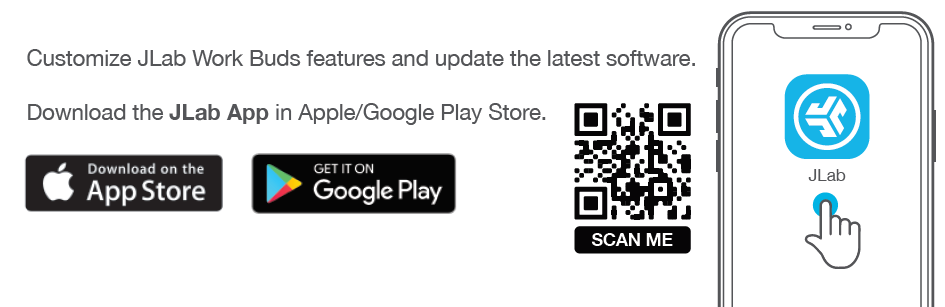
DOWNLOAD THE APP
Troubleshooting: Common Issues and Solutions for JLab Work Buds
Even the best wireless earbuds can encounter occasional hiccups. Here’s how to resolve common problems with your JLab Work Buds and keep them performing at their best:
- Pairing Issues: Ensure Bluetooth is enabled on your device, reset the earbuds by placing them in the case and holding the touchpads until the LEDs flash, then re-pair.
- Intermittent Audio: Check for interference from other wireless devices, move closer to your connected device, and ensure firmware is up to date via the JLab App.
- Boom Mic Not Detected: Confirm the mic is fully inserted into the earbud port. Try switching the mic to the other earbud if issues persist.
- Short Battery Life: Recalibrate the battery by fully draining and recharging the earbuds. Avoid exposing them to extreme temperatures.
- Charging Problems: Use the included USB-C cable and ensure the charging contacts are clean. The case does not support Qi wireless charging.
- App Connectivity: Reinstall the JLab App if customization features aren’t working, and ensure your smartphone’s OS is up to date.
For persistent issues, consult the official JLab support site, which offers step-by-step guides, firmware updates, and direct contact options. The 2-year limited warranty covers defects in materials and workmanship—register your product online for faster service.
NO AUDIO IN ONE EARBUD OR EARBUDS DISCONNECTED (MANUAL RESET)
- Keep earbuds in the charging dock and forget “JLab Work Buds” in your Bluetooth device settings.
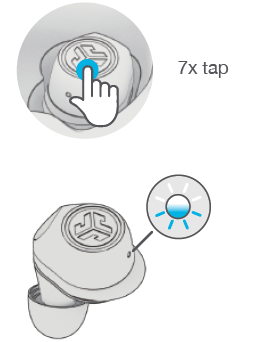
Quick tap 7x on one earbud in the charging case. The earbud blinks blue 4 times.
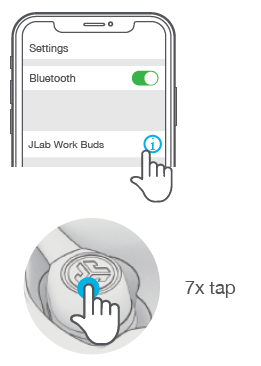
- Quick tap 7x on the other earbud in the charging case. The earbud blinks blue 4 times.
Take both earbuds out of the charging case. One earbud will blink blue/white, indicating ready to pair to your device.
YOUR WARRANTY
All warranty claims are subject to JLab authorization and at our sole discretion. Retain your proof of purchase to ensure warranty coverage.
CONTACT US
Reach out to us at support@jlab.com or visit jlab.com/contact
Pros & Cons: Balanced Assessment of JLab Work Buds
Pros
- Exceptional Battery Life: Up to 55+ hours of total playtime with the charging case, and fast charging support.
- Flexible Boom Mic: Detachable, noise-canceling boom mic works on either earbud, enhancing call clarity and comfort.
- Bluetooth Multipoint: Seamlessly switch between two devices—ideal for professionals using both a computer and smartphone.
- Customizable Sound: EQ3 presets and app-based customization for music, movies, and podcasts.
- Comfort and Fit: Multiple ear tips and Cush Fin sizes for a secure, personalized fit.
Cons
- No Active Noise Cancelation (ANC): Only passive noise isolation and a transparency (“Be Aware”) mode.
- No AAC Codec: Limited to SBC, which may affect audio quality for Apple device users.
- Boom Mic Fit Issues: Some users report the mic doesn’t stay securely seated, causing occasional call quality issues.
- Bulky Charging Case: The case is larger than average, which may affect portability.
- Mixed Reviews on Build Quality: A few users mention concerns about long-term durability and microphone performance.
In summary, the JLab Work Buds offer outstanding value for professionals needing long battery life, clear calls, and device flexibility, though they may not satisfy those seeking premium ANC or audiophile-grade music playback.
Customer Reviews: Real-World Feedback on JLab Work Buds
User experiences with the JLab Work Buds are mixed but generally positive for professionals prioritizing call quality and battery life. On Verizon, the product holds a 3.0 out of 5 rating, with some users praising the battery and call clarity, while others note the battery doesn’t last as long as advertised in real-world use. Independent reviewers highlight the convenience of the detachable boom mic and the ability to customize sound via the JLab App, but some criticize the mic’s fit and the lack of premium features like ANC or AAC support.
Common praises include the earbuds’ energetic sound signature, comfortable fit with multiple ear tips, and the practicality of Bluetooth Multipoint for multitasking. Frequent complaints focus on the boom mic’s instability during calls and the large charging case. Testimonials suggest the JLab Work Buds are best suited for professionals who need reliable, all-day wireless earbuds for calls and light music listening, rather than audiophiles or those seeking advanced noise cancellation.
For purchase recommendations: If you need a wireless headset with a boom mic for clear calls and long battery life, the JLab Work Buds are a solid, budget-friendly choice. However, if you prioritize music quality or require active noise cancellation, consider higher-end alternatives.
Faqs
How do I set up my jlab Work Buds for the first time with Bluetooth Multipoint?
What should I do if my jlab Work Buds microphone is not working or producing muffled sound?
Can I use only one earbud of the jlab Work Buds independently for calls or music?
Are the jlab Work Buds compatible with both Android and iOS devices, and do they support fast pairing?
How long does the battery last on jlab Work Buds, and how does fast charging work?
What features in the jlab Work Buds app help customize my sound experience?
How do I maintain and clean my jlab Work Buds to ensure optimal performance?
Why do my jlab Work Buds sometimes disconnect or have connectivity issues, and how can I fix them?
Tags
More jlab manuals
- Usage & Pairing: Jlab Jbuds Air Pro Earbuds User Manual
- Pairing & Usage: Jlab Epic Lux Lab Edition Headphones User Manual
- Setup & Pairing: Jlab Flex Open Earbuds User Manual
- Pairing & Setup: Jlab Jbuddies Pop Wireless Headphones User Manual
- Pairing & Setup: Jlab Jbuddies ANC Wireless Headphones User Manual
- Setup & Pairing: Jlab Studio Pro Wireless Headphones User Manual
Leave a Comment