
Pairing & Setup: Jlab Jbuddies Pop Wireless Headphones User Manual
Content
Jlab Jbuddies Pop Wireless Headphones
Introduction
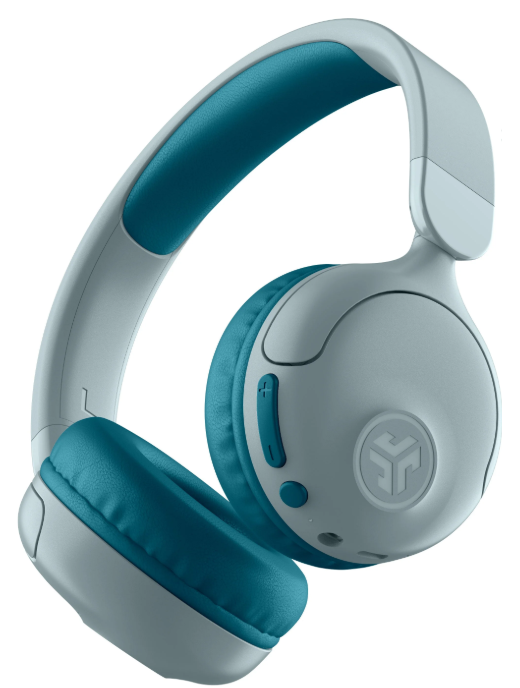
The JLab JBuddies Pop Wireless Headphones are a standout choice for parents seeking a reliable, kid-friendly audio solution. Designed specifically for children, these wireless kids headphones combine safety, comfort, and convenience—qualities essential for young listeners. The JBuddies Pop offers both wireless Bluetooth 5.2/5.3 connectivity and a wired 3.5mm jack, delivering flexible listening options for home, school, or travel.
A key selling point is the built-in volume safe setting, which lets parents choose between 85 dB (recommended for kids) and 95 dB for older users, helping to protect young ears from excessive noise. Comfort is a priority, with plush Cloud Foam earcups and an adjustable, foldable headband ensuring extended wear without discomfort. The impressive 48-hour battery life means fewer charges and more playtime, while the Wireless Share Mode allows two headphones to connect to a single device—perfect for sharing music or watching movies with friends.
The JLab JBuddies Pop Wireless Headphones are targeted at children aged 6 and up, making them ideal for school, travel, and daily entertainment. Their durable, water-resistant (not waterproof) design and compact, portable build make them a practical choice for active kids. The estimated price range is budget-friendly, typically available for under $50, with wide availability at major retailers and online stores.
Specifications
- Brand: JLab
- Model: JBuddies Pop
- Type: On-ear, wireless, and wired kids headphones
- Bluetooth: Version 5.2/5.3, SBC/AAC codecs, 10m/30+ ft range
- Wired: 3.5mm audio jack
- Battery: 380mAh LiPo, up to 48 hours playtime, 3-hour charge, 600+ hours standby
- Audio: 40mm dynamic drivers, 20–20,000 Hz frequency response, 32 ohm impedance
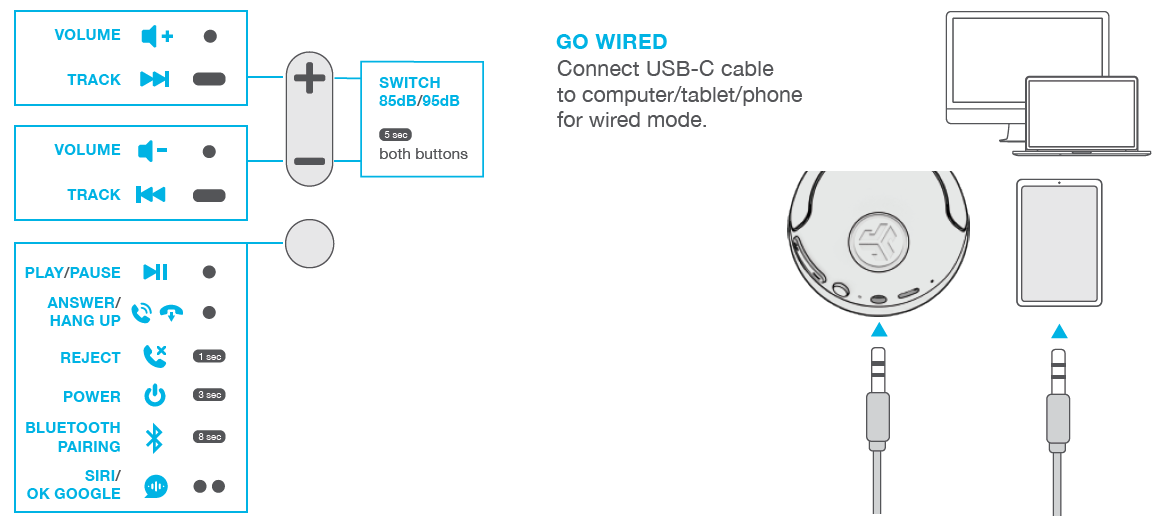
- Volume Limiting: Switchable 85 dB (kid-safe) or 95 dB
- Microphone: Built-in, -38 dB sensitivity
- Controls: Button controls, music/track control
- Comfort: Cloud Foam earcups and headband, adjustable, foldable design
- Connectivity: Wireless Share Mode for two headphones, HSP/HFP/A2DP/AVRCP support
- Warranty: 2-year limited manufacturer warranty
- Included: USB-C to USB-C charging cable
Compared to similar kids’ headphones, the JLab JBuddies Pop Wireless Headphones offer longer battery life, dual wireless/wired modes, and superior comfort features. The volume limiter and Wireless Share Mode are unique among budget kids’ headphones.
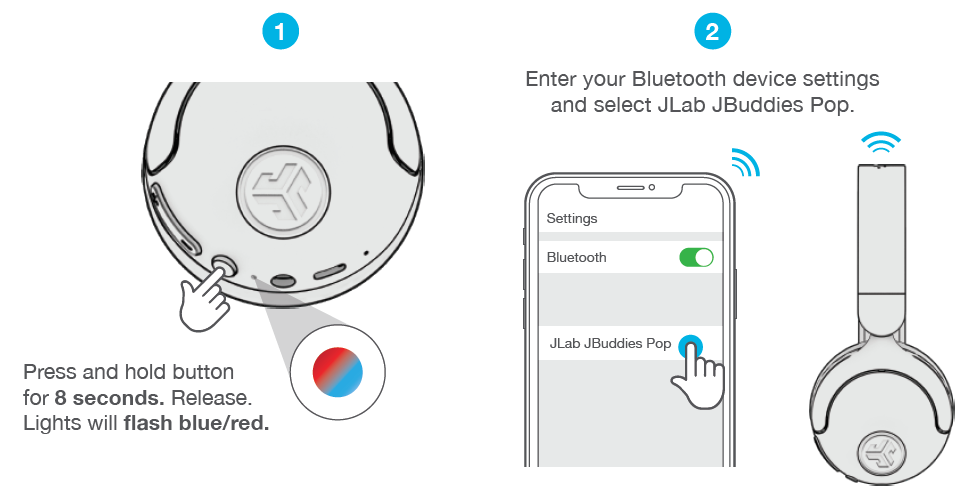
BLUETOOTH
CONTROLS
- 1x Press
- 2x Press
- Press Hold

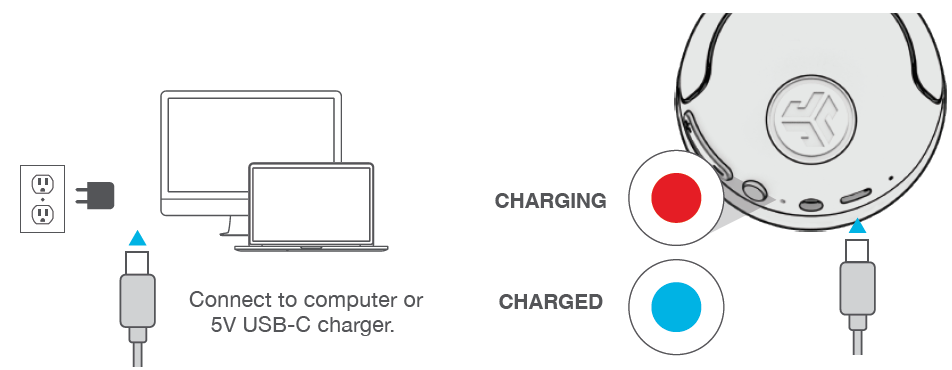
CHARGING
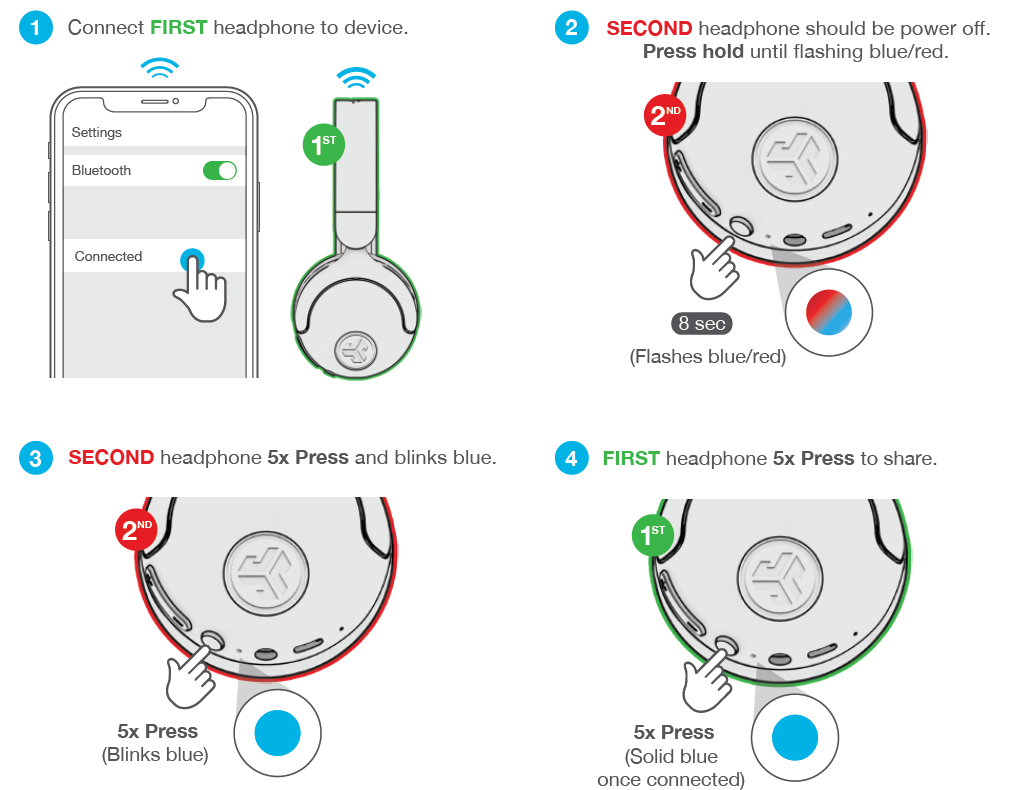
SHARE MODE
(Share between two JBuddies Pop Wireless headphones)
Shop products | Product alerts | Burn-in your headphones
JLab Audio + Burn-in Tool

Troubleshooting
Common issues with the JLab JBuddies Pop Wireless Headphones include connectivity problems, charging issues, and volume control concerns. Here are solutions and preventive tips:
- No Sound/Won’t Connect: Ensure Bluetooth is enabled on your device. If pairing fails, reset the headphones by holding the power button for 10 seconds. Remove old pairings from your device’s Bluetooth menu.
- Charging Problems: Use the included USB-C cable and a compatible charger. If the headphones don’t charge, try a different cable or power source. Full charge takes about 3 hours.
- Low Volume/No Audio: Check the volume limiter switch (85 dB/95 dB). Ensure the 3.5mm cable is fully inserted if using wired mode.
- Microphone Not Working: Confirm the headphones are connected to a device that supports microphone use over Bluetooth or a wired connection.
- Preventive Measures: Store the headphones in a dry place, avoid extreme temperatures, and keep them clean. Regularly inspect the charging port and cable for damage.
For persistent issues, consult the JLab JBuddies Pop Wireless Headphones support page or contact JLab customer service. The product is backed by a 2-year limited warranty—keep your proof of purchase for claims.
Pros & Cons
Pros
- Superior Battery Life: Up to 48 hours of playtime outperforms most kids’ wireless headphones.
- Volume Safe Feature: Switchable 85 dB limit protects young ears, a critical safety benefit.
- Dual Connectivity: Wireless Bluetooth and wired 3.5mm options offer flexibility for any situation.
- Comfortable Design: Cloud Foam earcups and an adjustable headband ensure comfort during long use.
- Wireless Share Mode: Connect two headphones to one device for shared listening—great for siblings or friends.
- Affordable Price: Delivers premium features at a budget-friendly price point.
Cons
- No Active Noise Cancellation: Unlike some premium models, these headphones lack ANC, which may be a drawback in noisy environments.
- Limited Color Options: Available in select colors, which may not appeal to all kids.
- Basic Sound Quality: While adequate for children, audiophiles may find the sound profile lacking compared to higher-end headphones.
- Not Fully Waterproof: Water-resistant design is durable but not suitable for submersion.
Overall, the JLab JBuddies Pop Wireless Headphones offer excellent value for money, especially for families prioritizing safety, battery life, and comfort in kids’ headphones.
Customer Reviews
User feedback for the JLab JBuddies Pop Wireless Headphones is generally positive, with many parents praising the long battery life, volume limiter, and comfortable fit. Common compliments include the headphones’ durability and ease of use for children. The Wireless Share Mode is frequently highlighted as a fun, practical feature for siblings or playdates.
Some users note that the ear cushions could be a bit larger for older kids, and a few mention occasional Bluetooth connectivity hiccups. However, these issues are rare and often resolved with a quick reset. Star ratings are consistently high, with most reviews awarding 4.5 stars or above. Parents recommend these headphones for school, travel, and everyday use, citing their reliability and kid-friendly design as deciding factors.
If you’re seeking affordable, safe, and versatile wireless headphones for kids, the JLab JBuddies Pop Wireless Headphones are a top choice based on authentic customer experiences.
Faqs
How do I set up JLab JBuddies Pop Wireless Headphones for the first time?
What should I do if JLab JBuddies Pop Wireless Headphones are not working properly?
Can I use JLab JBuddies Pop Wireless Headphones with multiple devices simultaneously?
How often should I maintain JLab JBuddies Pop Wireless Headphones?
What are the key features that make JLab JBuddies Pop Wireless Headphones different?
Are JLab JBuddies Pop Wireless Headphones compatible with all devices?
How do I optimize the performance of JLab JBuddies Pop Wireless Headphones?
Can I use JLab JBuddies Pop Wireless Headphones in noisy environments?
More jlab manuals
- Pairing & Usage: Jlab Epic Lux Lab Edition Headphones User Manual
- Setup & Pairing: Jlab Studio Pro Wireless Headphones User Manual
- Pairing & Usage: Jlab Work Buds User Manual
- Pairing: Jlab Rewind Wireless Retro Headphone User Manual
- Usage & Pairing: Jlab Jbuds Air Pro Earbuds User Manual
- Setup & Pairing: Jlab Flex Open Earbuds User Manual
Leave a Comment