
Pairing: Jlab Rewind Wireless Retro Headphone User Manual
Content
JLab Rewind Wireless Retro Headphones
Introduction
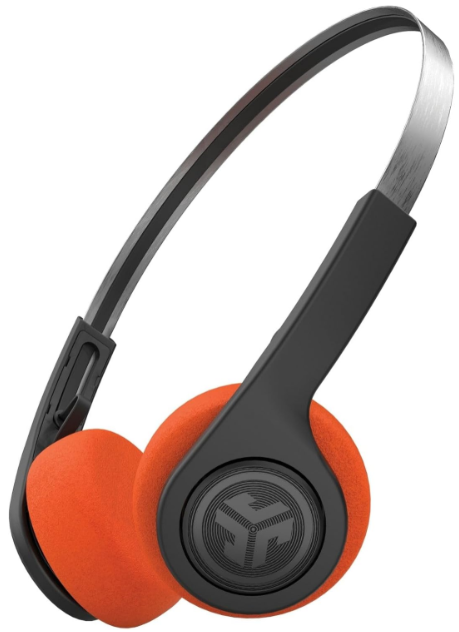
The JLab Rewind Wireless Retro Headphone brings a stylish blend of vintage design and modern wireless functionality, appealing to users who value both aesthetics and audio performance. These headphones offer a nostalgic 1980s/1990s retro look while delivering up-to-date Bluetooth 4.2 connectivity and a lightweight on-ear design for everyday use. With up to 12 hours of Bluetooth playtime on a single charge, they are perfect for music lovers, commuters, students, and anyone who appreciates a classic style combined with versatile wireless convenience.
Key benefits include Custom EQ3 sound settings (Signature, Balanced, and Bass Boost) allowing users to tailor their listening experience, a built-in MEMS microphone for hands-free calls, and compatibility with voice assistants like Siri and Google Assistant. These headphones are especially suited for casual listening, office work, and light outdoor activities where style and ease of use matter most.
Available at an affordable price range of about $25, the JLab Rewind Wireless Retro offers exceptional value, making it an accessible option for budget-conscious buyers seeking reliable sound quality and retro flair. They are widely available through online retailers and electronics stores with a two-year warranty and a 30-day return policy.
Specifications of the JLab Rewind Wireless Retro Headphone
- Speaker: 36mm Dynamic with Neodymium Magnet
- Frequency Response: 20 Hz – 20 kHz
- Impedance: 32 Ω
- Output: 106 ± 3 dB
- Microphone: Built-in MEMS, -41 dB ± 3 dB
- Bluetooth: Version 4.2 with 30+ ft. wireless range
- Battery Life: Up to 12 hours of continuous playtime
- Charging: Micro USB, 2 hours full charge; rapid charge offers 1.5+ hours of playback after 10 minutes of charge
- Standby Time: 300 hours
- Weight: Lightweight at 57 grams (approx. 2 oz.)
- Sound Features: Custom EQ3 Sound modes for Signature, Balanced, and Bass Boost
- Controls: Single multifunction button for power, playback, calls, voice assistant activation, and track navigation
- Build Materials: A Combination of foam, metal, and plastic for comfort and durability.
- Warranty: 2-year limited warranty
Compared to similar wireless retro headphones, the JBL Rewind offers competitive battery life and EQ customization at a notably lower price point, making it a value leader in its category.
FIRST TIME SETUP
BLUETOOTH PAIRING
- Turn on the Bluetooth in your device settings.
- Press and hold the button for 10 seconds. Release. Light will blink red and blue near the foam ear pad to indicate pairing mode.
Select “JLab Rewind” in your device settings to connect. Light will slowly blink blue when Bluetooth is paired.
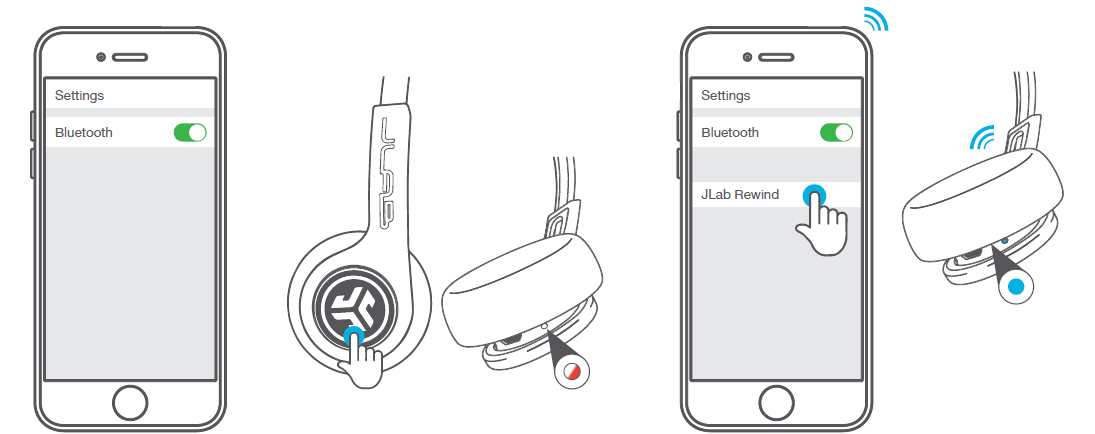
PAIRING NEW / ADDITIONAL DEVICES:
Turn OFF Bluetooth on your previously paired device and turn ON Bluetooth on the new device. Repeat FIRST TIME STEUP process for new devices.
Notes:
- Bluetooth is a wireless radio technology, which means it is sensitive to objects between the headphone and the connected device. The headphone is designed to be used within 33 feet (10 meters) of a connected device, with no major objects in between (walls, etc.).
- Once successfully connected, the headphone will memorize your device and automatically pair when turned on in the future.
Only one device may be connected at a time. To pair a different device, first unpair the current one through its Bluetooth settings. - If, for any reason Bluetooth connection is lost, manually reconnect your Bluetooth device.
CHARGING
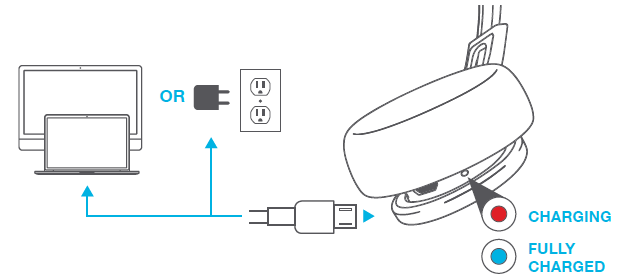
Note: Headphones will not turn on while charging. Allow about 3 hours to fully charge.
Connect the Rewind Headphone to a computer or USB 5V output device with the provided charging cable.
Red light will indicate charging, and blue light will indicate a full charge.
BUTTON FUNCTIONS
- BLUETOOTH PAIRING: (Follow First Time Setup instructions)
- POWER ON: Press & hold 2 seconds
- POWER OFF: Press & hold 4 seconds (slow blinking blue light indicates power is on)
- PLAY / PAUSE / ANSWER / HANG UP: 1 click
- ACTIVATE SIRI (iOS) OR “OK GOOGLE” (ANDROID): 2 clicks
- TRACK FORWARD: Press & hold 2 seconds
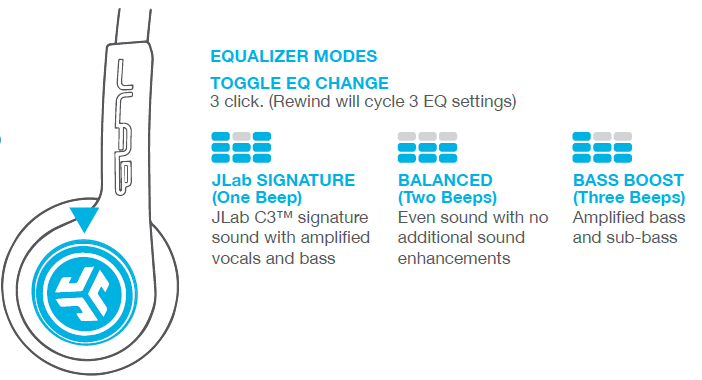
EQUALIZER MODES
TOGGLE EQ CHANGE
3 clicks. (Rewind will cycle 3 EQ settings)
CAUTIONS
- Avoid getting moisture or liquids on the headphone cups.
- Avoid extreme heat, cold, and humidity.
- Avoid dropping or crushing headphones, stressing the cable by rapid pulling or extreme force, or bending the cable at a sharp angle.
- Wax may build up in headphone cups, lowering the sound quality. Carefully remove the wax with a cotton swab or other small tool to improve the sound quality.
- If you experience discomfort or pain, try lowering the volume or discontinuing use temporarily.
- If you experience regular discomfort while using this product, discontinue use and consult your physician.
- We recommend you treat your headphones as you would a nice pair of sunglasses and keep them in a safe location when not in use.
Shop products | Product alerts | Burn-in your headphones
JLab Audio + Burn-in Tool

Troubleshooting JLab Rewind Wireless Retro Headphones
- Problem: Headphones won't power on.
Solution: Ensure the battery is charged; connect the Micro USB charger and charge for at least 2 hours. - Problem: Bluetooth won't pair.
Solution: Turn off and on the headphones, enable Bluetooth on your device, and select "Rewind Retro" from the list. Clear previous pairings if needed. - Problem: Audio cuts out or is distorted.
Solution: Check the wireless range (should be within 30 feet), remove obstructions, and ensure the battery is sufficiently charged. - Problem: The Microphone is not working during calls.
Solution: Verify device permissions for microphone access and test the microphone on another device.
Warranty
Preventive measures include regular charging, avoiding exposure to water (IP rating not available), and keeping firmware updated if applicable. The headphones come with a 2-year warranty covering manufacturing defects. For further support, contact JLab customer service via their official website or support hotline; keep your proof of purchase for warranty claims.
We love that you are rocking JLab Audio! We take pride in our products and fully stand behind them.
- YOUR WARRANTY All warranty claims are subject to JLab Audio authorization and at our sole discretion. Retain your proof of purchase to ensure warranty coverage.
- CONTACT US Reach out to us at support@jlabaudio.com or visit jlabaudio.com/contact
- REGISTER TODAY jlabaudio.com/register
- Product updates
- How-to tips, FAQs & more
Pros & Cons of the JLab Rewind Wireless Retro Headphone
- Pros:
- Affordable price point (~$25) with great value for money
- Custom EQ3 sound settings for a personalized audio experience
- Lightweight and comfortable for extended use
- Good battery life with a rapid charge feature
- Stylish retro design appealing to nostalgic users
- Built-in microphone and voice assistant support
- Two-year warranty for peace of mind
- Cons:
- Lacks active noise cancellation and an IP rating (not water-resistant)
- On-ear design may not isolate sound as well as over-ear models
- Bluetooth 4.2 is not the latest standard, potentially limiting range/stability compared to newer versions
- Adjustable headband not available, which may affect fit for some users
Compared to higher-end retro-style headphones, the JLab Rewind prioritizes affordability and style over premium features like ANC or advanced connectivity.
Customer Reviews of the JLab Rewind Wireless Retro Headphones
Users commonly praise the JLabb Rewind Wireless Retro Headphones for their comfortable fit, clear sound quality, and excellent price-performance ratio. Many highlight the nostalgic design as a major draw, with positive feedback on the Custom EQ3 sound presets enhancing listening enjoyment. The 12-hour battery life and rapid charge feature receive frequent commendations for convenience.
Some common complaints include the absence of noise cancellation, occasional Bluetooth pairing difficulties, and the on-ear fit causing slight discomfort during prolonged wear for a few users. Overall, the product holds a strong average rating of around 4 out of 5 stars, with many recommending it for casual use, students, and budget-conscious buyers seeking retro wireless headphones.
Faqs
How do I set up the jlab Rewind Wireless Retro Headphone for the first time?
What can I do if my jlab Rewind Wireless Retro Headphone is not connecting to Bluetooth devices?
What are the key sound features of the jlab Rewind Wireless Retro Headphone and how do I use them?
Are the jlab Rewind Wireless Retro Headphones compatible with voice assistants like Siri or Google Assistant?
How long does the battery last on the jlab Rewind Wireless Retro Headphone and what is the charging time?
How can I optimize the performance and sound quality of my jlab Rewind Wireless Retro Headphone?
What maintenance and care tips should I follow for the jlab Rewind Wireless Retro Headphone?
Can I use the jlab Rewind Wireless Retro Headphone for phone calls, and how do I manage call controls?
More jlab manuals
- Setup & Pairing: Jlab Studio Pro Wireless Headphones User Manual
- Pairing & Setup: Jlab Jbuddies Pop Wireless Headphones User Manual
- Pairing & Usage: Jlab Epic Lux Lab Edition Headphones User Manual
- Pairing & Usage: Jlab Work Buds User Manual
- Usage & Pairing: Jlab Jbuds Air Pro Earbuds User Manual
- Setup & Pairing: Jlab Flex Open Earbuds User Manual
Leave a Comment