
Pairing & Usage: Jlab Epic Lux Lab Edition Headphones User Manual
Content
JLab Epic Lux Lab Edition Headphones
Introduction
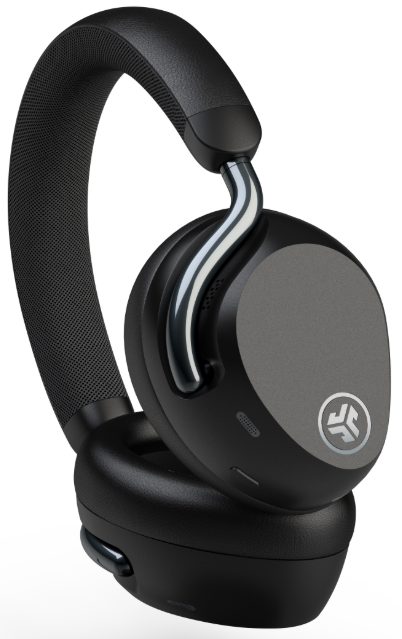
The JLab Epic Lux Lab Edition Headphones are a groundbreaking entry in the premium wireless audio market, delivering a harmonious blend of advanced technology, luxury comfort, and exceptional sound quality—all at a competitive price. Designed for audiophiles, professionals, and anyone seeking an immersive audio experience, these over-ear headphones are JLab’s most sophisticated offering to date.
At the heart of the Epic Lux Lab Edition are 32mm high-fidelity dynamic drivers that produce a wide, detailed frequency response from 20Hz to 40kHz, supporting Hi-Res Audio for both Android (LDAC) and iOS (AAC) users. The Lab Spatial Audio with head-tracking technology creates a true 360-degree soundstage, making music, movies, and gaming feel more lifelike and immersive than ever before. Adaptive Active Noise Cancellation (ANC), enhanced by AI, reduces environmental noise by up to 42dB, while the Be Aware mode lets you stay connected to your surroundings with a single touch.
Comfort is prioritized with plush, memory foam earcups and a lightweight, breathable mesh headband, ensuring extended listening sessions remain fatigue-free. The headphones also feature a remarkable 90+ hours of playtime (60+ with ANC on), multipoint Bluetooth connectivity, wireless charging, and a premium carrying case—features typically reserved for higher-priced competitors.
Priced around $199.99, the JLab Epic Lux Lab Edition Headphones are available in select markets, including the US, UK, and EU, offering exceptional value for those seeking luxury features without the luxury price tag. Whether you’re commuting, working from home, or relaxing with your favorite content, these headphones are engineered to deliver a premium, personalized audio experience for a wide range of users.
JLab Epic Lux Lab Edition Headphones: Detailed Specifications
- Driver Type: 32mm high-fidelity custom dynamic drivers
- Frequency Response: 20Hz – 40kHz
- Active Noise Cancellation: Adaptive ANC with AI, up to 42dB reduction
- Spatial Audio: Lab Spatial Audio with head-tracking for immersive 360° sound
- Playtime: 90+ hours (60+ hours with ANC on)
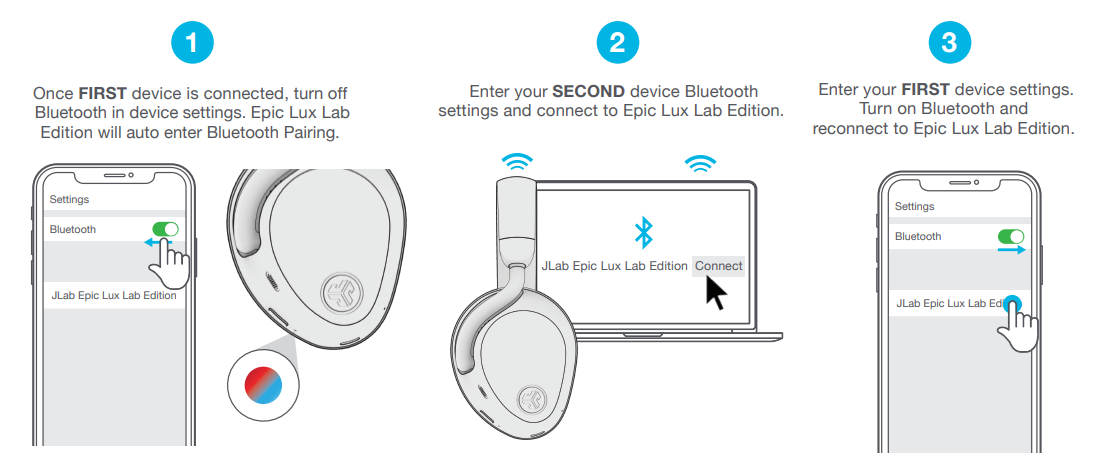
- Bluetooth: 5.4 with multipoint connectivity (up to 2 devices), supports LDAC (Android), AAC (iOS), SBC
- Microphones: 4 beamforming mics with advanced noise reduction for crystal-clear calls
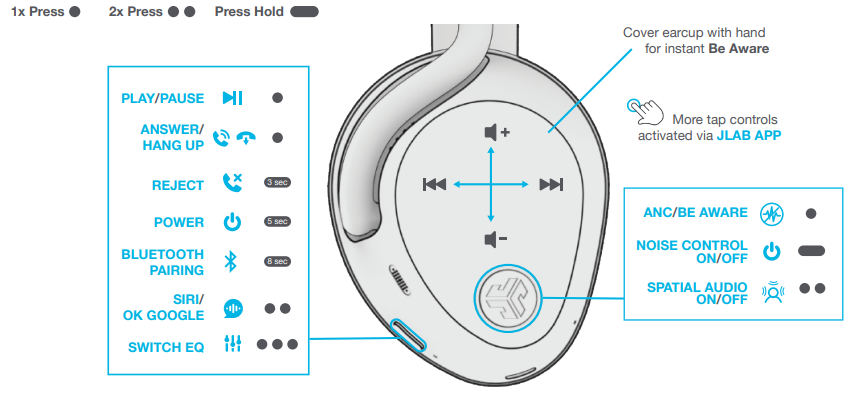
- Controls: Touch, swipe, and physical buttons; quick palm press for Be Aware mode
- Charging: Wireless charging pad included, USB-C wired charging, 3.5mm wired playback.k
- Weight: 10.58 ounces
- Included Accessories: Premium hardshell case, braided USB-C and 3.5mm cables, wireless charging dock
- Warranty: 2-year limited warranty
Compared to similarly priced competitors, the JLab Epic Lux Lab Edition Headphones stand out with their marathon battery life, advanced spatial audio, and comprehensive ANC features. While some flagship models may offer slightly richer sound profiles, the Epic Lux Lab Edition delivers a compelling package of performance, comfort, and value that rivals more expensive options.ns
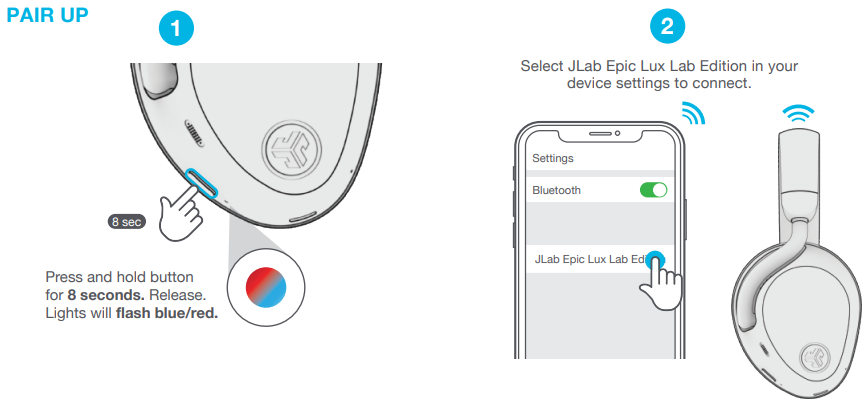
PAIR UP
GET CHARGED (WIRELESS)
.png)
GET CHARGED (WIRED)
WIRED MODE
.png)
GO AHEAD, PRESS THE BUTTON
MULTIPOINT
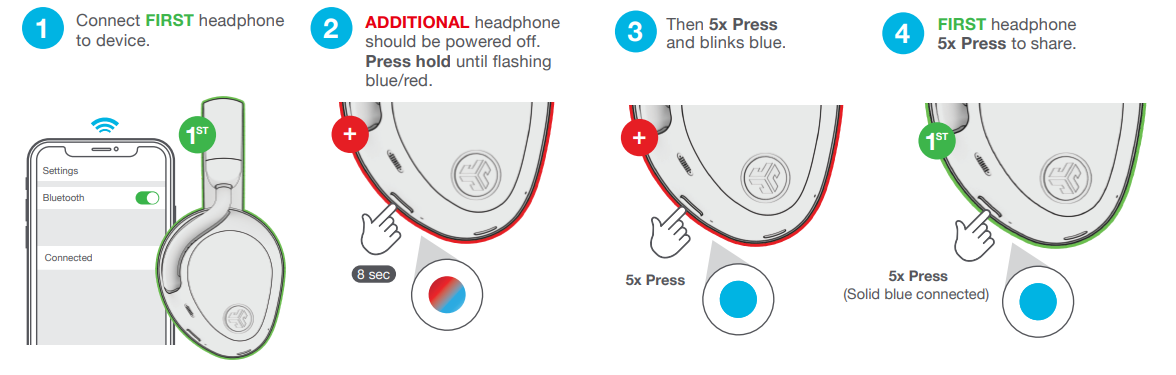
LabShare
(Share with multiple Epic Lux Lab Edition headphones)
Troubleshooting Common Issues with JLab Epic Lux Lab Edition Headphones
Despite their advanced features, users may encounter occasional issues with the JLab Epic Lux Lab Edition Headphones. Below are common problems, solutions, and support options to ensure a seamless experience.
Common Problems & Solutions
- Bluetooth Connectivity Issues: Ensure headphones and device are within range. Reset Bluetooth on both devices and re-pair. Multipoint is limited to two devices at a time.
- ANC Not Working: Check that ANC is enabled via the JLab App or physical controls. Ensure firmware is up to date.
- Sound Quality Concerns: For scratchy or distorted audio, disable Spatial Audio or adjust EQ in the JLab App. Test with different codecs (LDAC for Android, AAC for iOS)[5].
- Battery Life Shortage: Turn off ANC or unused features. Ensure the battery is fully charged and use the included wireless dock or USB-C cable.
- Wear Detection Problems: Clean sensors and ensure headphones are worn properly. Disable wear detection if issues persist.
Error Codes & Fixes
No specific error codes are documented; most issues can be resolved via resets, firmware updates, or app adjustments.
Preventive Measures
- Regularly update firmware via the JLab App.
- Store headphones in the provided case when not in use.
- Avoid exposure to extreme temperatures and moisture.
Warranty & Support
JLab offers a 2-year limited warranty. For further assistance, contact JLab customer support via their official website. Include your serial number and a description of the issue for faster resolution.
Pros & Cons of JLab Epic Lux Lab Edition Headphones
Pros
- Exceptional Battery Life: 90+ hours of playback (60+ with ANC) outlasts most competitors.
- Premium Comfort: Plush memory foam earcups aa nd a lightweight design for long listening sessions.
- Advanced ANC & Spatial Audio: Adaptive noise cancellation and immersive 360° sound with head-tracking
- Hi-Res Audio Support: LDAC and AAC codecs deliver high-quality sound for both Android and iOS users.
- Wireless Charging: The included charging dock adds convenience.
- Value: Luxury features at a mid-range price point.
Cons
- Spatial Audio Limitations: Some users report minor audio artifacts (e.g., scratchy guitar riffs) when Spatial Audio is enabled
- Wear Detection: Occasional finicky performance with automatic play/pause
- Sound Profile: While detailed and dynamic, it may not match the absolute refinement of top-tier competitors.
- Design: Minimalist and stylish, but some may prefer more premium materials.
Overall, the JLab Epic Lux Lab Edition Headphones offer outstanding value, combining long battery life, effective ANC, and immersive audio in a comfortable, well-built package. They are an excellent choice for users seeking premium features without the flagship price tag.
Customer Reviews & Testimonials for JLab Epic Lux Lab Edition Headphones
User feedback for the JLab Epic Lux Lab Edition Headphones highlights both the strengths and occasional drawbacks of this model. Most customers praise the marathon battery life, with many noting they can go days between charges—even with regular ANC use[5]. Comfort is another standout, with the plush earcups and lightweight design receiving consistent positive remarks for extended listening sessions.
The adaptive ANC and spatial audio features are frequently mentioned as impressive, delivering a truly immersive experience for music, movies, and gaming. Hi-Res Audio support via LDAC and AAC is appreciated by audiophiles, though some note that while sound quality is excellent for the price, it may not quite rival the very best in class.
Common complaints include minor issues with wear detection and occasional audio quirks when spatial audio is enabled, such as scratchy guitar tones. However, these are generally seen as minor trade-offs for the overall value and feature set.
Star ratings from major retailers and tech sites consistently place the JLab Epic Lux Lab Edition Headphones in the 4 to 4.5 out of 5 range, with users recommending them for anyone seeking premium features without the premium price. If you prioritize battery life, comfort, and advanced ANC in a stylish, well-built package, these headphones are a strong purchase recommendation.
Faqs
How do I connect jlab Epic Lux Lab Edition Headphones to two devices simultaneously using Bluetooth multipoint?
What is the difference between Adaptive ANC and Be Aware mode on jlab Epic Lux Lab Edition Headphones, and how do I switch between them?
Why is my call quality poor with jlab Epic Lux Lab Edition Headphones in noisy environments?
How do I get the best sound quality from jlab Epic Lux Lab Edition Headphones with Hi-Res Audio sources?
Can I use jlab Epic Lux Lab Edition Headphones wired, and what cables are included?
How do I maintain and clean my jlab Epic Lux Lab Edition Headphones for long-term durability?
What should I do if my jlab Epic Lux Lab Edition Headphones won’t charge wirelessly?
How do I customize sound and settings on jlab Epic Lux Lab Edition Headphones using the JLab app?
More jlab manuals
- Pairing & Usage: Jlab Work Buds User Manual
- Pairing & Setup: Jlab Jbuddies Pop Wireless Headphones User Manual
- Usage & Pairing: Jlab Jbuds Air Pro Earbuds User Manual
- Setup & Pairing: Jlab Studio Pro Wireless Headphones User Manual
- Setup & Pairing: Jlab Flex Open Earbuds User Manual
- Pairing: Jlab Rewind Wireless Retro Headphone User Manual
Leave a Comment