
Setup & Pairing: Jlab Flex Open Earbuds User Manual
Content
Jlab Flex Open Earbuds
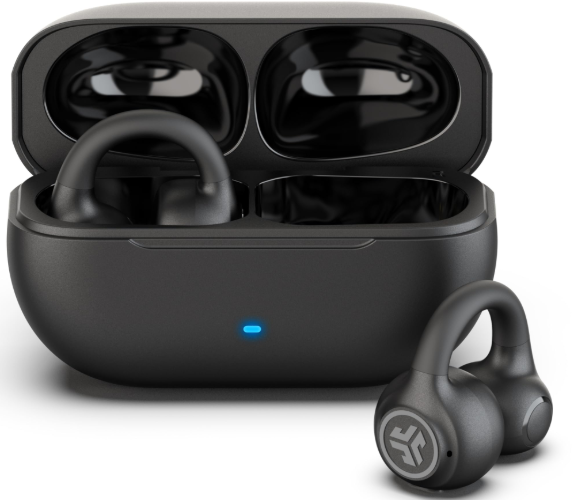
Introduction
The JLab Flex Open Earbuds offer a modern take on wireless audio with their innovative open-ear clip-on design, delivering an immersive listening experience without isolating you from your surroundings. Crafted for users seeking both comfort and situational awareness, these earbuds combine convenience with advanced technology, making them ideal for daily commutes, workouts, and outdoor activities.
Key benefits include 21+ hours of total playtime, IPX4-rated sweat and splash resistance, and multipoint Bluetooth connectivity that enables seamless connections to two devices simultaneously. The earbuds also feature environmental noise-canceling microphones for crystal-clear calls and support customization through the dedicated JLab app, allowing users to tailor sound profiles to personal preferences.
Perfect for active individuals, commuters, and tech enthusiasts who want to stay aware of their environment while enjoying quality sound, the JBL Flex Open Earbuds retail in the mid-range price category, approximately $50, and are widely available through online retailers and electronics stores.
Specifications and Key Features of JLab Flex Open Earbuds
- Design & Fit: Open-ear clip-on cuff for fatigue-free, lightweight wear
- Audio Drivers: 12mm dynamic drivers delivering a frequency response of 20 Hz to 20 kHz
- Bluetooth Version: 5.4 with SBC and AAC codec support for high-quality wireless audio
- Connectivity: Multipoint Bluetooth allowing connection to two devices simultaneously; range of over 30 feet
- Battery Life: Up to 7 hours per earbud, with an additional 14+ hours from the compact USB-C charging case (total 21+ hours)
- Microphones: Four MEMS microphones with environmental noise cancellation (2-mic ENC) for clear voice calls
- Water Resistance: IPX4 rating for sweat and splash protection during workouts or light rain
- App Support: JLab App for custom EQ settings, touch control customization, Safe Hearing, and firmware updates
- Additional Features: Google Fast Pair for Android devices, Microsoft Swift Pair, touch controls with EQ3 sound presets
Compared to similar open-ear earbuds like the Soundcore C30, the JLab Flex stands out with its longer battery life, multipoint connectivity, and more customizable sound options via the app, offering enhanced user versatility.
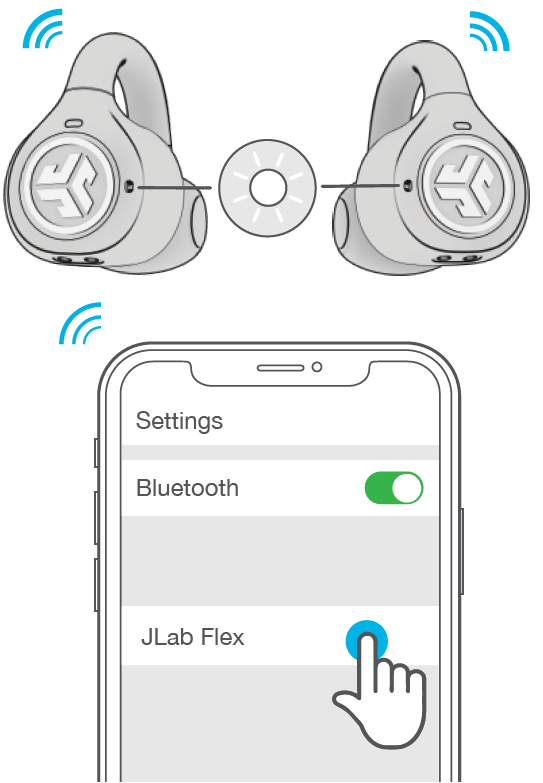
PAIR UP
Remove the tab and close the door.
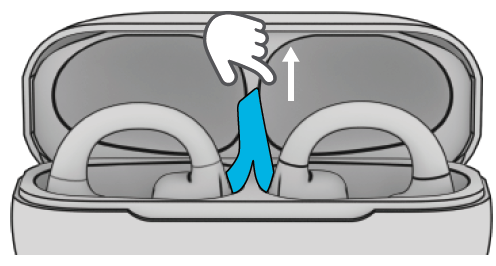
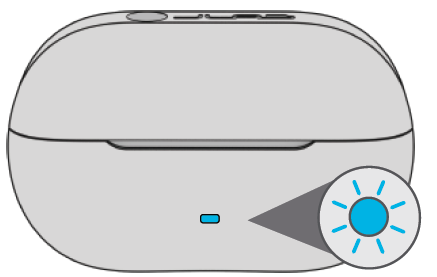
Blue light on the case indicates a charge. Remove earbuds from case.
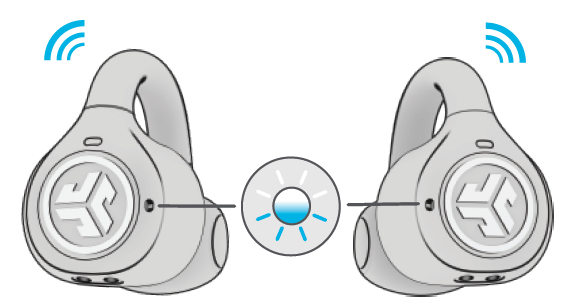
One earbud will blink blue/white, indicating ready to pair to your device.
Select JLab Flex in your device's Bluetooth settings to connect. Voice prompt “Bluetooth connected” followed by lights off will indicate connection.
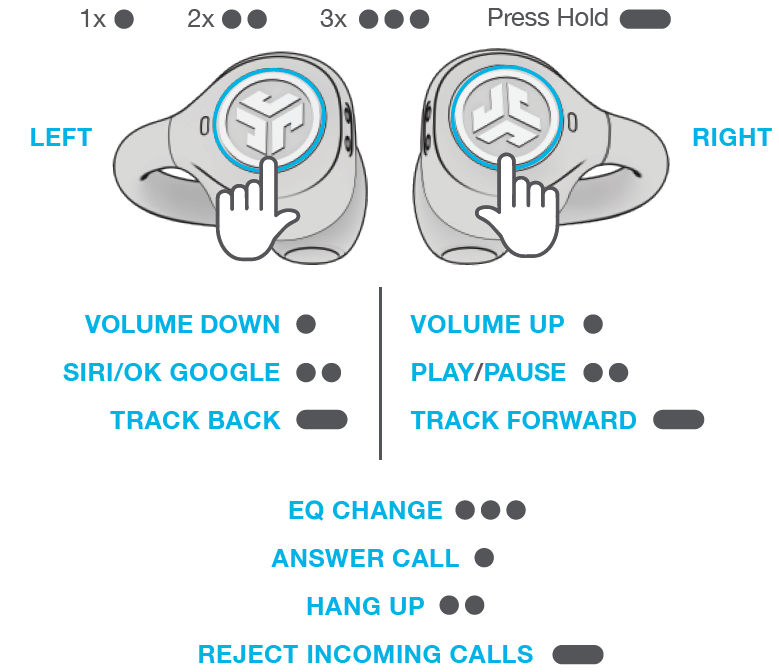
GO AHEAD, PRESS THE BUTTON
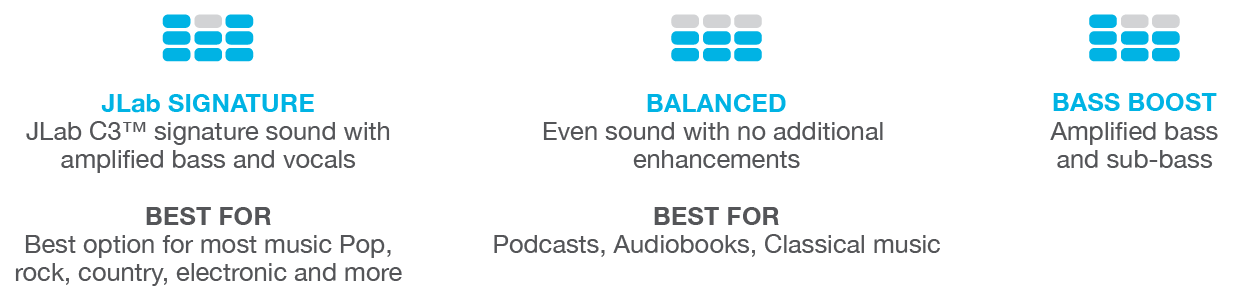
THE RIGHT SOUND FOR EVERY MOMENT
We get it, sound is personal. Choose your sound preferences from our EQ3 settings and customize your sound style to match exactly what you’re doing.
GET CHARGED (EARBUDS)
.png)
GET CHARGED (CASE)
Connect the JLab Flex to a computer or USB-C 5V 1A (or less) output device.
.png)
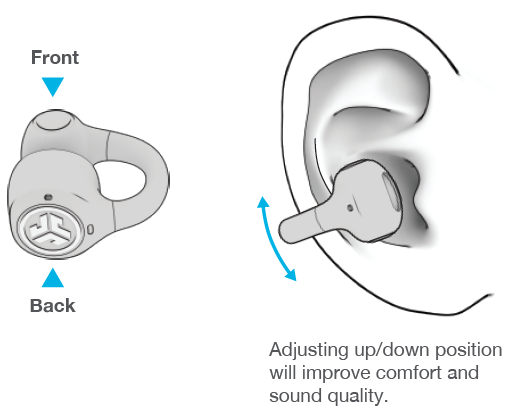
FITTING
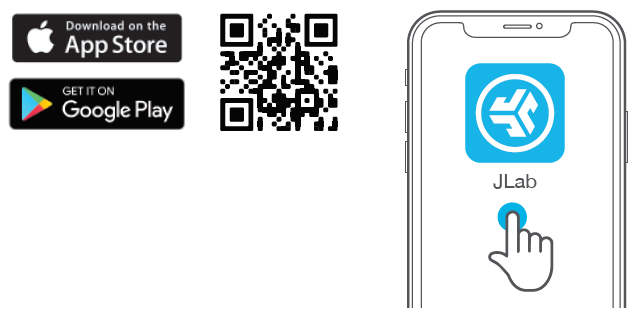
DOWNLOAD THE APP
Customize JLab Flex with features like an interval timer and update to the latest software.
Download the JLab App from the the Apple/Google Play Store.
Common Troubleshooting Tips for JLab Flex Open Earbuds
- Issue: Earbuds won’t pair or connect to the device
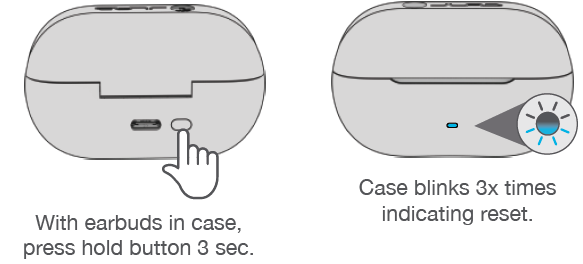
- Solution: Ensure Bluetooth is enabled, reset the earbuds by placing them in the case and holding the touch controls for 10 seconds, then try reconnecting.
- Issue: Poor call quality or the microphone not working
- Solution: Clean microphone openings; check that Environmental Noise Cancelling (ENC) is enabled in the JLab app; ensure firmware is up to date.
- Issue: Low battery or earbuds not charging
- Solution: Use the supplied USB-C cable; verify charging contacts on earbuds and case are clean; avoid charging with incompatible chargers.
- Preventive Measures: Store earbuds in the charging case after use, avoid exposure to excessive moisture beyond the IPX4 rating, and regularly update firmware via the JLab app.
The JLab Flex Open Earbuds come with a 2-year limited warranty,, ensuring reliable support. For further assistance, users can contact JLab Support or call their customer service hotline.
CONNECTION FAILURE/ISSUES (MANUAL RESET
Pros and Cons of the LababFlex Open Earbuds
Pros
- Comfort & Design: Lightweight, open-ear clip design ensures all-day comfort without ear fatigue.
- Battery Life: 21+ hours total playback provides extended use without frequent charging.
- Multipoint Connectivity: Seamlessly switch between two devices, enhancing productivity and convenience.
- Call Quality: Dual environmental noise-cancelling microphones deliver clear voice transmission, even in noisy environments.
- Customization: The JLab app allows personalized EQ, touch controls, and firmware updates.
Cons
- Sound Profile: Open-ear design naturally limits bass depth compared to in-ear or over-ear models.
- Build Quality: While functional, some users report that the clip mechanism feels less robust than premium alternatives.
- IP Rating: IPX4 is suitable for sweat and light splashes but not for heavy rain or submersion.
When compared to alternatives like Soundcore's open-ear earbuds, the JBL Flex offers better battery life and multipoint support but trades off some bass impact. Overall, the earbuds provide excellent value for money at their price point.
Customer Reviews and Feedback on jlab Flex Open Earbuds
The JJLabFlex Open Earbuds have received an average rating of approximately 4.3 out of 5 stars from over 400 reviewers. Customers frequently praise the earbuds’ comfortable open-ear design and impressive battery life, highlighting ease of use and multipoint connectivity as standout features. Many users report clear call quality and appreciate the customization available via the JLab app.
Common complaints include the less pronounced bass due to the open-ear form factor and occasional concerns about the clip’s durability during intense activities. However, the overall sentiment is positive, with numerous users recommending the earbuds for those who prioritize situational awareness alongside good sound quality.
Star ratings often emphasize value for money, particularly noting the competitive pricing for features like 21+ hours of playtime and Bluetooth 5.4. Recommended for active users, commuters, and casual listeners seeking open-ear wireless earbuds.
Faqs
How do I set up my jlab Flex Open Earbuds for the first time?
What should I do if my jlab Flex Open Earbuds are not pairing with my device?
How does the multipoint connection feature work on jlab Flex Open Earbuds?
Can I customize the controls and sound features on the jlab Flex Open Earbuds?
What is the best way to achieve a comfortable and secure fit with jlab Flex Open Earbuds?
Are the jlab Flex Open Earbuds compatible with all Bluetooth devices?
How do I maintain and care for my jlab Flex Open Earbuds to ensure longevity?
What can I do if I experience audio dropouts or connectivity problems with my jlab Flex Open Earbuds?
More jlab manuals
- Pairing & Setup: Jlab Jbuddies ANC Wireless Headphones User Manual
- Usage & Pairing: Jlab Jbuds Air Pro Earbuds User Manual
- Pairing: Jlab Wireless Headphones User Manual
- Pairing & Usage: Jlab Work Buds User Manual
- Pairing & Usage: Jlab Studio 2 Wireless Headphones User Manual
- Pairing & Usage: Jlab Epic Lux Lab Edition Headphones User Manual
Leave a Comment