
Pairing & Setup: Jlab Jbuddies ANC Wireless Headphones User Manual
Content
JLab Jbuddies ANC Wireless Headphones
Introduction
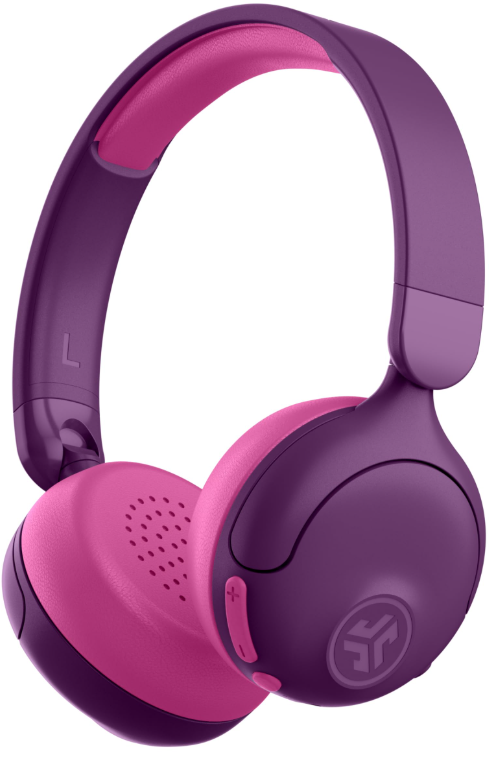
The jlab Jbuddies ANC Wireless Headphones are specially designed over-ear headphones tailored for kids, combining safety, comfort, and advanced audio technology. These headphones feature active noise cancellation (ANC) that helps children focus by reducing distracting background noise while maintaining safe sound levels with volume limiting options set at 85 dB and 95 dB. Ideal for school, travel, or home use, their 2-in-1 wireless and wired connectivity provides versatile listening options for various devices.
With over 48 hours of wireless playtime, they support extended use on long trips or daily activities without frequent charging. The headphones boast soft Cloud Foam earcups and headband for maximum comfort during prolonged wear. Additional features include wireless share mode to connect two headphones for shared listening sessions, perfect for playdates or family time.
Targeting parents who want safe yet high-quality audio experiences for their children, the jlab Jbuddies ANC headphones balance fun with hearing protection. They are available at an estimated price range of $25 to $30 and can be purchased through major retailers and online stores. Their combination of durability, comfort, and safety makes them a compelling choice for young users.
Specifications of jlab Jbuddies ANC Wireless Headphones
- Audio Drivers: 40mm Dynamic drivers delivering clear sound across 20 Hz to 20 kHz frequency range
- Connectivity: Bluetooth 5.2 with SBC, AAC, and MPEG-2 codecs; wired 3.5mm jack included
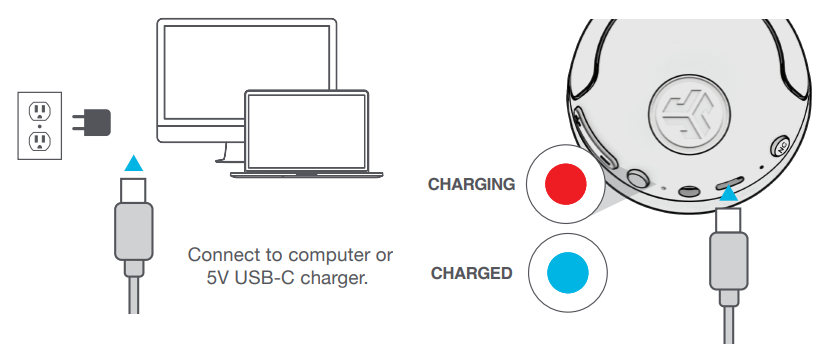
- Battery Life: Up to 48 hours of wireless playtime; 40 hours with ANC enabled; 3-hour USB-C fast charging
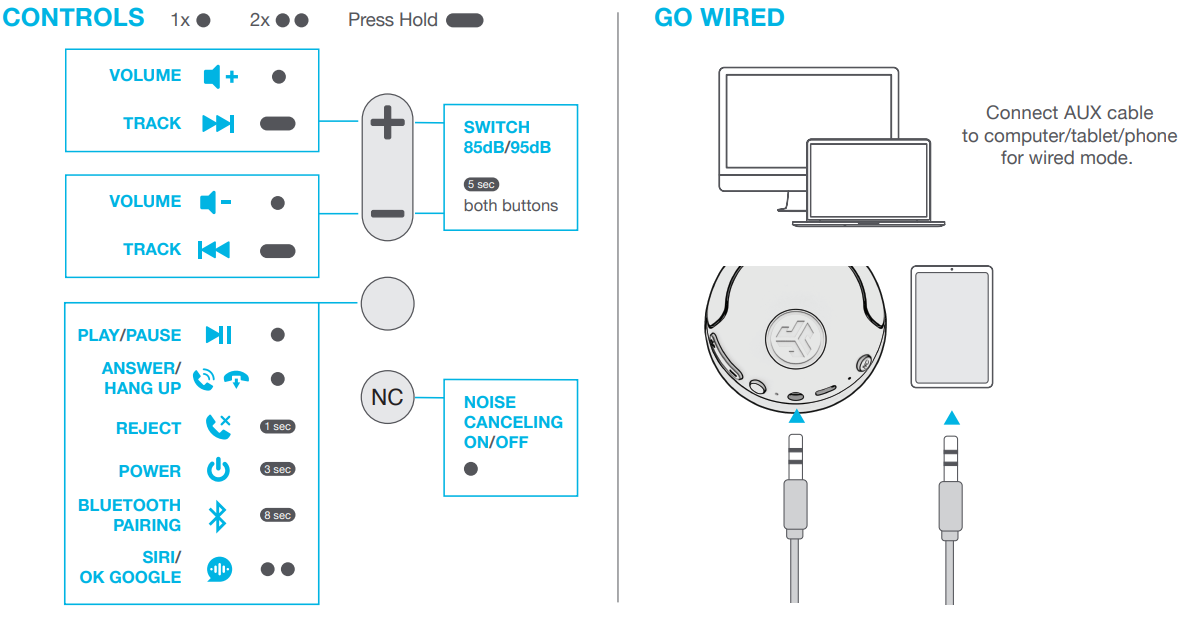
- Volume Limiting: Switchable between 85 dB and 95 dB for hearing safety
- Microphone: Triple condenser mics with -38 dB ±1 dB sensitivity for clear calls
- Design: Adjustable, foldable headband with Cloud Foam cushions for comfort and portability
- Range: Wireless range over 30 feet for flexible movement
- Additional Features: Wireless share mode to connect two headphones; active noise cancellation to reduce ambient sounds
- Weight: Approximately 150 grams for lightweight wear
- Warranty: 2-year limited warranty included
Compared to similar kids' headphones like the JBuddies Pro Wireless, these ANC headphones offer longer battery life (48+ hours vs. 35+ hours) and enhanced noise control, making them superior for extended use and noisy environments.
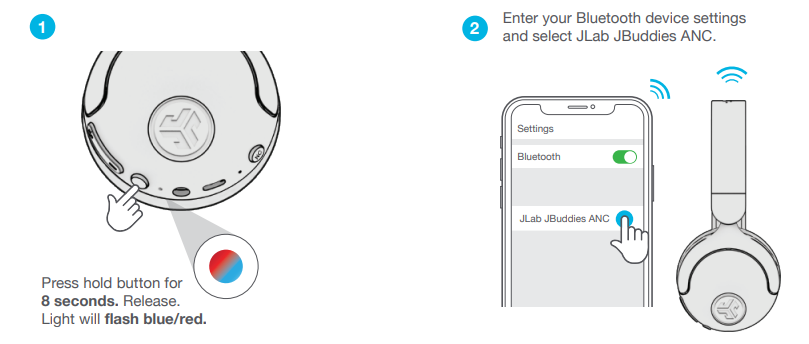
BLUETOOTH
CHARGING
CONTROLS
GO WIRED
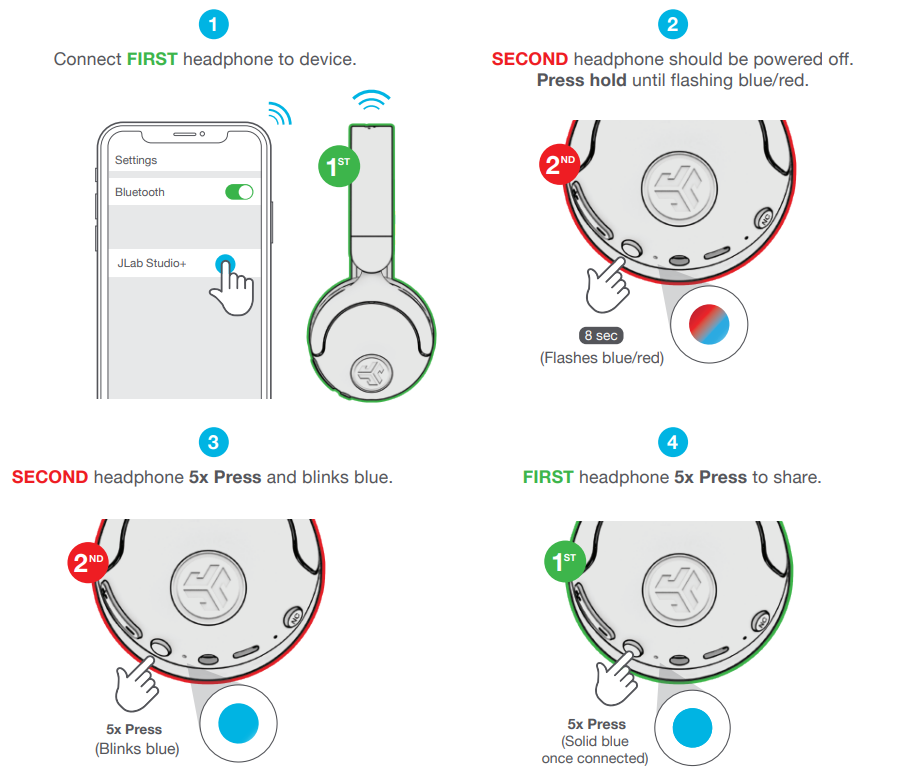
SHARE MODE
(Share between two JBuddies ANC Wireless headphones)
Troubleshooting jlab Jbuddies ANC Wireless Headphones
- Issue: Headphones not powering on
Solution: Ensure the headphones are charged using the USB-C cable; hold the power button for 2+ seconds to turn on. - Issue: No sound or connectivity problems
Solution: Check Bluetooth connection; disconnect and re-pair device. For wired use, confirm 3.5mm cable is properly connected. - Issue: ANC not activating
Solution: Press the “NC” button on the headphone’s bottom to toggle active noise cancellation mode. - Issue: Volume too low or too high
Solution: Switch between 85 dB and 95 dB volume modes by holding the + and - buttons simultaneously for 5 seconds until you hear the mode prompt. - Preventive Measures: Avoid exposing headphones to water or extreme temperatures; charge regularly to maintain battery health.
For unresolved issues, users can contact JLab support or call 1-405-445-7219. The headphones come with a 2-year limited warranty covering manufacturing defects.
Pros & Cons of jlab Jbuddies ANC Wireless Headphones
- Pros:
- Exceptional battery life with up to 48 hours wireless use, ideal for long trips
- Active Noise Cancellation enhances listening focus in noisy environments
- Volume limiting with selectable 85 dB/95 dB settings protects young ears
- Comfortable Cloud Foam cushions ensure long-lasting wear without discomfort
- Wireless share mode allows two users to listen from one device
- Versatile dual wired and wireless connectivity
- Cons:
- No water resistance rating, so not suitable for wet conditions
- ANC quality may not match adult premium headphones but sufficient for kids
- Limited color options compared to some competitors
- Lack of customizable EQ settings
Overall, the jlab Jbuddies ANC Wireless Headphones offer excellent value for money, especially for parents seeking a safe, comfortable, and durable headphone designed specifically for children. Compared with alternatives like the JLab JBuddies Pro, these headphones provide longer battery life and noise cancellation features optimized for young users.
Customer Reviews of jlab Jbuddies ANC Wireless Headphones
Many users praise the headphones for their long battery life and comfortable fit, noting that the Cloud Foam earcups significantly enhance wearability during extended use. Parents appreciate the volume limiting feature, which reassures them about protecting their children's hearing. The wireless share mode is frequently highlighted as a fun and practical feature for siblings and friends.
Common complaints include occasional connectivity issues which are usually resolved by re-pairing the device, and some users mention that the ANC could be stronger. The headphones earn an average rating of around 4 out of 5 stars, with users recommending the jlab Jbuddies ANC Wireless Headphones for kids aged 5-12, especially for travel and school use.
Faqs
How do I set up my JLab JBuddies ANC Wireless Headphones for the first time?
What is the difference between the 85 dB and 95 dB volume settings on JLab JBuddies ANC Wireless Headphones?
Can I use JLab JBuddies ANC Wireless Headphones with my tablet or smartphone?
How do I troubleshoot if my JLab JBuddies ANC Wireless Headphones are not connecting via Bluetooth?
Can I use JLab JBuddies ANC Wireless Headphones while traveling, and how do I maintain them?
How do I activate Active Noise Canceling (ANC) on my JLab JBuddies ANC Wireless Headphones?
What are the key features that make JLab JBuddies ANC Wireless Headphones different?
How often should I charge my JLab JBuddies ANC Wireless Headphones?
More jlab manuals
- Pairing: Jlab Wireless Headphones User Manual
- Setup & Pairing: Jlab Flex Open Earbuds User Manual
- Pairing & Usage: Jlab Studio 2 Wireless Headphones User Manual
- Usage & Pairing: Jlab Jbuds Air Pro Earbuds User Manual
- Setup & Pairing: Jlab Go Lux ANC Headphone User Manual
- Pairing & Usage: Jlab Work Buds User Manual
Leave a Comment