
Setup: Jlab Epic Sport ANC 3 Earbuds User Manual
Content
JLab Epic Sport ANC 3 Earbuds
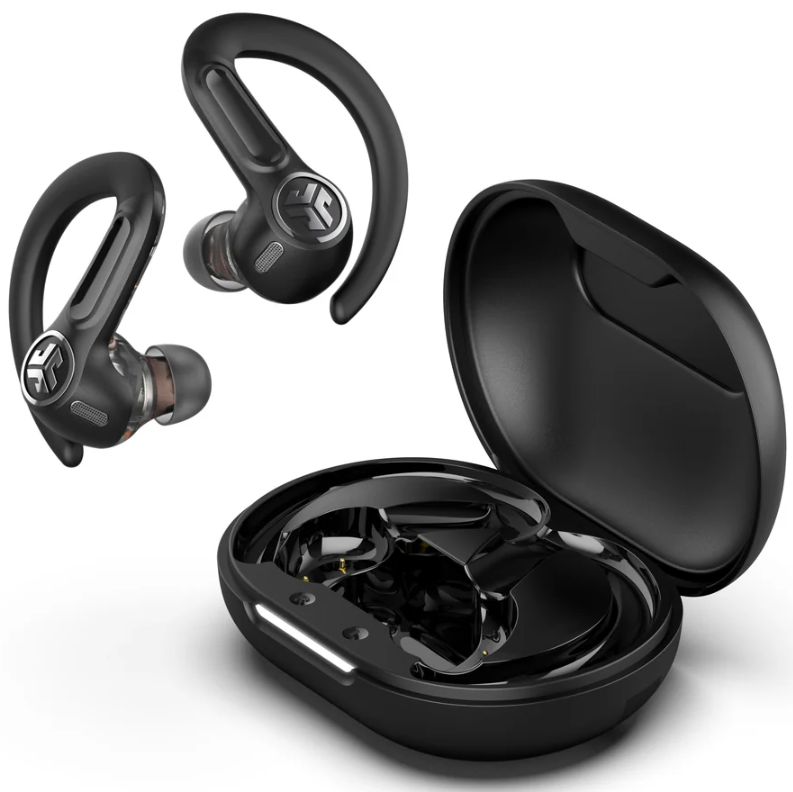
Introduction
The JLab Epic Sport ANC 3 Earbuds are a premium pair of true wireless sport earbuds designed to deliver exceptional sound quality, robust active noise cancellation, and durable sweatproof performance suitable for athletes and fitness enthusiasts alike. Featuring hybrid dual drivers including Knowles balanced armature technology, these earbuds offer a high-resolution listening experience that appeals to audiophiles who demand clarity and depth during workouts or daily commutes. Their hybrid active noise cancelling (ANC) system adapts dynamically to your environment, letting you switch between ANC, Be Aware, and ANC Off modes for customizable sound control.
Ideal for runners, gym-goers, and outdoor adventurers, the Epic Sport ANC 3 boasts an IP66 sweatproof rating to withstand intense training sessions, rain, and sweat. The secure sport-fit earhooks ensure they stay firmly in place through vigorous movement. With over 52 hours of total battery life combining earbuds and charging case, plus wireless and USB-C charging options, these earbuds provide long-lasting playtime for extended use without frequent recharging. They also support multipoint Bluetooth connectivity, enabling simultaneous connections to two devices for seamless switching.
Available in black and priced approximately in the mid to upper segment of sport earbuds, the JBLEpic Sport ANC 3 Earbuds are widely accessible through major retailers and online. Their combination of audiophile-grade sound, advanced noise cancellation, and fitness-focused durability makes them a compelling choice for anyone seeking a versatile, high-performance wireless earbud solution.
PAIR UP
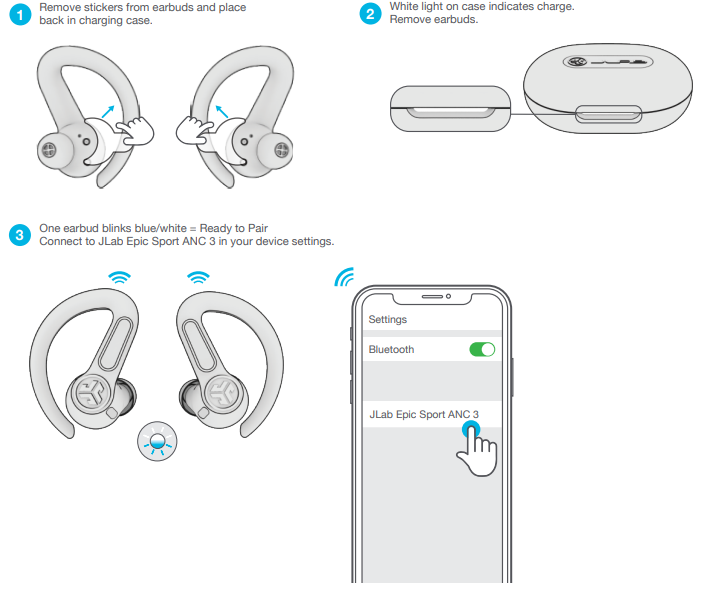
GO AHEAD, PRESS THE BUTTON
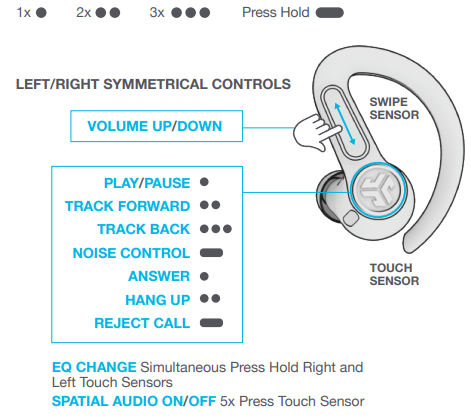
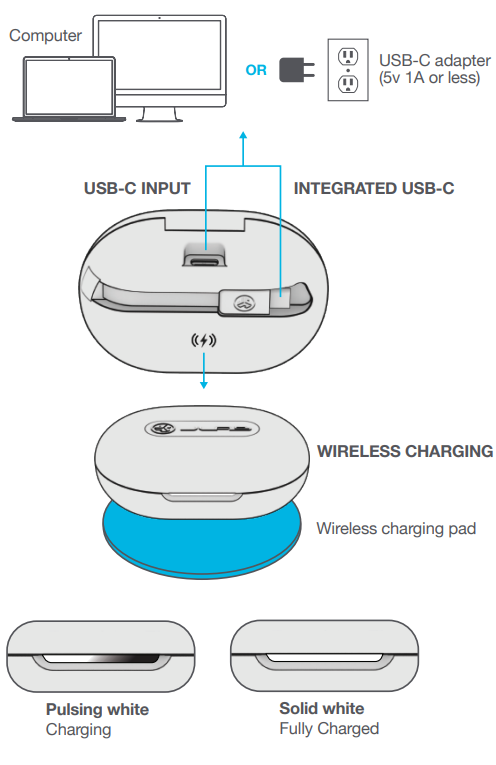
GET CHARGED (EARBUDS)
Earbuds auto power off and start charging when placed in the case. Earbuds will auto-connect when removed.
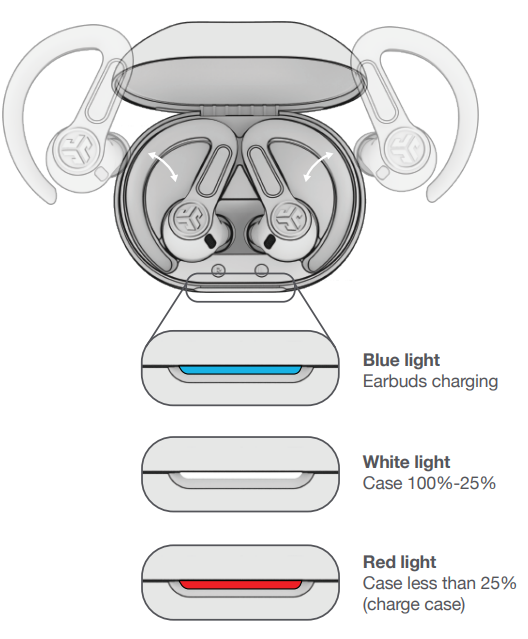
GET CHARGED (CASE)
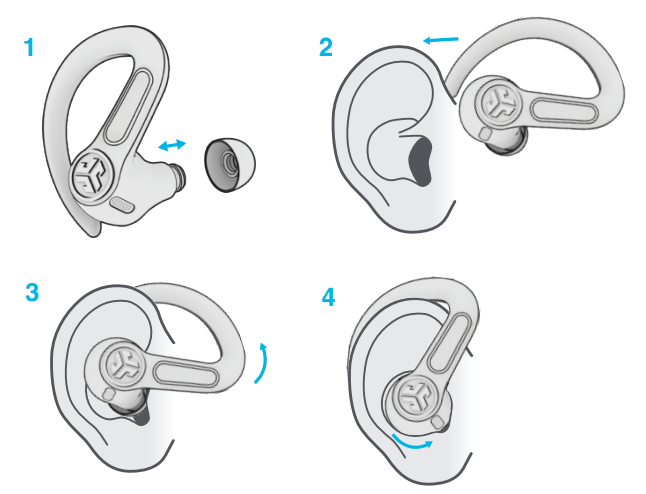
FIND YOUR FIT
Try all ear tips for the best fit and proper seal.
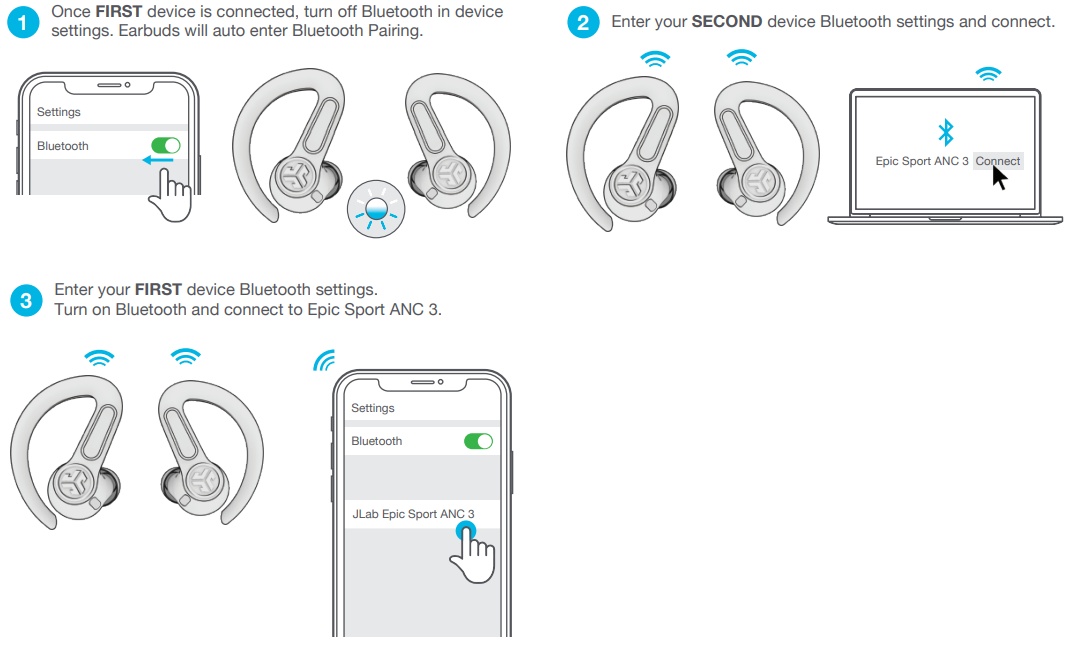
MULTIPOINT
Specifications and Key Features of JLJLabpic Sport ANC 3 Earbuds
- Drivers: Hybrid dual drivers with Knowles balanced armature for Hi-Res Audio fidelity
- Active Noise Cancellation: Hybrid ANC with three noise control modes (ANC On, ANC Off, Be Aware)
- Battery Life: 12+ hours per earbud, 40+ hours additional with charging case; total 52+ hours
- Charging: Wireless charging support plus integrated USB-C charging cable
- Connectivity: Bluetooth 5.2 with multipoint for connecting two devices simultaneously
- Fit and Durability: IP66-rated sweatproof, secure sport-fit earhooks for active use
- Sound Customization: JLab app with customizable EQ and built-in Lab Spatial Audio for immersive sound
- Microphones: Dual noise-canceling microphones for crystal-clear calls
- Weight & Dimensions: Lightweight ergonomic design optimized for comfort and stability
Compared to similar models like the JLab Epic Air Sport ANC, the Epic Sport ANC 3 offers enhanced battery life, a refined hybrid ANC system, and superior sound quality through Knowles drivers, making it a top-tier sport earbud option.
Troubleshooting Guide for JLab Epic Sport ANC 3 Earbuds
- Problem: Earbuds not pairing or connecting
Solution: Ensure Bluetooth is enabled on your device, reset the earbuds by placing them in the case and holding the button for 15 seconds, then attempt pairing again. - Problem: No sound or low volume
Solution: Check the volume on both the earbuds and the connected device. Clean the earbud mesh to remove debris. - Error Codes: No specific error codes, but app diagnostics can indicate connection or firmware issues.
- Preventive Measures: Regularly update firmware via the JLab app, keep earbuds dry, and store them in the case when not in use.
- Warranty & Support: JLab offers a 1-year warranty on the Epic Sport ANC 3. For assistance, users can contact JLab support via their official website or customer service hotline.
Pros & Cons of JLab Epic Sport ANC 3 Earbuds
Pros
- Exceptional Sound Quality: Premium hybrid drivers deliver rich, detailed audio suitable for audiophiles and casual listeners.
- Long Battery Life: Over 52 hours total playtime reduces the need for frequent charging during extended use.
- Effective ANC: Hybrid active noise cancellation with selectable modes enhances listening in noisy environments.
- Sport-Ready Design: IP66 sweatproof and secure earhook fit ideal for intense workouts and outdoor activities.
- Customizable Sound: Comprehensive EQ settings and spatial audio via the JLab app provide tailored audio experiences.
Cons
- Price Point: Slightly higher than some competitors, which may deter budget-conscious buyers.
- Size: Earhooks may feel bulky for users preferring minimalistic earbuds.
- App Dependency: Full feature set requires use of the JLab app, which may not appeal to all users.
Customer Reviews of JLab Epic Sport ANC 3 Earbuds
Users consistently praise the JLab Epic Sport ANC 3 Earbuds for their outstanding sound clarity, comfortable, secure fit, and extended battery life. Many reviews highlight the effective noise cancellation and the convenience of wireless charging. The earbuds receive an average rating of around 4.2 stars, reflecting high overall satisfaction.
Common complaints include the bulkiness of the earhooks for some users and occasional connectivity glitches, which are typically resolved with firmware updates. Customers recommend these earbuds especially for athletes and active users who value durable, high-performance audio gear.
Faqs
How do I set up my jlab Epic Sport ANC 3 Earbuds for the first time?
What should I do if my jlab Epic Sport ANC 3 Earbuds won't connect or keep disconnecting?
How can I use the multipoint feature on jlab Epic Sport ANC 3 Earbuds to connect two devices?
What are the key features of the jlab Epic Sport ANC 3 Earbuds that enhance workout performance?
How do I maintain and clean my jlab Epic Sport ANC 3 Earbuds for optimal performance?
Are the jlab Epic Sport ANC 3 Earbuds compatible with all Bluetooth devices?
What should I do if only one earbud of my jlab Epic Sport ANC 3 is not producing sound?
How can I optimize the sound quality on my jlab Epic Sport ANC 3 Earbuds?
More jlab manuals
Leave a Comment