
Setup: Jlab Jbuds Ergonomic Mouse User Manual
Content
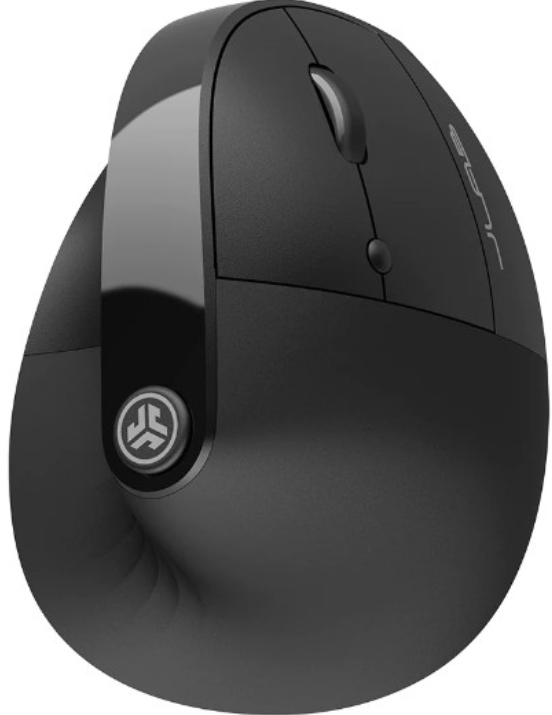
JLab Jbuds Ergonomic Mouse
Introduction
The JLab Jbuds Ergonomic Mouse is designed to deliver superior comfort and precision for both professional and casual users. Its vertical, contoured shape promotes a natural wrist position, reducing strain during extended computer use, which makes it ideal for office workers, gamers, and remote professionals seeking ergonomic support. This wireless mouse combines style with functionality, featuring seven customizable buttons that cater to personalized workflows and gaming preferences.
Equipped with dual wireless connectivity—Bluetooth 5.2 and a 2.4 GHz USB-A dongle—the JBuds mouse offers seamless compatibility across multiple devices and operating systems, including Windows, Mac OS, and Chrome OS. The adjustable DPI settings, ranging from 1200 to 240,0, allow users to customize cursor sensitivity for precision tasks or fast-paced gaming. Additionally, a rechargeable 600 mAh battery provides over four months of use on a single charge, enhancing mobility and reducing downtime.
Available for approximately $39.99, the JLab Jbuds Ergonomic Mouse is widely accessible via major retailers such as Best Buy, Amazon, and the official JLab website. Its blend of ergonomic design, robust performance, and affordable pricing makes it a strong contender for those looking to upgrade their workstation or gaming setup.
Specifications of the JLab Jbuds Ergonomic Mouse
- Connectivity: Bluetooth 5.2 and 2.4 GHz USB wireless dongle for versatile device pairing
- Buttons: 7 customizable buttons, including DPI adjustment, forward/backward, and media controls
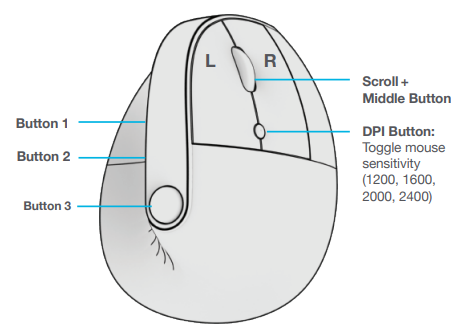
- DPI Settings: Adjustable between 1200, 1600, 2000, and 2400 for tailored cursor speed
- Sensor: Optical sensor with a frame rate of 4000 fps and a max speed of 30 IPS (inches per second)
- Ergonomics: Vertical design with adjustable palm rest, silent clicks to minimize noise
- Battery: Rechargeable 600 mAh battery with 4+ months of battery life, charged via USB-C
- Dimensions: 4.41 in (L) x 2.83 in (W) x 3.31 in (H); weight approximately 109 grams
- Polling Rate: 125 Hz (2.4 GHz), 115 Hz (Bluetooth)
- Operating Systems: Compatible with Windows, Mac OS, and Chrome OS
Compared to similar ergonomic wireless mice, the JLab Jbuds stand out for their extended battery life, dual wireless connectivity, and broad customization options via the JLab Work App.
SETUP
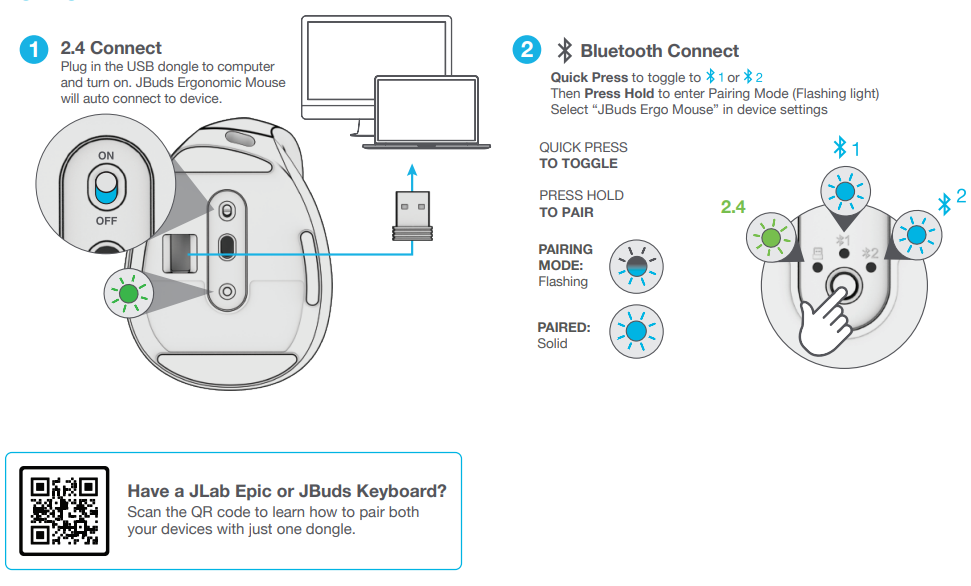
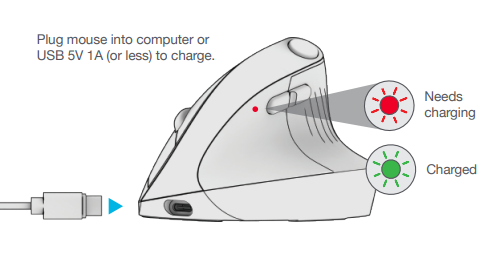
CHARGING
INTERFACE
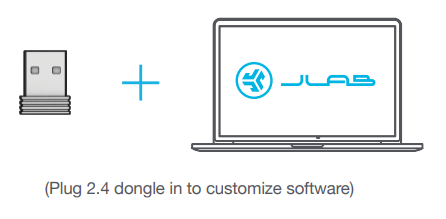
Download JLab Work App (for Mac and PC) to fully customize JBuds Ergonomic Mouse
Troubleshooting Guide for the JJLabJbuds Ergonomic Mouse
- Connection Issues: If the mouse fails to connect, ensure the USB dongle is securely plugged in or that Bluetooth is enabled and paired correctly. Restart your device if needed.
- Unresponsive Buttons: Reset customization settings via the JLab Work App and update firmware if available.
- Battery and Charging: If the mouse does not charge, verify the USB-C cable connection and use a compatible 5V, 1A charger. Avoid chargers exceeding 5 Watts to prevent damage.
- Cursor Drift or Lag: Clean the optical sensor area, update drivers, and adjust DPI settings for improved performance.
- Silent Clicks Not Working: Confirm that the mouse is set to silent mode in the app; a firmware update may be necessary.
Preventive tips include keeping the mouse and dongle away from USB 3.0 ports to avoid interference, regularly updating the JLab Work App, and charging the mouse before battery depletion. The product comes with a 2-year limited warranty covering manufacturing defects. For further assistance, contact JLab customer support via their official website or through authorized retailers.
Pros & Cons of the JLab Jbuds Ergonomic Mouse
- Pros:
- Ergonomic vertical design reduces wrist strain and promotes comfort during long sessions
- Dual wireless connectivity (Bluetooth 5.2 and 2.4 GHz dongle) ensures device flexibility
- Long battery life of over four months on a single charge, with convenient USB-C recharging
- Seven fully customizable buttons enhance productivity and gaming control
- Compatible with multiple operating systems, including Windows, Mac, and Chrome OS
- Silent click technology is ideal for quiet work environments
- Cons:
- No included wall charger—users must supply their own USB-C power source
- Polling rate is moderate (125 Hz/115 Hz), which may not satisfy competitive gamers needing ultra-high responsiveness
- Vertical design may require an adjustment period for users accustomed to traditional mice
- Limited color options (primarily black) restrict aesthetic choices
Overall, the JLab Jbuds Ergonomic Mouse represents strong value for money, especially for users prioritizing comfort and versatility over high-end gaming specs. It compares favorably to similarly priced ergonomic mice by offering advanced customization and longer battery life.
Customer Reviews and Feedback on the JLab Jbuds Ergonomic Mouse
Users consistently praise the JLab Jbuds Ergonomic Mouse for its comfortable vertical design and impressive battery longevity, often highlighting the ease of switching between Bluetooth and USB dongle connections. Many reviewers rate it highly (4 to 4.5 stars), noting that the silent clicks are a significant benefit in shared workspaces.
Common complaints include the absence of a charging wall adapter and the initial learning curve due to the vertical form factor. Some users express a desire for higher polling rates for gaming purposes, but most agree it excels for productivity and everyday use.
Several testimonials recommend the mouse for home office setups and gamers looking for ergonomic alternatives. The majority emphasize its value considering the price point, making it a recommended purchase for those seeking an ergonomic wireless mouse with advanced customization features.
More jlab manuals
Leave a Comment