
Setup: Jlab Popcam Webcam User Manual
Content
Jlab Popcam Webcam
IntroJLabion
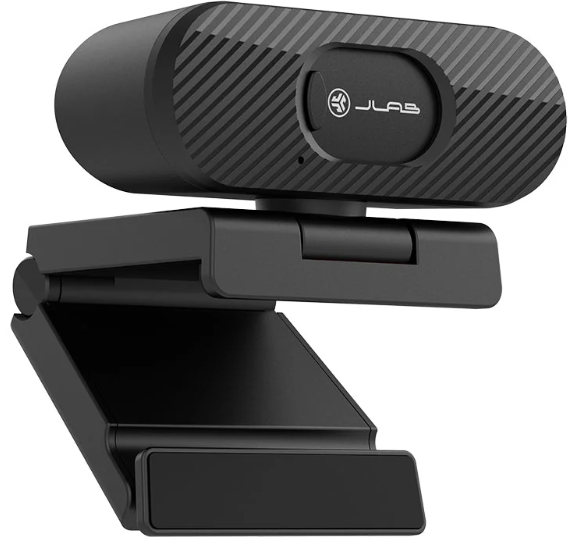
The jlab Popcam Webcam is an affordable, high-definition webcam designed to elevate your video communication experience with crisp 1080p resolution and smooth 30 frames per second (fps) video capture. Whether you're a remote worker, content creator, streamer, or student attending virtual classes, this webcam offers clear visuals and reliable performance that fits a variety of use cases. Its compact and minimalist design, paired with a privacy shutter and universal clip, ensures both functionality and security in everyday use.
Key benefits include its straightforward plug-and-play USB connectivity compatible with Windows, Mac, and Chromebook systems, making setup effortless for users at all skill levels. The 2.1-megapixel sensor and 80-degree field of view provide a balanced frame for video calls and streaming, while automatic exposure and low-light compensation enhance image quality under varying lighting conditions. The built-in privacy shutter offers peace of mind by physically blocking the lens when not in use.
Priced competitively around $25 JLab30, the jlab Popcam Webcam is widely available through major retailers and online platforms, making it an accessible choice for budget-conscious buyers seeking dependable HD video performance without unnecessary extras like built-in microphones. Its blend of clarity, simplicity, and security suits professionals, students, and casual users alike.
Specifications and Features of the jlab Popcam Webcam
- Resolution: Full HD 1080p (1920 x 1080 pixels)
- Sensor: 2.1 megapixels with 1/2.7" image sensor
- Frame Rate: 30 frames per second for smooth video
- Field of View: 80° wide-angle lens for balanced framing
- Focus: Fixed focus lens optimized for desk use
- Lighting: Auto exposure, auto white balance, and low brightness compensation
- Audio: No built-in microphone (ideal for users with external mics)
- Connectivity: USB-A plug-and-play compatibility with Windows, macOS, Chromebook, and Android TV
- Physical Design: Adjustable universal clip, compact dimensions (~3.27" H x 2.51" W x 4.53" D), lightweight
- Privacy: Built-in privacy shutter for lens cover
- Cable Length: Approximately 6.5 feet for flexible positioning
- Warranty: Lifetime limited warranty
Compared to similar webcams in the budget category, the jlab Popcam Webcam excels with its privacy shutter and straightforward USB compatibility, though it lacks a built-in microphone, which some competitors include. Its fixed focus and 80° field of view offer adequate framing for personal use but do not cater to advanced zoom or autofocus needs found in higher-end models.
SETUP
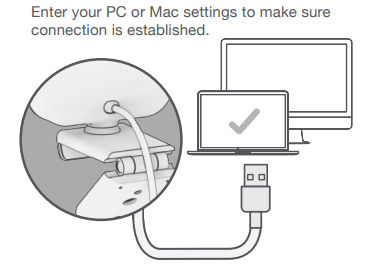
Connect to your PC or Mac USB INPUT
Enter your PC or Mac settings to make sure the connection is established.
Unfold and place the GO Webcam on the monitor
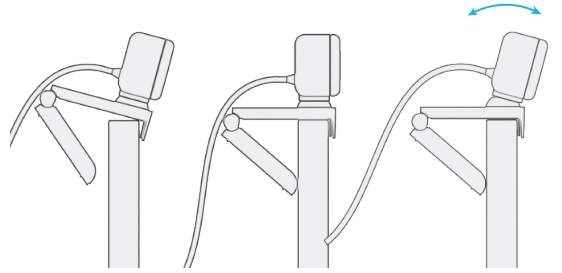
Configure as desired
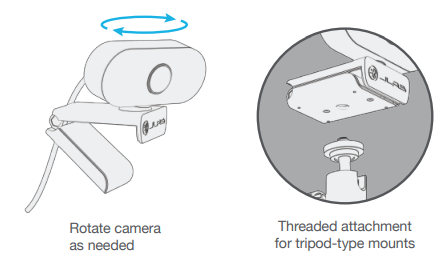
INTERFACE
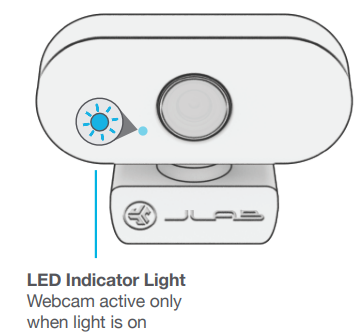
Troubleshooting and SuppJLabJLabfor the jlab Popcam Webcam
- Common Issue: Webcam not recognized by the computer. Solution: Ensure the USB cable is securely connected; try different USB ports and verify system compatibility.
- Video Lag or Choppy Frames: Close other bandwidth-heavy applications and check connection speed; adjust video settings in conferencing software.
- Image Quality Problems: Clean the lens and ensure sufficient ambient lighting; enable auto exposure and white balance features.
- Privacy Shutter Jammed: Gently slide the shutter; avoid forcing it to prevent damage.
- Error Codes: No specific error codes; general USB device errors indicate connection issues or driver conflicts.
- Preventive Measures: Use the webcam on stable surfaces, avoid excessive cable bending, and keep firmware/software updated.
- Warranty & Support: Covered by a lifetime limited warranty. For assistance, users can contact JLab customer support via their official website or call their support hotline.
YOUR WARRANTY
All warranty claims are subject to JLab authorization and at our sole discretion. Retain your proof of purchase to ensure warranty coverage.
CONTACT US
Reach out to us at support@jlab.com or visit jlab.com/contact
Pros & JLabJLab of the jlab Popcam Webcam
- Pros:
- Excellent Full HD 1080p vi,,deo at 30fps ideal for streaming and video calls
- Built-in privacy shutter ensures camera lens security when not in use
- Wide 80° field of view suitable for most desktop setups
- Plug-and-play USB compatibility without drivers on multiple platforms
- Compact, lightweight design with an adjustable universal clip
- Low price point offers high value for budget-conscious users
- Cons:
- No built-in microphone—requires external audio equipment for sound
- Fixed focus lens limits close-up sharpness and zoom flexibility
- Imi's age ,, quality good but not comparable to high-end or mirrorless cameras
- Limited manual control over exposure settings in some software
- Some users report occasional device recognition issues over time
Customer Reviews and Feedback on the jlab Popcam Webcam
Users generally like the JLab Popcam Webcam for delivering clear 1080p video quality at an affordable price, highlighting its ease of use and solid construction. Many appreciate the privacy shutter as a valuable security feature. The universal clip is noted for fitting well on various monitor types.
Common complaints focus on the lack of an internal microphone and the fixed focus lens, which some find limiting for detailed close-ups. A few users have reported early hardware failures or connectivity issues, although these appear to be exceptions rather than the norm. Overall, the webcam holds a strong average rating of around 4 out of 5 stars and is frequently recommended for remote work, online learning, and casual streaming.
For best results, customers recommend pairing the Popcam with an external microphone and using software like OBS to adjust settings and improve image control.
Faqs
How do I set up my jlab Popcam Webcam for the first time?
Why is my jlab Popcam Webcam not working properly?
Can I use the jlab Popcam Webcam with a tripod?
What are the key features of the jlab Popcam Webcam?
Is the jlab Popcam Webcam compatible with Mac and PC?
How often should I clean and maintain my jlab Popcam Webcam?
Can I use the jlab Popcam Webcam for video recording and streaming?
What kind of warranty does the jlab Popcam Webcam come with?
Tags
More jlab manuals
Leave a Comment