
Pairing: Jlab Go Mouse User Manual
Content
JLab Go Mouse
Introduction
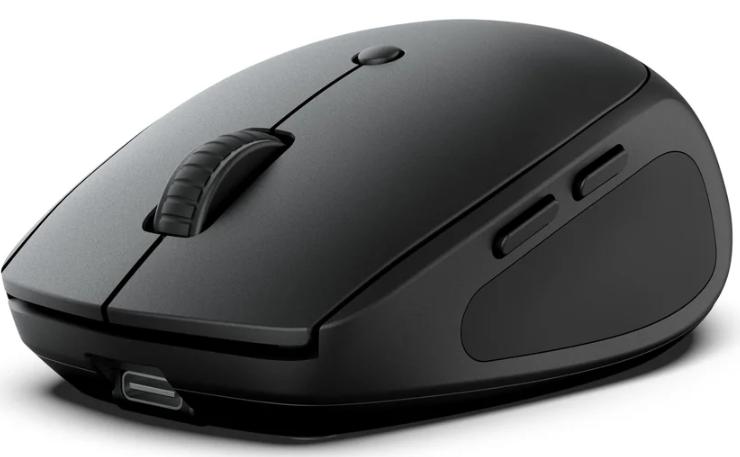
The JLab Go Mouse is an ultra-compact, lightweight wireless mouse designed for users seeking portability without sacrificing performance. Ideal for digital nomads, students, remote workers, and anyone with an on-the-go lifestyle, this mouse offers seamless multi-device connectivity, ergonomic comfort, and silent clicks to enhance productivity in any environment. Its sleek design fits comfortably in the hand and easily travels from desks to cafés or coworking spaces.
Equipped with Bluetooth 5.0 and a 2.4 GHz USB wireless dongle, the Go Mouse supports switching between up to three devices, making it perfect for multitasking across laptops, tablets, and smartphones. Adjustable DPI sensitivity ranging from 800 to 1600 ensures precise cursor control tailored to your workflow, whether browsing, gaming, or working on detailed projects.
The Go Mouse combines functionality and value, with a price range typically between $13 and $20, available through major retailers such as Walmart and directly from JLab. Its extended battery life—lasting over six months on a single AA battery—adds to its appeal for users needing reliability during long work sessions or travel. Overall, the JLab Go Mouse is a compelling choice for anyone prioritizing portability, multi-device support, and ergonomic design in a wireless mouse.
Specifications of the JLab Go Mouse
- Connectivity: Bluetooth 5.0 and 2.4 GHz USB wireless dongle for versatile device pairing
- Multi-Device Support: Connect and toggle between up to three saved devices (two Bluetooth, one USB dongle)
- DPI Sensitivity: Adjustable at 800 / 1200 / 1600 DPI for customizable cursor speed
- Frame Rate: High, 3000 frames per second for smooth tracking
- Maximum Speed: 28 inches per second
- Buttons: 4 buttons,s including left click, right click, scroll wheel, and DPI button
- Battery: Powered by 1 x AA battery with over 6 months s battery life; battery life varies with usage
- Weight and Dimensions: Lightweight at 63 grams; dimensions 2.51 x 1.52 x 3.89 inches
- Ergonomics: Compact design suitable for both right- and left-handed users
- Silent Clicks: Quiet button mechanism for distraction-free use in shared spaces
- Warranty: 2-year limited warranty ensuring product reliability
Compared to similar wireless mice in the same price range, the JLab Go Mouse stands out with its multi-device toggle feature and silent clicks, which are often found only in higher-end models. Its battery life also competes favorably, making it a strong contender for portable productivity peripherals.
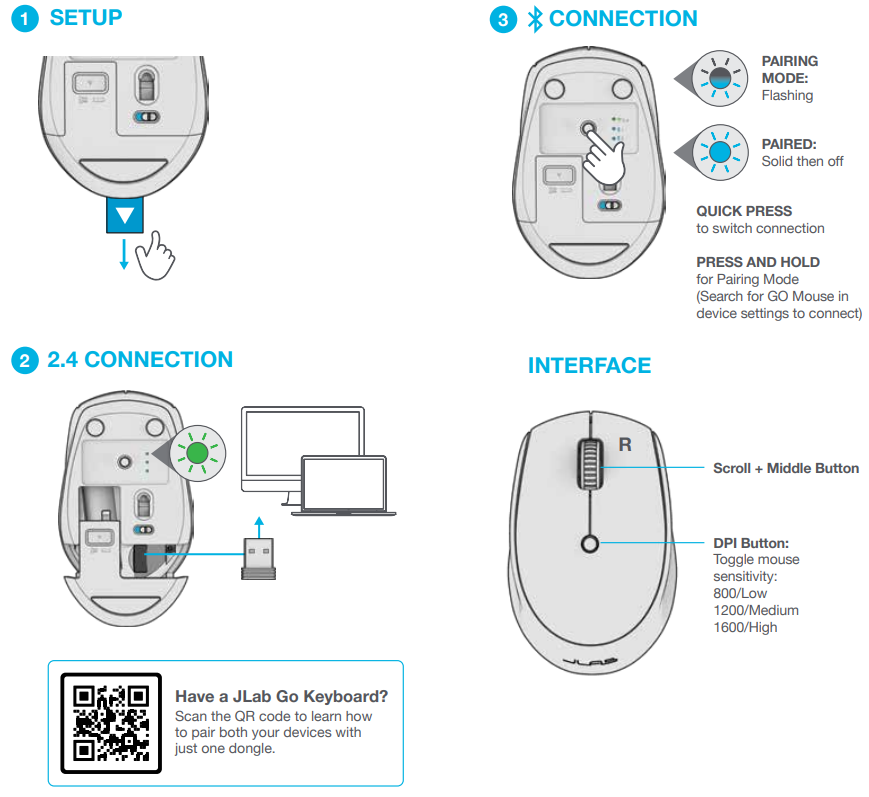
GO MOUSE
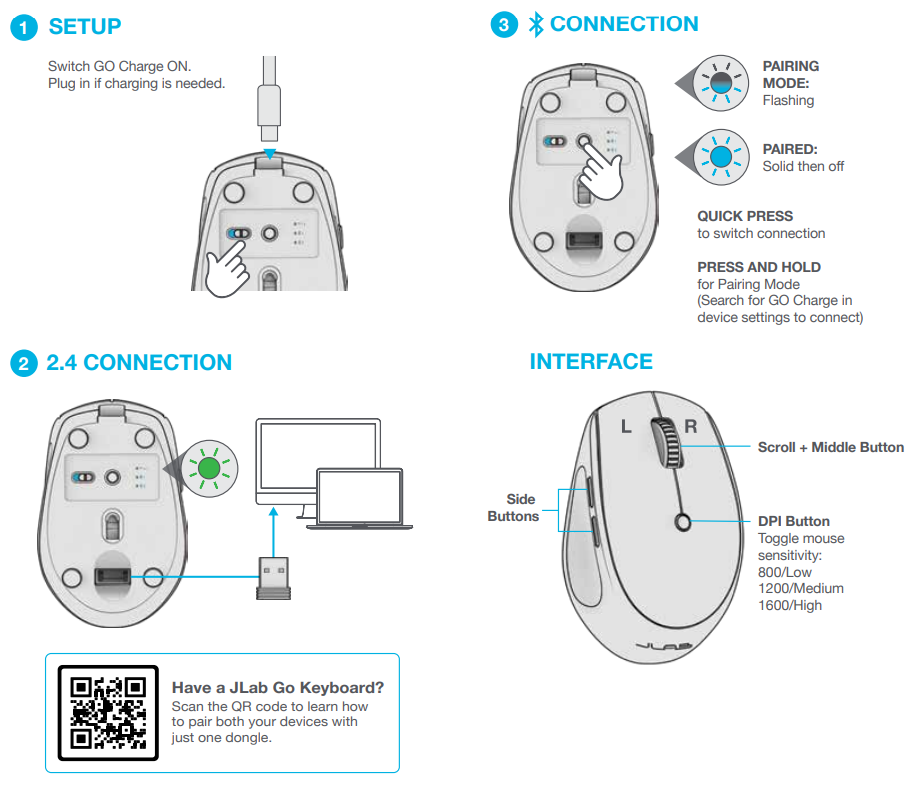
GO CHARGE MOUSE
Troubleshooting Your JLab Go Mouse
- Mouse Not Connecting: Ensure the USB dongle is securely inserted or Bluetooth is enabled on your device. Use the toggle button underneath the mouse to cycle through saved devices.
- Cursor Movement Lag: Clean the optical sensor on the underside to remove dust and debris, and verify battery level is sufficient.
- Buttons Not Responding: Check for physical obstructions or dirt around buttons, and try resetting the mouse by turning it off and on.
- Device Switching Issues: Re-pair devices by removing old connections and pairing anew, following the Quick Start Guide instructions.
Preventive measures include regularly cleaning the sensor, avoiding harsh impacts, and replacing the AA battery timely manner to maintain optimal performance.
The JLab Go Mouse comes with a 2-year limited warranty. For additional support, users can contact JLab's customer service via their official website or access resources such as user manuals and FAQs on the JLab support page.
Pros & Cons of the JLab Go Mouse
Pros
- Multi-Device Connectivity: Supports seamless toggling between three devices, ideal for multitasking.
- Silent Clicks: Quiet operation reduces distractions, suitable for quiet work environments.
- Long Battery Life: Over six months of use on a single AA battery, minimizing maintenance.
- Compact & Lightweight: Easy to carry and comfortable for extended use.
- Affordable: Offers premium features at a budget-friendly price point compared to competitors.
Cons
- Lack of Advanced Buttons: Only four buttons are available, limiting customization for gaming or productivity shortcuts.
- No Rechargeable Battery Model: Requires AA battery replacement rather than built-in rechargeable battery (though a GO Charge model exists separately).
- Size May Be Small for Some Users: Compact design might feel too small for users with larger hands.
Overall, the JLab Go Mouse delivers strong value for money, particularly for users valuing portability and multi-device use over advanced gaming features.
Customer Reviews of the JLab Go Mouse
Users consistently praise the JLab Go Mouse for its portability and multi-device toggle feature, noting how convenient it is to switch seamlessly between laptops, tablets, and phones. The silent click design receives frequent positive mention for creating a quieter work environment.
Common complaints include the limited number of buttons and the small size, which some users find less comfortable for prolonged use. Battery longevity is generally well-reviewed, though a few customers mention occasional connection drops that are resolved by toggling the device or re-pairing.
On average, the mouse holds a solid 4.5 out of 5 stars across major retail platforms. Many reviewers recommend it for students, remote workers, and travelers looking for a budget-friendly, reliable mouse that works across multiple devices.
Faqs
How do I set up the jlab Go Mouse for the first time with multiple devices?
What should I do if my jlab Go Mouse is not connecting to my computer?
Can the jlab Go Mouse DPI sensitivity be adjusted, and how does it affect usage?
Is the jlab Go Mouse compatible with different operating systems like Windows and Mac OS?
How can I optimize the battery life of my jlab Go Mouse for long-term use?
What maintenance steps should I follow to keep the jlab Go Mouse performing well?
Does the jlab Go Mouse support silent clicking for a quieter workspace?
How do I switch between multiple devices using the jlab Go Mouse?
Tags
More jlab manuals
Leave a Comment