
Setup & Features: Marantz Cinema 30 AV Surround Receiver User Manual
Content
Marantz Cinema 30 AV Surround Receiver Review and Product Manual
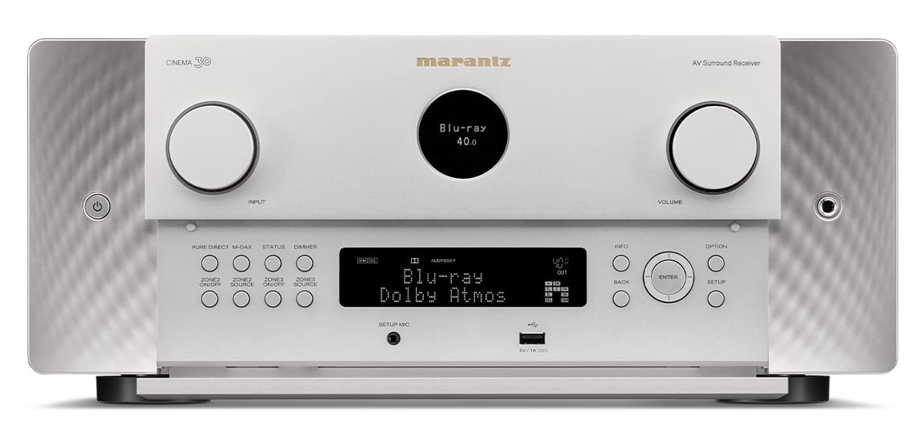
Introduction
The Marantz Cinema 30 AV Surround Receiver is a flagship home theater hub built for enthusiasts who want reference-grade sound, advanced HDMI 2.1 video support, and flexible multichannel expansion in one premium chassis. Designed as a high-end 11.4-channel receiver with processing for up to 13.4 channels, it is aimed at users building serious Dolby Atmos, DTS:X, or Auro-3D systems that demand both power and refinement.
This receiver stands out for its 140 watts per channel output, seven HDMI inputs, three HDMI outputs, HEOS streaming integration, and support for 8K/60Hz and 4K/120Hz pass-through. It is especially appealing to custom home theater owners, audiophiles, and users who want a single device that can anchor a large entertainment setup without sacrificing sound quality or modern video compatibility. The Cinema 30 also supports multiple subwoofers and advanced calibration, making it a strong choice for rooms that need careful tuning.
Estimated pricing typically sits around the premium flagship range, with an expected street price near $4,500 USD or equivalent depending on region and retailer. Availability is generally through authorized Marantz dealers, premium home theater retailers, and selected online sellers. For buyers comparing luxury AV receivers, the Marantz Cinema 30 AV Surround Receiver offers a compelling balance of classic Marantz sonic character, robust amplification, and future-ready connectivity.
Specifications
- Amplification: 11 powered channels with 13.4-channel processing support
- Power output: 140 W per channel at 8 ohms, 20 Hz to 20 kHz, 0.05% THD, 2-channel drive
- Channel configuration: Up to 9.4.4 or 7.6.4 layouts with external amplification
- HDMI: 7 inputs and 3 outputs, including eARC support
- Video features: 8K/60Hz, 4K/120Hz, VRR, ALLM, and QMS
- HDR support: HDR10, HDR10+, HLG, and Dolby Vision
- Audio formats: Dolby Atmos, Dolby TrueHD, DTS:X, DTS:X Pro, Neural:X, and Auro-3D
- Streaming: HEOS, AirPlay 2, Bluetooth, Spotify Connect, Tidal, Amazon Music HD, and TuneIn
- Subwoofer support: Four independent subwoofer outputs for advanced bass management
- Weight: Approximately 42.8 lbs
- Dimensions: Roughly 17.4 x 17.6 x 7.5 inches
Compared with midrange AV receivers, the Marantz Cinema 30 AV Surround Receiver delivers more power, more processing headroom, and broader expansion options. Against similarly priced flagship models, it competes strongly on audio quality, streaming integration, and multizone flexibility.
Detailed Description
The Marantz Cinema 30 AV Surround Receiver is engineered as the centerpiece of a premium home theater system. It uses discrete Class A/B amplification and Marantz’s current-feedback design to deliver clean, controlled power across demanding speaker layouts. In practical terms, this means smoother dynamics for movie soundtracks, clearer dialogue, and greater authority during bass-heavy scenes or concert playback.
Its real-world strengths are most noticeable in large living rooms, dedicated theaters, and mixed-use media spaces where multiple sources need to be switched without delay. Gamers benefit from 4K/120Hz and VRR support, while film fans gain immersive object-based audio and support for up to four subwoofers. The build quality feels appropriately premium, with a sturdy chassis designed to handle the heat and vibration that come with a high-output surround receiver.
User experience is centered on flexibility. The on-screen setup process, room calibration, app control, and streaming options make it easier to integrate with televisions, projectors, disc players, game consoles, and music services. The Marantz Cinema 30 AV Surround Receiver is best understood as a long-term investment for users who want theater-grade performance without moving to a separate processor-and-amplifier stack.
Setup Guide
Start by placing the receiver on a stable, well-ventilated surface with several inches of clearance on all sides. Connect the front speakers, center channel, surrounds, height channels, and subwoofers before powering on. If you plan to use external amplification, route the pre-outs to your power amplifiers and confirm the channel mapping in the menu.
Next, connect HDMI sources such as a Blu-ray player, streaming device, console, and TV or projector. Use the designated HDMI output with eARC if you want audio return from a compatible television. After powering up, run the guided setup to assign speaker sizes, distances, levels, and crossover points. For best results, use room correction and save a profile for movies and another for music if the system supports your preferred configuration.
Pair Bluetooth or sign into HEOS for wireless playback and multiroom use. If you encounter no video, confirm the correct HDMI input, verify 8K-compatible cables, and check the TV’s HDMI enhanced mode. Safety matters: do not block ventilation, do not stack other hot components directly on top, and disconnect power before moving cables. The Marantz Cinema 30 AV Surround Receiver performs best when connected carefully and calibrated fully.
Troubleshooting
One common issue is no sound from one or more channels. Check speaker wiring, confirm the correct input mode, and make sure the speaker assignment matches the layout in the setup menu. If bass seems weak, verify subwoofer power, cable connections, crossover settings, and whether all subwoofer outputs are enabled.
For HDMI handshake problems, power-cycle the TV, source device, and receiver, then reconnect with certified Ultra High Speed HDMI cables. If video drops out at 4K/120Hz or 8K, reduce the cable length, test another HDMI input, and confirm the source device is set to the proper output format. Error messages or protection shutdowns usually point to overheating, speaker short circuits, or excessive load; shut the unit down and inspect ventilation and wiring before restarting.
Preventive care includes keeping firmware current, dusting vents regularly, and leaving open space around the chassis. Warranty coverage and official support are typically provided through Marantz authorized service channels and regional customer service teams. For help, use the brand’s official support page, your retailer’s service desk, or an authorized installer familiar with premium AV systems.
Pros & Cons
Pros
- Powerful 11-channel amplification with 13.4-channel processing support
- Excellent 8K and 4K/120Hz HDMI 2.1 compatibility for modern TVs and consoles
- Four independent subwoofer outputs for advanced bass control
- Strong streaming ecosystem with HEOS, AirPlay 2, and major music services
- Premium sound quality suited to movies, music, and gaming
Cons
- High price puts it beyond casual buyers
- Large chassis requires substantial space and ventilation
- Setup can be complex for beginners
- Best performance may require external amplification in very large systems
For value for money, it makes the most sense for users who will fully use its processing, HDMI features, and multi-subwoofer support. Compared with more affordable alternatives, the Marantz Cinema 30 AV Surround Receiver offers a notably higher ceiling for both sound quality and system expansion.
Customer Reviews
Typical user feedback highlights a strong 4.5 out of 5 style reputation among home theater enthusiasts. Owners frequently praise the rich, detailed sound, reliable HDMI switching, and the convenience of HEOS streaming. Many describe dialogue as cleaner and surround effects as more immersive than on older receivers.
Common complaints focus on the premium cost, the heavy chassis, and the learning curve during setup. Some buyers also mention that the best results require careful calibration and high-quality HDMI cabling. A representative testimonial would read: “The sound is cinematic and effortless, but this is definitely a serious enthusiast product.” Another common view is: “Worth it if you want a true flagship receiver with room to grow.”
Purchase recommendation: ideal for advanced users, dedicated theater rooms, and buyers upgrading from midrange AVR models. Less suitable for small rooms or simple TV setups.
Faqs
How do I set up the marantz Cinema 30 AV Surround Receiver for the first time?
What should I do if the marantz Cinema 30 AV Surround Receiver has no sound from one or more speakers?
Which speaker layouts work best with the marantz Cinema 30 AV Surround Receiver in a home theater?
How do I optimize room correction on the marantz Cinema 30 AV Surround Receiver for better sound?
Is the marantz Cinema 30 AV Surround Receiver compatible with 8K TVs, gaming consoles, and streaming devices?
Why is the marantz Cinema 30 AV Surround Receiver not passing video to my TV?
How can I get the best sound quality from the marantz Cinema 30 AV Surround Receiver for movies and music?
What maintenance and care does the marantz Cinema 30 AV Surround Receiver need over time?
More marantz manuals
- How to Use: Marantz Turntable TT-15S1 User Manual
- Setup & Features: Marantz SR4001/SR5001 AV Surround Receiver User Manual
- Setup: Marantz Cinema 40 AV Preamplifier User Manual
- Setup & Features: Marantz AV Surround Receiver Owner Manual
- Marantz SR7009 AV Surround Receiver User Manual
- Marantz Model-M1 Wireless Streaming Amplifier User Manual
Leave a Comment