
Marantz SR7009 AV Surround Receiver User Manual
Content
Marantz SR7009 AV Surround Receiver: Complete Product Manual
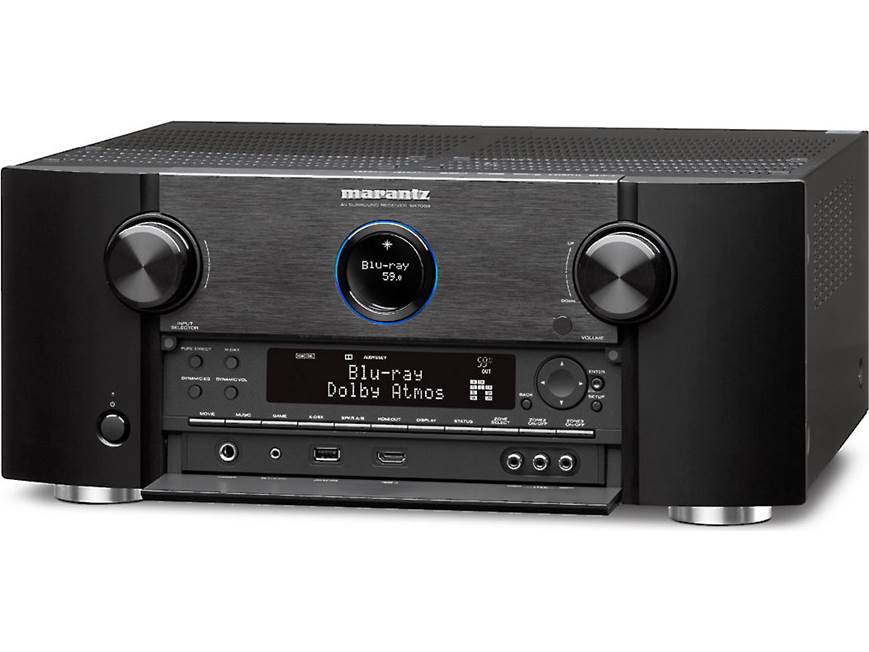
Introduction
The marantz SR7009 AV Surround Receiver is a premium networked home theater receiver designed for enthusiasts who want powerful amplification, flexible surround processing, and broad connectivity in one component. With 9-channel amplification and support for expansive speaker layouts, it delivers the immersive soundstage needed for modern movie rooms, music systems, and gaming setups. Its discrete amplifier design and high-current performance make it a strong choice for users who want detailed sound, confident dynamics, and dependable control over large speaker systems.
One of the biggest advantages of the marantz SR7009 AV Surround Receiver is its versatility. It supports multiple HDMI inputs and outputs, legacy video sources, network playback, and multi-room audio integration, making it suitable for mixed equipment environments. Home theater owners can use it for 7.1 or expanded height-channel configurations, while music listeners benefit from its clean amplification and broad source compatibility. It also works well as the centerpiece of a living room cinema, dedicated media room, or multi-zone audio setup.
This model is now typically found through the used and refurbished market, with prices commonly ranging from about $400 to $700 depending on condition, accessories, and seller. Availability is strongest through third-party resellers, collector markets, and pre-owned AV specialists. For buyers seeking a robust, feature-rich receiver with classic Marantz tuning, the SR7009 remains a compelling option.
Specifications for Marantz SR7009 AV Surround Receiver
- Amplification: 9-channel discrete power amplifier with high-current design
- Rated output: 125 W per channel into 8 ohms, 20 Hz to 20 kHz, 0.05% THD
- Power output: 165 W per channel into 6 ohms, 1 kHz, 0.7% THD
- Peak/IEC output: 200 W per channel into 6 ohms, 1 kHz, 1% THD, single channel driven
- Audio channels: 7.1 processing with 9-channel amplification and support for expanded speaker layouts
- SNR: 98 dB for clean signal reproduction
- HDMI connectivity: 8 HDMI inputs and 3 HDMI outputs, including dual main-room outputs
- Legacy video: Composite and component video support for older devices
- Network features: Ethernet LAN for streaming and network control
- Dimensions: 440 x 185 x 399 mm
- Weight: 13.6 kg
- Power consumption: 710 W
Compared with many similar mid-2010s AV receivers, the SR7009 stands out for its 9-channel amp section and strong HDMI flexibility. In practical use, it competes with other premium receivers in the same class by offering more advanced speaker routing and solid power reserves for medium to large rooms.
Troubleshooting the Marantz SR7009 AV Surround Receiver
Common issues with the marantz SR7009 AV Surround Receiver usually involve HDMI handshakes, no sound output, network dropouts, or speaker setup errors. If the unit shows no picture, confirm the correct HDMI input is selected, test another cable, and power-cycle both the receiver and display. For no audio, check speaker wiring, verify the selected sound mode, and ensure the source device is outputting a compatible format.
- HDMI no signal: Replace the cable, switch inputs, and re-seat source connections.
- No sound from one channel: Check speaker polarity, balance settings, and amp assignment.
- Network not connecting: Restart the router, reconnect Ethernet, or reset network settings.
- Protection mode: Inspect for shorted speaker wires, overheating, or impedance mismatches.
- Setup error codes: If the display shows an error or protection message, remove external loads, disconnect speakers one by one, and restart after cooling.
To prevent issues, maintain airflow around the chassis, use quality HDMI cables, and avoid overloading low-impedance speakers. Marantz support and authorized service centers are the best options for hardware faults, firmware-related behavior, or internal protection problems. For help, contact the dealer that sold the unit, an authorized Marantz service provider, or the official Marantz customer support channel in your region.
Pros and Cons of the Marantz SR7009 AV Surround Receiver
Pros
- Powerful 9-channel amplification supports immersive surround and height-channel setups.
- Flexible HDMI layout works well for TVs, projectors, game consoles, and media players.
- Strong audio performance with clear mids, detailed highs, and controlled bass.
- Excellent for users upgrading from older 5.1 or basic 7.1 receivers.
- Good value on the used market for buyers wanting a premium AV receiver at a lower cost.
Cons
- Older HDMI generation means it lacks the latest gaming and video features found in newer models.
- Large chassis requires enough cabinet space and ventilation.
- Used units may need calibration, cleaning, or firmware attention.
- Setup can feel complex for first-time home theater users.
For value for money, the receiver remains attractive if purchased in good condition. Compared with newer alternatives, it trades modern convenience features for strong amplification, broad connectivity, and proven Marantz sound quality.
Customer Reviews for Marantz SR7009 AV Surround Receiver
Customer feedback on the marantz SR7009 AV Surround Receiver is generally positive, with many owners praising its powerful sound and reliable home theater performance. Typical ratings fall around 4.4 out of 5 stars among enthusiast buyers who value build quality and channel separation.
- Praise: “Big, detailed sound and effortless drive for my speakers.”
- Praise: “Perfect for movie nights with a projector and surround setup.”
- Complaint: “Menu navigation feels dated compared with newer receivers.”
- Complaint: “Runs warm, so ventilation matters.”
Most users recommend it for movie-focused systems, multi-speaker rooms, and buyers looking for a high-quality used receiver. Commonly mentioned issues include older interface design and the need to verify condition before purchase, especially on pre-owned units.
Faqs
How do I set up the marantz SR7009 AV Surround Receiver for the first time without missing important calibration steps?
Why is my marantz SR7009 AV Surround Receiver not outputting sound through the speakers, and how do I fix it?
Which speaker configurations work best with the marantz SR7009 AV Surround Receiver for home theater use?
Can the marantz SR7009 AV Surround Receiver handle 4K HDMI devices and modern streaming sources?
How do I improve sound quality on the marantz SR7009 AV Surround Receiver after auto setup?
What should I do if the marantz SR7009 AV Surround Receiver keeps overheating or shutting down?
How do I connect the marantz SR7009 AV Surround Receiver to a TV, sound system, and gaming console correctly?
How often should I clean and maintain the marantz SR7009 AV Surround Receiver for reliable performance?
More marantz manuals
- Marantz Model-M1 Wireless Streaming Amplifier User Manual
- Setup: Marantz Cinema 40 AV Preamplifier User Manual
- Marantz Cinema 60 AV Surround Receiver User Manual
- How to Use: Marantz Turntable TT-15S1 User Manual
- Marantz CINEMA 70s AV Surround Receiver User Manual
- Setup & Features: Marantz Cinema 30 AV Surround Receiver User Manual
Leave a Comment