
Marantz Cinema 60 AV Surround Receiver User Manual
Content
Marantz Cinema 60 AV Surround Receiver: Complete Product Manual
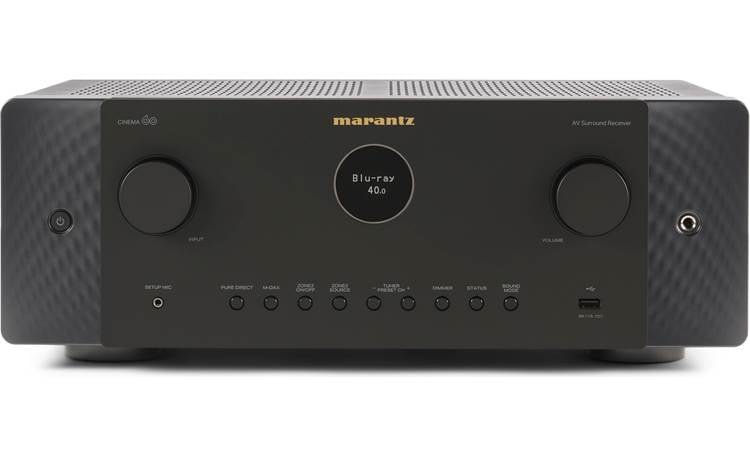
The Marantz Cinema 60 AV Surround Receiver is a premium 7.2-channel home theater receiver designed for users who want refined sound quality, modern HDMI 2.1 connectivity, and a clean, flexible setup experience. It delivers 100 watts per channel into 8 ohms with 2 channels driven, supports Dolby Atmos and DTS:X immersive audio, and includes 6 HDMI inputs plus 2 HDMI outputs with eARC for streamlined TV and source integration. This makes the Marantz Cinema 60 AV Surround Receiver a strong fit for movie lovers, gamers, and music listeners who want an elegant all-in-one solution for a compact to mid-sized home theater.
One of its biggest strengths is its balance of power, clarity, and usability. Marantz’s amplifier design and HEOS built-in streaming support make it appealing for users who want both cinematic impact and everyday convenience. It also includes 2 subwoofer outputs, phono input support for turntables, and multizone flexibility for whole-home audio. Typical pricing has generally been in the mid-premium range, with retail offers commonly appearing around $1,200 to $1,700 depending on region, availability, and promotions. It is widely sold through authorized audio retailers and the official Marantz channel, making it relatively easy to find in current inventory.
Specifications for Marantz Cinema 60 AV Surround Receiver
- Channels: 7.2-channel AV receiver with 7 powered speaker channels and 7.2 preamp outputs.
- Power output: 100W per channel at 8 ohms, 20 Hz–20 kHz, 0.08% THD, 2 channels driven.
- Higher-load output: 140W at 6 ohms, 1 kHz, 0.7% THD, 2 channels driven.
- Peak output: Up to 200W at 6 ohms, 1 kHz, 10% THD, 1 channel driven.
- HDMI: 6 HDMI inputs and 2 HDMI outputs with eARC support.
- Audio formats: Dolby Atmos, DTS:X, and other common surround sound formats.
- Connectivity: 2 optical inputs, 2 coaxial inputs, 4 analog RCA inputs, USB-A front input, and MM phono input.
- Subwoofer support: 2 independent subwoofer outputs for improved bass management.
- Streaming: HEOS built-in for network audio and multi-room playback.
- Warranty: Commonly listed with a 5-year warranty in many markets.
- Comparison: Compared with many similarly priced 7.2-channel receivers, it stands out for its Marantz tuning, premium industrial design, and cleaner audio presentation, while some competitors may offer more raw HDMI ports or higher wattage claims.
In real-world use, the Cinema 60 is best viewed as a polished midrange home theater receiver rather than a brute-force amplifier. It competes closely with other premium 7-channel AV receivers that emphasize room correction, HDMI 2.1, and streaming rather than extreme output power.
Troubleshooting Marantz Cinema 60 AV Surround Receiver Problems
If the receiver does not power on, first verify the power cable, wall outlet, and trigger settings, then perform a full restart. If there is no sound, confirm speaker wiring, source selection, HDMI input assignment, and mute status. For HDMI issues, reseat cables, test another cable, and make sure the TV and source support the chosen video mode. If the receiver cannot complete an update, an update error message may appear; in that case, reboot the unit and retry with a stable network connection.
- Power issue: Check outlet, power cord, and standby settings.
- No audio: Confirm speakers, input source, and volume level.
- No video: Test HDMI cables, enable correct input format, and check eARC settings.
- Update error: Restart the unit and repeat the firmware update on a stable connection.
- Network failure: Reboot the router and reconnect Wi-Fi or Ethernet.
- Preventive care: Keep firmware updated, provide ventilation, and use certified HDMI 2.1 cables for 8K or high-bandwidth sources.
Marantz support commonly offers phone and online help, and the U.S. support line has been listed as 800-654-6633 during business hours. The Cinema 60 is also backed by a 5-year warranty in many regions, which adds confidence for long-term ownership and service support.
Pros and Cons of the Marantz Cinema 60 AV Surround Receiver
Pros
- Warm, detailed Marantz sound that works well for movies, music, and gaming.
- 100W per channel is enough for many bookshelf and floorstanding speakers in typical living rooms.
- 6 HDMI inputs, 2 outputs, and eARC provide strong connectivity for modern AV setups.
- HEOS built-in makes streaming and multi-room playback simple.
- Two subwoofer outputs improve bass integration in home theater systems.
- Premium styling and intuitive setup make it easy to live with day to day.
Cons
- Not the best choice for very large rooms or demanding low-efficiency speakers.
- Some rival receivers offer more HDMI inputs or more aggressive feature lists at similar prices.
- Users seeking maximum wattage per dollar may prefer a more power-focused alternative.
- Advanced home theater builders may want more channels than the 7.2 layout provides.
For most buyers, the Marantz Cinema 60 AV Surround Receiver offers strong value because it combines high-end sound quality, reliable connectivity, and a polished user experience. If the priority is pure amplification power or 9-channel expansion, larger receivers may be a better fit. If the priority is refined sound and practical features, this model is highly competitive.
Customer Reviews for Marantz Cinema 60 AV Surround Receiver
Average user sentiment for the Marantz Cinema 60 AV Surround Receiver is typically positive, often landing around 4.5 out of 5 stars in retailer feedback. Owners frequently praise the clean soundstage, rich dialogue clarity, and easy integration with TVs, game consoles, and streaming devices. Many reviewers also like the build quality and the fact that setup is straightforward for a receiver in this category.
Common complaints include the premium price, the limited 7-channel layout compared with larger models, and occasional frustration during firmware or HDMI handshakes. A typical testimonial theme is: “It made my movie system sound more expensive than it is.” Another common comment is: “Excellent sound, but I wish it had more channels for future expansion.” For buyers who value sound quality, the Cinema 60 remains a highly recommended choice.
Faqs
How do I set up the marantz Cinema 60 AV Surround Receiver for the first time without missing key settings?
Why is my marantz Cinema 60 AV Surround Receiver not producing sound through the speakers?
What devices are compatible with the marantz Cinema 60 AV Surround Receiver for HDMI, gaming, and streaming?
How do I optimize room calibration and speaker levels on the marantz Cinema 60 AV Surround Receiver?
Why does my marantz Cinema 60 AV Surround Receiver keep losing HDMI signal or showing a blank screen?
Can I use the marantz Cinema 60 AV Surround Receiver for both movies and music without changing settings every time?
How should I maintain the marantz Cinema 60 AV Surround Receiver to keep it performing well long term?
What should I check if the marantz Cinema 60 AV Surround Receiver remote or app control is not responding?
More marantz manuals
- Marantz CINEMA 70s AV Surround Receiver User Manual
- Marantz Model-M1 Wireless Streaming Amplifier User Manual
- Marantz SR7009 AV Surround Receiver User Manual
- Setup: Marantz Cinema 40 AV Preamplifier User Manual
- How to Use: Marantz Turntable TT-15S1 User Manual
- Setup & Features: Marantz Cinema 30 AV Surround Receiver User Manual
Leave a Comment