
Marantz Model-M1 Wireless Streaming Amplifier User Manual
Content
Marantz Model-M1 Wireless Streaming Amplifier: Complete Product Manual and Buyer’s Guide
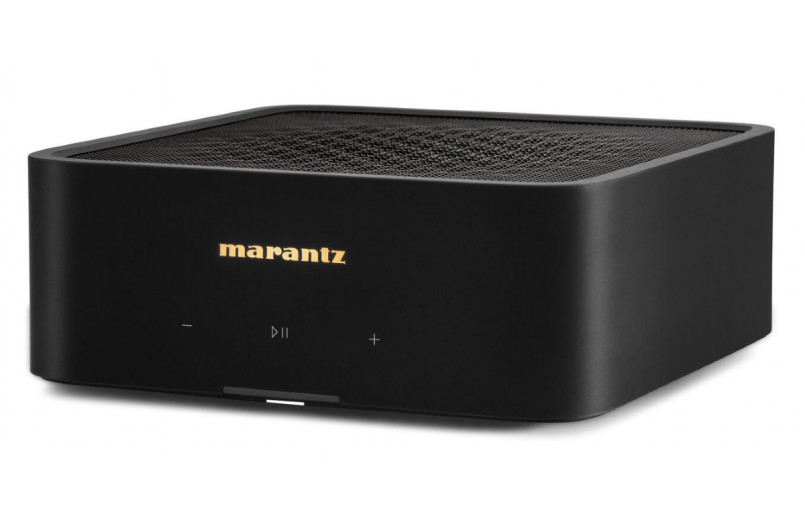
The Marantz Model-M1 Wireless Streaming Amplifier is a compact high-performance integrated amp designed for modern living rooms, desktop hi-fi setups, and minimalist home theater systems. It combines wireless music streaming, HDMI eARC TV integration, and powerful 2-channel amplification in a small chassis that fits easily into shelves, media consoles, and audio racks. With 100 watts per channel into 8 ohms and 125 watts per channel into 4 ohms, it delivers enough output to drive a wide range of bookshelf speakers and many smaller floorstanding speakers with confidence.
One of its biggest selling points is how much functionality Marantz packs into a single box. The Marantz Model-M1 Wireless Streaming Amplifier supports HEOS Built-in for multiroom playback, Wi-Fi networking, Ethernet, optical input, line input, subwoofer output, and HDMI eARC for simple TV hookup. That makes it a strong choice for users who want better sound without a full-size AV receiver or a complicated separates system. It is especially appealing for music lovers, TV viewers, apartment setups, and anyone building a clean, cable-light audio system.
In 2026, the estimated price range remains around the $1,000 mark, with regional pricing often landing near £899 to £900 in the UK. Availability is generally good through Marantz dealers, major audio retailers, and online hi-fi stores, though stock can vary by region. For buyers seeking a premium wireless streaming amp with elegant design, strong power, and broad connectivity, the Marantz Model-M1 Wireless Streaming Amplifier stands out as one of the most practical modern audio solutions.
Marantz Model-M1 Wireless Streaming Amplifier Specifications and Key Features
- Amplification: 2-channel class-D design with 100W per channel into 8 ohms and 125W per channel into 4 ohms.
- Distortion: Rated at 0.05% THD for both 8-ohm and 4-ohm output figures.
- Frequency response: 20 Hz to 40 kHz, supporting wide-band playback for music and TV audio.
- Connectivity: HDMI eARC, optical digital input, RCA line input, Ethernet, Wi-Fi, and subwoofer output.
- Streaming platform: HEOS Built-in for wireless music streaming and multiroom audio.
- Wireless standard: Wi-Fi support on 2.4 GHz and 5 GHz bands with modern network security options.
- Audio support: High-resolution playback up to 24-bit/192 kHz over supported digital sources.
- Physical size: Approximately 8.56 inches wide, 3.38 inches high, and 9.94 inches deep.
- Weight: About 4.84 pounds, making it easy to place almost anywhere.
- Power consumption: Around 70 watts under rated operating conditions.
- Speaker compatibility: Designed for speakers in the 4 to 16 ohm range.
Compared with similarly priced streaming amplifiers, the Marantz Model-M1 Wireless Streaming Amplifier offers a very balanced mix of compact size, high output, and TV-friendly features. Against rivals in the $900 to $1,000 category, it competes well on connectivity and ease of use, while its power rating makes it especially attractive for users who want stronger speaker control in a small form factor.
Pros and Cons of the Marantz Model-M1 Wireless Streaming Amplifier
Pros
- Compact design makes it ideal for small living spaces, desktops, and minimalist systems.
- Strong power output for its size, delivering confident performance with bookshelf speakers.
- HDMI eARC simplifies TV integration and reduces cable clutter.
- HEOS Built-in supports easy streaming and multiroom listening.
- Includes a subwoofer output for adding low-end impact in music and movies.
- Clean, modern approach to hi-fi that reduces the need for a separate receiver and streamer.
Cons
- No built-in phono input, so vinyl users need an external phono preamp.
- Only two channels, so it is not a replacement for a full surround receiver.
- Premium pricing may feel high for buyers who only need basic streaming.
- Best suited to bookshelf and smaller room setups rather than large, demanding home theaters.
In value-for-money terms, the Marantz Model-M1 Wireless Streaming Amplifier is strongest for buyers who want a premium all-in-one streaming amp rather than a budget solution. Cheaper alternatives may cover basic streaming, but they often fall short on power, build quality, or TV connectivity. If the goal is a sleek, high-quality stereo system with modern inputs and reliable performance, the asking price is easier to justify.
Customer Reviews of the Marantz Model-M1 Wireless Streaming Amplifier
Customer feedback is generally very positive, with many owners praising the compact size, strong output, and excellent sound quality. A common rating pattern places the unit around 4.5 out of 5 stars, especially among users who paired it with bookshelf speakers and a subwoofer. Typical praise includes comments like “surprisingly powerful for such a small box” and “the HDMI eARC setup made my TV sound dramatically better.”
Common complaints focus on the lack of a phono stage and the premium price. Some users also note that it is not intended for large home theater systems or speakers that need very high current delivery. For buyers who want simple streaming, easy TV integration, and a clean physical footprint, the reviews strongly support a purchase recommendation. For vinyl-first listeners or surround-sound users, a different component may be a better fit.
Is the Marantz Model-M1 Wireless Streaming Amplifier Worth It?
The Marantz Model-M1 Wireless Streaming Amplifier is worth considering if you want a compact, feature-rich stereo amp with serious power, modern streaming support, and hassle-free TV connectivity. It is best suited to music fans, apartment dwellers, and anyone building a premium two-channel system without the bulk of a receiver. For the right user, it delivers an excellent combination of convenience, style, and performance.
Faqs
How do I set up the marantz Model-M1 Wireless Streaming Amplifier for the first time?
Why is my marantz Model-M1 Wireless Streaming Amplifier not connecting to Wi-Fi, and how can I fix it?
What speakers work best with the marantz Model-M1 Wireless Streaming Amplifier?
Can I use the marantz Model-M1 Wireless Streaming Amplifier with Spotify Connect, AirPlay, or Bluetooth?
How do I get better sound quality from the marantz Model-M1 Wireless Streaming Amplifier?
What should I do if the marantz Model-M1 Wireless Streaming Amplifier has no sound?
How can I update the marantz Model-M1 Wireless Streaming Amplifier firmware safely?
How should I clean and maintain the marantz Model-M1 Wireless Streaming Amplifier over time?
More marantz manuals
- Marantz Cinema 60 AV Surround Receiver User Manual
- Marantz SR7009 AV Surround Receiver User Manual
- Marantz CINEMA 70s AV Surround Receiver User Manual
- Setup: Marantz Cinema 40 AV Preamplifier User Manual
- How to Use: Marantz Turntable TT-15S1 User Manual
- Setup & Features: Marantz Cinema 30 AV Surround Receiver User Manual
Leave a Comment