
Setup & Pairing: Marshall Bromley 750 Party Speaker User Manual
Content
Marshall Bromley 750 Party Speaker
Introduction
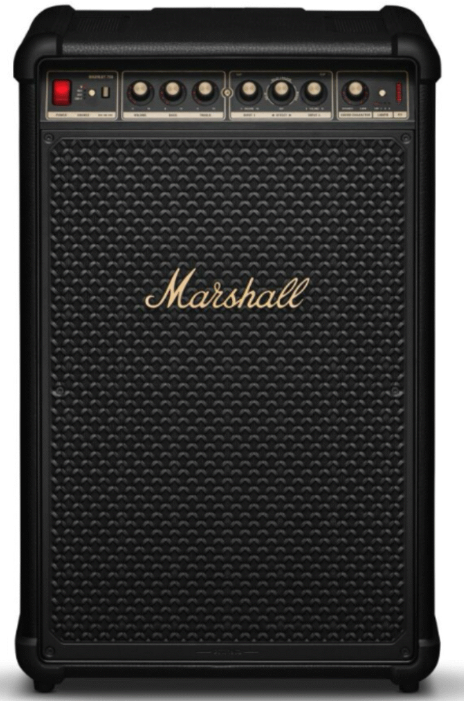
The Marshall Bromley 750 Party Speaker represents a powerful leap in portable audio, designed to amplify any gathering with immersive 360-degree sound and iconic Marshall style. Combining vintage amplifier aesthetics with cutting-edge technology, this speaker is built for party enthusiasts, musicians, and outdoor entertainers seeking premium sound quality and versatility.
Key benefits include a robust 500-watt output delivered through multiple drivers, an impressive 40+ hour battery life for extended playtime, and a durable IP54 water-resistant design that withstands splashes and light rain. Its comprehensive connectivity options—Bluetooth 5.3, USB-C, RCA, 3.5mm aux, and combo XLR/6.35mm ports—make it suitable for DJs, karaoke lovers, and live instrument input, ensuring seamless integration whether indoors or outdoors.
Ideal for backyard parties, beach hangouts, warehouse events, or even street performances, the Bromley 750 offers both portability with its built-in wheels and handle, and a versatile sound character control to customize the audio mood. Priced around $1,299.99, this speaker is available globally through authorized Marshall retailers and online platforms, positioning it as a premium option for users who want a robust, stylish, and feature-rich party speaker.
Specifications of the Marshall Bromley 750 Party Speaker
- Dimensions: 25.7 x 16.3 x 14 inches (652 x 413 x 355 mm)
- Weight: 52.7 lbs (23.9 kg)
- Amplification: Class D amplifiers delivering 500 Watts RMS total power
- Speaker Configuration:
- 2 x 10-inch 150W woofers
- 2 x 5.25-inch 50W mid-range drivers
- 2 x 1-inch 7W tweeters
- 2 x 0.8-inch 14W tweeters (top firing)
- Sound: True stereophonic 360° sound with side-firing and up-firing drivers, max SPL 127 dB @ 1m
- Connectivity: Bluetooth 5.3 with Auracast, USB-C, 3.5mm aux, RCA inputs, dual XLR/6.35mm combo jacks for mics/instruments
- Battery Life: 40+ hours of playback on a single charge
- Water Resistance: IP54 rating for splash and dust resistance
- Controls: Physical knobs for volume and sound character (Dynamic to Loud), power toggle switch
- Portability: Built-in handle and retractable wheels for easy transport
Compared to other premium party speakers like the Marshall Tufton, the Bromley 750 stands out with higher power output and enhanced 360-degree sound dispersion, alongside advanced input options suited for live performance scenarios.
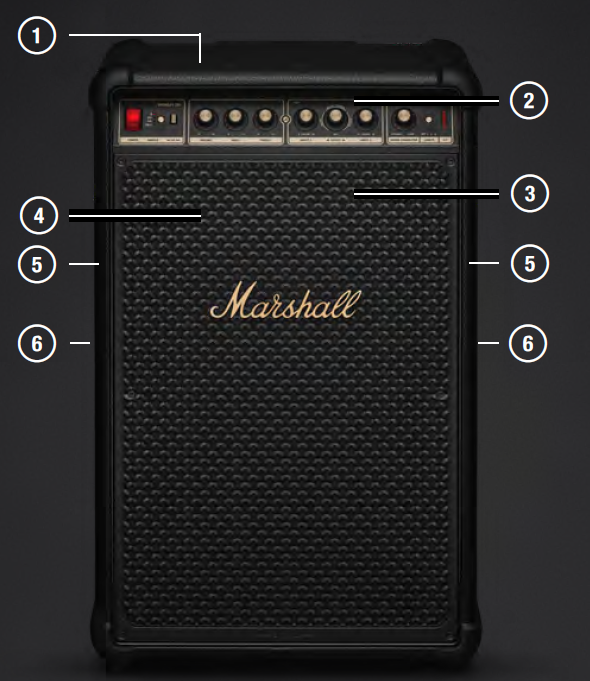
DEVICE LAYOUT
- TOP DRIVERS
- FRONT PANEL
- FRONT DRIVERS
- LIGHT PANEL
- SIDE DRIVERS
- CARRYING HANDLES
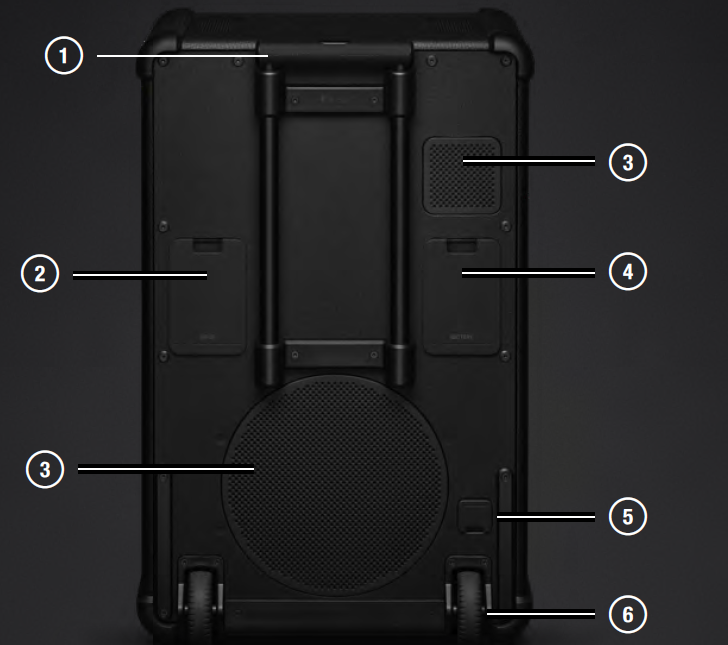
LAYOUT
- TELESCOPIC HANDLE
- INPUT PANEL
- REAR DRIVERS
- BATTERY HATCH
- MAIN POWER INPUT
- WHEELS
INSTRUCTIONS
GETTING STARTED
- POWER ON
Push the power switch to turn on the speaker. - START PAIRING
Use the source selector to select Bluetooth and then push and hold the button until the LED starts blinking. - SELECT BROMLEY 750
Open your audio device’s Bluetooth list and select BROMLEY 750.
Download the Marshall Bluetooth app to get the most out of your speaker.
Caution: Make sure that the volume is set to low on both the speaker and the audio source before using the speaker.
MAINS POWER INPUT
Open the mains input hatch to access the power input. Connect the mains lead to the speaker and then to the wall socket to power the speaker and charge the battery.
Caution: Always unplug the mains lead from the wall socket before disconnecting it from the speaker.
BROMLEY POWER BANK
Bromley 750 comes with a removable battery that can also be used as a power bank. The battery is located in the battery socket behind the hatch.
More information about the power bank can be found in the Bromley Powerbank online manual at marshall.com.
BATTERY SOCKET
Open the hatch to access the battery. Grab the battery while pressing the lock button, then pull to remove it.
Insert the battery and push it until you hear a click to install it. The battery is charging when Bromley 750 is plugged into a mains socket.
CONNECTING AN INSTRUMENT OR MICROPHONE
Bromley 750 comes with two input channels for microphones or other mono instruments. These channels can be mixed with any other selected input and use the built-in effects. The inputs and gain switches are located on the back of the speaker.
INPUT 1 is used in the instruction below,, applies to INPUT 2 as well.
- Set the input gain for your channel. MIC for microphone or INST for line-level instrument.
- Connect your microphone or instrument lead to INPUT 1.
- Carefully turn up the volume for INPUT 1 on the front panel. If the red CLIP LED is lit, lower the volume on your instrument until it is not lit.
USING THE IN-BUILT EFFECTS
INPUT 1 and INPUT 2 can each use one of the three built-in effects: reverb, reverb and delay, and delay.
- Push the effects knob to select the input channel. A lit indicator shows what channel is selected.
- Turn the effect knob to taste.
SOUND CHARACTER
Sound character control matches the music to the pace of your party. Go from pre-party mingling to the peak and then straight to the after-party with a few simple adjustments.
The character goes from DYNAMIC, well-suited for laidback listening at home, to LOUD, when you need full power in a large space.
As music and settings are unique, you can fine-tune sound character to your current situation.
CHANGING THE LIGHT MODE
Push the light button to toggle between the light presets (1, 2, 3, and off).
CONNECTING TO THE RCA INPUTS
Plug in an RCA audio device such as a DJ mixer or a CD player.
- Connect a lead with RCA jacks to RCA IN on the back of the speaker.
- Connect the other end of the lead to the output on your audio source.
- Use the source selector button to select RCA.
Note: The turntable must be equipped with an RIAA amplifier or connected via a separate preamplifier. Audio lead and RIAA amplifier are not included.
CONNECTING TO THE AUX INPUT
- Connect a lead with a 3.5 mm stereo jack to the AUX IN on the back of the speaker.
- Connect the other end of the lead to the audio output on your audio source.
- Use the source selector button to select AUX.
Note: Audio leads are not included.
CONNECTING AUDIO CABLE TO USB-C
- Connect a USB-C audio lead to the USB-C port on the back of the speaker.
- Connect the other end of the lead to the audio output on your audio source.
- Use the source selector button to select USB-C.
Note: Audio leads are not included.
CHARGING YOUR PHONE VIA USB-C
- Ensure that the speaker is on and has more than 20% battery charge.
- Plug in your phone, tablet, or other USB device to the USB OUT on the back of the speaker.
A separate lead with USB-C and a relevant jack for your device is required.
PAIRING WITH A BLUETOOTH DEVICE
Bromley 750 can connect to 2 Bluetooth devices at a time and remembers up to 10 previously paired devices. When in range, it will try to reconnect with the last connected device.
- Use the Source selector button to select Bluetooth.
- Push the Source selector button for 2 seconds until the Bluetooth source LED turns to a slow pulse.
- Select Bromley 750 from your audio device’s Bluetooth list.
DAISY-CHAINING BROMLEY SPEAKERS
Bromley speakers can be daisy-chained (connected in series) through the AUX OUT and AUX IN ports. While the speakers are daisy-chained, the volume is managed on each speaker individually.
- Connect a lead with a 3.5 mm stereo jack to the AUX OUT on the first speaker.
- Connect the other end of the lead to the AUX IN port on the second speaker.
- Use the source selector button to select AUX on the second speaker.
- To add more speakers, repeat the procedure,, passing the signal from the send to the third,d and so on.
CHILD LOCK
Child lock is a safety feature that prevents the user from accidentally increasing the volume to dangerous levels.
Push the Source selector and the Light mode buttons for 2 seconds to toggle child lock on or off.
CUSTOMISABLE M-BUTTON
Push the M-button to trigger a burst of strobe light. The M-button can be customised in the Marshall Bluetooth app.
CLEANING THE SPEAKER
Clean your speaker regularly to keep it fresh and last longer.
Unplug any leads before cleaning the speaker,ker,, and make sure everything is completely dry before plugging them back in.
Gently clean the speaker and the leads with a lint-free cloth, slightly damp with either:
- water,
- 70% isopropyl alcohol, or
- 75% ethyl alcohol
Note when cleaning the speaker:
- Do not use any sharp or metal objects.
- Do not use compressed air.
- Do not use products containing bleach or hydrogen peroxide.
- Do not submerge the speaker in any cleaning agents.
- Do not rinse the speaker under running water.
RESETTING BROMLEY 750
A factory reset will reset the speaker to its original settings, excluding any firmware updates.
Note: This will delete all user settings,s, and the speaker will need to be set up again.
- Remove BROMLEY 750, and BROMLEY 750 [LE] if present, from your sound device’s Bluetooth list.
- Ensure that the speaker is on.
- Push and hold both the Source selector and the M-button for 10 seconds. All indicators on the front start blinking,, and the speaker restarts.
The speaker has returned to its factory settings and is ready to be paired, see the section Getting started.
MARSHALL BLUETOOTH APP
Download the Marshall Bluetooth app to get the most out of your speaker and keep it up to date with the latest software.

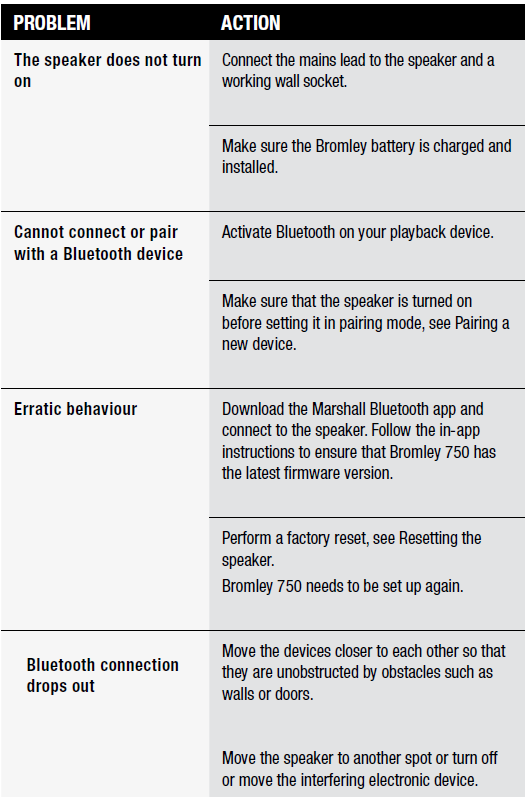
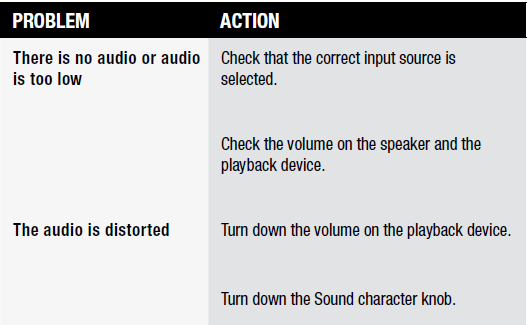
TROUBLESHOOTING
Pros & Cons of the Marshall Bromley 750 Party Speaker
- Pros:
- Exceptional 360° Sound: Provides immersive audio coverage for large gatherings, ensuring consistent sound everywhere.
- Robust Power Output: 500W RMS delivers loud, clear, and punchy sound suitable for indoor and outdoor venues.
- Versatile Connectivity: Multiple input options including XLR/mic and instrument ports,, support karaoke and live performances.
- Long Battery Life: Over 40 hours of gameplay keep parties going without frequent recharging.
- Rugged and Portable: IP54 rating plus wheels and handle make it durable and easy to transport.
- Cons:
- Weight: At nearly 53 lbs, it’s heavier than many portable speakers, which might limit some users’ mobility.
- Premium Price: The $1,299.99 price point is high compared to basic Bluetooth speakers, but justified by features and build quality.
- Size: Its large footprint requires ample storage and space at events.
- Limited App Control: Lacks an advanced companion app for detailed audio customization, relying on physical knobs instead.
Customer Reviews & Feedback on the Marshall Bromley 750 Party Speaker
Use the Marshall Bromley 750 Party Speaker for its powerful and clear 360-degree sound that easily fills large spaces. Many appreciate the nostalgic design combined with modern functionality, especially the extensive connectivity that supports mics and instruments. The long battery life and weather-resistant build receive frequent commendations for making it ideal for outdoor use.
Common complaints mention the speaker’s weight and that size, noting it is less convenient for casual transport compared to smaller Bluetooth speakers. Some users also wish for more app-based control features to fine-tune sound presets. Overall, most reviewers rate it between 4 to 4.5 stars, recommending it for serious party hosts, musicians, and event organizers who value sound quality and durability.
Purchase recommendations highlight the Bromley 750 as a top-tier choice for those needing a powerful, versatile party speaker with professional-grade inputs and an iconic Marshall look.
Faqs
How do I set up the marshall Bromley 750 Party Speaker for the first time?
What should I do if the marshall Bromley 750 Party Speaker is not working properly?
Can I use the marshall Bromley 750 Party Speaker with microphones or instruments?
How often should I maintain the marshall Bromley 750 Party Speaker?
What are the key features that make the marshall Bromley 750 Party Speaker different?
How do I optimize the sound quality of the marshall Bromley 750 Party Speaker?
Is the marshall Bromley 750 Party Speaker compatible with all Bluetooth devices?
Can I use the marshall Bromley 750 Party Speaker in various weather conditions?
More marshall manuals
- Setup: Marshall Stanmore Multi-Room Speaker User Manual
- Setup: Marshall Emberton III Portable Loudspeaker User Manual
- Setup: Marshall Woburn Multi-Room Speaker User Manual
- Setup & Pairing: Marshall Willen II Portable Loudspeaker User Manual
- Setup & Pairing: Marshall Acton Bluetooth Stereo Loudspeaker Instruction Guide
- Setup: Marshall Tufton Portable Stereo Loudspeaker User Manual
Leave a Comment