
Setup: Marshall Stanmore Multi-Room Speaker User Manual
Content
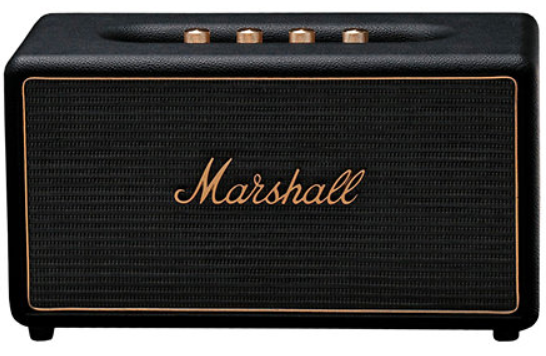
Marshall Stanmore Multi-Room Speaker
Introduction
The Marshall Stanmore Multi-Room Speaker is a premium wireless audio device designed to deliver iconic Marshall sound with versatile connectivity and vintage aesthetics. Known for its classic Marshall amplifier-inspired design, the speaker blends timeless style with modern wireless functionality, making it ideal for audiophiles and style-conscious users seeking rich, powerful sound for both personal and multi-room setups.
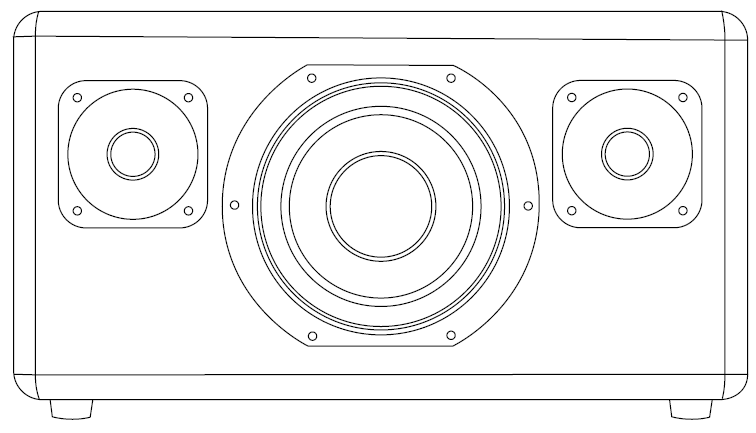
Equipped with a two-way stereo system, including two 0.75" dome tweeters and a 5.25" cone woofer powered by a 75W Class D amplifier, the Stanmore produces detailed mids, crisp highs, and deep bass through its bass reflex enclosure with a rear-firing port. It supports dual-band WiFi and Bluetooth 4.2, enabling seamless integration with Chromecast Built-In, Apple AirPlay, Spotify Connect, and multi-room audio configurations via the Marshall Multi-Room app.
This speaker targets home audio enthusiasts who want to combine exceptional sound quality with flexible wireless options for streaming and multi-room synchronization. Its robust build, retro styling, and high-quality audio make it suitable for living rooms, home offices, or entertainment areas.
The Marshall Stanmore Multi-Room Speaker typically retails between $400 and $450, with certified refurbished versions available at slightly lower prices. It is widely available through authorized retailers, including online marketplaces and select electronics stores.
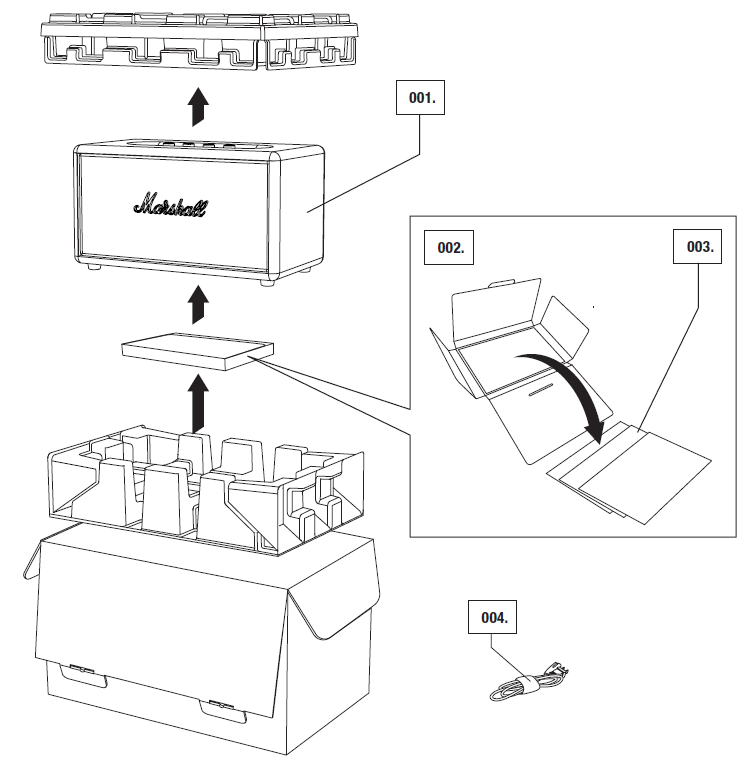
BOX CONTENTS
- MARSHALL STANMORE MULTI-ROOM ACTIVE STEREO LOUDSPEAKER
- QUICK START GUIDE
- IMPORTANT SAFETY INSTRUCTIONS
- POWER CORD
TECHNICAL INFORMATION
SOUND SPECIFICATION
ACTIVE STEREO LOUDSPEAKER WITH BASS REFLEX SYSTEM
- DIGITAL CLASS D AMPLIFIER: 2 X 15 W + 1 X 45 W
- ¾″ DOME TWEETERS: 2X
- 51/4″ WOOFER: 1X
BASS AND TREBLE TONE CONTROLS
- FREQUENCY RESPONSE: 50 – 20,000 Hz ±6 dB
- CONNECTIVITY:
- Wi-Fi: 802.11A/B/G/N/
- Bluetooth: STANDARD V4.2 EDR A2DP
- INPUT 1: AUX 3.5 mm
- INPUT 2: RCA (LEFT AND RIGHT)
- CONTINUOUS POWER OUTPUT: 75 W RMS
TECHNICAL INFORMATION
- MAINS INPUT VOLTAGE: 100 – 240 V~ /200 W
- ABSOLUTE MIN/MAX: 90 – 264 V~
- MAINS FREQUENCY: 50 – 60 Hz
- MAX PEAK POWER CONSUMPTION: 90 W
- NETWORK STANDBY POWER CONSUMPTION: 1.6 W
- WEIGHT: 5.00 kg
- SIZE: 350 X 195 X 190 mm
Overview
SETTING UP THE SPEAKER
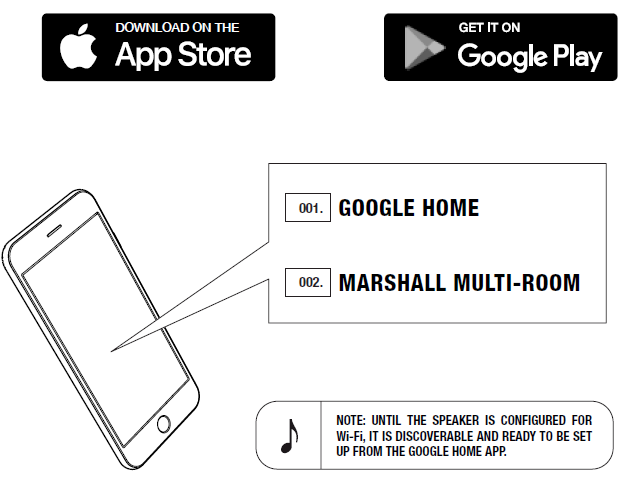
BEFORE USING YOUR MARSHALL MUTI-ROOM SPEAKER, CONFIGURE IT FOR Wi-Fi® WITH THE GOOGLE HOME APP. USE THE MARSHALL MULTI-ROOM APP TO GET THE MOST OUT OF YOUR SPEAKER, ADD PRESETS, PLAY INTERNET RADIO, AND MUCH MORE.
- DOWNLOAD THE GOOGLE HOME APP AND FOLLOW THE IN-APP INSTRUCTIONS TO SET UP YOUR SPEAKER.
- DOWNLOAD THE MARSHALL MULTI-ROOM APP AND FOLLOW THE IN-APP INSTRUCTIONS TO CUSTOMISE YOUR SPEAKER.
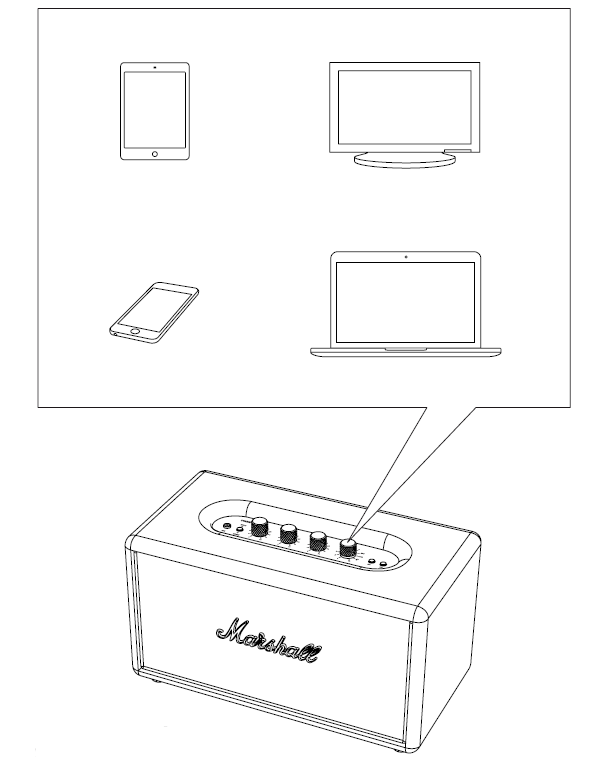
MANY WAYS TO CONNECT
THERE ARE MANY WAYS TO CONNECT TO YOUR STANMORE MULTI-ROOM, WHETHER VIA YOUR PHONE, TV, TABLET, OR TURNTABLE. THE CONNECTION CAN BE WIRELESS WITH Wi-Fi OR Bluetooth® OR BY USING A CABLE. THE SOURCE KNOB LETS YOU SELECT THE SOURCE.
STORING PRESETS
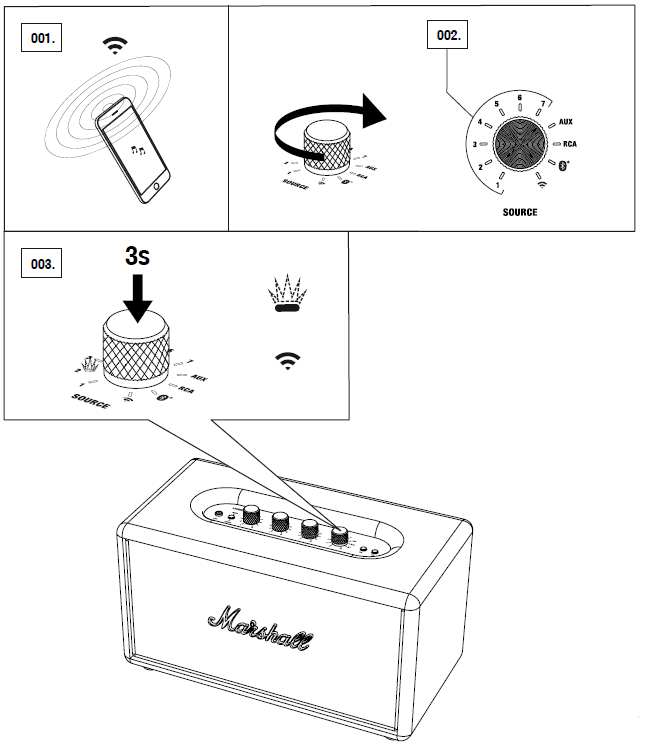
THE STANMORE MULTI-ROOM CAN HOLD UP TO 7 PRESETS FOR INSTANT MUSIC STREAMING VIA Wi-Fi.
- PLAY THE Spotify PLAYLIST OR INTERNET RADIO CHANNEL THAT YOU WANT TO STORE.
- TURN THE SOURCE KNOB TO SELECT THE POSITION (1-7) WHERE YOU WANT TO STORE THE PRESET.
- PUSH THE SOURCE KNOB FOR MORE THAN 3 SECONDS TO STORE THE PRESET. PREVIOUSLY STORED PRESETS ARE OVERWRITTEN.
PRESETS CAN ALSO BE MANAGED IN THE MARSHALL MULTI-ROOM APP.
STANDBY MODE
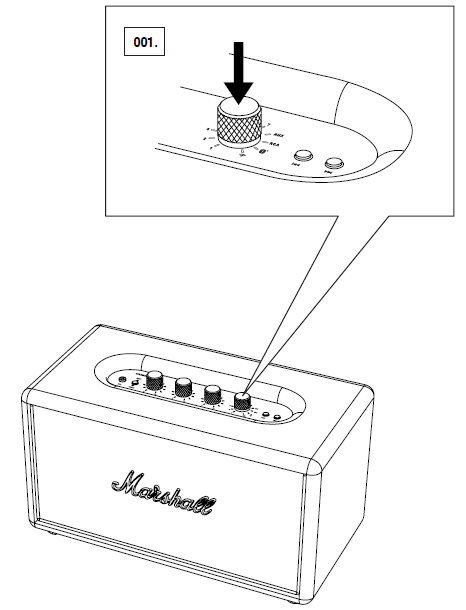
THE SPEAKER GOES INTO STANDBY MODE IF NO AUDIO HAS BEEN PLAYED FOR 20 MINUTES. THE SPEAKER IS STILL CONNECTED TO THE NETWORK.
PUSH THE SOURCE KNOB TO WAKE THE SPEAKER.
SPEAKER SOFTWARE UPDATE
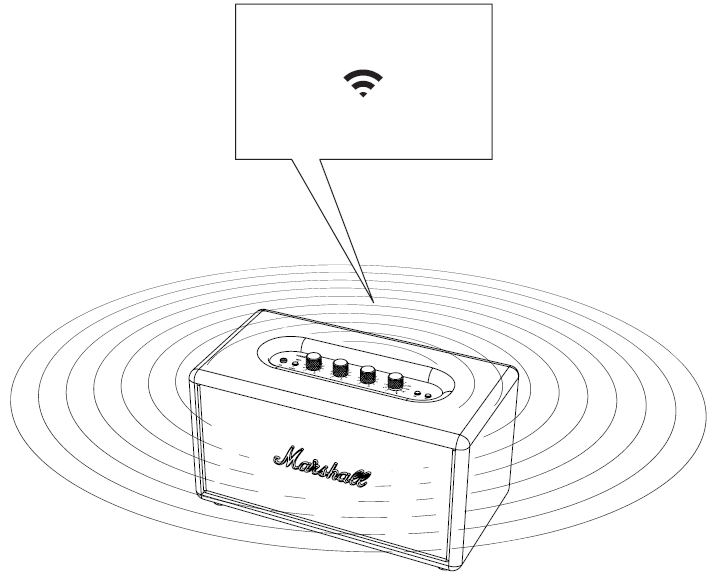
THE STANMORE MULTI-ROOM SPEAKER IS AUTOMATICALLY UPGRADED TO THE LATEST SOFTWARE RELEASE AS LONG AS THE SPEAKER IS CONNECTED TO Wi-Fi.
THIS IS DONE IN THE BACKGROUND AND REQUIRES NO MANUAL WORK.
FACTORY RESET
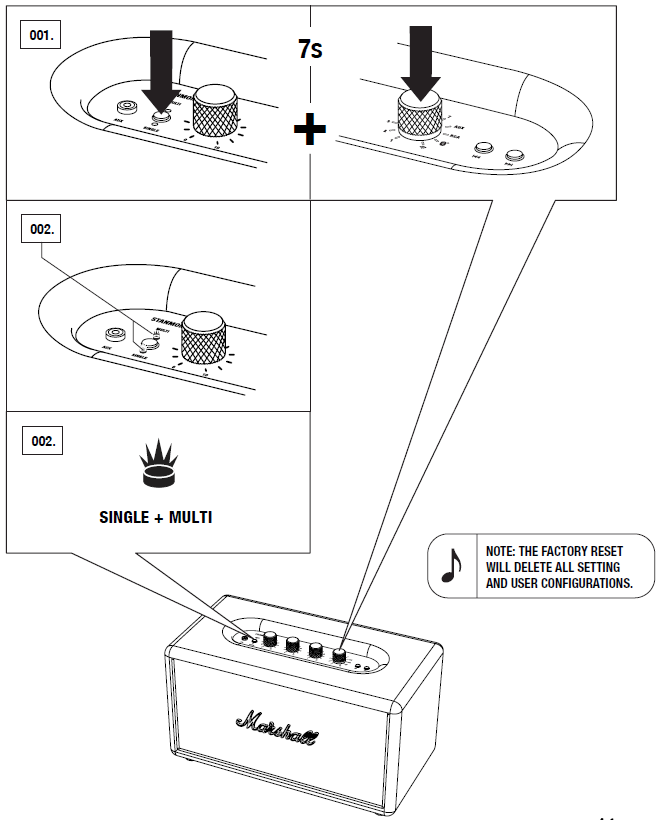
TO RESET THE SPEAKER TO ITS FACTORY STATE:
- PUSH AND HOLD THE SINGLE/MULTI MODE BUTTON AND THE SOURCE KNOB FOR 7 SECONDS UNTIL BOTH THE SINGLE AND MULTI MODE INDICATORS ARE LIT.
- THE SPEAKER IS RESET TO ITS FACTORY STATE, RESTORED TO SETUP MODE,, AND IS READY TO BE CONFIGURED.
INSTALLATION & CONNECTION
- Connect the product according to the instructions in this manual.
- Connect the product only to the correct mains voltage as shown on the product.
- Protect the power cord from being walked on or pinched, especially at plugs, convenience receptacles, and the point where they exit the product.
- Use only power cables of the type specified in these operating instructions or as marked on the product.
- Do not defeat the safety purpose of the polarized or grounding-type plug.
- If the provided plug does not fit into your outlet, consult an electrician for replacement of the obsolete outlet.
- Unplug the product during lightning storms or when unused for long periods of time.
- Do not install this product in a confined or a built-in space. Only install the product in a well-ventilated and open location. The ventilation should not be impeded by covering the ventilation openings with items such as newspaper, table-cloths, curtains,, etc.
- No naked flame sources, such as lighted candles, should be placed on the product.
CLEANING & MAINTENANCE
Refer all servicing to qualified service personnel. Servicing is required when the product has been damaged in any way, such as power-supply cord or plug is damaged, liquid has been spilled or objects have fallen into the product, the product has been exposed to rain or moisture, does not operate normally, or has been dropped.
Clean only with a dry cloth.
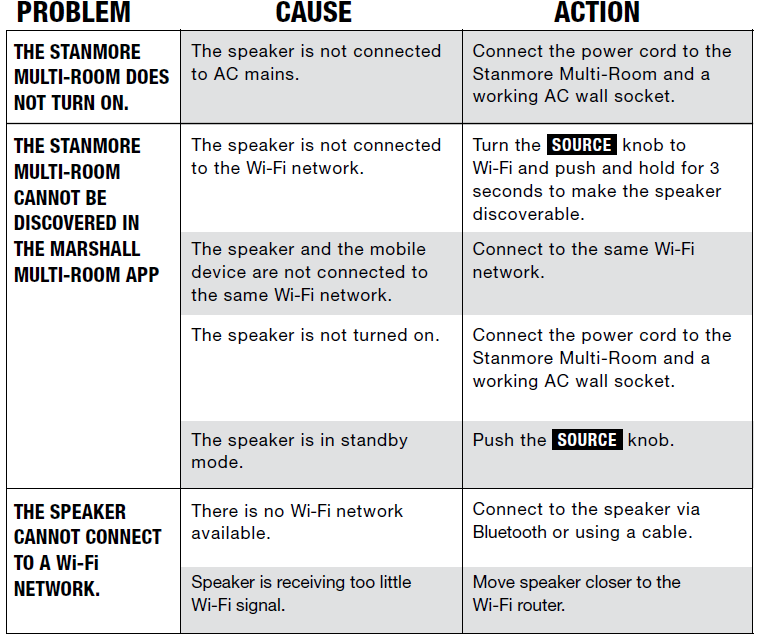
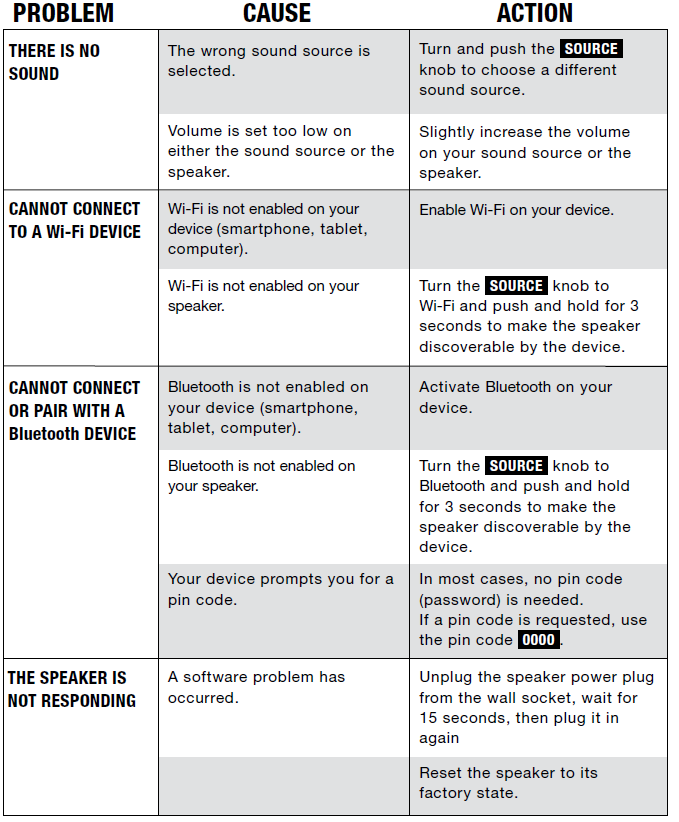
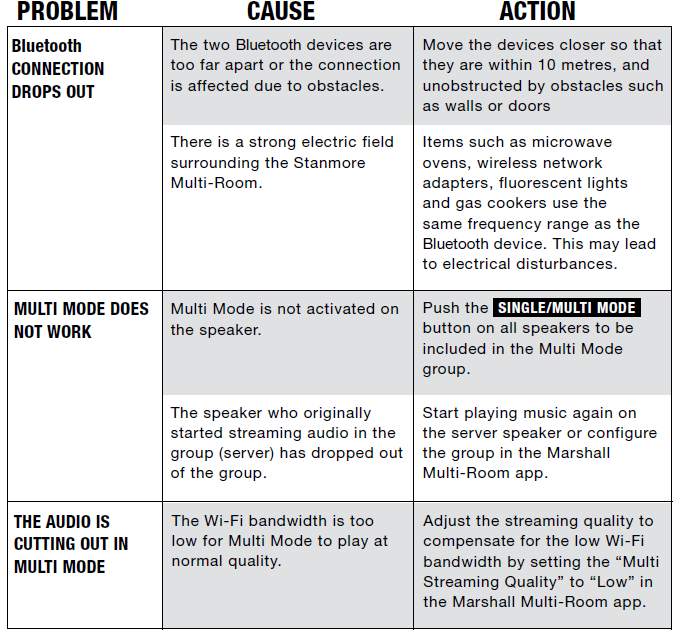
TROUBLESHOOTING
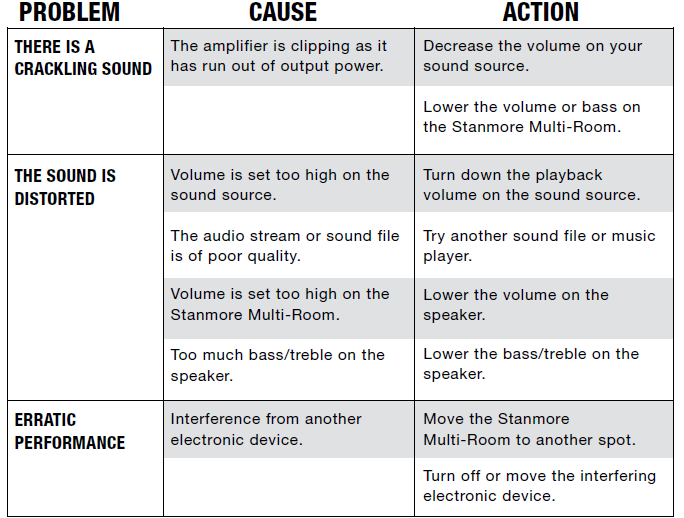
Pros & Cons of the Marshall Stanmore Multi-Room Speaker
Pros
- Rich, Balanced Sound: Offers a well-balanced audio experience with clear highs, pronounced mids, and deep bass thanks to its 75W Class D amplifier and bass reflex design.
- Classic Design: Iconic Marshall styling with vintage brass knobs and a black vinyl finish that fits stylishly into any home décor.
- Multi-Room Connectivity: Supports WiFi, Bluetooth, Chromecast, AirPlay, and Spotify Connect, allowing flexible wireless streaming and integration into multi-room audio setups.
- Solid Build Quality: Durable wooden enclosure and high-quality materials ensure long-lasting performance and a premium feel.
- Easy Controls: Physical knobs for volume, bass, treble, and source selection offer user-friendly tactile control without relying solely on an app.
Cons
- Size and Weight: At 4.7 kg and larger dimensions, it may not be the most portable option compared to smaller wireless speakers.
- No Remote Control: Lacks a remote, which some users may miss for convenient operation from a distance.
- App Limitations: Some users report that the Marshall Multi-Room app can be less intuitive compared to competitors like Sonos.
- Price Point: Higher price compared to some alternatives, such as Sonos Play:5, which may offer similar streaming features.
Marshall Stanmore Multi-Room Speaker Customer Reviews and Feedback
Users consistently praise the Marshall Stanmore Multi-Room Speaker for its powerful and clear sound quality, with many highlighting the deep bass and classic design as standout features. The tactile knobs for sound adjustment receive frequent positive remarks for their satisfying feel and ease of use.
Common praises include the robust multi-room functionality, seamless WiFi and Bluetooth connectivity, and compatibility with popular streaming services like Spotify and Apple AirPlay. The speaker’s build quality and vintage aesthetic also earn high marks from buyers seeking both style and substance.
Some complaints focus on the lack of a remote control and occasional connectivity hiccups with the multi-room setup. A few users mention that the Marshall app could be improved for a smoother user experience and more reliable speaker grouping. Despite these issues, most reviewers rate the product highly, often 4 to 4.5 stars out of 5, recommending it especially for users who prioritize sound quality and design over budget constraints.
Faqs
How do I set up the marshall Stanmore Multi-Room Speaker for the first time?
What should I do if my marshall Stanmore Multi-Room Speaker is not connecting to Bluetooth?
Can I connect multiple marshall Stanmore Multi-Room Speakers together?
How do I optimize the sound quality of my marshall Stanmore Multi-Room Speaker?
What devices are compatible with the marshall Stanmore Multi-Room Speaker?
How often should I update the software of my marshall Stanmore Multi-Room Speaker?
How do I troubleshoot if my marshall Stanmore Multi-Room Speaker is not producing sound?
How do I maintain and care for my marshall Stanmore Multi-Room Speaker?
More marshall manuals
- Setup: Marshall Woburn Multi-Room Speaker User Manual
- Setup & Pairing: Marshall Bromley 750 Party Speaker User Manual
- Setup & Pairing: Marshall Acton Bluetooth Stereo Loudspeaker Instruction Guide
- Setup: Marshall Emberton III Portable Loudspeaker User Manual
- Pairing & Usage: Marshall Woburn - Active Stereo Loudspeaker User Manual
- Setup & Pairing: Marshall Willen II Portable Loudspeaker User Manual
Leave a Comment