
Setup: Marshall Emberton III Portable Loudspeaker User Manual
Content
Marshall Emberton III Portable Loudspeaker
Introduction
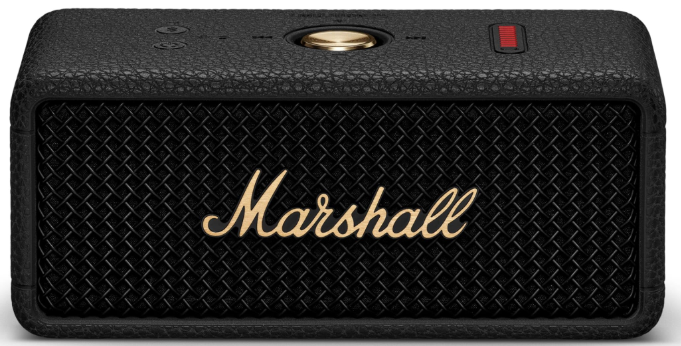
The Marshall Emberton III Portable Loudspeaker stands out as a compact yet mighty Bluetooth speaker designed for music lovers who demand both style and substance. With its instantly recognizable Marshall aesthetic—complete with textured vinyl, metal grille, and iconic script—the Emberton III not only looks the part but also delivers a powerful audio experience that punches above its weight class. Whether you're hosting a backyard party, heading to the beach, or simply enjoying music at home, this rugged speaker is built to keep up with your lifestyle.
Key benefits include 360-degree True Stereophonic sound, a substantial 32+ hours of playtime, and an IP67 dust and waterproof rating—meaning it can withstand submersion in up to 1 meter of water for 30 minutes. Upgrades over previous models include Bluetooth 5.3 LE with Auracast readiness for multi-device audio sharing, a built-in microphone for hands-free calls, and improved bass response for a richer listening experience. The Emberton III is designed for portability, weighing just 0.67 kg (1.5 lbs), and features a straightforward control layout for ease of use.
This speaker is ideal for adventurers, students, commuters, and anyone who appreciates a blend of retro design and modern tech. With a price range similar to its predecessor (typically under $200), the Marshall Emberton III Portable Loudspeaker offers exceptional value for a premium portable audio device, widely available from major electronics retailers and Marshall’s official website.
Specifications
- Audio Drivers: Two 2-inch 10W full-range drivers with dual passive radiators for enhanced bass
- Frequency Response: 60Hz – 20kHz for clear highs and deep lows
- Sound Output: True Stereophonic for immersive 360° sound
- Max SPL: 90 dB at 1 meter for loud, distortion-free audio
- Battery Life: 32+ hours of portable playtime; 2 hours to full recharge (6 hours playback with just 20 minutes charging)
- Water/Dust Resistance: IP67 rated (submersible up to 1m for 30 minutes)
- Connectivity: Bluetooth 5.3 LE with Auracast support (via firmware update)
- Built-in Features: Microphone for hands-free calls, USB-C charging, multipoint pairing
- Dimensions & Weight: 160 x 68 x 76.9 mm (6.3 x 2.7 x 3 in), 0.67 kg (1.5 lbs)
- EQ Modes: Three presets via Marshall Bluetooth app (Push, Voice, Marshall)
- In the Box: Speaker, USB-C cable, user manual
Compared to competitors like the JBL Flip 6, the Marshall Emberton III Portable Loudspeaker offers a more balanced, warm sound signature with cleaner bass, though it may lack the deep sub-bass “rumble” of some rivals. Its battery life and ruggedness are top-tier for its size class.
DEVICE LAYOUT
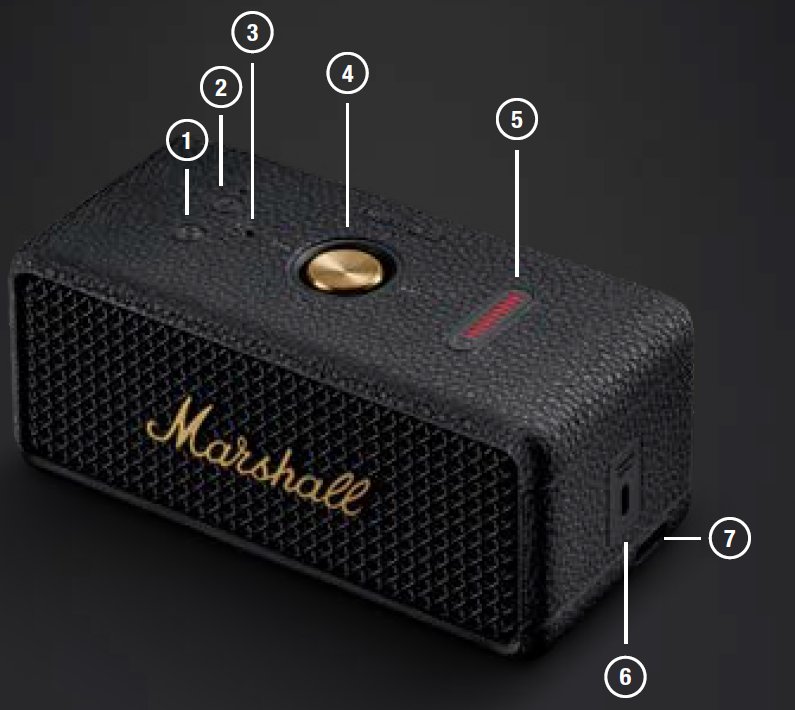
- POWER BUTTON
Push and hold the power button to turn the speaker on or off. - BLUETOOTH BUTTON
Push and hold the Bluetooth® button until the LED turns to a slow blue pulse to start pairing mode. - MICROPHONE
The microphone lets you use Emberton III as a speaker phone. Push the Bluetooth button to toggle the call between the speaker and our phone. - CONTROL KNOB
Use the control knob to manage your music playback, phone calls , and more. - BATTERY INDICATOR
The 10-segment battery indicator shows the battery charge. - USB-C POWER INPUT
Charge the speaker by plugging in a USB-C power source via the included USB-C lead. - STRAP ANCHOR
The strap anchor provides a fastening point for a carry strap or your personal charm (not included).
INSTRUCTIONS
GETTING STARTED
- Push and hold the Power button until the speaker turns on.
- Push and hold the Bluetooth button until the LED turns to a slow blue pulse.
- Select EMBERTON III from your audio device’s Bluetooth list.
USING THE CONTROL KNOB
- Play/pause – push once
- Skip backward/forward – push left/right
- Turn up/down the volume – push up/down
- Receive/end a call – push once
- Reject a call – push twice
CHARGING THE SPEAKER
Use the included USB-C cable to connect the speaker to a USB power source (5 V, 3 A). The USB-C power input port is located on the right side of the speaker.
Note: Always make sure that the speaker is completely dry before charging it.
BATTERY INDICATOR
The 10-segment battery indicator shows the battery charge. A rising animation indicates that the battery is charging.
CLEANING THE SPEAKER
Clean your speaker regularly to keep it fresh and last longer.
Unplug any leads before cleaning the speaker,, and make sure everything is completely dry before plugging in a USB charger.
The silicone sleeve can be removed and cleaned separately. Gently clean it and the leads with a lint-free cloth, slightly damp with either:
- water,
- 70% isopropyl alcohol, or
- 75% ethyl alcohol
Carefully clean the speaker mesh and openings with a dry and soft brush, or a cotton swab.
- Do not use any sharp or metal objects.
- Do not use compressed air.
- Do not use products containing bleach or hydrogen peroxide.
- Do not submerge the speaker in any cleaning agents.
- Do not rinse the speaker under running water.
BATTERY CARE GUIDE
Your speaker comes equipped with high-performance lithium-ion batteries with a life span that is affected by charging and usage. Follow the guidelines below to keep your battery in great condition for as long as possible.
- Avoid using fast chargers if possible. Fast charging causes stress on the battery and will degrade it.
- Avoid letting the battery drain completely or charging it when it’s already full. Try to keep the charge between 30% and 80%.
- If the speaker is stored for a long time, it is recommended to charge the speaker to about half-charge and then do a factory reset. Store the speaker in a cool, dark, and dry place.
- Avoid using or charging the speaker in hot and unventilated places, 45°C/113°F and above, such as in a parked car or by a window in direct sunlight.
- Avoid charging the battery at low temperatures, below 10°C/50°F and using the speaker below 0°C/32°F.
- Avoid strong mechanical shocks, such as dropping the speaker on a hard surface,s, as it might harm the batteries.
Download the Marshall Bluetooth app and select the battery preservation level that best suits you and your speaker.
PAIRING A NEW DEVICE
Emberton III can be connected with 2 devices at a time and remembers up to 8 previously paired devices. When in range, it will try to reconnect with the last connected device.
- Push and hold the power button until the speaker turns on.
- Push and hold the Bluetooth button until the LED turns to a slow blue pulse.
- Select EMBERTON III from your audio device’s Bluetooth list.
RESETTING THE SPEAKER
A factory reset will reset the speaker to its original settings, excluding any firmware updates.
Note: This will delete all user settings,s and the speaker will need to be set up again.
- Remove EMBERTON III, and EMBERTON III [LE] if present, from your sound device’s Bluetooth list.
- Ensure that the speaker is on.
- Push and hold the Bluetooth button for 7 seconds. The Bluetooth indicator turns quickly red, and the speaker restarts.
- The speaker has returned to its factory settings and is ready to be paired, see the section Getting started.
MARSHALL BLUETOOTH APP
Download the Marshall Bluetooth app to get the most out of your speaker and keep it up to date with the latest software.

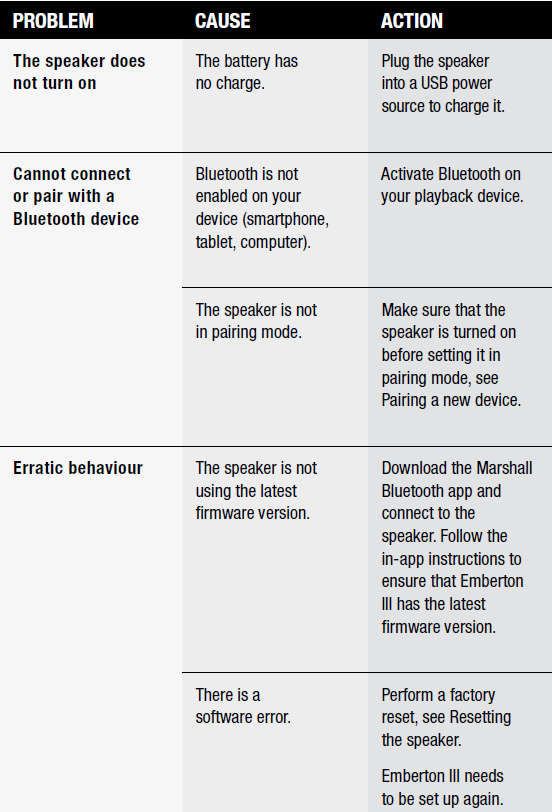
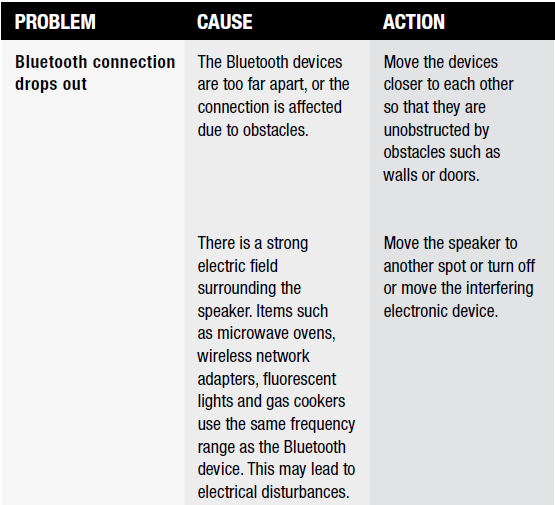
TROUBLESHOOTING
Pros & Cons
Pros
- Outstanding Sound Quality: Warm, vibrant Marshall signature sound with improved bass and crisp vocals even at high volumes
- Superior Battery Life: 32+ hours of playtime and fast charging
- Rugged Build: IP67 rating for dust and waterproofing—ideal for outdoor use
- Portable Design: Lightweight, compact, and easy to carry anywhere
- Bluetooth 5.3 LE & Auracast: Future-proof connectivity with multi-device audio sharing
- Built-in Microphone: Clear hands-free calling
- Value for Money: Premium features at a competitive price
Cons
- Limited EQ Customization: Only three preset EQ modes in the app, no manual adjustments
- No Physical Strap Included: Despite having a loop for a strap, one is not provided
- No Stack Mode: Unlike Emberton II, you cannot wirelessly pair multiple Emberton III units together
- Auracast Not Fully Available at Launch: Requires a future firmware update for full functionality
While the Marshall Emberton III Portable Loudspeaker is not perfect, it delivers excellent value and performance for its size and price, making it a strong contender against other compact Bluetooth speakers like the JBL Flip 6 and Ultimate Ears Wonderboom 3.
Customer Reviews
User feedback for the Marshall Emberton III Portable Loudspeaker is overwhelmingly positive, with many praising its robust sound quality, impressive battery life, and durable, travel-friendly design. Customers highlight the speaker’s ability to deliver clear, balanced audio at high volumes without distortion, as well as its stylish, iconic look. The IP67 rating and true 360° sound make it a favorite for outdoor activities, from beach trips to camping.
Common praises include the fast charging, intuitive controls, and the addition of a built-in microphone for calls. Some users note minor drawbacks, such as the lack of a physical strap, limited EQ customization, and the absence of a stack mode for multi-speaker setups. Star ratings consistently land in the 4.5 to 5 out of 5 range across major retailers, with testimonials like, “The best small Bluetooth speaker I’ve ever used” and “Worth every penny for the sound and battery life”.
For those seeking a reliable, stylish, and powerful portable speaker, the Marshall Emberton III Portable Loudspeaker is highly recommended—especially for users who prioritize sound quality, durability, and battery life in a compact package.
Purchase recommendation: Ideal for music enthusiasts, travelers, and anyone needing a tough, great-sounding Bluetooth speaker for daily use. Check for firmware updates to unlock Auracast and future features.
Faqs
How do I set up the Marshall Emberton III Portable Loudspeaker for the first time?
What should I do if my Marshall Emberton III Portable Loudspeaker is not connecting via Bluetooth?
Can I use the Marshall Emberton III Portable Loudspeaker with multiple devices at the same time?
How do I optimize sound performance on the Marshall Emberton III Portable Loudspeaker?
What is the battery life and charging time for the Marshall Emberton III Portable Loudspeaker?
Is the Marshall Emberton III Portable Loudspeaker waterproof and dustproof?
How do I maintain and care for my Marshall Emberton III Portable Loudspeaker?
What features make the Marshall Emberton III Portable Loudspeaker stand out from other portable speakers?
More marshall manuals
- Setup & Pairing: Marshall Bromley 750 Party Speaker User Manual
- Setup & Pairing: Marshall Willen II Portable Loudspeaker User Manual
- Setup: Marshall Stanmore Multi-Room Speaker User Manual
- Setup: Marshall Tufton Portable Stereo Loudspeaker User Manual
- Setup: Marshall Woburn Multi-Room Speaker User Manual
- Setup: Marshall Kilburn II Portable Stereo Loudspeaker User Manual
Leave a Comment