
Setup: Marshall Kilburn II Portable Stereo Loudspeaker User Manual
Content
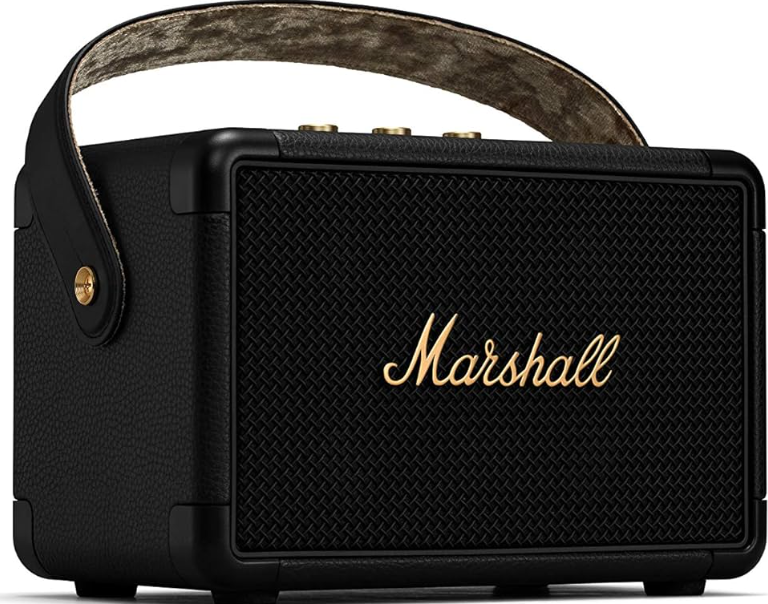
Marshall Kilburn II Portable Stereo Loudspeaker
Introduction
The Marshall Kilburn II Portable Stereo Loudspeaker is a powerful and stylish Bluetooth speaker designed for music enthusiasts on the go. With its iconic Marshall design, this speaker offers a unique blend of vintage aesthetics and modern technology. It features Bluetooth 5.0 with aptX for high-quality audio streaming, allowing users to connect two devices simultaneously. The Kilburn II boasts a stereo channel configuration with a total power output of 36W, driven by three independent Class D amplifiers. It includes two 20 mm dome tweeters and a single 4" woofer, providing a frequency response of 52 Hz to 20,000 Hz.
The speaker is perfect for outdoor gatherings, house parties, or everyday use. It offers 20+ hours of playtime on a single charge and is IPX2-rated for water resistance, making it a durable companion for any adventure. The estimated price range for the Marshall Kilburn II is around $250-$300, and it is widely available at major electronics retailers.
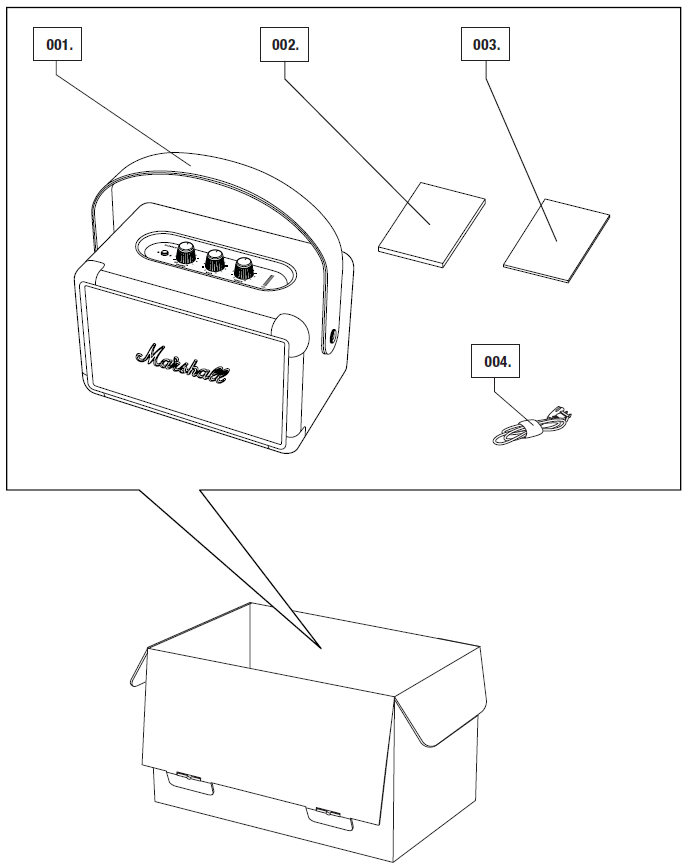
BOX CONTENTS
- Marshall Kilburn II portable stereo loudspeaker
- Quick start guide
- Important safety instructions
- Power cord
TECHNICAL INFORMATION
Acoustic specification
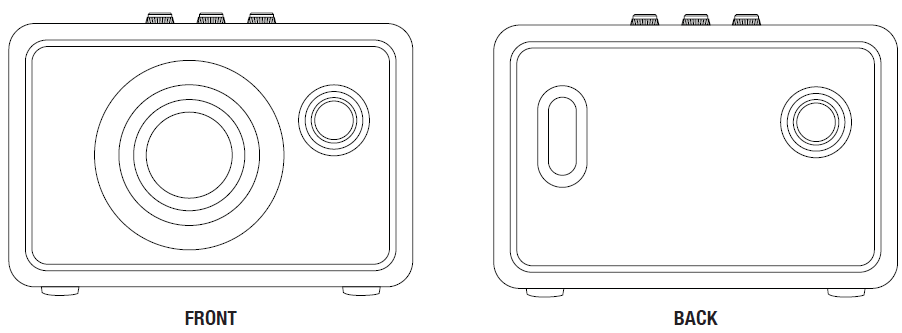
Portable stereo loudspeaker with bass reflex system
- Digital class D amplifiers: 2 x 8 W + 1 x 20 W
- Tweeters: 2 x 20 mm dome tweeters
- Woofer: 1 x 4" woofer
Bass and treble tone controls
- Frequency response: 52–20,000 Hz ±6 dB
- Maximum sound pressure level: 100.4 dB SPL @ 1 m
Connectivity:
- Bluetooth®: Bluetooth 5.0 with Qualcomm aptX™
- AUX: 3.5 mm stereo jack
Technical information
- Mains input voltage: 100–240 V~
- Mains frequency: 50–60 Hz
- Size: 243 x 162 x 140 mm
- Weight: 2.5 kg
Battery
- Battery type: Built-in, rechargeable Li-ion battery
- Playtime: 20+ h
- Charging time: 2.5 h
Overview
CHARGING THE INTERNAL BATTERY
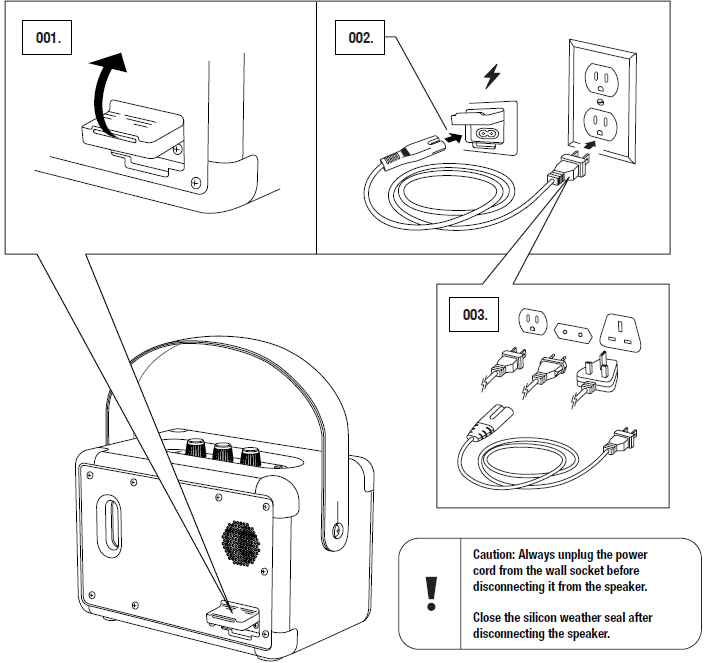
Important: Always ensure that the power cable, plug, and speaker are compatible with your mains supply and wall socket.
The Kilburn II is equipped with an internal battery with a playing time of more than 20 hours at mid volume. Charging the battery from empty to full charge takes approximately 2.5 hours.
- Gently pull open the silicone weather seal on the back of the speaker.
- Connect the power cord to the power jack on the speaker.
- Connect the power plug to the wall socket. The battery charge is shown on the battery level indicator.
TURNING THE KILBURN II ON/OFF
The volume knob doubles as an on/off control.
- Turn the volume knob clockwise to the desired volume, and the speaker turns on.
- The battery level indicator shows the battery charge.
- Turn the volume knob fully counter-clockwise until you hear a click to turn off the speaker.
- All indicators turn off.

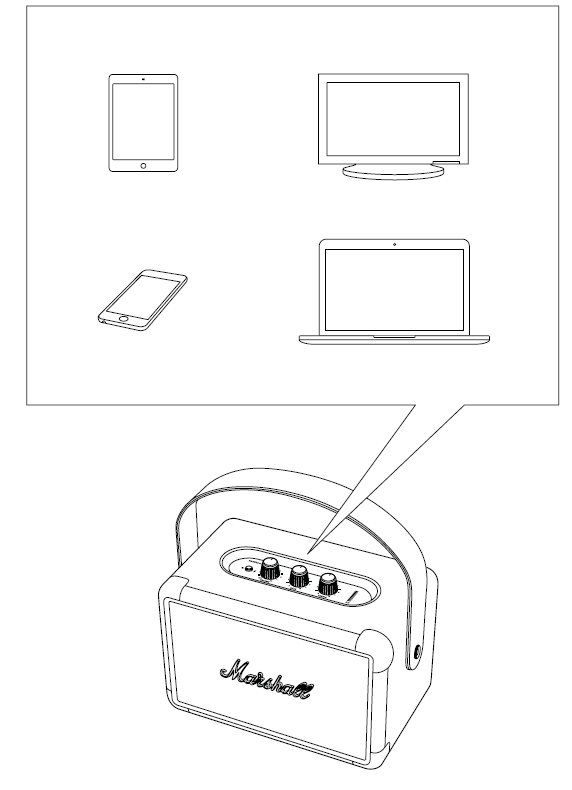
MANY WAYS TO CONNECT
There are many ways to connect to your Kilburn II. The connection can be wireless via Bluetooth or by using a cable with a 3.5 mm stereo plug.
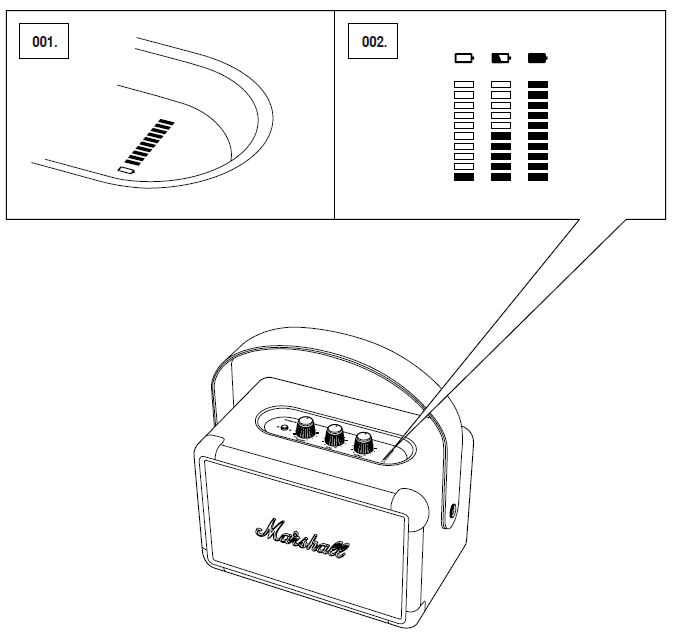
BATTERY LEVEL INDICATOR
The battery level indicator shows the battery charge of the Kilburn II. The indicator is dimmed during normal operation to save battery power. Turning any knob will make the indicator light up.
When charging the battery, the indicator displays the battery charge with a rising animation.
STANDBY MODE
If the Kilburn II is left unused for 10 minutes, the speaker saves battery charge by going into standby. In this mode, all indicators are off, and the speaker does not respond to Bluetooth connection.
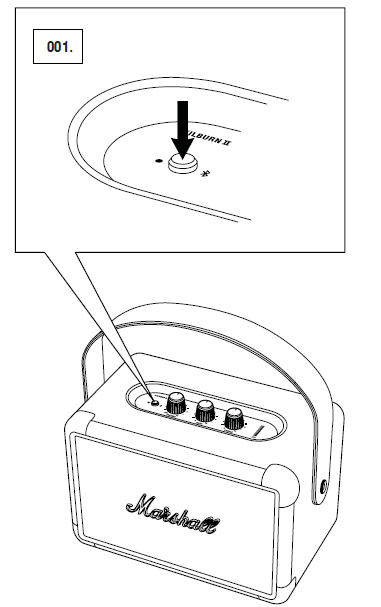
Push the Bluetooth button to wake the speaker from standby mode.
PERFORMING A FACTORY RESET
A factory reset will return the speaker to its original settings, excluding any firmware updates.
Note: This will delete all user settings, and the speaker will need to be set up again.
- Ensure that the speaker is on.
- Push and hold the Bluetooth button for 7 seconds. All indicators turn off, and the speaker restarts.
- Remove KILBURN II from your audio device’s Bluetooth list before pairing again.
TROUBLESHOOTING
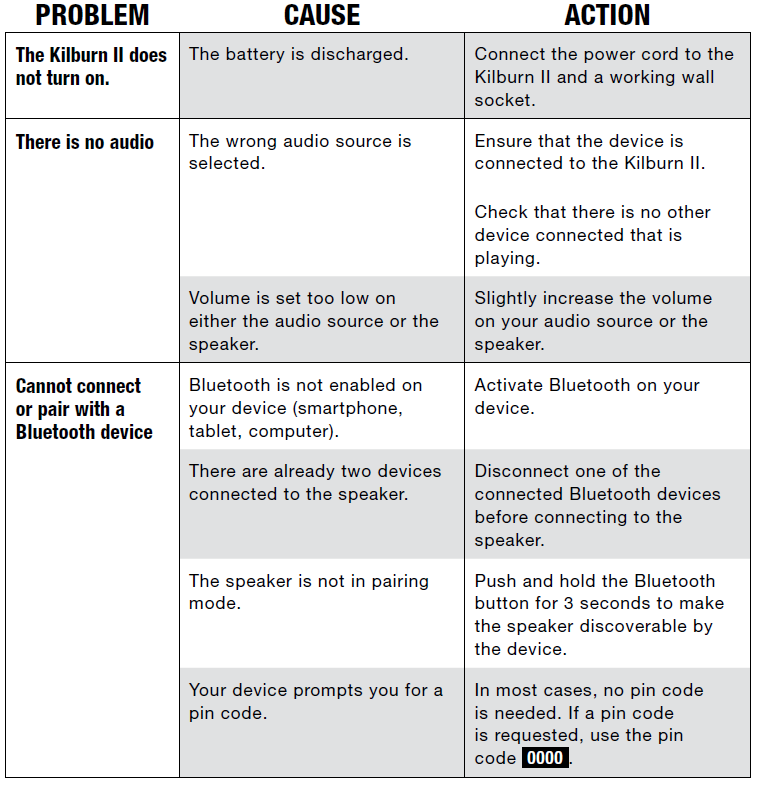
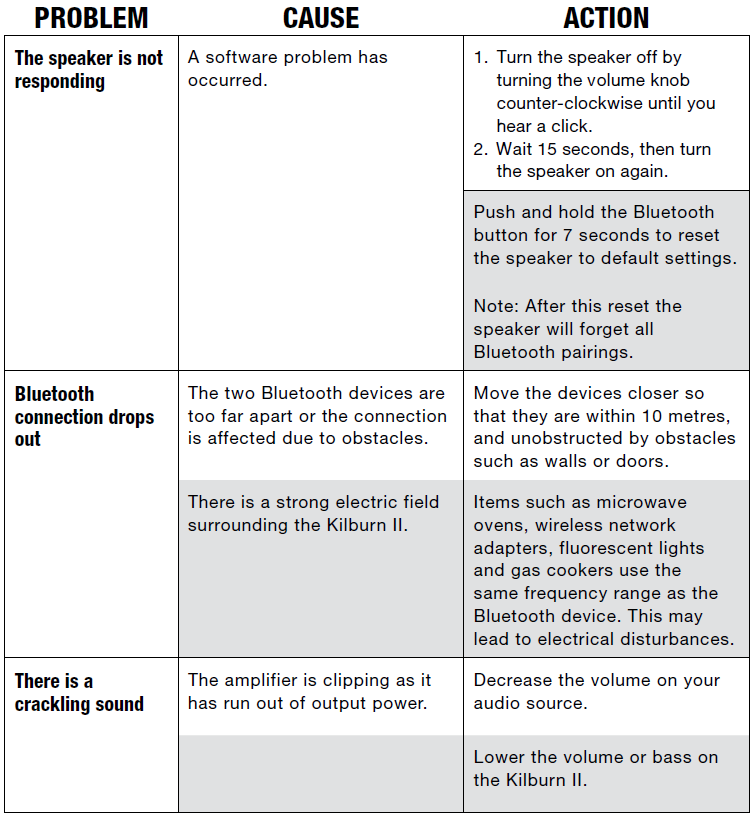
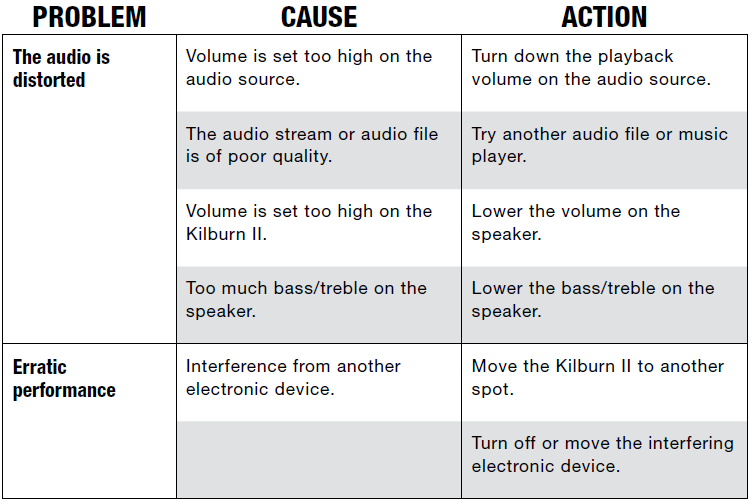
Notes:
A Bluetooth device could cause audio-related or technical faults, depending on use, in the following cases:
- When some part of the body is in contact with the receiving/transmitting system for the Bluetooth device or the Kilburn II.
- Electrical variations due to obstacles in the form of walls, corners, etc.
- Exposure to electrical disruptions from devices within the same frequency band, for example, medical equipment , microwave ovens,s and wireless networks.
This wireless device may cause electrical disruptions during use.
Pros and Cons of the Marshall Kilburn II
Pros
- Powerful Sound Output: The Kilburn II delivers robust and clear sound with deep bass, making it ideal for large gatherings.
- Long Battery Life: Offers up to 20 hours of playtime on a single charge, perfect for extended use.
- Water Resistance: IPX2 rating provides protection against splashing water, enhancing durability.
- Iconic Design: Features a vintage-inspired design with a solid metal grille, adding to its aesthetic appeal.
Cons
- Weight and Size: Weighs about 2.5 kg, which might be heavy for some users, though it's compact and portable.
- No App Control: Users must rely on Bluetooth settings from their devices, which can be inconvenient for some.
- Volume Control: Analog volume knobs can be adjusted directly on the speaker or via connected devices.
Customer Reviews and Feedback
Users praise the Marshall Kilburn II for its excellent sound quality and durability. Many appreciate its vintage design and the versatility of its True Stereophonic sound, which provides a 360° listening experience. Common complaints include the lack of app control and the need for manual volume adjustments. The speaker has a 4.3-star rating on platforms like Croma, with users recommending it for its value for money and performance.
Conclusion
The Marshall Kilburn II Portable Stereo Loudspeaker is a top choice for those seeking a combination of style, sound quality, and portability. With its robust performance and durable design, it's ideal for both indoor and outdoor use. For those looking for a reliable, high-quality Bluetooth speaker, the Marshall Kilburn II is an excellent option in the $250-$300 price range.
Faqs
How do I set up marshall Kilburn II Portable Stereo Loudspeaker for the first time?
What should I do if marshall Kilburn II Portable Stereo Loudspeaker is not working properly?
Can I use marshall Kilburn II Portable Stereo Loudspeaker with my TV?
How often should I maintain marshall Kilburn II Portable Stereo Loudspeaker?
What are the key features that make marshall Kilburn II Portable Stereo Loudspeaker different?
Can I use marshall Kilburn II Portable Stereo Loudspeaker while it's charging?
How do I optimize the sound quality of marshall Kilburn II Portable Stereo Loudspeaker?
Is marshall Kilburn II Portable Stereo Loudspeaker compatible with my smartphone?
More marshall manuals
- Setup: Marshall Tufton Portable Stereo Loudspeaker User Manual
- Setup & Pairing: Marshall Emberton II Portable Loudspeaker User Manual
- Setup & Pairing: Marshall Willen II Portable Loudspeaker User Manual
- Setup: Marshall Willen Portable Loudspeaker User Manual
- Setup: Marshall Emberton III Portable Loudspeaker User Manual
- Setup & Pairing: Marshall Stanmore II Speaker User Manual
Leave a Comment