
Setup & Pairing: Marshall Emberton II Portable Loudspeaker User Manual
Content
Marshall Emberton II Portable Loudspeaker
Introduction
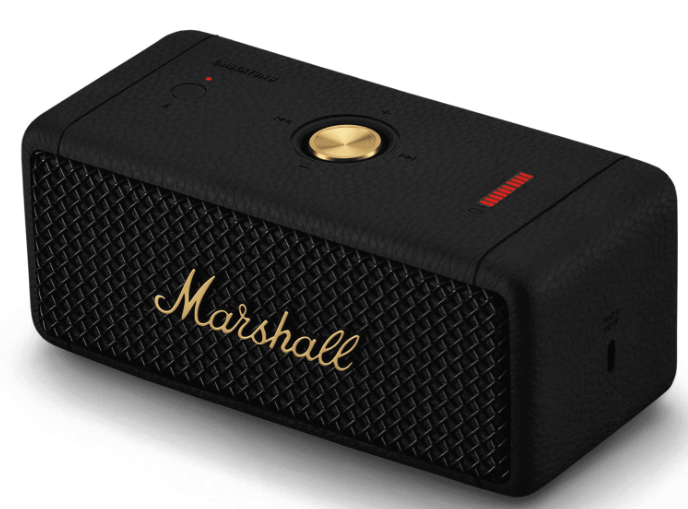
The Marshall Emberton II Portable Loudspeaker is a compact, rugged, and stylish Bluetooth speaker designed for music lovers who demand both portability and powerful sound. Built by Marshall, a brand synonymous with rock ‘n’ roll heritage, the Emberton II delivers signature audio quality in a package that’s easy to carry anywhere, anytime.
This speaker stands out with its True Stereophonic technology, offering immersive 360° sound that fills any room or outdoor space—every spot is a sweet spot, thanks to expertly separated stereo recordings. With over 30 hours of playtime on a single charge, a quick 3-hour recharge, and an IP67-rated dustproof and waterproof build, the Emberton II is built for adventure, whether you’re at the beach, park, campsite, or backyard party.
The Emberton II’s iconic design features a textured silicone sleeve, solid metal grille, and the legendary Marshall script, making it as much a statement piece as a music device. Its target audience includes travelers, outdoor enthusiasts, and anyone seeking a reliable, high-quality portable speaker with a classic look and modern features. Priced around £149.99 (approximately $170–$180 USD), it’s widely available at major electronics retailers and online stores.
If you want a portable speaker that combines durability, long battery life, and the unmistakable Marshall sound, the Emberton II is a top contender in its class.
DEVICE LAYOUT
GENERAL
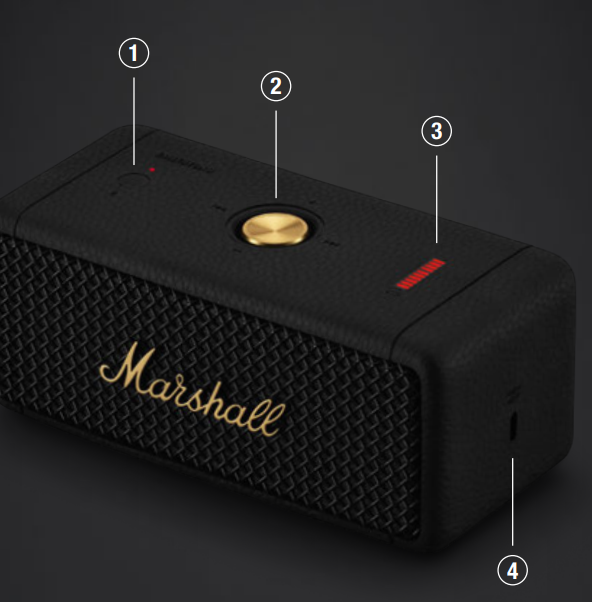
BLUETOOTH BUTTON
Push and hold the Bluetooth® button until the LED turns to a slow red pulse to start pairing mode.
CONTROL KNOB
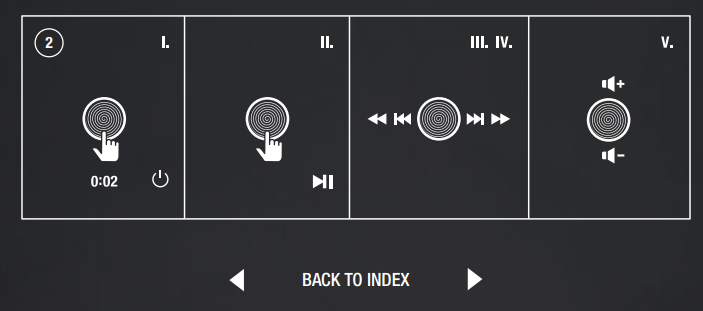
- Push and hold for 2 seconds to turn on/off. Push once to play/pause.
- Push right/left to skip forward/back.
- Hold right/left to fast forward/rewind.
- Hold upwards/downwards to adjust the volume.
BATTERY INDICATOR
The 10-segment Battery indicator shows the battery charge with a steady light,, and a rising animation indicates charging.
USB-C POWER INPUT
Charge the speaker by plugging it into a USB power source.
BLUETOOTH PAIRING
- Push and hold the control knob until the speaker turns on.
- Push and hold the Bluetooth button until the LED turns to a slow red pulse.
- Select EMBERTON II from your audio device’s Bluetooth list.
PERFORMING A FACTORY RESET
- A factory reset will reset the speaker to its original settings, excluding any firmware updates.
- Note: This will delete all user settings, gs, and the speaker will need to be set up again.
- Ensure that the speaker is on.
- Push and hold the Bluetooth button for 7 seconds. All indicators turn , off and the speaker restarts.
- Remove EMBERTON II from your audio device’s Bluetooth list before pairing again.
CLEANING THE SPEAKER
- Clean your speaker regularly to keep it fresh and last longer.
- Unplug any leads before cleaning the speaker, and make sure everything is completely dry before plugging in any USB power source.
- The silicone sleeve can be removed and cleaned separately. Use a disinfectant wipe or a lint-free cloth, slightly damp with 70% isopropyl alcohol or 75% ethyl alcohol, to gently clean silicon parts. Dry them with a towel before putting them back on the speaker.
- Carefully clean the speaker mesh and openings with a dry and soft brush or a cotton swab.
- Do not use any sharp or metal objects.
- Do not use compressed air.
- Do not use products containing bleach or hydrogen peroxide.
- Do not submerge the speaker in any cleaning agents.
BATTERY CARE GUIDE
Your speaker comes equipped with a high-performance lithium-ion battery, and the life span is affected by charging and usage. Follow the guidelines below to keep your battery in great condition for as long as possible.
- Avoid using fast chargers if possible. Fast charging causes stress on the battery and will degrade it.
- Avoid charging the battery when it is already full or letting it drain completely. Try keeping the charge between 30% and 80%.
- If the speaker is stored for a long time, do so with a half-charged battery and in a cool, dark, and dry place.
- Do not use or charge the speaker in hot and unventilated places, 45°C/113°F and above, such as in a parked car or by a window in direct sunlight.
- Avoid charging the battery at low temperatures, below 10°C/50°F and using the speaker below 0°C/32°F.
- Avoid strong mechanical shocks, such as dropping the speaker on a hard surface,s as it might damage the battery.
STACK MODE
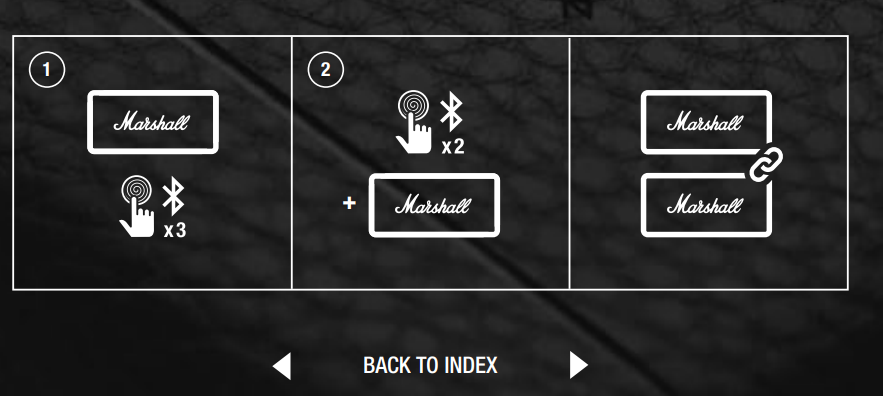
Connect two or more Emberton II speakers in a Stack session for a bigger sound. Play anything on the main speaker, er and all speakers in the session will play in sync. You can adjust the volume on any individual speaker for the perfect balance.
MAIN SPEAKER
Triple-press the Bluetooth button to start or end a Stack session. The LED starts to blink until another speaker joins the session.
ADDITIONAL SPEAKER
Double-press the Bluetooth button on any speaker you want to add to the session. The LED starts to blink until the speaker has joined a session. While in a session, the speaker will disconnect from any previously connected audio device and will try to reconnect after leaving the session.
To remove a speaker from the session, double-press the Bluetooth button on that speaker.
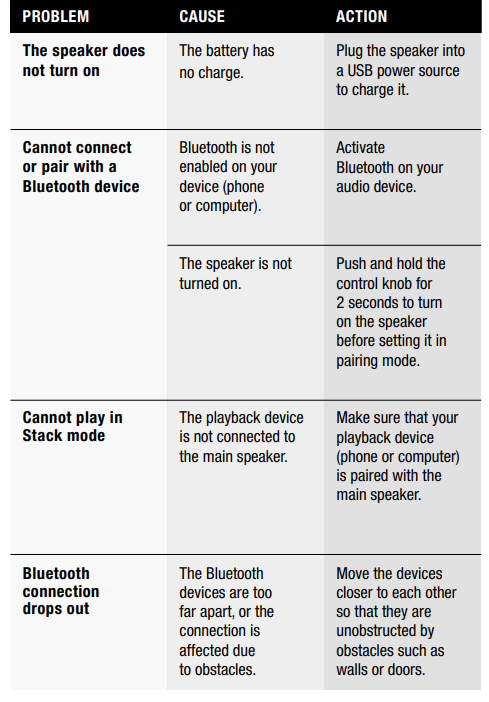
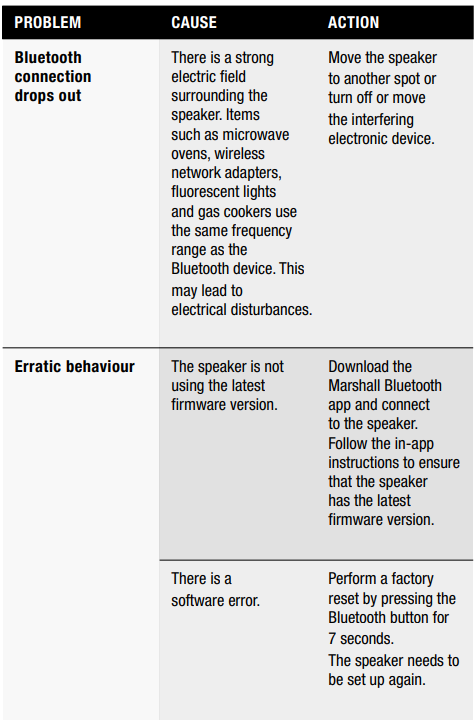
TROUBLESHOOTING
Marshall Emberton II Portable Loudspeaker: Technical Specifications
- Drivers: Two 2” 10W full-range drivers, two passive radiators for enhanced bass
- Frequency Range: 60Hz – 20,000Hz
- Output Power: 20W total (10W per channel)
- Battery Life: 30+ hours on a single charge
- Charging Time: 3 hours to full charge
- Bluetooth: 5.0 or 5.1 (model dependent), wireless range not specified
- Durability: IP67 dustproof and waterproof (submersible up to 1 meter for 30 minutes)
- Weight: 0.7 kg (1.5 lbs)
- Dimensions: 68 x 160 x 76 mm (2.68 x 6.30 x 2.99 in)
- Controls: Multidirectional control knob for power, playback, and volume; dedicated Bluetooth button; LED battery indicator
- Special Features: True Stereophonic 360° sound, Stack Mode (pair multiple speakers), sustainable build (50% recycled plastic, 100% PVC-free)
- App Support: Marshall Bluetooth app for firmware updates and EQ presets (limited additional features)
Comparison: The Marshall Emberton II Portable Loudspeaker outperforms many competitors in its class with superior battery life, ruggedness, and the unique 360° sound. Compared to the JBL Flip 6, it’s slightly heavier but offers a more distinctive rock-inspired design and longer playtime[5]. It’s an excellent choice for those who prioritize both style and substance in a portable speaker.
Pros & Cons of the Marshall Emberton II Portable Loudspeaker
Pros
- Exceptional Battery Life: 30+ hours of playtime make it ideal for extended outings
- Rugged and Waterproof: IP67 rating ensures durability in any environment
- Immersive 360° Sound: True Stereophonic technology delivers consistent audio from any angle
- Iconic Design: Recognizable Marshall styling with premium materials
- Quick Charging: Fully recharges in just 3 hours
- Stack Mode: Connect multiple Emberton II speakers for a bigger sound
- Sustainable Build: Made with 50% recycled plastic and 100% PVC-free materials
Cons
- Vocal Clarity at High Volumes: Vocals can lose some clarity when the volume is turned up
- No Backlit Controls: Buttons are not illuminated, which can be inconvenient in low light
- Limited App Features: The Marshall Bluetooth app offers minimal EQ and functionality
- Heavier Than Some Competitors: At 0.7 kg, it’s not the lightest in its class.
- No Aux Input: Bluetooth-only connectivity; no wired audio option
Value for Money: The Marshall Emberton II Portable Loudspeaker is competitively priced for its battery life, durability, and sound quality. It’s a great investment for those who want a stylish, rugged, and reliable portable speaker, though alternatives like the JBL Flip 6 may appeal to those seeking ng lighter weight or more app features
Customer Reviews: Marshall Emberton II Portable Loudspeaker
The Marshall Emberton II Portable Loudspeaker enjoys strong user satisfaction, reflected in its 4.8 out of 5 stars from over 600 reviews at major retailers.s Customers consistently praise its robust build, impressive battery life, and the distinctive Marshall sound profile—especially for rock, indie, and pop music. Many note that the 360° audio projection works well for outdoor gatherings and small parties, with sound that belies the speaker’s compact size.
Common complaints include the lack of backlit controls, occasional vocal muddiness at maximum volume, and limited app functionality. However, most users agree that the Emberton II offers excellent value for its price, with many recommending it as a go-to portable speaker for travel and outdoor use.
Testimonials frequently mention the speaker’s ability to withstand rain, sand, and rough handling, making it a favorite for beach trips and camping. The classic design and sustainable materials also receive positive feedback from environmentally conscious buyers[2]. Overall, if you need a dependable, great-sounding, and stylish portable speaker, the Marshall Emberton II is highly recommended—just be aware of its minor limitations if you prioritize vocal clarity at high volumes or advanced app features.
Faqs
How do I set up my Marshall Emberton II Portable Loudspeaker for the first time?
What should I do if my Marshall Emberton II Portable Loudspeaker won’t connect to Bluetooth?
Can I connect multiple Marshall Emberton II Portable Loudspeakers together for amplified sound?
What is the IP67 rating on the Marshall Emberton II Portable Loudspeaker, and how does it protect the device?
How long does the battery last on the Marshall Emberton II Portable Loudspeaker, and how do I charge it efficiently?
How can I optimize the sound quality of my Marshall Emberton II Portable Loudspeaker for different music genres?
What maintenance steps should I follow to keep my Marshall Emberton II Portable Loudspeaker in good condition?
Is the Marshall Emberton II Portable Loudspeaker compatible with all Bluetooth devices, including iPhones and Android phones?
More marshall manuals
- Setup: Marshall Kilburn II Portable Stereo Loudspeaker User Manual
- Setup: Marshall Willen Portable Loudspeaker User Manual
- Setup: Marshall Tufton Portable Stereo Loudspeaker User Manual
- Setup & Pairing: Marshall Stanmore II Speaker User Manual
- Setup & Pairing: Marshall Willen II Portable Loudspeaker User Manual
- Setup: Marshall Acton II Bluetooth Speaker User Manual
Leave a Comment