
Setup & Pairing: Marshall Stanmore II Speaker User Manual
Content
Marshall Stanmore II Speaker
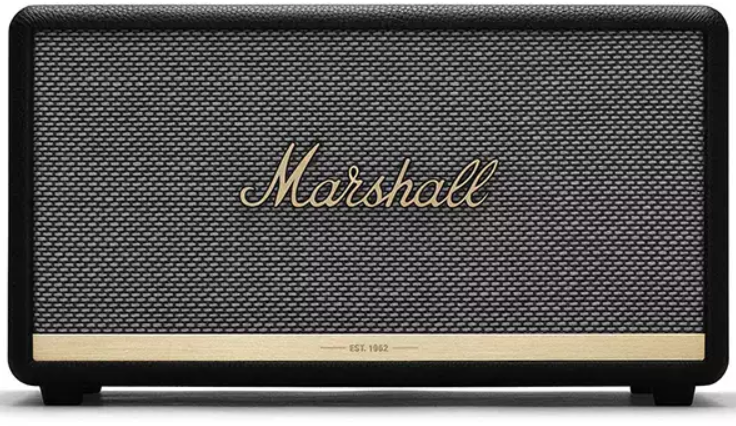
Introduction to the Marshall Stanmore II Speaker
The Marshall Stanmore II Speaker stands out as a versatile, high-performance Bluetooth speaker designed to deliver larger-than-life sound suitable for any room size, from cozy bedrooms to spacious living areas. With a powerful 80-watt output driven by a 50-watt Class D amplifier for the woofer and two 15-watt Class D amplifiers for the tweeters, this speaker produces clean, precise audio with rich bass and clear mids that embody the iconic Marshall sound heritage. Its Bluetooth 5.0 connectivity with aptX technology ensures lossless wireless streaming up to 30 feet, allowing seamless pairing with smartphones, tablets, and computers.
The Stanmore II features a classic Marshall design with a textured vinyl covering, a salt & pepper fret, and the distinctive script logo on a sturdy wooden frame—highlighting the brand’s legacy dating back to 1962. Users can customize the sound profile through the Marshall Bluetooth app or manual analog controls for bass, treble, and volume on the top panel. Additionally, the speaker supports wired inputs via 3.5 mm and RCA ports for flexible connectivity options.
Targeted at audiophiles and casual listeners alike who seek a stylish, well-rounded speaker capable of filling any room with immersive sound, the Stanmore II is ideal for home entertainment, parties, and everyday music enjoyment. It typically retails within the range of €259 to €369, with wide availability online and through authorized retailers.
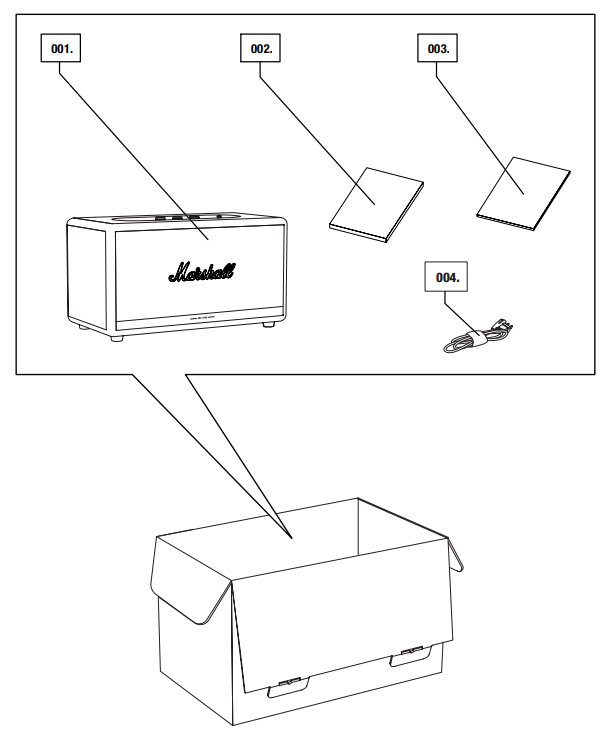
BOX CONTENTS
- MARSHALL STANMORE II WIRELESS HOME Bluetooth® SPEAKER
- QUICK START GUIDE
- IMPORTANT SAFETY INSTRUCTIONS
- MAINS LEAD
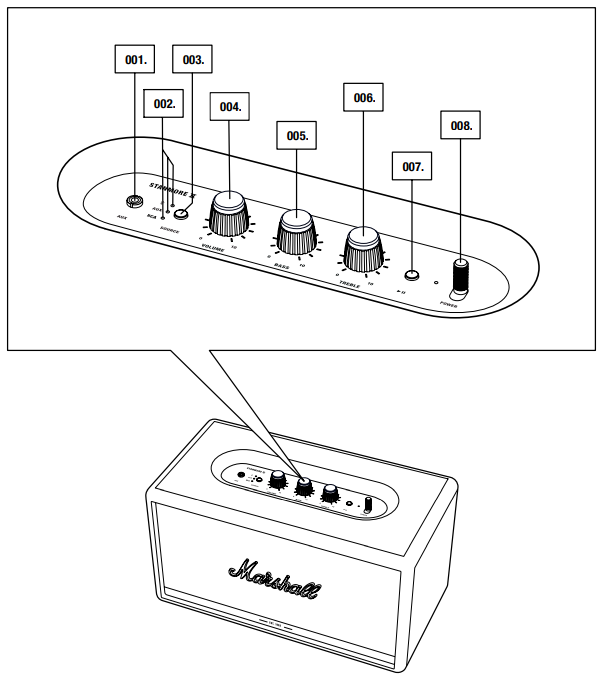
- AUX INPUT FOR 3.5 mm JACK
- SOURCE INDICATORS
- SOURCE BUTTON
- VOLUME KNOB
- BASS KNOB
- TREBLE KNOB
- PLAY/PAUSE BUTTON
- POWER LEVER
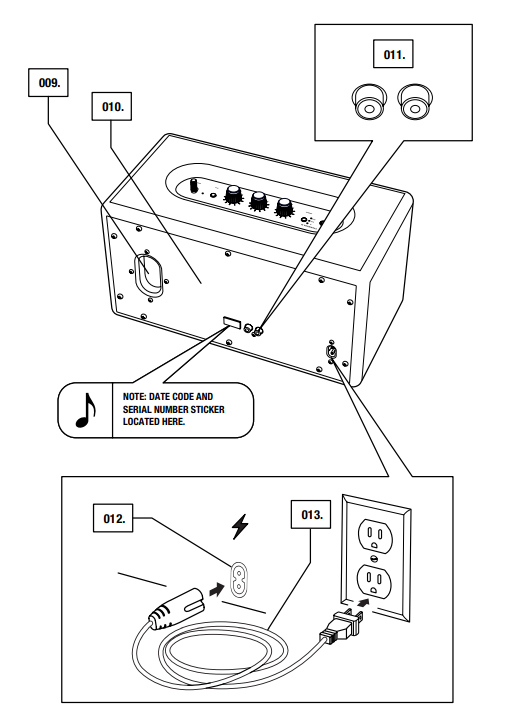
- BASS PORT
- BACKPLATE
- RCA INPUT (LEFT AND RIGHT)
- MAINS INPUT
- MAINS LEAD
SETTING UP THE STANMORE II
CONFIGURE THE SPEAKER WITH THE MARSHALL BLUETOOTH® APP TO GET THE MOST OUT OF IT. THE APP IS AVAILABLE FROM THE APP STORE AND GOOGLE PLAY.
- DOWNLOAD THE MARSHALL BLUETOOTH® APP AND FOLLOW THE IN-APP INSTRUCTIONS.

SELECTING AUDIO SOURCE
THERE ARE MANY WAYS TO CONNECT TO YOUR STANMORE II, EITHER WIRELESSLY OR BY CABLE.
- WIRELESS Bluetooth CONNECTION
- AUX - 3.5 mm STEREO JACK
- RCA - DOUBLE RCA (LEFT AND RIGHT) JACKS
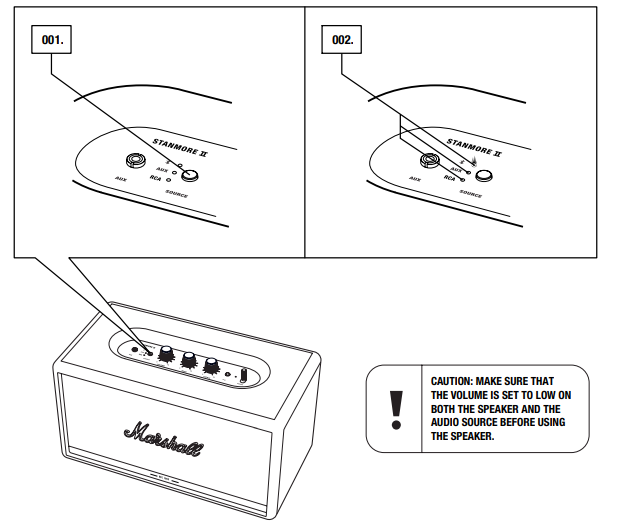
- PUSH THE SOURCE BUTTON TO TOGGLE BETWEEN Bluetooth, AUX, AND RCA AUDIO SOURCE.
- A LIT INDICATOR SHOWS WHICH SOURCE IS SELECTED.
THE SOURCE CAN ALSO BE SELECTED FROM THE MARSHALL BLUETOOTH® APP.
CONNECTING VIA Bluetooth (PAIRING)
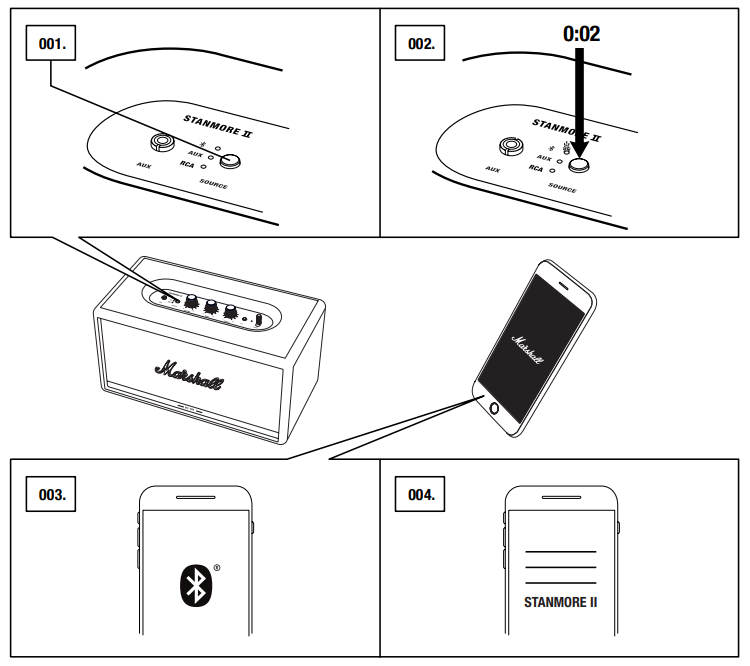
- SELECT Bluetooth AS THE INPUT. PUSHING THE SOURCE BUTTON TOGGLES THE INPUT SOURCES.
- PUSH AND HOLD THE SOURCE BUTTON FOR 2 SECONDS.
THE Bluetooth INDICATOR STARTS TO BLINK. - ENABLE Bluetooth ON YOUR DEVICE (SMARTPHONE, TABLET, COMPUTER).
- SELECT STANMORE II FROM THE Bluetooth LIST AND ACCEPT PAIRING. THE Bluetooth INDICATOR ON THE SPEAKER STOPS BLINKING AND REMAINS LIT WHEN THE UNITS ARE CONNECTED.
STANMORE II CAN BE CONNECTED TO TWO Bluetooth DEVICES AT THE SAME TIME. PLAYING A CONNECTED Bluetooth DEVICE WILL MAKE IT THE SELECTED AUDIO SOURCE, PAUSING ANY PREVIOUSLY PLAYED AUDIO ON THE SECOND DEVICE.
CONNECTING VIA AUX INPUT
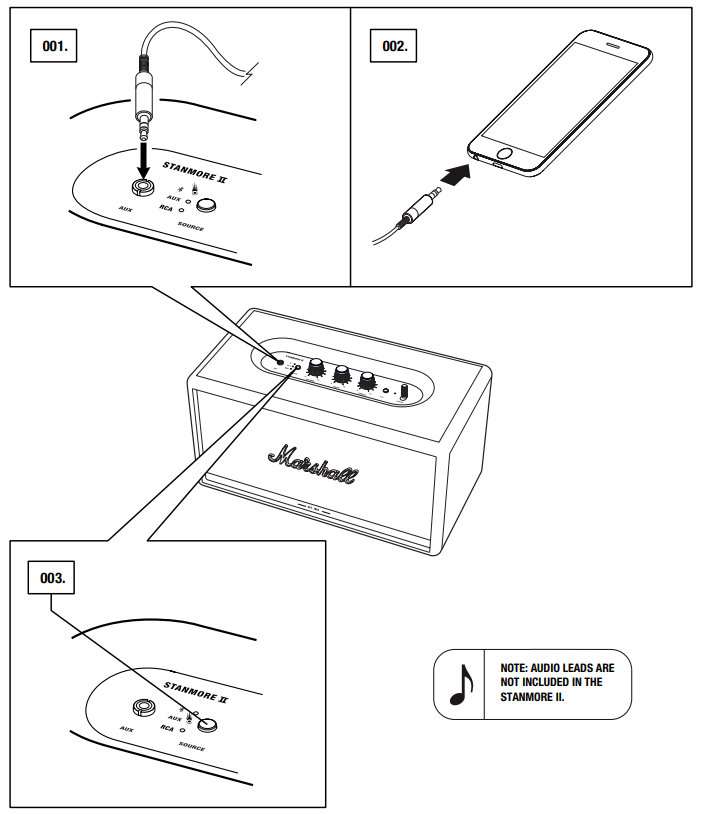
- CONNECT A 3.5 mm STEREO JACK TO THE INPUT LABELLED AUX ON THE TOP OF THE SPEAKER.
- CONNECT THE OTHER END OF THE LEAD TO THE AUDIO OUTPUT ON YOUR AUDIO SOURCE.
- SELECT AUX AS THE INPUT. PUSHING THE SOURCE BUTTON TOGGLES THE INPUT SOURCES.
CONNECTING VIA RCA INPUT
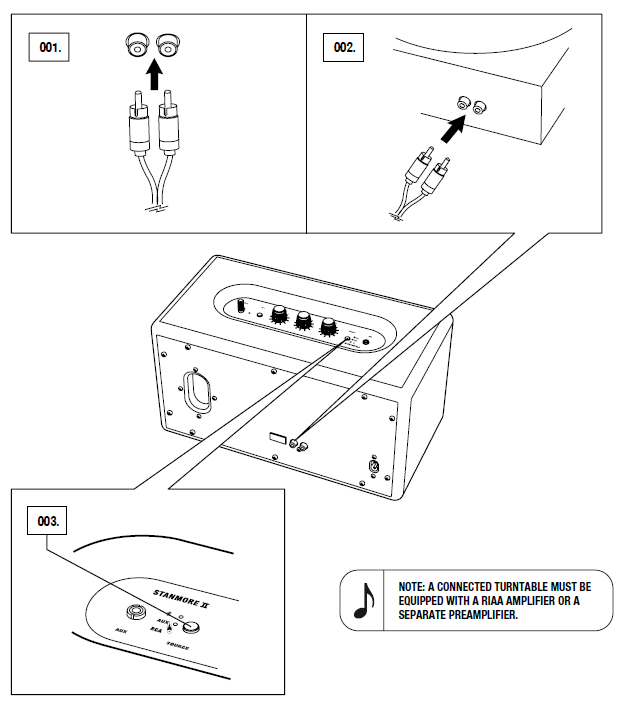
- CONNECT A LEAD WITH RCA JACKS TO THE INPUTS LABELLED RCA ON THE BACK OF THE SPEAKER.
- CONNECT THE OTHER END OF THE LEAD TO THE OUTPUT ON YOUR AUDIO SOURCE.
- SELECT RCA AS THE INPUT. PUSHING THE SOURCE BUTTON TOGGLES THE INPUT SOURCES.
TECHNICAL INFORMATION
ACOUSTIC SPECIFICATION
- • STEREO LOUDSPEAKER WITH BASS REFLEX SYSTEM
• DIGITAL CLASS D AMPLIFIERS: 2 x 15 W + 1 x 50 W
• TWEETERS: 2 x ¾" dome tweeters
• WOOFER: 1 x 5¼" woofer
• BASS AND TREBLE TONE CONTROLS
• FREQUENCY RESPONSE: 50–20,000 Hz ±6 dB
• MAXIMUM SOUND PRESSURE LEVEL: 101 dB SPL @ 1 m
CONNECTIVITY
- • Bluetooth®: Bluetooth 5.0 with Qualcomm® aptX™
• AUX: 3.5 mm stereo jack
• RCA: RCA (left and right)
TECHNICAL INFORMATION
- • MAINS INPUT VOLTAGE: 100–240 VAC
• MAINS FREQUENCY: 50–60 Hz
• SIZE: 350 x 195 x 185 mm
• WEIGHT: 4.65 kg
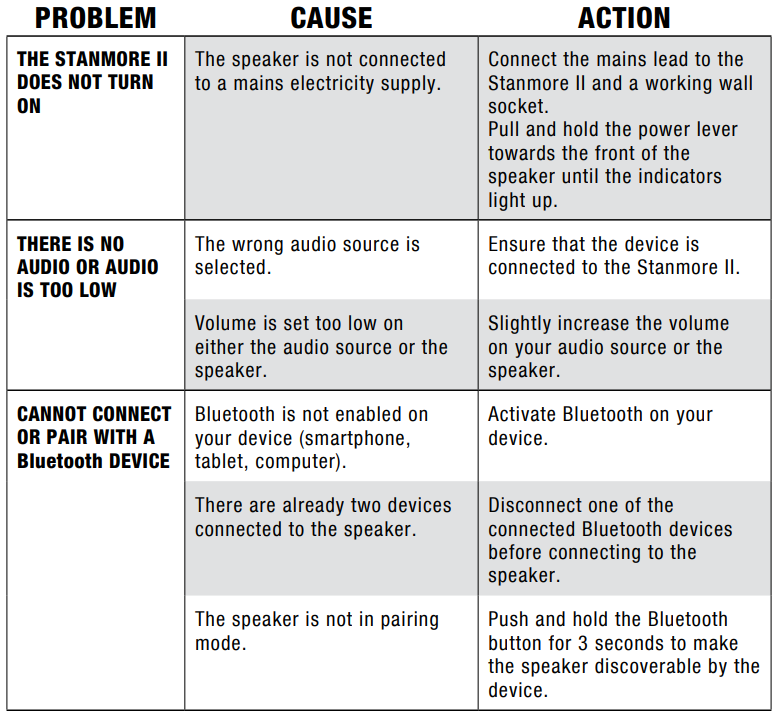
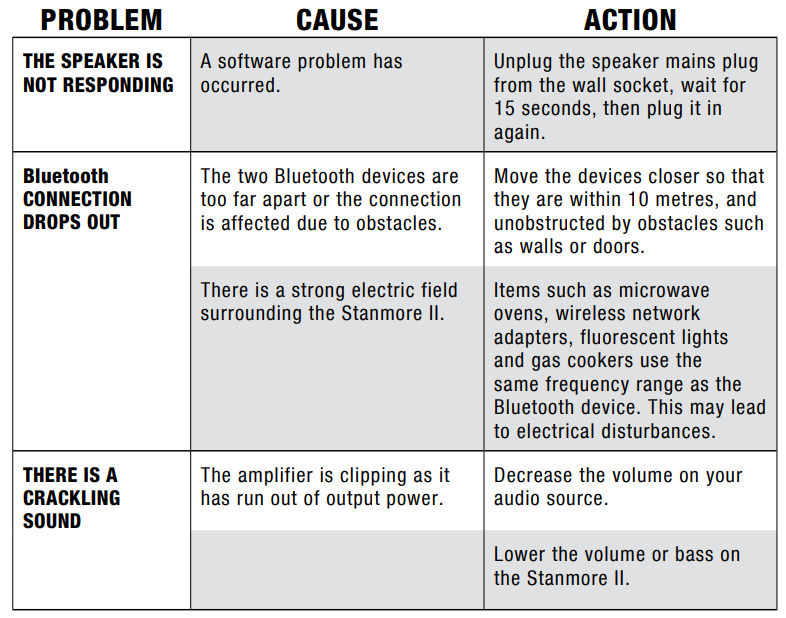
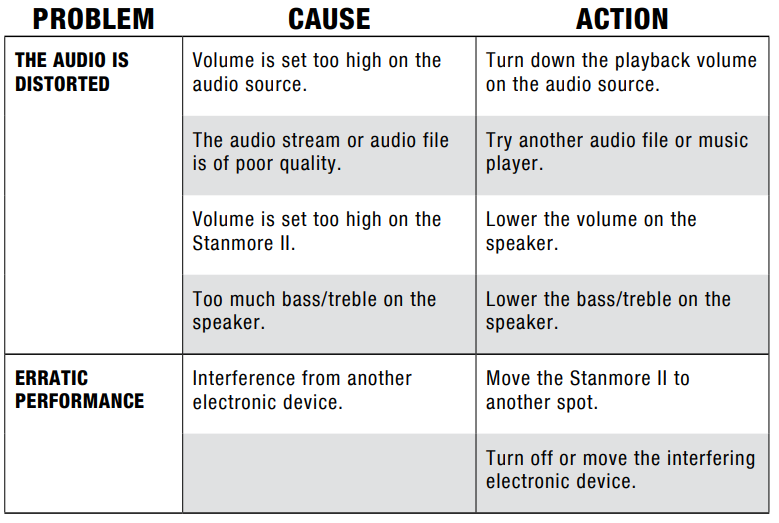
TROUBLESHOOTING
Pros and Cons of the Marshall Stanmore II Bluetooth Speaker
- Pros:
- Powerful Sound Output: Capable of 80 watts RMS, delivering dynamic, loud audio with minimal distortion at moderate levels.
- Versatile Connectivity: Bluetooth 5.0 with aptX for wireless streaming, plus wired RCA and 3.5 mm inputs for analog sources.
- Classic Aesthetic: Iconic Marshall design with textured vinyl and brass accents complements any room decor.
- Customizable Audio: Adjustable bass, treble, and volume controls, plus app support for fine-tuning.
- Stereo Pairing: Ability to pair two Stanmore II speakers via the Marshall app for stereo or multi-room use.
- Great Value: Delivers premium sound quality comparable to more expensive speakers in its class.
- Cons:
- Stereo Imaging: The stereo soundstage is somewhat narrow, affecting spatial audio perception and instrument separation.
- High-Frequency Extension: Some users note a slight lack of brightness in the high mids and highs, making vocals less prominent.
- Not Portable: Requires constant power connection, limiting use to stationary environments.
- Distortion at Max Volume: At very high volumes, audio distortion and dynamics falter.
- No Built-in Voice Assistant: Unlike some competitors, it doesn’t include Amazon Alexa or Google Assistant integration by default.
Customer Reviews and User Feedback on the Marshall Stanmore II Speaker
Users generally praise the Marshall Stanmore II Speaker for its powerful, well-balanced sound and stylish vintage design. Many highlight the ease of wireless connection using Bluetooth 5.0 and appreciate the analog controls that allow quick sound customization without needing a phone app. The speaker’s loudness and bass response receive frequent commendations, making it suitable for music lovers who enjoy rich, full audio.
Common complaints include the speaker’s performance at maximum volume, where some distortion arises, and the relatively narrow stereo field. Some users express a desire for built-in voice assistant features, which are absent in the standard Stanmore II model (though available in the Stanmore II Voice variant). Overall, most reviewers rate it highly, typically 4 to 4.5 stars out of 5, recommending it for home use where superior sound quality and iconic design are priorities.
Frequent advice from purchasers includes pairing two Stanmore II units via the Marshall app for enhanced stereo sound and exploring the app’s equalizer settings to optimize sound personalized to user preference.
Faqs
How do I set up the Marshall Stanmore II Speaker for the first time?
What should I do if my Marshall Stanmore II Speaker is not pairing with Bluetooth devices?
Can the Marshall Stanmore II Speaker be connected to a turntable or record player?
How do I adjust the sound settings like bass and treble on the Marshall Stanmore II Speaker?
Is it possible to pair two Marshall Stanmore II Speakers for stereo sound?
What should I do if my Marshall Stanmore II Speaker produces crackling or distorted sound?
How can I maintain and clean my Marshall Stanmore II Speaker to ensure lasting performance?
What input options does the Marshall Stanmore II Speaker support and which devices are compatible?
More marshall manuals
- Setup: Marshall Willen Portable Loudspeaker User Manual
- Setup: Marshall Acton II Bluetooth Speaker User Manual
- Setup & Pairing: Marshall Emberton II Portable Loudspeaker User Manual
- Setup: Marshall Woburn II Wireless Home Bluetooth Speaker User Manual
- Setup: Marshall Kilburn II Portable Stereo Loudspeaker User Manual
- Setup: Marshall Stockwell II - Portable Stereo Loudspeaker User Manual
Leave a Comment