
Setup: Marshall Woburn II Wireless Home Bluetooth Speaker User Manual
Content
Marshall Woburn II Wireless Home Bluetooth Speaker
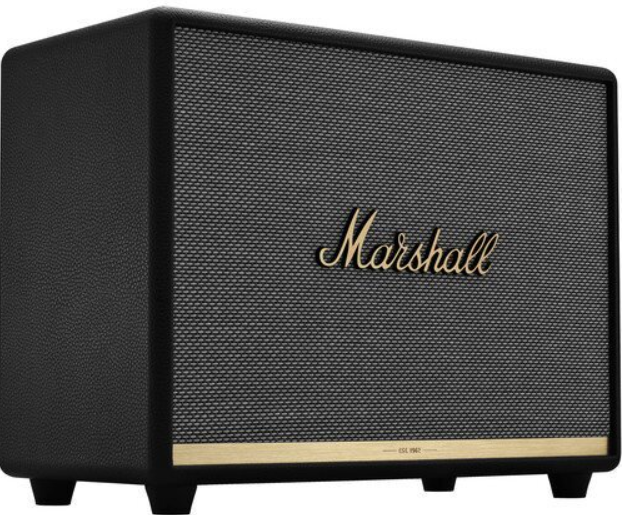
Introduction
The Marshall Woburn II Wireless Home Bluetooth Speaker is a bold, high-performance audio device designed for music lovers who demand both style and substance. This stereo loudspeaker combines Marshall’s iconic rock ‘n’ roll heritage with modern wireless technology, delivering a powerful, room-filling sound that stands out in any home audio setup. With its striking design—featuring a textured vinyl covering, golden Marshall script logo, and classic amp-style controls—the Woburn II is as much a statement piece as it is a serious audio tool.
Engineered for those who appreciate deep bass, crisp highs, and a lifelike midrange, the Marshall Woburn II Wireless Home Bluetooth Speaker features dual 5.25-inch woofers and two ¾-inch dome tweeters, each powered by dedicated Class D amplifiers for a total output of 110 watts. The bass reflex cabinet, crafted from solid wood, enhances low-end response and delivers a warm, natural sound signature that’s perfect for everything from rock anthems to acoustic sessions.
Wireless connectivity is seamless thanks to Bluetooth 5.0 with aptX support, ensuring high-quality, low-latency streaming from smartphones, tablets, or computers up to 10 meters away. For wired connections, the Woburn II offers both 3.5mm AUX and RCA inputs, providing flexibility for various audio sources. The intuitive top-panel controls and companion Marshall Bluetooth app allow users to fine-tune bass, treble, and volume to match their room and musical preferences.
Ideal for living rooms, home studios, or any space where audio quality and aesthetics matter, the Marshall Woburn II Wireless Home Bluetooth Speaker targets discerning listeners who value both performance and design. Priced in the premium segment (typically around $550 USD), it’s widely available through major electronics retailers and the official Marshall website. Whether you’re hosting a party or enjoying a solo listening session, the Woburn II promises an immersive, “larger than life” audio experience that’s unmistakably Marshall.
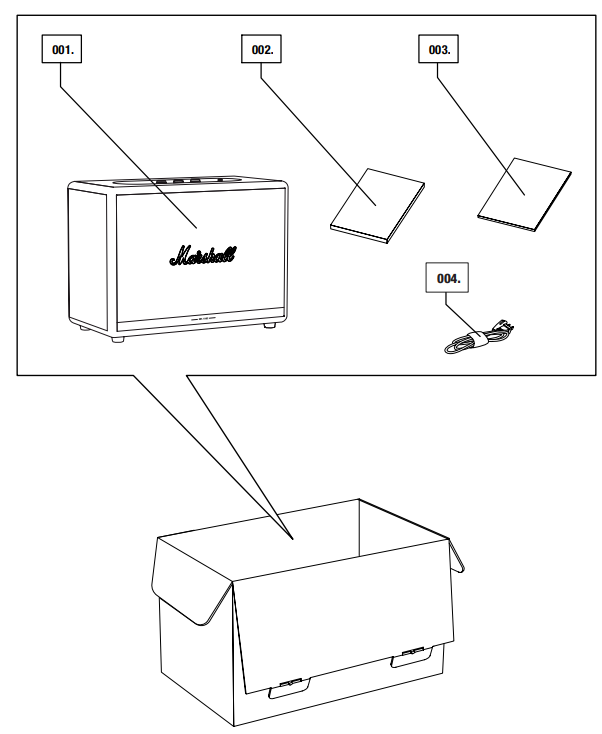
BOX CONTENTS
- MARSHALL WOBURN II WIRELESS HOME Bluetooth® SPEAKER
- QUICK START GUIDE
- IMPORTANT SAFETY INSTRUCTIONS
- MAINS LEAD
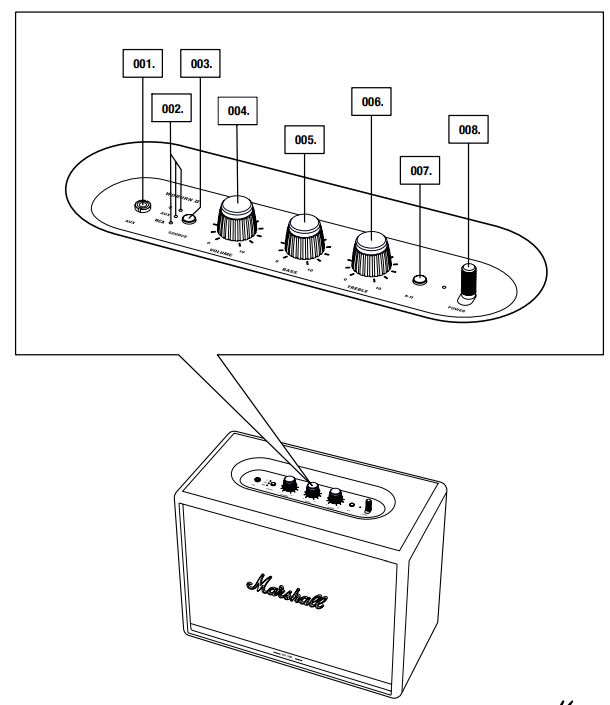
- AUX INPUT FOR 3.5 mm JACK
- SOURCE INDICATORS
- SOURCE BUTTON
- VOLUME KNOB
- BASS KNOB
- TREBLE KNOB
- PLAY/PAUSE BUTTON
- POWER LEVER
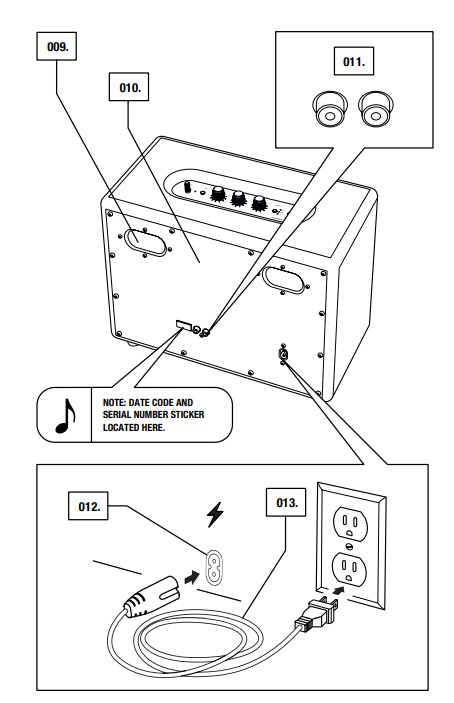
- BASS PORT
- BACKPLATE
- RCA INPUT (LEFT AND RIGHT)
- MAINS INPUT
- MAINS LEAD
SETTING UP THE WOBURN II
CONFIGURE THE SPEAKER WITH THE MARSHALL BLUETOOTH® APP TO GET THE MOST OUT OF IT. THE APP IS AVAILABLE FROM THE APP STORE AND GOOGLE PLAY.
- DOWNLOAD THE MARSHALL BLUETOOTH® APP AND FOLLOW THE IN-APP INSTRUCTIONS.
SELECTING AUDIO SOURCE
THERE ARE MANY WAYS TO CONNECT TO YOUR WOBURN II, EITHER WIRELESSLY OR BY CABLE.
- WIRELESS Bluetooth CONNECTION
- AUX - 3.5 mm STEREO JACK
- RCA - DOUBLE RCA (LEFT AND RIGHT) JACKS
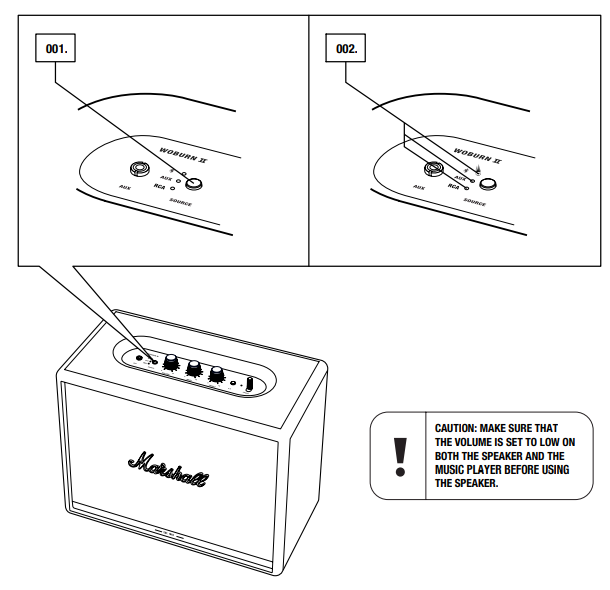
- PUSH THE SOURCE BUTTON TO TOGGLE BETWEEN Bluetooth, AUX AND RCA AUDIO SOURCE.
- A LIT INDICATOR SHOWS WHICH SOURCE IS SELECTED.
THE SOURCE CAN ALSO BE SELECTED FROM THE MARSHALL BLUETOOTH® APP.
CONNECTING VIA Bluetooth (PAIRING)
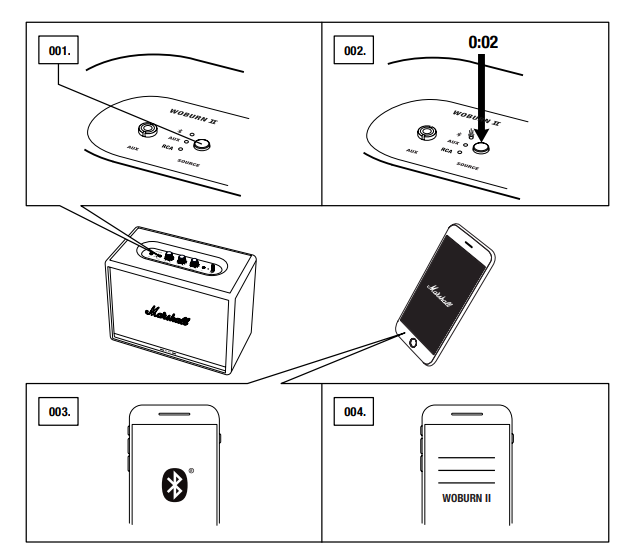
- SELECT Bluetooth AS THE INPUT. PUSHING THE SOURCE BUTTON TOGGLES THE INPUT SOURCES.
- PUSH AND HOLD THE SOURCE BUTTON FOR 2 SECONDS.
THE Bluetooth INDICATOR STARTS TO BLINK. - ENABLE Bluetooth ON YOUR DEVICE (SMARTPHONE, TABLET, COMPUTER).
- SELECT WOBURN II FROM THE Bluetooth LIST AND ACCEPT PAIRING. THE Bluetooth INDICATOR ON THE SPEAKER STOPS BLINKING AND REMAINS LIT WHEN THE UNITS ARE CONNECTED.
WOBURN II CAN BE CONNECTED TO TWO Bluetooth DEVICES AT THE SAME TIME. PLAYING A CONNECTED Bluetooth DEVICE WILL MAKE IT THE SELECTED AUDIO SOURCE, PAUSING ANY PREVIOUSLY PLAYED AUDIO ON THE SECOND DEVICE.
CONNECTING VIA AUX INPUT
- CONNECT A 3.5 mm STEREO JACK TO THE INPUT LABELLED AUX ON THE TOP OF THE SPEAKER.
- CONNECT THE OTHER END OF THE LEAD TO THE AUDIO OUTPUT ON YOUR AUDIO SOURCE.
- SELECT AUX AS THE INPUT. PUSHING THE SOURCE BUTTON TOGGLES THE INPUT SOURCES.
.png)
CONNECTING VIA RCA INPUT
- CONNECT A LEAD WITH RCA JACKS TO THE INPUTS LABELLED RCA ON THE BACK OF THE SPEAKER.
- CONNECT THE OTHER END OF THE LEAD TO THE OUTPUT ON YOUR AUDIO SOURCE.
- SELECT RCA AS THE INPUT. PUSHING THE SOURCE BUTTON TOGGLES THE INPUT SOURCES.
-a.png)
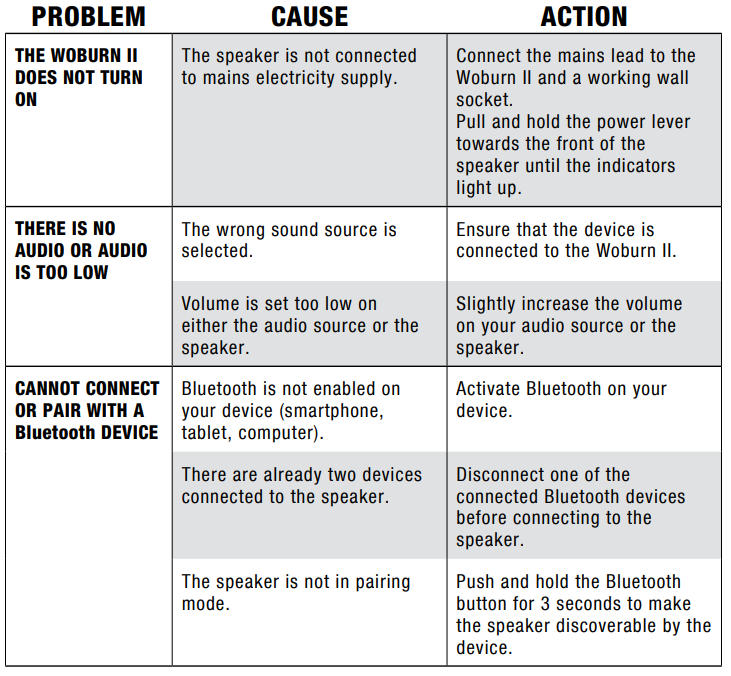
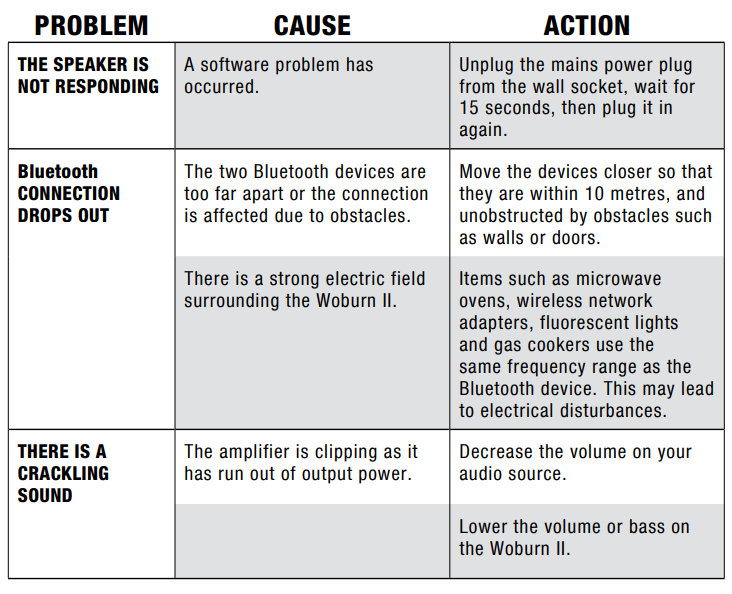
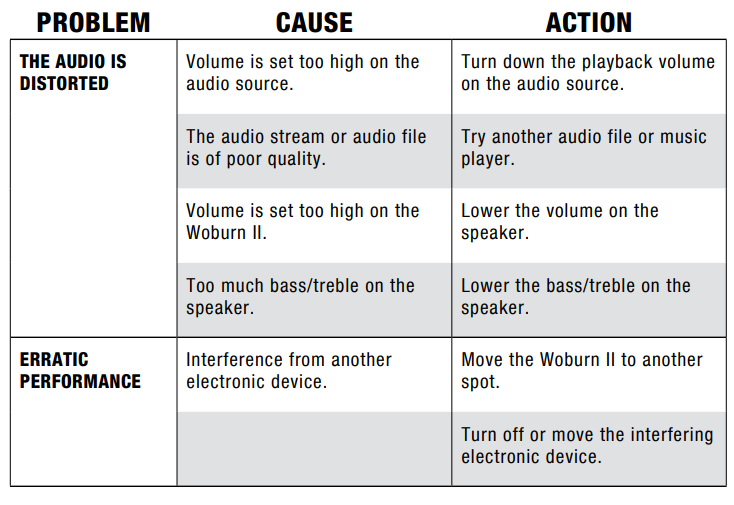
TROUBLESHOOTING
Pros & Cons
Strengths
- Powerful, Balanced Sound: Delivers 110 watts of clear, dynamic audio with deep bass and sparkling highs, thanks to dedicated amplifiers for each driver.
- Iconic Design: The retro-inspired look, with a wooden cabinet, vinyl covering, and gold accents, makes it a standout home decor piece
- Flexible Connectivity: Bluetooth 5.0 with aptX for wireless streaming, plus 3.5mm AUX and RCA inputs for wired sources.
- Customizable Audio: Analog bass and treble knobs, plus app-based EQ adjustments, let you tailor the sound to your room and taste.
- Build Quality: Sturdy construction and premium materials ensure durability and a refined aesthetic.
Limitations
- Size and Weight: At nearly 19 pounds and over 15 inches wide, the Woburn II is not portable and requires a dedicated space.
- No Optical Input: Lacks a digital optical input, which may disappoint some audiophiles seeking the highest fidelity connections.
- App Experience: While functional, the Marshall Bluetooth app has room for improvement in terms of user interface and features.
- Price: Positioned in the premium category, it may be out of reach for budget-conscious buyers.
- Power On/Off Sound: The loud startup chime cannot be disabled without the app, which some users find intrusive.
Value for Money: The Marshall Woburn II Wireless Home Bluetooth Speaker justifies its price with exceptional sound quality, build, and design, though alternatives like the Sonos Five or KEF LSX may offer different features (e.g., multi-room audio, higher-resolution streaming) at similar price points.
Customer Reviews
Users consistently praise the Marshall Woburn II Wireless Home Bluetooth Speaker for its powerful, room-filling sound and striking retro design. Many highlight the clarity of highs, punchy bass, and the ability to customize EQ settings via the app or physical controls. The build quality and aesthetic appeal are frequently mentioned as reasons for purchase, with several users stating it’s a “conversation starter” in their homes.
Common complaints include the speaker’s large size and weight, making it unsuitable for portability, and the absence of an optical input for digital audio. Some users note that the Bluetooth app could be more intuitive, and the loud power-on chime can be bothersome—though this can be disabled via the app. Star ratings are typically high, with many users awarding 4.5 out of 5 stars for sound quality and design, but docking half a star for the app experience and lack of certain inputs.
Purchase Recommendation: The Marshall Woburn II Wireless Home Bluetooth Speaker is highly recommended for those seeking a premium, stylish home speaker with robust sound. It’s less suitable for users needing portability or advanced smart features, but for pure audio performance and design, it’s a top contender in its class.
Technical Specifications
- Drivers: 2 x 5.25" woofers, 2 x ¾" dome tweeters
- Amplifiers: 2 x 50W (woofers), 2 x 15W (tweeters) – Total 130W RMS
- Frequency Response: 30–20,000 Hz ±6 dB
- Max SPL: 110 dB @ 1m
- Connectivity: Bluetooth 5.0 with aptX, 3.5mm AUX, RCA
- Cabinet: Bass reflex, solid wood
- Dimensions: 400 x 310 x 200 mm (15.75 x 12.2 x 7.87 in)
- Weight: 8.55 kg (18.9 lbs)
- Power: 100–240 VAC, 50–60 Hz
- Controls: Analog bass, treble, volume; app-based EQ
Setup and Usage Tips
- Placement: For best sound, place the Marshall Woburn II Wireless Home Bluetooth Speaker on a sturdy surface away from walls to allow bass to breathe.
- Bluetooth Pairing: Enable Bluetooth on your device, select “Marshall Woburn II” from the list, and confirm pairing. Use the Marshall app for firmware updates and advanced settings.
- Wired Connections: Connect devices via the 3.5mm AUX or RCA inputs for sources without Bluetooth.
- Customizing Sound: Adjust bass and treble using the top-panel knobs or the app for a personalized listening experience.
- Standby Mode: The speaker enters standby after 20 minutes of inactivity; press any button to wake it.
Maintenance and Care
- Wipe the cabinet with a dry, soft cloth; avoid liquids and abrasive cleaners.
- Keep the speaker away from direct sunlight and extreme temperatures.
- Regularly check for firmware updates via the Marshall app to ensure optimal performance.
Warranty and Support
The Marshall Woburn II Wireless Home Bluetooth Speaker comes with a standard manufacturer’s warranty. For support, visit the official Marshall website or contact your retailer. Register your product online for streamlined service and updates.
Conclusion
The Marshall Woburn II Wireless Home Bluetooth Speaker is a premium audio solution that blends iconic design with powerful, customizable sound. Whether you’re a music enthusiast, design aficionado, or simply seeking a standout home speaker, the Woburn II delivers a compelling mix of performance, style, and user-friendly features. While it may not suit every budget or need, its combination of robust audio, flexible connectivity, and unmistakable Marshall heritage makes it a top choice for discerning listeners.
Faqs
How do I set up my marshall Woburn II Wireless Home Bluetooth Speaker for the first time?
What should I do if my marshall Woburn II Wireless Home Bluetooth Speaker is not connecting via Bluetooth?
Can I use my marshall Woburn II Wireless Home Bluetooth Speaker with a turntable?
How do I optimize the sound quality of my marshall Woburn II Wireless Home Bluetooth Speaker?
What are the key features that make the marshall Woburn II Wireless Home Bluetooth Speaker different?
How often should I clean and maintain my marshall Woburn II Wireless Home Bluetooth Speaker?
Can I use the marshall Woburn II Wireless Home Bluetooth Speaker outdoors?
How do I couple two marshall Woburn II Wireless Home Bluetooth Speakers for stereo sound?
More marshall manuals
- Setup: Marshall Acton II Bluetooth Speaker User Manual
- Setup: Marshall Stockwell II - Portable Stereo Loudspeaker User Manual
- Setup & Pairing: Marshall Stanmore II Speaker User Manual
- Setup: Marshall Woburn III Home Bluetooth Speaker User Manual
- Setup: Marshall Willen Portable Loudspeaker User Manual
- Setup: Marshall Monitor II A.N.C. User Manual
Leave a Comment