
Setup: Marshall Woburn III Home Bluetooth Speaker User Manual
Content
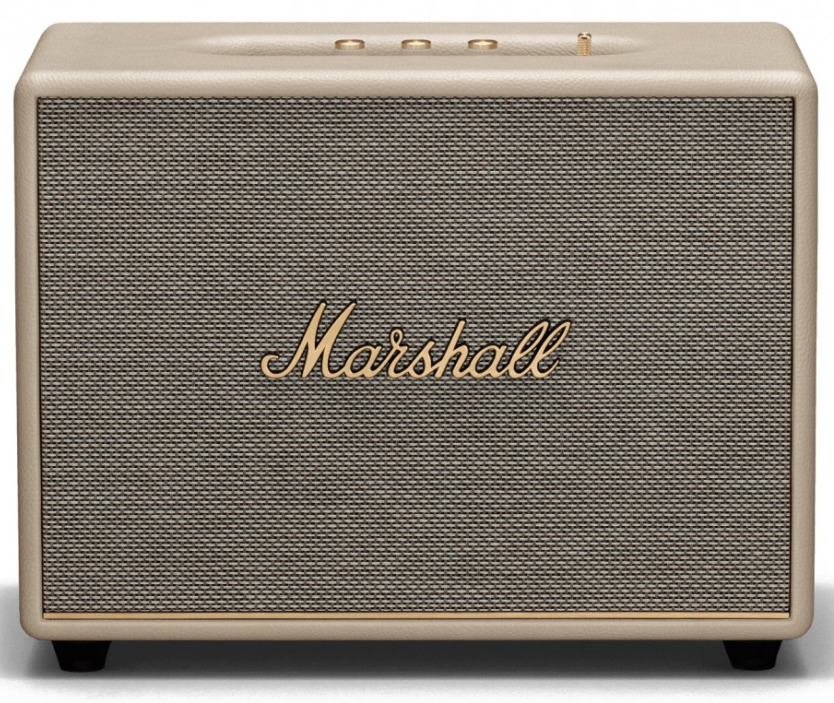
Marshall Woburn III Home Bluetooth Speaker
Introduction
The Marshall Woburn III Home Bluetooth Speaker stands as a premium, powerful audio solution designed to deliver immersive and iconic Marshall sound with modern wireless convenience. Featuring a re-engineered three-way driver system and a classic vintage-inspired design, the Woburn III is tailored for audiophiles and music lovers seeking rich, room-filling audio that elevates any home environment.
This speaker is ideal for users who want a versatile, high-performance sound system capable of handling everything from casual music streaming to home theater integration. Its wide soundstage, adjustable bass and treble controls, and dynamic loudness feature ensure consistent audio clarity at any volume, making it perfect for living rooms, studios, or entertainment spaces. The inclusion of HDMI ARC and multiple analog inputs also makes it a strong contender as a hub for TV and hi-fi components.
Priced around $600, the Marshall Woburn III is available globally through authorized retailers and online platforms. With next-generation Bluetooth 5.2 technology and over-the-air firmware updates, this speaker blends classic aesthetics with future-ready connectivity, providing a seamless music experience for modern households.
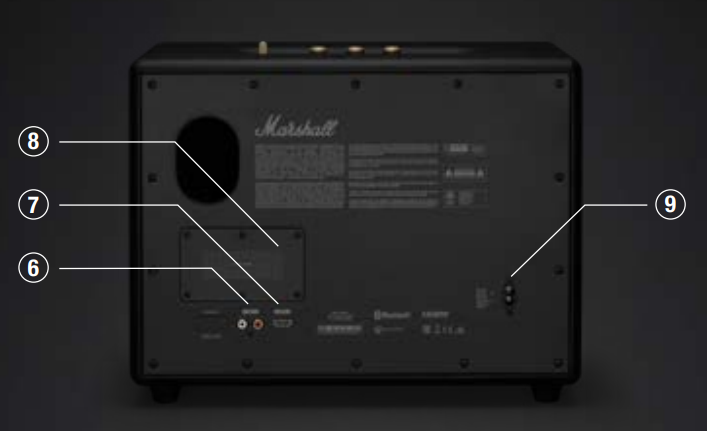
DEVICE LAYOUT
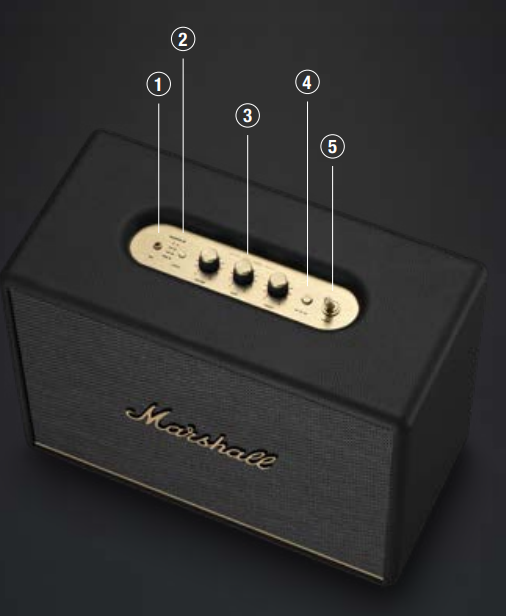
3.5 MM INPUT
- Plug in an analogue audio device with a 3.5 mm stereo jack.
SOURCE SELECTION
- Push the source button to toggle between Bluetooth®, AUX, RCA, and
- HDMI audio sources. A lit indicator shows which source is selected.
- This can also be selected from the Marshall Bluetooth app.
- Caution: Make sure that the volume is set to low on both the speaker and the audio device before using the speaker.
AUDIO CONTROLS
Woburn III includes three controls for adjusting the audio.
- Volume control
- Bass control
- Treble control
MEDIA CONTROL
Control the audio directly from the top panel when playing via Bluetooth.
- Push to play or pause
- Push right to skip forward
- Push left to skip back
- Hold left or right to rewind or fast forward
- Playback can also be controlled from the Marshall Bluetooth app.
POWER SWITCH
- Use the power switch to turn the speaker on or off.
- RCA INPUT (LEFT AND RIGHT)
- Plug in an RCA audio device, such as an RIAA turntable.
HDMI ARC INPUT
- Plug in an HDMI-supported TV.
HEAT SINK
- Dissipates heat from the internal power supply.
POWER INPUT
- Use the included mains lead to connect Woburn III to the wall socket.
GETTING STARTED
- Connect the mains lead to the mains input on your speaker, then connect the mains plug to the wall socket.
- Use the power switch to turn the speaker on.
- Download the Marshall Bluetooth app and follow the in-app instructions to set up your speaker.
Important: Always ensure that the mains lead, plug, and speaker are compatible with your mains supply and wall socket.
Caution: Always unplug the mains lead from the wall socket before disconnecting it from the speaker.
BLUETOOTH PAIRING
- Use the source button to select Bluetooth.
- Push and hold the source button until the Bluetooth LED pulses red.
- Select WOBURN III from your audio device’s Bluetooth list.
Woburn III can be connected to two Bluetooth devices at the same time. If a connected device is playing, a second connected device cannot start playing until the first device is paused.
CONNECTING AN AUX DEVICE
- Connect a 3.5 mm stereo jack to the AUX input on the top of the speaker.
- Connect the other end of the lead to the audio output on your audio source.
- Use the source button to select AUX.
Note: Audio leads are not included.
CONNECTING AN RCA DEVICE
- Connect a lead with RCA jacks to the RCA input on the back of the speaker.
- Connect the other end of the lead to the output on your audio source.
- Use the source button to select RCA.
Note: The turntable must be equipped with an RIAA amplifier or connected via a separate preamplifier. Audio lead and RIAA amplifier are not included.
CONNECTING A TV WITH HDMI
- Plug an HDMI lead into the HDMI port on the back of Woburn III and the HDMI ARC port on your TV.
- Turn on the speaker and use the source button to select HDMI.
- Turn on your TV and select HDMI ARC audio output,t and choose PCM (2-channel) as the format.
If Woburn III is powered on and connected to a TV, turning on the TV will auto-select HDMI as the source.
Note: HDMI leads are not included.
For information about your TV’s HDMI support, labelling of ports, and user instructions, please consult its user manual.
NETWORK STANDBY MODE
- Woburn III will go into network standby if left unused for 10 minutes to save energy. Any connected Bluetooth device will be disconnected.
- Interact with any control or button on the top panel, reconnect a Bluetooth device,e or play anything via the physical inputs to wake up the speaker.
PERFORMING A FACTORY RESET
- A factory reset will return the speaker to its original settings, excluding any firmware updates.
- Note: This will delete all user settings, and the speaker needs to be set up again.
- Push and hold the media control for more than 10 seconds,s and the speaker will reset.
- Remove WOBURN III from your audio device’s Bluetooth list before pairing again.
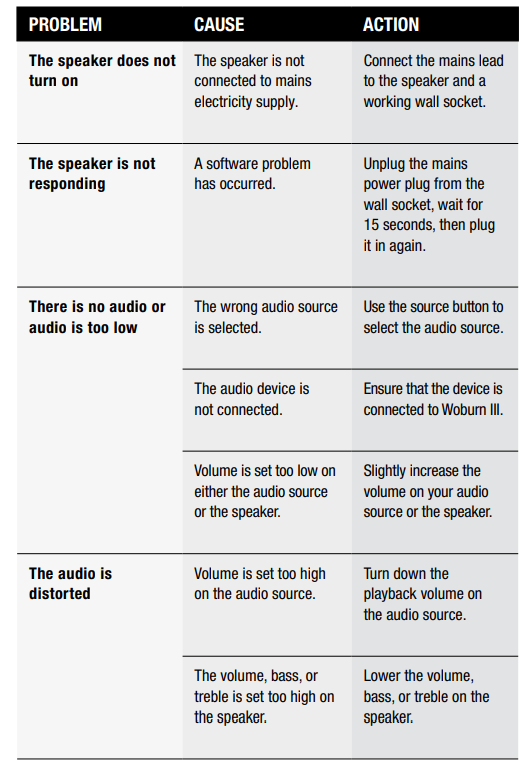
TROUBLESHOOTING
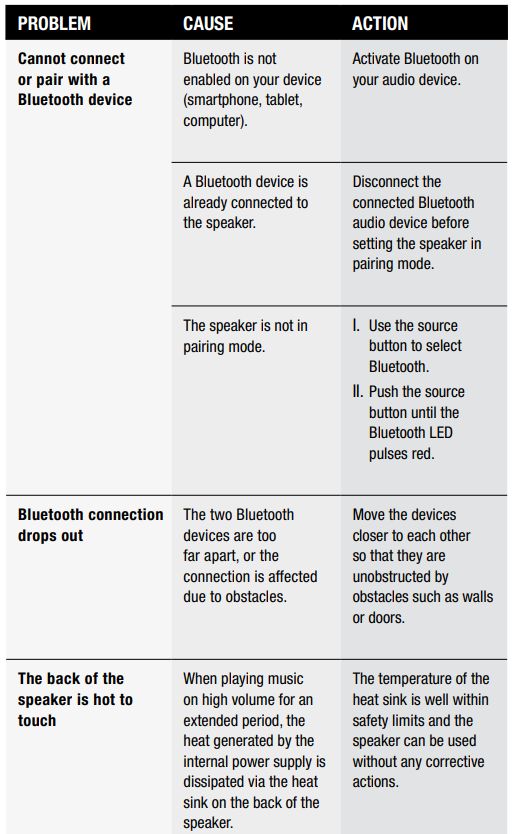
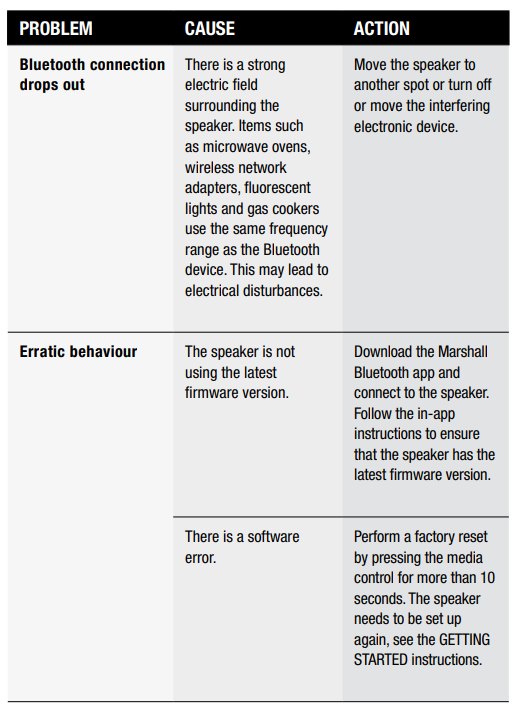
Specifications of the Marshall Woburn III Home Bluetooth Speaker
- Audio Drivers: One 6" woofer, two 2" midrange drivers, two 3/4" tweeters with angled waveguides for wide sound dispersion
- Amplification: Total 150 watts output (90W Class D for woofer, 15W Class D each for midrange and tweeters)
- Frequency Response: 35 Hz – 20,000 Hz,, providing deep bass and crisp highs
- Maximum Sound Pressure Level: 100.5 dB at 1 meter
- Connectivity: Bluetooth 5.2 with multipoint pairing, 3.5 mm stereo input, RCA stereo input, HDMI ARC (PCM stereo only)
- Controls: Brass analog knobs for volume, bass, treble, power switch, source selector, play/pause, skip track buttons on top panel
- Additional Features: Dynamic Loudness for balanced sound at all volumes, Placement Compensation for room-adaptive sound adjustment, Marshall Bluetooth app for equalizer and firmware updates
- Dimensions: 15.75" W x 12.48" H x 7.99" D (400 x 317 x 203 mm)
- Weight: Approximately 21.5 lbs (7.5 kg)
- Materials: PVC-free construction with 70% recycled plastic and vegan materials
- Warranty: 1-year manufacturer's warranty
Compared to similar high-end home Bluetooth speakers like the Marshall Stanmore III, the Woburn III offers a wider and more immersive stereo soundstage, enhanced midrange clarity, and superior bass control, making it a standout choice for room-filling audio performance.
Pros & Cons of the Marshall Woburn III Home Bluetooth Speaker
Pros
- Exceptional Sound Quality: Powerful 150W output with a three-way driver system delivering deep bass, clear mids, and crisp treble for a rich listening experience.
- Wide Soundstage: Angled tweeters and waveguides create immersive, room-filling sound that effectively envelops the listener.
- Versatile Connectivity: Supports Bluetooth 5.2 with multipoint pairing, plus wired inputs including HDMI ARC, RCA, and 3.5 mm for easy integration with TVs and legacy devices.
- Intuitive Controls: Classic brass knobs and buttons on the top panel provide tactile, easy access to volume, bass, treble, and playback functions.
- Smart Features: Dynamic Loudness maintains tonal balance at any volume; Placement Compensation optimizes sound based on speaker location; firmware updates via app keep the speaker future-proof.
- Eco-Friendly Build: Use of recycled and vegan materials appeals to environmentally conscious users.
Cons
- Price Point: At around $600, it is a premium investment that may exceed some budgets compared to smaller or less featured speakers.
- No Battery Power: Requires AC power, limiting portability compared to battery-powered Marshall models.
- Soundstage Directionality: While wide, the sound is more directional and less 360-degree than some portable alternatives like the Marshall Kilburn III.
- HDMI Limitations: HDMI ARC supports only PCM stereo signals, which may not satisfy users looking for multichannel audio audio through the TV connection.
Customer Reviews and Feedback on the Marshall Woburn III Home Bluetooth Speaker
Users consistently praise the Marshall Woburn III Home Bluetooth Speaker for its powerful, clear sound and classic design. Many highlight the impressive bass depth and the convenience of multiple input options. The dynamic loudness and placement compensation features receive positive remarks for ensuring balanced audio regardless of volume or room placement.
Common complaints include the speaker’s lack of portability due to its weight and the absence of battery operation. Some users note the HDMI ARC input’s limitation to stereo PCM rather than surround sound, which might be a drawback for home theater enthusiasts. The Bluetooth connection is generally stable, though firmware updates can take time to install via Bluetooth.
Overall, the speaker averages around 4.5 stars across retailer platforms, with recommendations focusing on its suitability as a premium home speaker rather than a portable device. Buyers appreciate the solid build quality and sound performance, making it a worthwhile purchase for those prioritizing audio excellence and stylish design in their home setup.
More marshall manuals
- Setup: Marshall Stockwell II - Portable Stereo Loudspeaker User Manual
- Setup: Marshall Monitor II A.N.C. User Manual
- Setup: Marshall Woburn II Wireless Home Bluetooth Speaker User Manual
- Setup: Marshall Acton II Bluetooth Speaker User Manual
- Setup & Pairing: Marshall Stanmore II Speaker User Manual
- Setup: Marshall Willen Portable Loudspeaker User Manual
Leave a Comment