
Setup: Marshall Willen Portable Loudspeaker User Manual
Content
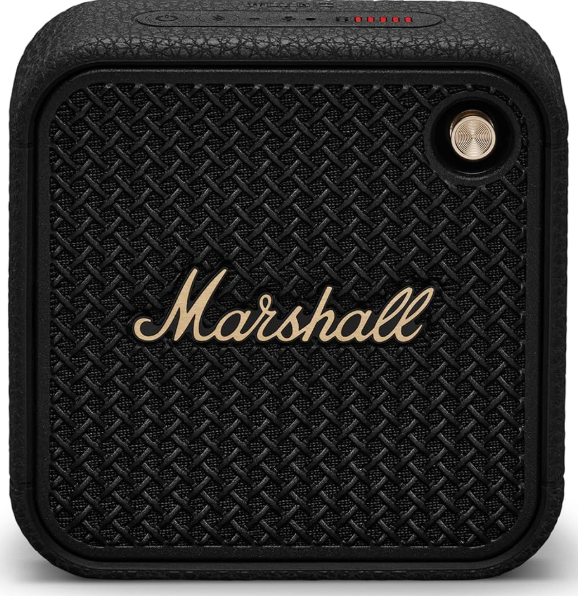
Marshall Willen Portable Loudspeaker
Introduction
The Marshall Willen Portable Loudspeaker is a compact, wireless Bluetooth speaker designed to deliver powerful, high-fidelity sound in a small, rugged form factor. Perfect for music enthusiasts who value portability without compromising audio quality, the Willen combines Marshall’s iconic rock ’n’ roll sound signature with modern convenience and durability. Its IP67-rated dust and water resistance make it highly suitable for outdoor activities, from beach days and hiking trips to casual shower listening.
Key benefits include a built-in microphone for hands-free calls, a multi-directional control knob for intuitive playback control, and compatibility with the Marshall Bluetooth app for personalized sound settings. With over 15 hours of playtime on a single charge, this speaker supports on-the-go lifestyles and social gatherings alike.
Included in the box
- Marshall Willen speaker
- USB-C charging cable
- User manual and legal/warranty information
Technical Specifications
General
- Product type: Portable Bluetooth loudspeaker
- Brand: Marshall
- Model: Willen
- Release year: 2022
- Color options: Black & Brass, Cream, Burgundy
Physical
- Dimensions: 101.6 × 100.5 × 40.4 mm (4.0 × 3.96 × 1.59 in)
- Weight: 310 g (0.68 lb)
- Build material: Silicone exterior with rubber strap and textured grill
- Water & dust resistance: IP67 (fully dust-tight and water-resistant up to 1 m for 30 min)
- Mounting: Built-in multi-position strap (for hanging or attaching)
Audio
- Amplifier: 10 W Class D amplifier
- Driver configuration:
- 1 × 2" full-range driver
- 2 × passive radiators
- Frequency response: 100 Hz – 20 kHz
- Sound orientation: Mono
- Maximum sound pressure level (SPL): ~82 dB @ 1 m (typical)
- Custom EQ presets: via Marshall Bluetooth App (e.g., “Marshall”, “Push”, “Voice”)
Connectivity
- Wireless technology: Bluetooth 5.1
- Supported profiles: A2DP, AVRCP
- Wireless range: Up to 10 m (33 ft)
- Multipoint connectivity: No
- Wired input: None (Bluetooth only)
- Microphone: Built-in (for calls & voice assistant)
- Stack Mode: Can link multiple Willen speakers together for a louder sound
Power & Battery
- Battery type: Built-in rechargeable Li-ion
- Playback time: Up to 15 + hours (manufacturer rated; real-world tests show up to ~18 h)
- Charging port: USB-C
- Charging time: ≈ 3 hours for a full charge
- Quick charge: 20 minutes gives ~3 hours of playtime
- Power input: 5 V DC, 2 A
App & Controls
- App support: Marshall Bluetooth app (iOS & Android)
- Functions via app: EQ presets, firmware updates, Stack Mode control, battery monitoring
- On-speaker controls:
- Multi-directional joystick (play/pause, volume, track skip)
- Bluetooth pairing button
- LED battery indicator
Sustainability
- PVC-free construction
- Recycled materials: 60 % of plastic from post-consumer electronics
Typical price range
- Around €79 – €99 EUR (≈ $80 – $100 USD), depending on region and color.
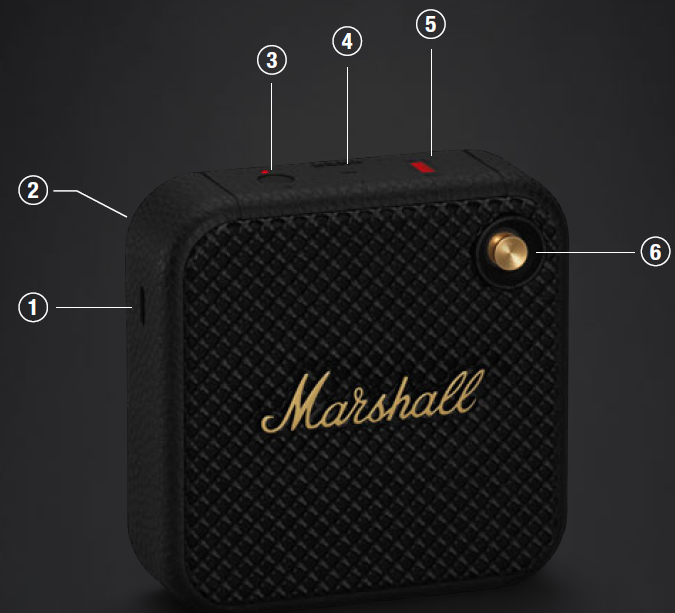
DEVICE LAYOUT
GENERAL
- USB-C POWER INPUT
Charge the speaker by plugging it into a USB power source. - FASTENING STRAP
Unhook the lower-right side of the strap by stretching it gently. - BLUETOOTH BUTTON
Push and hold the Bluetooth® button until the LED turns to a slow red pulse to start pairing mode. - MICROPHONE
The microphone lets you use Willen as a speakerphone. While in a call, push the Bluetooth button to toggle between using Willen for the call and your phone. - BATTERY INDICATOR
The 5-segment Battery indicator shows the battery charge with a steady light,, and a rising animation indicates charging. - CONTROL KNOB
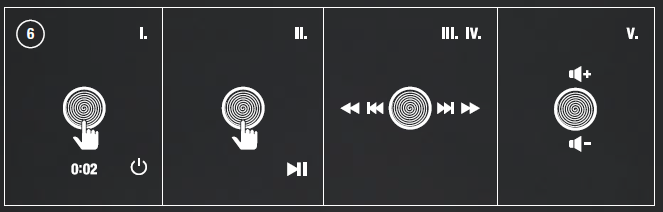
- Push and hold for 2 seconds to turn on/o. ff Push once to play/pause
- Push right/left to skip forward/back
- Hold right/left to fast forward/rewind
- Hold upwards/downwards to adjust the volume
- Push once to answer or end a call
- Push twice to reject a call
INSTRUCTIONS
BLUETOOTH PAIRING
- Push and hold the control knob until the speaker turns on.
- Push and hold the Bluetooth button until the LED turns to a slow red pulse.
- Select WILLEN from your audio device’s Bluetooth list.
PERFORMING A FACTORY RESET
A factory reset will return the speaker to its original settings, excluding any firmware updates.
Note: This will delete all user settings,, and the speaker will need to be set up again.
- Ensure that the speaker is on.
- Push and hold the Bluetooth button for 7 seconds. All indicators turn o,,ff and the speaker restarts.
- Remove WILLEN from your audio device’s Bluetooth list before pairing again.
MARSHALL BLUETOOTH APP
Download the Marshall Bluetooth app to get the most out of your speaker and keep it up to date with the latest software.

CLEANING THE SPEAKER
Clean your speaker regularly to keep it fresh and last longer.
Unplug any leads before cleaning the speaker ,, and make sure everything is completely dry before plugging in any USB power source.
The silicone sleeve and strap can be removed and cleaned separately. Use a disinfectant wipe or a lint-free cloth, slightly damp with 70% isopropyl alcohol or 75% ethyl alcohol,,l to gently clean silicon parts. Dry them with a towel before putting them back on the speaker.
Carefully clean the speaker mesh and openings with a dry and soft brush or a cotton swab.
- Do not use any sharp or metal objects.
- Do not use compressed air.
- Do not use products containing bleach or hydrogen peroxide.
- Do not submerge the speaker in any cleaning agents.
BATTERY CARE GUIDE
Your speaker comes equipped with a high-performance lithium-ion battery,, and the life span is affected by charging and usage. Follow the guidelines below to keep your battery in great condition for as long as possible.
- Avoid using fast chargers if possible. Fast charging causes stress on the battery and will degrade it.
- Avoid charging the battery when it is already full or letting it drain completely. Try keeping the charge between 30% and 80%.
- If the speaker is stored for a long time, do so with a half-charged battery and in a cool, dark, and dry place.
- Do not use or charge the speaker in hot and unventilated places, 45°C/113°F and above, such as in a parked car or by a window in direct sunlight.
- Avoid charging the battery at low temperatures, below 10°C/50°F and using the speaker below 0°C/32°F.
- Avoid strong mechanical shock,s such as dropping the speaker on hard surfaces,, as it might damage the battery.
STACK MODE
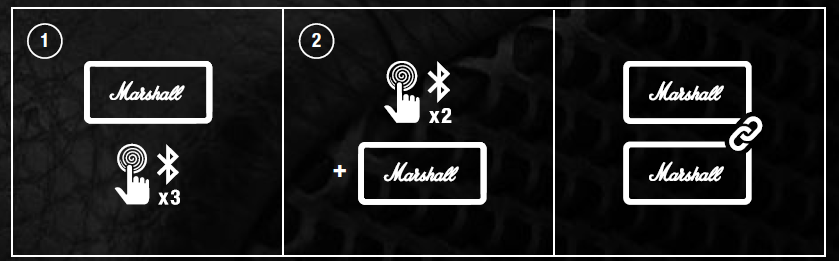
Connect two or more Willen speakers in a Stack session for a bigger sound. Play anything on the main speaker, er and all speakers in the session will play in sync. You can adjust the volume on any individual speaker for the perfect balance.
MAIN SPEAKER
Triple-press the Bluetooth button to start or end a Stack session. The LED starts to blinuntililanotherr speaker joins the session.
ADDITIONAL SPEAKER
Double-press the Bluetooth button on any speaker you want to add to the session. The LED starts to blink until the speaker has joined a session. While in a session, the speaker will disconnect from any previously connected audio device and will try to reconnect after leaving the session.
To remove a speaker from the session, double-press the Bluetooth button on that speaker.
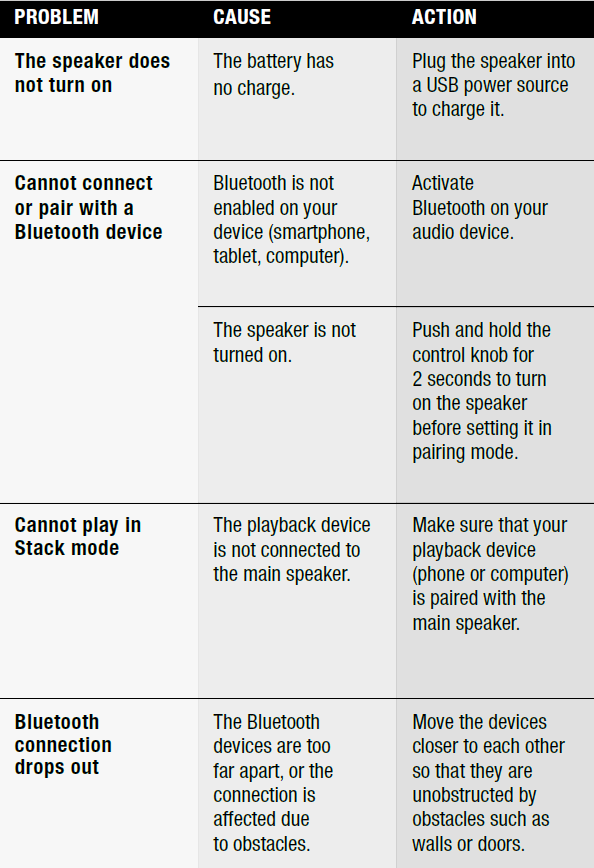
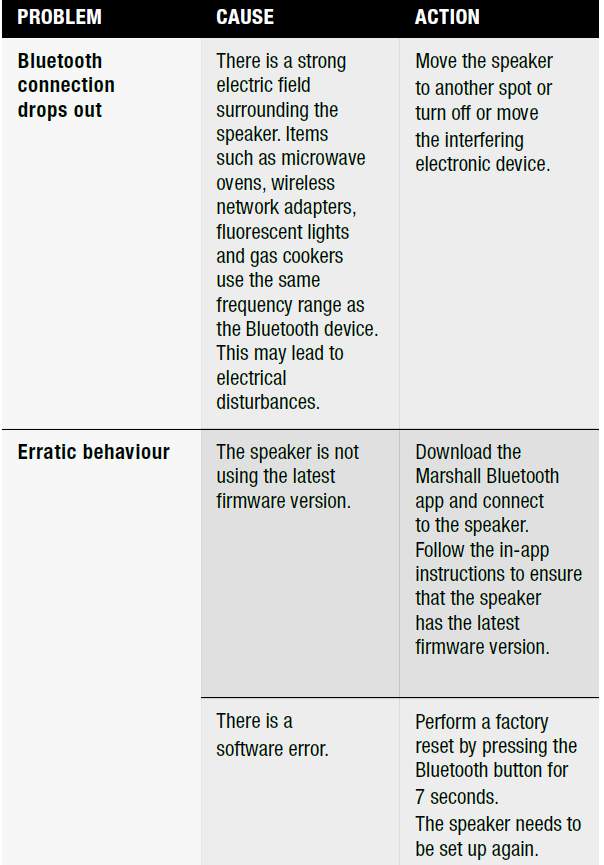
TROUBLESHOOTING
Faqs
How do I set up marshall Willen Portable Loudspeaker for the first time?
What should I do if marshall Willen Portable Loudspeaker is not working properly?
Can I use marshall Willen Portable Loudspeaker with any device?
How often should I maintain marshall Willen Portable Loudspeaker?
What are the key features that make marshall Willen Portable Loudspeaker different?
Can I use marshall Willen Portable Loudspeaker near water?
How do I optimize the sound quality of marshall Willen Portable Loudspeaker?
Is the marshall Willen Portable Loudspeaker compatible with specific music apps?
More marshall manuals
- Setup & Pairing: Marshall Emberton II Portable Loudspeaker User Manual
- Setup & Pairing: Marshall Stanmore II Speaker User Manual
- Setup: Marshall Kilburn II Portable Stereo Loudspeaker User Manual
- Setup: Marshall Acton II Bluetooth Speaker User Manual
- Setup: Marshall Tufton Portable Stereo Loudspeaker User Manual
- Setup: Marshall Woburn II Wireless Home Bluetooth Speaker User Manual
Leave a Comment