
Setup: Marshall Acton II Bluetooth Speaker User Manual
Content
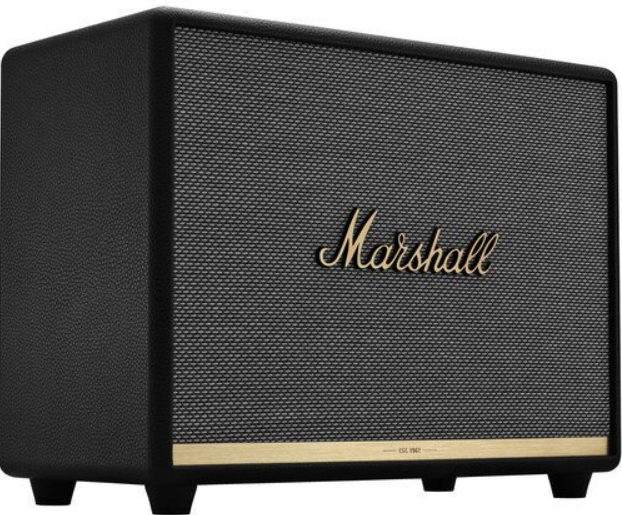
Marshall Acton II Bluetooth Speaker
Introduction
The Marshall Acton II Bluetooth Speaker is a compact yet powerful sound system designed to deliver a well-balanced audio experience. This speaker is part of Marshall's home line, launched in 2018, and is known for its dynamic sound and nostalgic design. It features three dedicated Class D amplifiers—two 15W for the tweeters and one 30W for the woofer—offering a frequency response of 50–20,000 Hz. The Acton II supports Bluetooth 5.0 for stable wireless connectivity and includes analog controls for bass and treble adjustments. It is available in black, white, and brown colorways, with a typical price range of €189 to €269.
This speaker is ideal for music enthusiasts who value clear sound and stylish design. It fits well in small spaces, making it a great option for home use. The Acton II is also compatible with the Marshall Bluetooth app, allowing users to customize sound settings and control playback remotely.
The Acton II is available for purchase from various retailers, both new and refurbished, with a standard one-year manufacturer's warranty. For those looking for a compact speaker with robust sound, the Marshall Acton II is an excellent choice.
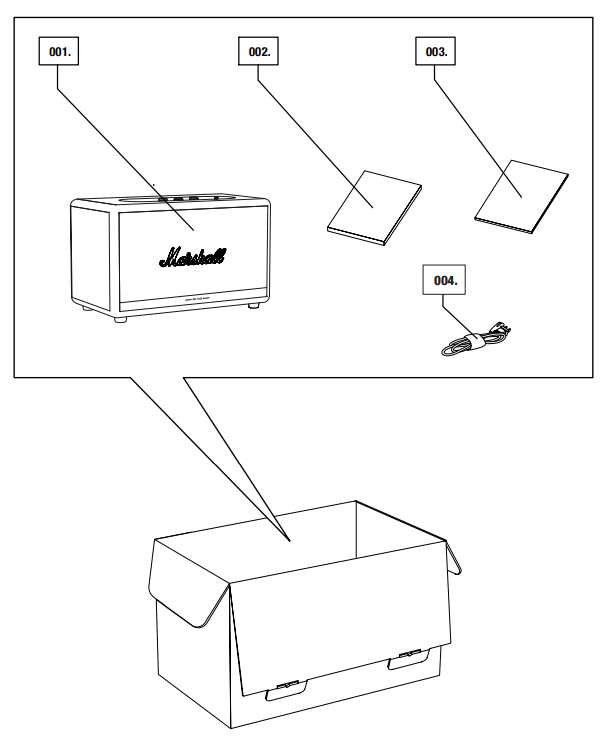
BOX CONTENTS
- MARSHALL ACTON II WIRELESS HOME Bluetooth® SPEAKER
- QUICK START GUIDE
- IMPORTANT SAFETY INSTRUCTIONS
- MAINS LEAD
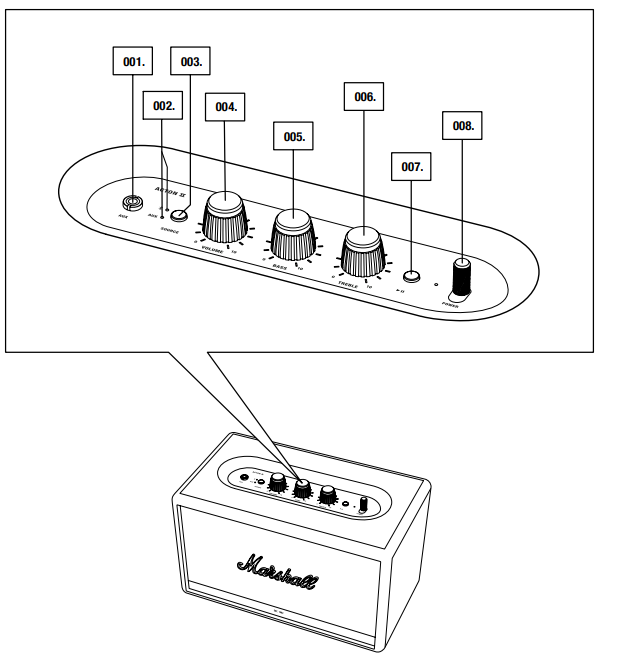
- AUX INPUT FOR 3.5 mm JACK
- SOURCE INDICATORS
- SOURCE BUTTON
- VOLUME KNOB
- BASS KNOB
- TREBLE KNOB
- PLAY/PAUSE BUTTON
- POWER LEVER
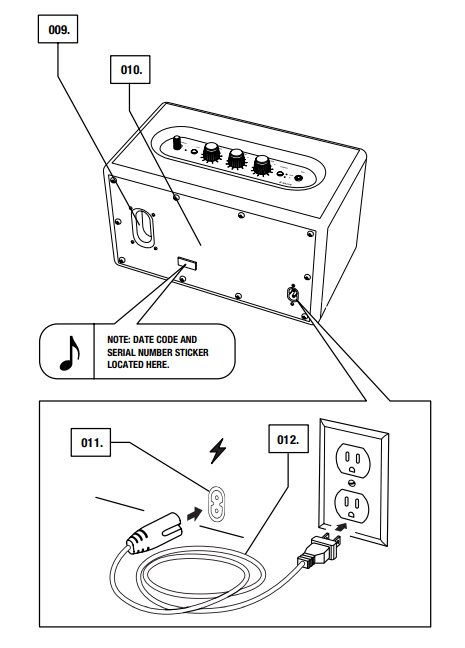
- BASS PORT
- BACKPLATE
- MAINS INPUT
- MAINS LEAD
SETTING UP THE ACTON II
CONFIGURE THE SPEAKER WITH THE MARSHALL BLUETOOTH® APP TO GET THE MOST OUT OF IT. THE APP IS AVAILABLE FROM THE APP STORE AND GOOGLE PLAY.
- DOWNLOAD THE MARSHALL BLUETOOTH® APP AND FOLLOW THE IN-APP INSTRUCTIONS.
SELECTING AUDIO SOURCE
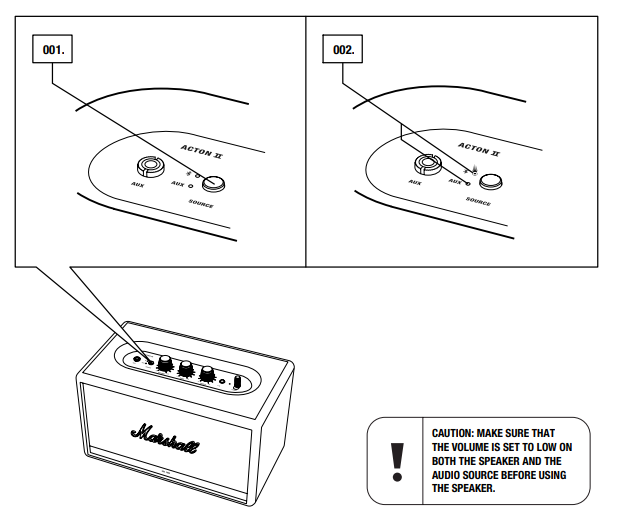
THERE ARE MANY WAYS TO CONNECT TO YOUR ACTON II, EITHER WIRELESSLY OR BY CABLE.
- WIRELESS Bluetooth CONNECTION
- AUX - 3.5 mm STEREO JACK
- PUSH THE SOURCE BUTTON TO TOGGLE BETWEEN Bluetooth AND AUX AUDIO SOURCE.
- A LIT INDICATOR SHOWS WHICH SOURCE IS SELECTED.
THE SOURCE CAN ALSO BE SELECTED FROM THE MARSHALL BLUETOOTH® APP.
CONNECTING VIA Bluetooth (PAIRING)
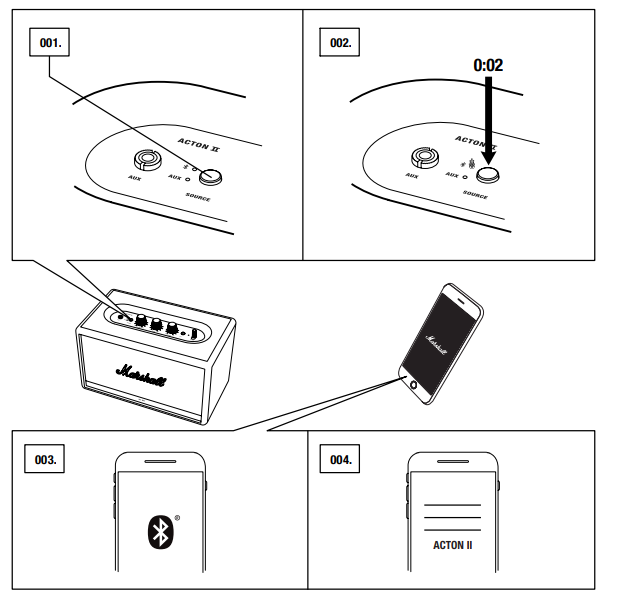
- SELECT Bluetooth AS THE INPUT. PUSHING THE SOURCE BUTTON TOGGLES THE INPUT SOURCES.
- PUSH AND HOLD THE SOURCE BUTTON FOR 2 SECONDS.
THE Bluetooth INDICATOR STARTS TO BLINK. - ENABLE Bluetooth ON YOUR DEVICE (SMARTPHONE, TABLET, COMPUTER).
- SELECT ACTON II FROM THE Bluetooth LIST AND ACCEPT PAIRING.
THE Bluetooth INDICATOR ON THE SPEAKER STOPS BLINKING AND REMAINS LIT WHEN THE UNITS ARE CONNECTED.
ACTON II CAN BE CONNECTED TO TWO Bluetooth DEVICES AT THE SAME TIME. PLAYING A CONNECTED Bluetooth DEVICE WILL MAKE IT THE SELECTED AUDIO SOURCE, PAUSING ANY PREVIOUSLY PLAYED AUDIO ON THE SECOND DEVICE.
CONNECTING VIA AUX INPUT
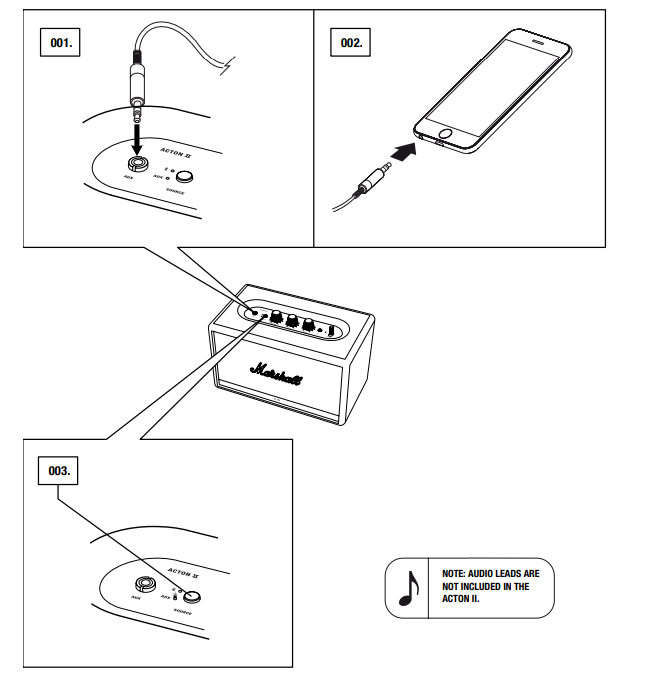
- CONNECT A 3.5 mm STEREO JACK TO THE INPUT LABELLED AUX ON THE TOP OF THE SPEAKER.
- CONNECT THE OTHER END OF THE LEAD TO THE AUDIO OUTPUT ON YOUR AUDIO SOURCE.
- SELECT AUX AS THE INPUT. PUSHING THE SOURCE BUTTON TOGGLES THE INPUT SOURCES.
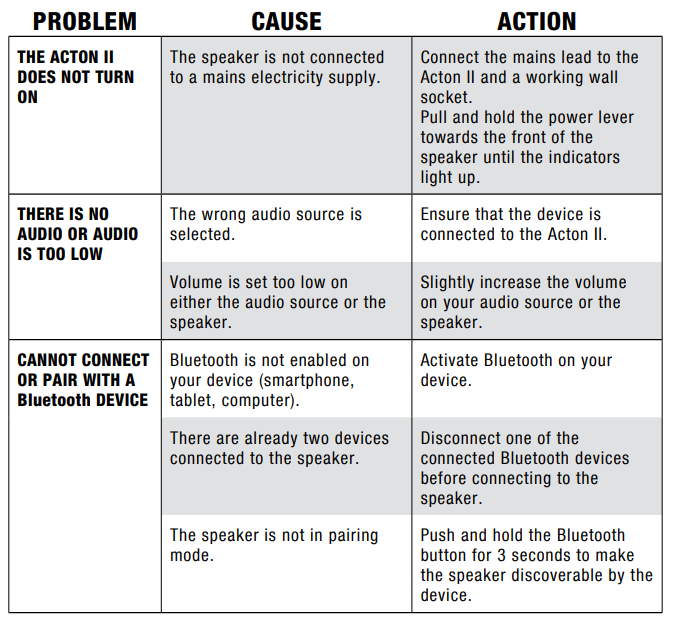
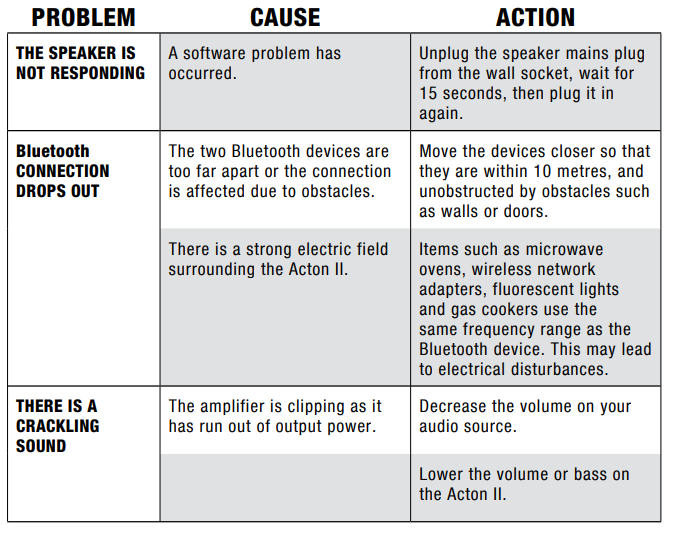
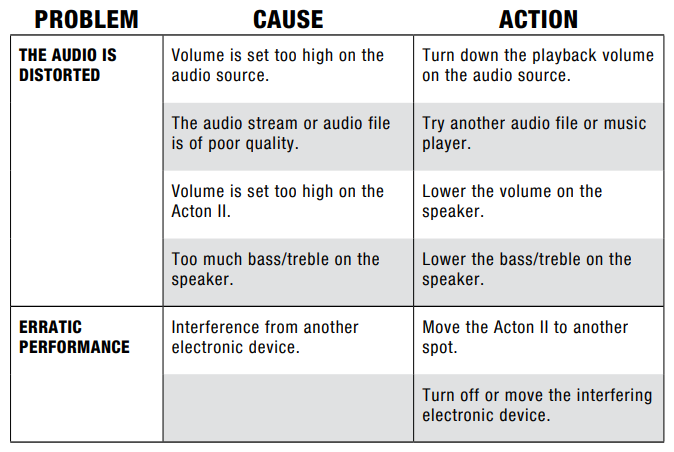
TROUBLESHOOTING
TECHNICAL INFORMATION
ACOUSTIC SPECIFICATION
- STEREO LOUDSPEAKER WITH BASS REFLEX SYSTEM
- DIGITAL CLASS D AMPLIFIERS: 2 x 15 W + 1 x 30 W
- TWEETERS: 2 x ¾" dome tweeters
- WOOFER: 1 x 4" woofer
- BASS AND TREBLE TONE CONTROLS
- FREQUENCY RESPONSE: 50–20,000 Hz ±6 dB
- MAXIMUM SOUND PRESSURE LEVEL: 98 dB SPL @ 1 m
CONNECTIVITY
- Bluetooth®: Bluetooth 5.0
- AUX: 3.5 mm stereo jack
TECHNICAL INFORMATION
- MAINS INPUT VOLTAGE: 100–240 VAC
- MAINS FREQUENCY: 50–60 Hz
- SIZE: 260 x 160 x 150 mm
- WEIGHT: 2.85 kg
Pros and Cons of the Marshall Acton II Bluetooth Speaker
Pros
- Compact Design: Despite its small size, it delivers a powerful sound experience.
- Bluetooth 5.0: Offers reliable wireless connectivity with multi-device support.
- Customizable Sound: Analog controls for bass and treble, along with app support for sound customization.
- Style: Classic Marshall design with a rugged, nostalgic aesthetic.
Cons
- Lack of Water Resistance: Not suitable for outdoor use in wet conditions.
- No Voice Assistant: While it supports voice control apps, it lacks built-in voice assistants.
- No Multi-Room Audio: Cannot connect wirelessly to other speakers for multi-room audio.
Customer Reviews and Feedback
Users praise the Marshall Acton II for its clear and balanced sound, as well as its stylish design. Common complaints include the lack of water resistance and limited connectivity options. On average, users rate the Acton II around 4 out of 5 stars, appreciating its value for money and robust performance.
"The Acton II is a fantastic speaker for its size. It produces a big sound in a small package." - John D.
"I wish it had water resistance, but overall, it's a great speaker for home use." - Emily W.
For those seeking a compact, high-quality Bluetooth speaker for home use, the Marshall Acton II is a solid choice.
Faqs
How do I set up the Marshall Acton II Bluetooth Speaker for the first time?
What should I do if my Marshall Acton II Bluetooth Speaker is not pairing with my device?
Can the Marshall Acton II Bluetooth Speaker connect to multiple devices simultaneously?
How do I adjust the sound settings like bass and treble on the Marshall Acton II Bluetooth Speaker?
What are common solutions if the Marshall Acton II Bluetooth Speaker produces distorted or crackling sound?
How do I switch between Bluetooth and AUX input on the Marshall Acton II Bluetooth Speaker?
How do I maintain and care for my Marshall Acton II Bluetooth Speaker to ensure longevity?
Why does my Marshall Acton II Bluetooth Speaker enter standby mode, and how do I wake it up?
More marshall manuals
- Setup & Pairing: Marshall Stanmore II Speaker User Manual
- Setup: Marshall Woburn II Wireless Home Bluetooth Speaker User Manual
- Setup: Marshall Willen Portable Loudspeaker User Manual
- Setup: Marshall Stockwell II - Portable Stereo Loudspeaker User Manual
- Setup & Pairing: Marshall Emberton II Portable Loudspeaker User Manual
- Setup: Marshall Woburn III Home Bluetooth Speaker User Manual
Leave a Comment