
Setup: Marshall Monitor II A.N.C. User Manual
Content
Marshall Monitor II A.N.C.

Introduction
The **Marshall Monitor II A.N.C.** headphones are designed to deliver high-performance sound with advanced active noise cancellation, making them perfect for music enthusiasts and commuters alike. Inspired by Marshall's iconic heritage, these headphones blend authentic style with modern technology to provide a superior listening experience. Key benefits include up to 30 hours of wireless playtime with noise cancellation, a balanced sound profile with deep bass, and easy-to-use controls. Targeted at those seeking both style and sound quality, these headphones are ideal for anyone looking to immerse themselves in music without distractions. Priced around $199.99 to $319.99, they are widely available online and in-store.
GETTING STARTED
- Push and hold the control knob until the LED indicator blinks blue.
- Select MONITOR II from your audio device’s Bluetooth® list.
- Download the Marshall Bluetooth app and follow the in-app instructions to set up the M-button, adjust ANC, customise the EQ settings and more.
Get the Marshall Bluetooth app on Google Play or the App Store.
It is recommended to charge the battery before using your headphones for the first time.
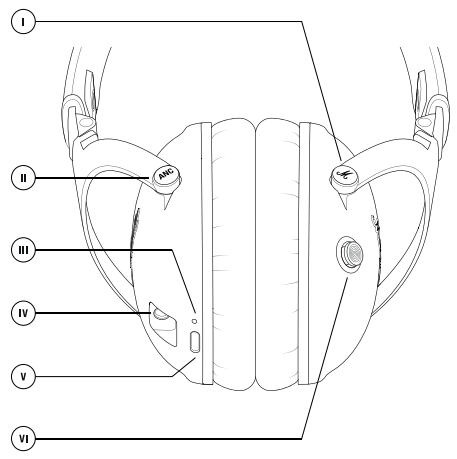
DEVICE LAYOUT
- Customisable M-button
- ANC mode button
- LED indicator
- 3.5 mm input
- USB-C port for charging
- Multi-directional control knob
THE CONTROL KNOB
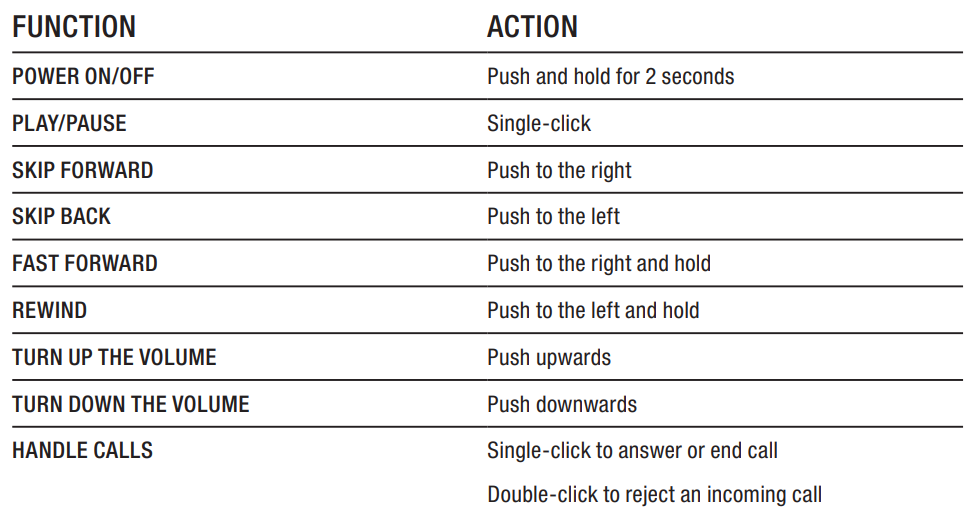
Use the control knob on the right ear cap to control audio, start Bluetooth® pairing mode and turn the headphones on or off . THE LED INDICATOR
THE LED INDICATOR
CHARGING YOUR HEADPHONES
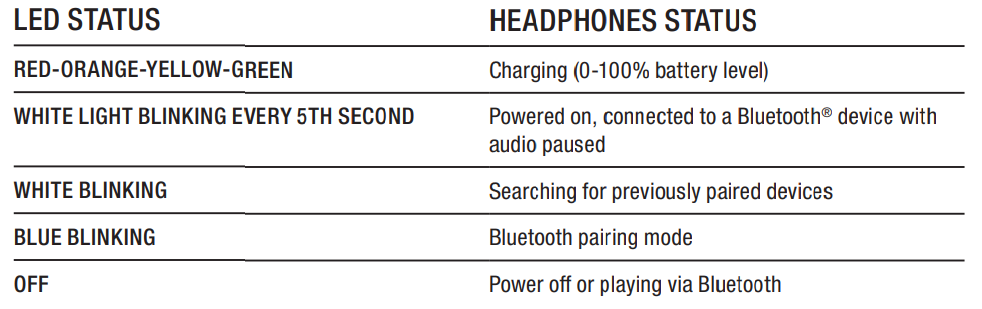
- When the battery charge is low, an alert will sound.
- Plug your headphones into a USB-C power source via the USB-C cable to charge the battery. A full battery recharge takes approximately 2 hours, and 15 minutes of charging can get you up to 5 hours of wireless playtime.
THE ANC MODE BUTTON
Monitor II A.N.C. utilise Active Noise Cancelling (ANC) technology that continuously pinpoints and measures ambient noise to control how much of the outside world you hear.
There are two ANC modes.
- Active noise cancelling - Block out the noise and focus on what is playing.
- Monitoring mode - Let the outside world in to engage in a conversation or listen to an announcement.
Use the ANC button to quickly change between modes.
- Short-press toggles Active noise cancelling and Monitoring mode
- Push and hold for 2 seconds to turn ANC off or on
The level of noise cancelling and monitoring can be adjusted in the Marshall Bluetooth app.
THE M-BUTTON
- The M-button can be set to switch between three different equaliser presets or, alternatively, your phone's voice assistant or the Google Assistant.
- Go to the Marshall Bluetooth app and configure the M-button from the
- M-Button settings menu
- Note: Voice assistant may not be available in your country and requires a separate account/agreement between you and the third-party service.
THE 3.5 MM INPUT
- To use the Monitor II A.N.C. with a wired device, simply use the 3.5 mm cable included. Once connected, Bluetooth will disconnect for audio streaming. You can still use ANC, as long as your headphones are turned on.
- When the 3.5 mm cable is disconnected, the headphones will try to reconnect with the last connected Bluetooth device.
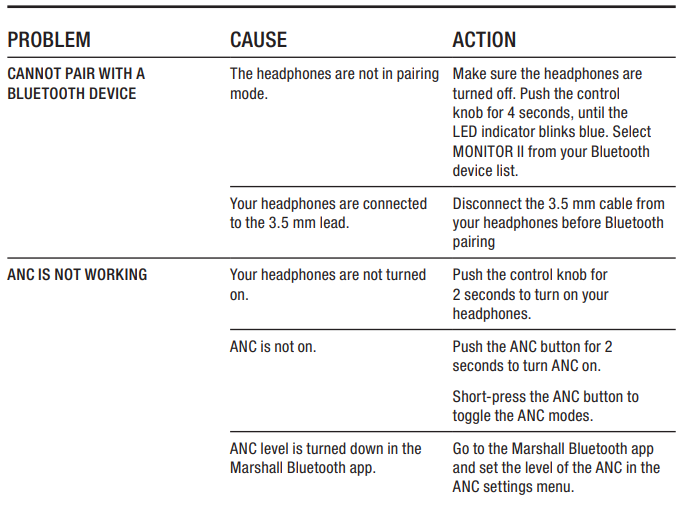
TROUBLESHOOTING
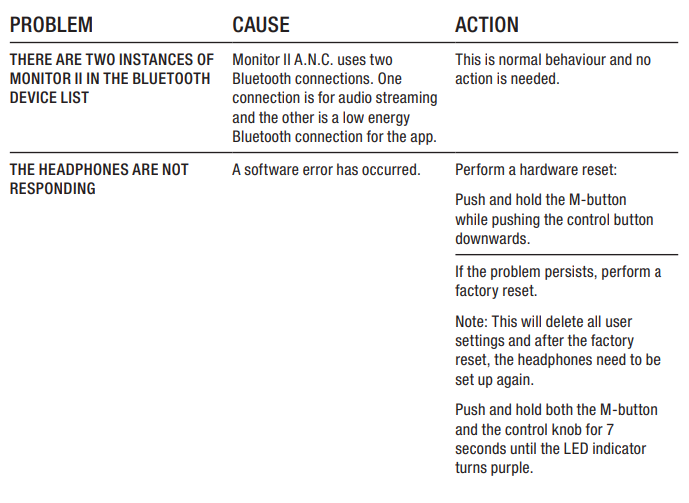
Specifications
Here are the key technical specifications of the **Marshall Monitor II A.N.C.** headphones:
- Driver Size: Custom-tuned 40 mm dynamic drivers
- Frequency Response: 20 Hz to 20,000 Hz
- Impedance: 19.3 ohms
- Sensitivity: 96 dB (measured at 99.08 dB)
- Weight: 321 g without cable, 345 g with cable
- Bluetooth Version: 5.0 with SBC codec
- Battery Life: Up to 45 hours without noise cancellation, up to 30 hours with
- Active Noise Cancellation: Advanced noise cancellation with transparency mode
- Controls: Golden knob for playback, ANC button for noise cancellation control
- Accessories: Includes a USB-C charging cable, 3.5 mm audio cable, and carrying pouch
Pros and Cons
Pros
- Sound Quality: Deliver crisp highs, punchy mids, and deep bass, offering a balanced sound profile.
- Design and Build: Ergonomic design with a comfortable fit, inspired by Marshall's iconic style.
- Noise Cancellation: Effective active noise cancellation enhances the listening experience.
- Long Battery Life: Offers up to 45 hours of playtime without noise cancellation.
Cons
- Lack of aptX Support: Limited Bluetooth codec options may reduce audio quality for some users.
- Clamp Tightness: Some users may find the headband clamp too tight.
- Volume Requirement: Noise cancellation is more effective at higher volumes.
Customer Reviews
Users praise the **Marshall Monitor II A.N.C.** for its stylish design, comfortable fit, and excellent sound quality. Many appreciate the effective noise cancellation and long battery life. However, some users mention the lack of aptX support and the tight clamp as drawbacks. Overall, these headphones are highly rated for their value and performance.
Rating: 4.5/5 stars.
"These headphones are perfect for commuters who want a stylish and sound-rich experience. The noise cancellation is effective, and the battery life is impressive," says a satisfied customer.
Purchase Recommendation: Ideal for those seeking a balance of style, sound quality, and noise cancellation.
Faqs
How do I set up the marshall Monitor II A.N.C. for the first time?
What should I do if my marshall Monitor II A.N.C. is not charging properly?
Can I use the marshall Monitor II A.N.C. with devices that don't support Bluetooth?
How do I maintain and clean my marshall Monitor II A.N.C.?
What are the key features of the marshall Monitor II A.N.C. that make them different?
Can I customize the sound settings on my marshall Monitor II A.N.C.?
Are the earpads of the marshall Monitor II A.N.C. interchangeable?
How do I troubleshoot audio quality issues with my marshall Monitor II A.N.C.?
More marshall manuals
- Setup: Marshall Woburn III Home Bluetooth Speaker User Manual
- Setup: Marshall Stockwell II - Portable Stereo Loudspeaker User Manual
- Setup: Marshall Woburn II Wireless Home Bluetooth Speaker User Manual
- Setup: Marshall Acton II Bluetooth Speaker User Manual
- Setup & Pairing: Marshall Stanmore II Speaker User Manual
- Setup: Marshall Willen Portable Loudspeaker User Manual
Leave a Comment