
Setup & Pairing: Marshall Willen II Portable Loudspeaker User Manual
Content
Marshall Willen II Portable Loudspeaker
Introduction
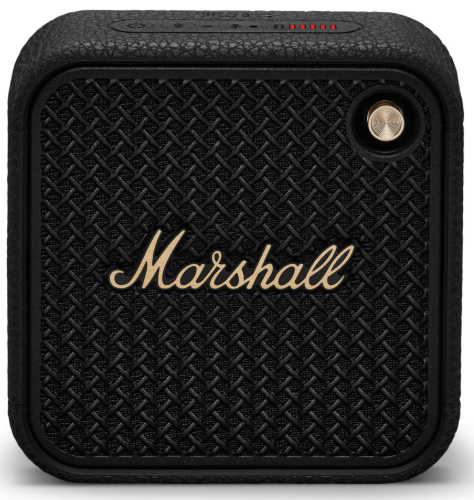
The Marshall Willen II Portable Loudspeaker is a rugged and ultra-portable Bluetooth speaker designed for those who value both style and sound quality on the go. This speaker embodies the classic Marshall aesthetic, combining a robust build with a powerful, bass-heavy sound that's characteristic of the brand. With an IP67 rating, it's dustproof and waterproof, making it perfect for outdoor adventures or everyday use in challenging environments. The Willen II is available in Black & Brass or Cream, offering a versatile design that appeals to fans of the Marshall look. It is priced at approximately $129.99 and is available from various retailers, including Marshall's official website and Verizon. Whether you're a music enthusiast, an outdoor adventurer, or simply someone who appreciates quality sound in a compact package, the Marshall Willen II is a great choice.
Specifications of the Marshall Willen II
The Marshall Willen II comes with a range of impressive features that make it a standout in its class:
- Physical Dimensions: 4.3 cm depth, 10.5 cm width, and 10.5 cm height, weighing 360 grams.
- Water and Dust Resistance: IP67 rated, capable of withstanding dust and water submersion up to 1 meter for 30 minutes.
- Audio Specifications:
- Driver: 2-inch full-range driver with two passive radiators.
- Amplification: Powered by a 38-watt Class-D amplifier.
- Frequency Response: 75 Hz to 20 kHz.
- Bluetooth Version: Bluetooth 5.3.
- Battery Life: Up to 17 hours of continuous playtime.
- Connectivity: No USB audio, no aux inputs, but supports hands-free calling and has a USB-C for charging.
DEVICE LAYOUT
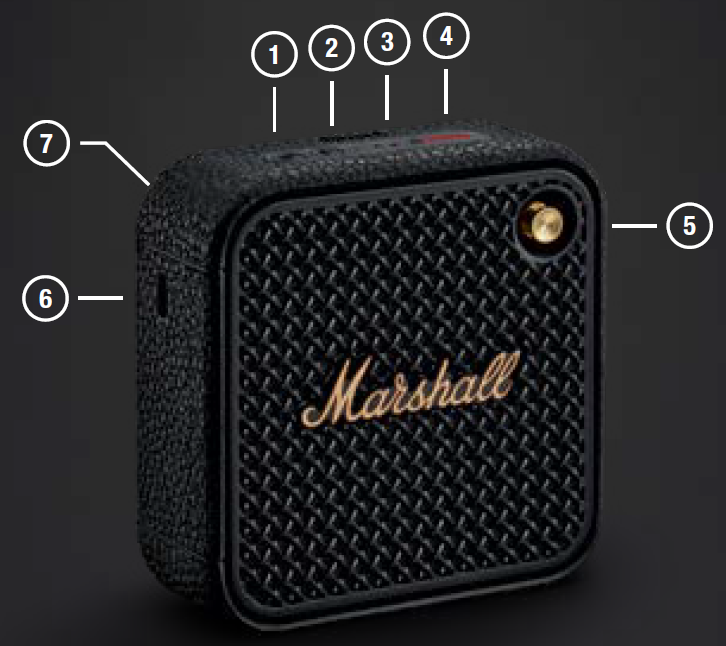
- POWER BUTTON
Push and hold the power button to turn the speaker on or off. - BLUETOOTH BUTTON
Push and hold the Bluetooth® button until the LED turns to a slow blue pulse to start pairing mode. - MICROPHONE
The microphone lets you use Willen II as a speaker phone. Push the Bluetooth button to toggle the call between the speaker and your phone. - BATTERY INDICATOR
The 5-segment battery indicator shows the battery charge. - CONTROL KNOB
Use the control knob to manage your music playback, phone calls,, and more. - USB-C POWER INPUT
Charge the speaker by plugging it into a USB power source via the included USB-C lead. - FASTENING STRAP
Unhook the lower-right side of the strap by stretching it gently.
INSTRUCTIONS
GETTING STARTED
- Push and hold the Power button until the speaker turns on.
- Push and hold the Bluetooth button until the LED turns to a slow blue pulse.
- Select WILLEN II from your audio device’s Bluetooth list.
USING THE CONTROL KNOB
- Play/pause – push once
- Skip backward/forward – push left/right
- Turn up/down the volume – push up/down
- Receive/end a call – push once
- Reject a call – push twice
CHARGING THE SPEAKER
Use the included USB-C cable to connect the speaker to a USB power source (5 V, 1.5 A). The USB-C power input port is located on the left side of the speaker.
Note: Always make sure that the speaker is completely dry before charging it.
BATTERY INDICATOR
The 5-segment battery indicator shows the battery charge. A rising animation indicates that the battery is charging.
PAIRING A NEW DEVICE
Willen II can be connected with 2 devices at a time and remembers up to 8 previously paired devices. When in range, it will try to reconnect with the last connected device.
- Push and hold the power button until the speaker turns on.
- Push and hold the Bluetooth button until the LED turns to a slow blue pulse.
- Select WILLEN II from your audio device’s Bluetooth list.
RESETTING THE SPEAKER
A factory reset will reset the speaker to its original settings, excluding any firmware updates.
Note: This will delete all user settings,, gs, and the speaker will need to be set up again.
- Remove WILLEN II, and WILLEN II [LE] if present, from your sound device’s Bluetooth list.
- Ensure that the speaker is on.
- Push and hold the Bluetooth button for 7 seconds. The Bluetooth indicator turns quickly red, and the speaker restarts.
- The speaker has returned to its factory settings and is ready to be paired, see section Getting started.
CLEANING THE SPEAKER
Clean your speaker regularly to keep it fresh and last longer.
Unplug any leads before cleaning the speaker, and make sure everything is completely dry before plugging in a USB charger.
The silicone sleeve and the carry strap can be removed and cleaned separately. Gently clean it and the leads with a lint-free cloth, slightly damp with either:
BATTERY CARE GUIDE
Your speaker comes equipped with high-performance lithium-ion batteries,s and the battery life span is affected by charging and usage. Follow the guidelines below to keep your battery in great condition for as long g possible.
- Avoid using fast chargers if possible. Fast charging causes stress on the battery and will degrade it.
- Avoid letting the battery drain completely or charging it when it’s already full. Try to keep the charge between 30% and 80%.
- If the speaker is stored for a long time, it is recommended to charge the speaker to about half-charge and then do a factory reset. Store the speaker in a cool, dark, and dry place.
- Avoid using or charging the speaker in hot and unventilated places, 45°C/113°F and above, such as in a parked car or by a window in direct sunlight.
- Avoid charging the battery at low temperatures, below 10°C/50°F and using the speaker below 0°C/32°F.
- Avoid strong mechanical shocks, such as dropping the speaker on hard surfaces, as it might harm the batteries.
Download the Marshall Bluetooth app and select the battery preservation level that best suits you and your speaker.
MARSHALL BLUETOOTH APP
Download the Marshall Bluetooth app to get the most out of your speaker and keep it up to date with the latest software.

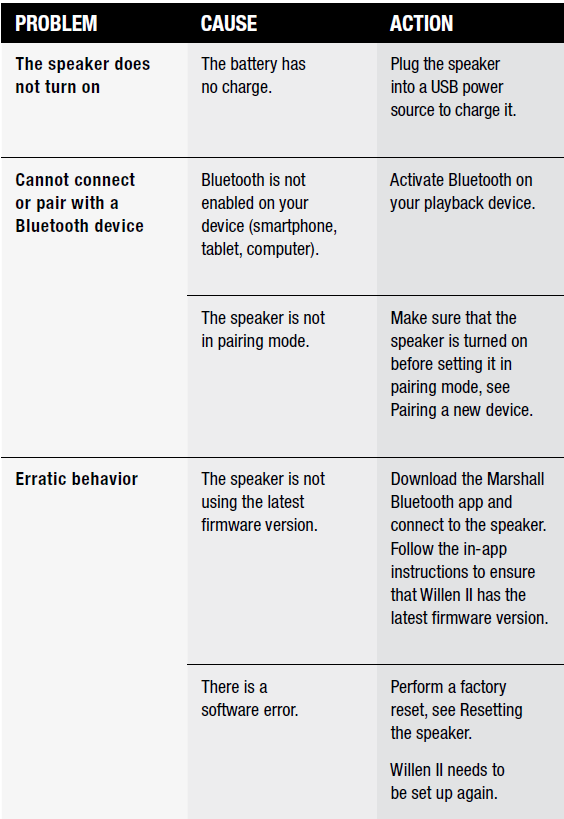
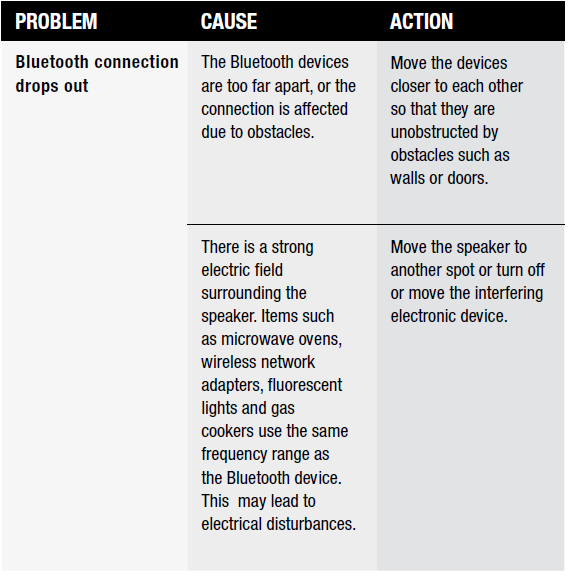
TROUBLESHOOTING
Pros and Cons of the Marshall Willen II
Pros
- Robust Build: Extremely durable with a metal grille and rubberized housing.
- Portable Design: Ultra-portable with a detachable strap for easy mounting.
- Sound Quality: Offers a balanced sound with strong bass, suitable for various genres.
- Long Battery Life: Provides up to 17 hours of playtime.
Cons
- Mono Output: Only produces mono sound, which might be a drawback for some users.
- Limited Features: No stereo pairing or support for higher audio formats like aptX or LDAC.
Customer Reviews and Feedback
Users generally praise the Marshall Willen II for its rugged design, impressive sound quality, and long battery life. Common praises include its ability to deliver balanced sound across various music genres and its durability in harsh environments. However, some users have noted that the lack of stereo pairing and limited extra features might be a drawback for those seeking more advanced functionalities. Overall, it's highly recommended for those looking for a reliable, portable speaker with a strong Marshall signature sound.
Faqs
How do I set up the Marshall Willen II Portable Loudspeaker for the first time?
What should I do if the Marshall Willen II Portable Loudspeaker is not connecting to Bluetooth?
Can the Marshall Willen II Portable Loudspeaker be used with non-Bluetooth devices?
How long does the battery last on the Marshall Willen II Portable Loudspeaker, and how do I maximize playtime?
What are the key features of the Marshall Willen II Portable Loudspeaker that enhance its durability?
How do I use the Marshall Willen II Portable Loudspeaker’s control knob effectively?
Does the Marshall Willen II Portable Loudspeaker support stereo or party mode pairing?
How should I clean and maintain the Marshall Willen II Portable Loudspeaker to ensure longevity?
More marshall manuals
- Setup: Marshall Emberton III Portable Loudspeaker User Manual
- Setup: Marshall Tufton Portable Stereo Loudspeaker User Manual
- Setup & Pairing: Marshall Bromley 750 Party Speaker User Manual
- Setup: Marshall Kilburn II Portable Stereo Loudspeaker User Manual
- Setup: Marshall Stanmore Multi-Room Speaker User Manual
- Setup & Pairing: Marshall Emberton II Portable Loudspeaker User Manual
Leave a Comment