
Setup: Marshall Uxbridge With Amazon Alexa Speaker User Manual
Content
Marshall Uxbridge With Amazon Alexa Speaker
Introduction
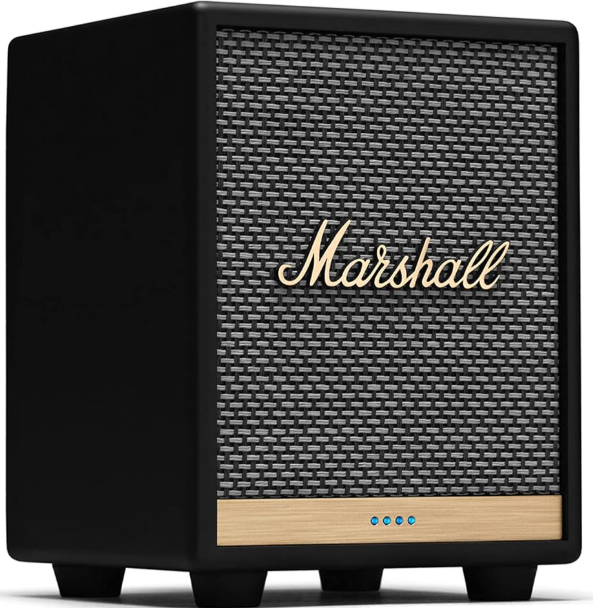
The Marshall Uxbridge with Amazon Alexa Speaker is a compact, stylish smart speaker designed to deliver powerful sound with seamless voice control. Featuring an Amazon Alexa built-in, this speaker allows users to easily play music, control smart home devices, check the weather, and manage daily tasks hands-free. Its iconic Marshall design combines vintage aesthetics with modern technology, making it a visually striking addition to any room.
Equipped with a 30-watt Class D amplifier powering both woofer and tweeter, the Uxbridge produces rich and clear sound with a frequency range of 54 Hz to 20,000 Hz. Users can customize audio output by adjusting bass and treble directly on the device or via the Marshall Voice app, ensuring an immersive listening experience tailored to personal preferences.
Connectivity options include Wi-Fi with AirPlay 2 support, Bluetooth 5.0, and Spotify Connect, enabling flexible streaming from various devices such as iPhones, iPads, Macs, and Android smartphones. The speaker also supports multi-room audio setups with other Alexa-enabled devices, enhancing home audio experiences.
Designed for music enthusiasts and smart home users alike, the Marshall Uxbridge with Amazon Alexa Speaker suits living rooms, bedrooms, and offices where quality sound and voice assistant functionality are desired. Retailing at an estimated price range of $150 to $170, the speaker is available in classic black and white finishes, offering both performance and style for an affordable smart speaker option.
BOX CONTENTS
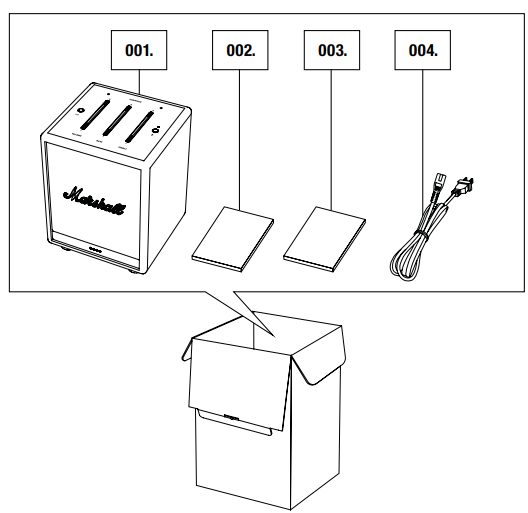
- Marshall Uxbridge with Amazon Alexa
- Quick Start Guide
- Important Safety Instructions
- Mains lead
GENERAL DESCRIPTION
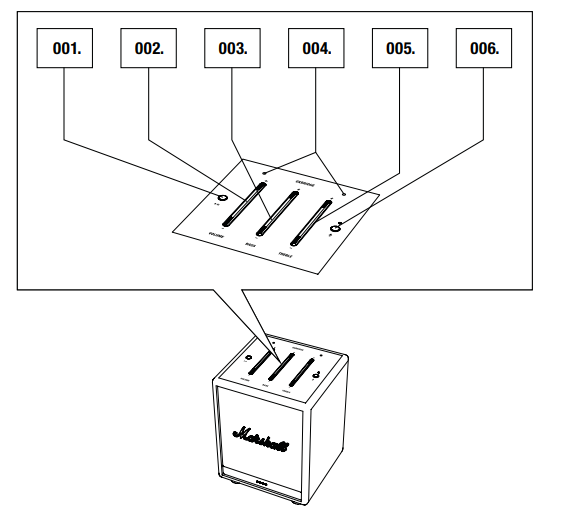
- Play/pause button
- Volume button
- Bass button
- Microphones
- Treble button
- Microphone button
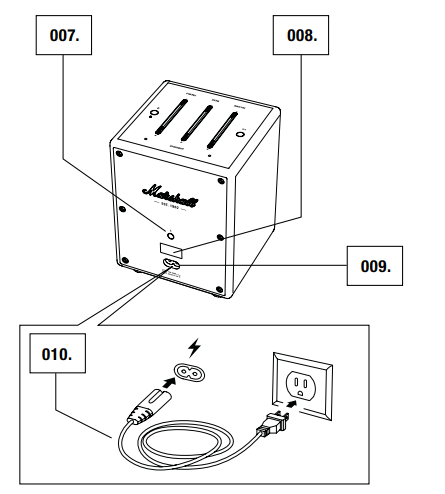
- Bluetooth® button
- Service port (not used)
- Mains input
- Mains lead
SETTING UP THE UXBRIDGE
Configure the speaker for Wi-Fi® with the Marshall Voice app. The app is available from the App Store and Google Play.
- Download the Marshall Voice app and follow the in-app instructions to set up your speaker.
USING AMAZON ALEXA
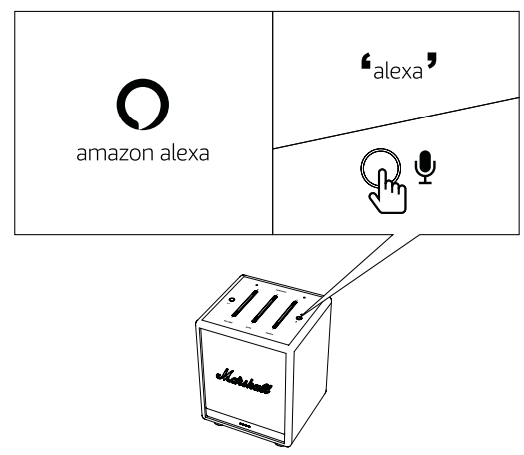
You can talk to Amazon Alexa in your Uxbridge. With Alexa, you can ask to play music, hear the news, check the weather, control smart home devices, and more. Sign in to Amazon Alexa from the Marshall Voice app to enable Alexa on your Uxbridge.
Activate Alexa by saying Alexa or pushing the microphone button.
- Alexa, what‘s the weather?
- Alexa, turn up the volume.
- Alexa, play the next song.
USING UXBRIDGE WITH SPOTIFY CONNECT®
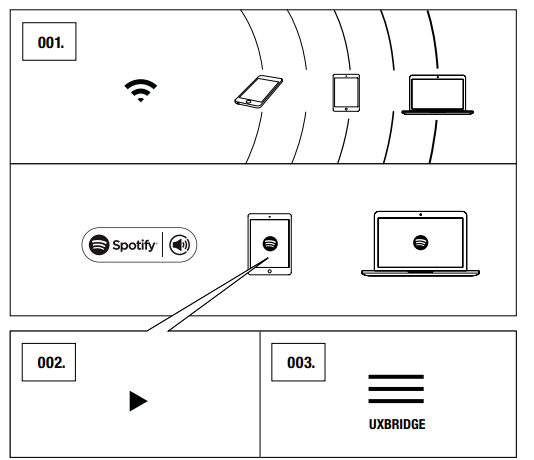
Use your phone, tablet, or computer as a remote control for Spotify. Go to Spotify Connect to learn more.
USING UXBRIDGE WITH AirPlay 2
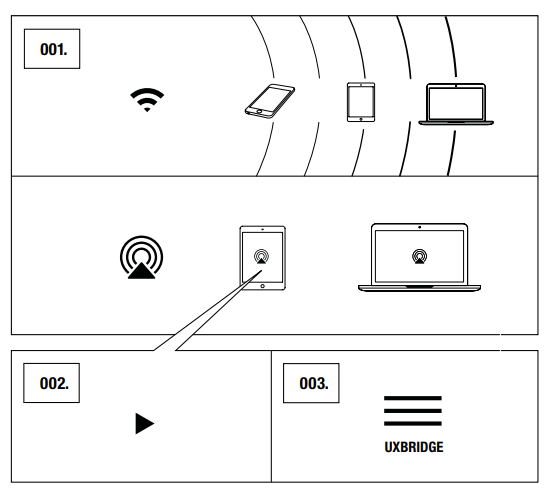
Uxbridge supports Apple’s AirPlay 2 technology,, designed to control home audio systems. It lets you play a song on every AirPlay 2 speaker in your house at the same time or adjust the volume in any room — all in sync.
- Connect your Apple device to the same Wi-Fi network as your Speaker.
- Play the audio you want to stream and tap AirPlay.
- Select Uxbridge from the list of available devices.
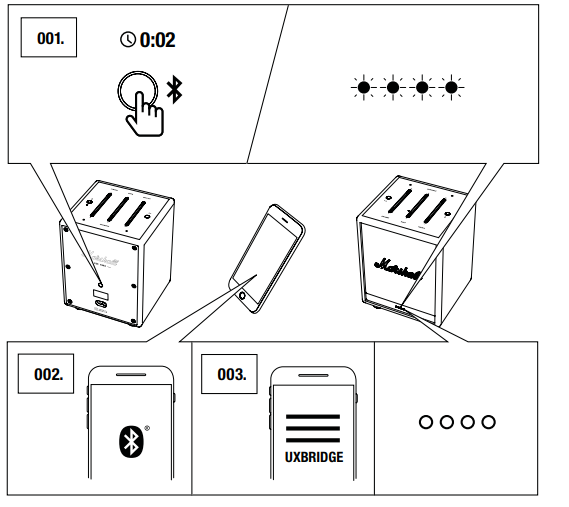
CONNECTING VIA BLUETOOTH® (PAIRING)
- Push and hold the Bluetooth button for 2 seconds.
The front indicators turn blue while in pairing mode. - Enable Bluetooth on your device (smartphone, tablet, computer).
- Select Uxbridge from the Bluetooth list and accept pairing.
The front indicators return to normal when the units are connected.
The Uxbridge stores up to eight Bluetooth devices and tries to connect to the last connected device first.
TECHNICAL INFORMATION
ACOUSTIC SPECIFICATION
- CABINET PRINCIPLE: Enclosed
- DIGITAL CLASS D AMPLIFIERS: 30 W
- BASS AND TREBLE TONE CONTROLS
- FREQUENCY RESPONSE: 54-20,000 Hz ±6 dB
- MAXIMUM SOUND PRESSURE LEVEL: 96 dB SPL @ 1 m
TECHNICAL SPECIFICATION
- MAINS INPUT VOLTAGE: 100–240 VAC
- MAINS FREQUENCY: 50/60 Hz
- NETWORK STANDBY POWER CONSUMPTION: <2 W
- WIRELESS CONNECTIVITY:
- Spotify Connect
- AirPlay 2
- Bluetooth
- WI-FI SUPPORT: Connects to your home Wi-Fi network with any WPA, 802.11b/g/n/ac 2.4 GHz/5 GHz with diversity.
- SIZE: 128 x 168 x 123 mm
- WEIGHT: 1.39 Kg
- VOICE CONTROL SERVICE: Amazon Alexa
- MICROPHONE SYSTEM: A dual microphone array with acoustic noise cancellation for far-field voice interaction.
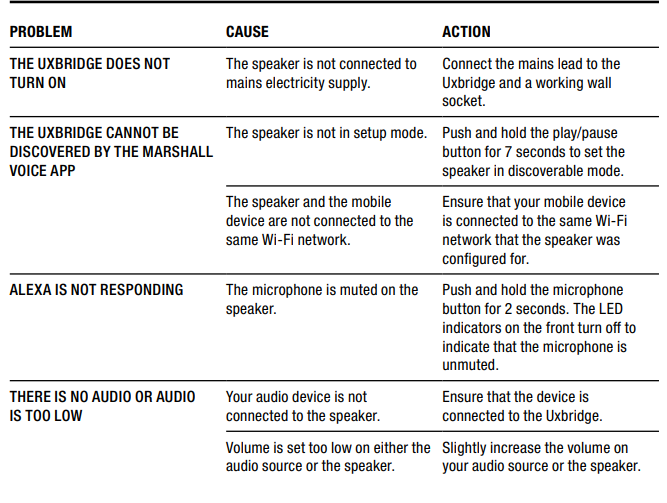
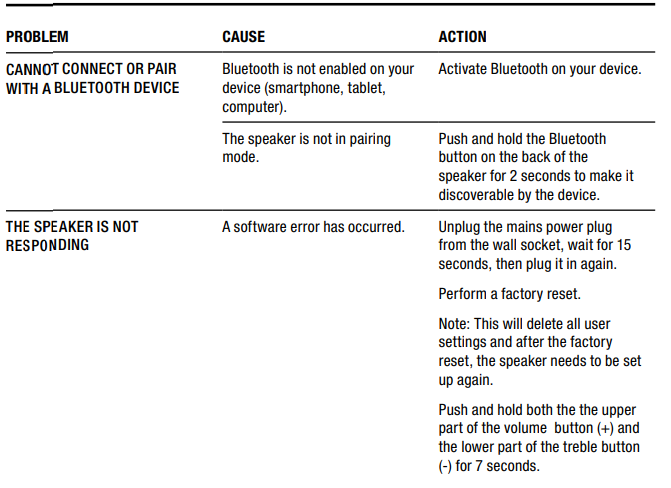
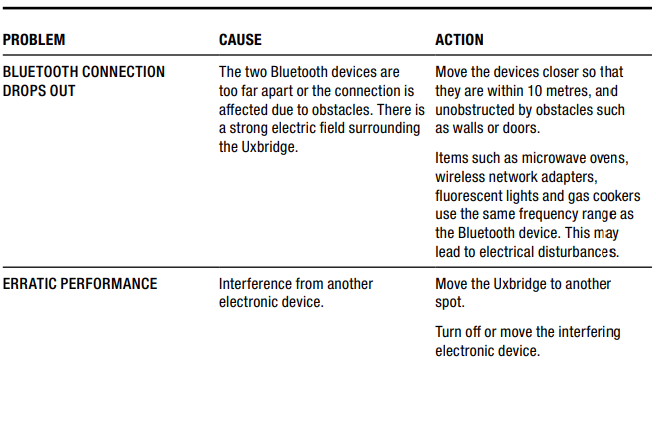
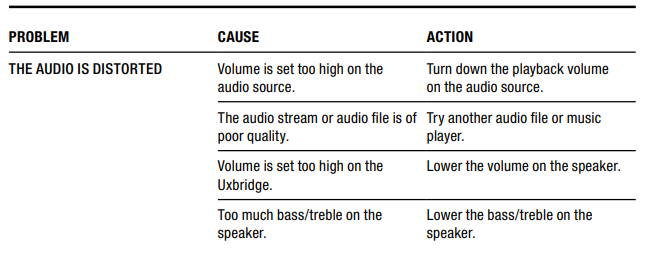
TROUBLESHOOTING
Pros & Cons of the Marshall Uxbridge With Amazon Alexa Speaker
Pros
- Powerful Sound in Compact Size: Despite its small form factor, the Uxbridge delivers 30 watts of clear, punchy audio with adjustable bass and treble for personalized sound tuning.
- Built-in Amazon Alexa: Hands-free voice control enables easy access to music, information, smart home control, and multi-room audio coordination.
- Multiple Connectivity Options: Supports Wi-Fi, Bluetooth 5.0, AirPlay 2, and Spotify Connect, providing versatile streaming flexibility.
- Iconic Marshall Design: Classic amp-style aesthetics with brass control knobs add a premium, vintage look to any environment.
- Multi-Room Compatibility: Integrates well with other Alexa-enabled speakers for synchronized playback throughout the home.
Cons
- Mono Sound Output: Limited to mono audio, which may not satisfy audiophiles seeking stereo separation.
- Requires Constant Power: The speaker must be plugged into an outlet, lacking a rechargeable battery for portability.
- Limited Google Assistant Support: Only Amazon Alexa is built in natively; the Google Assistant version requires a separate purchase or awaits release.
- Price Relative to Features: While competitively priced, some alternatives offer stereo sound or portability at similar cost points.
Customer Reviews & User Feedback on the Marshall Uxbridge With Amazon Alexa Speaker
Users generally praise the Marshall Uxbridge with Amazon Alexa Speaker for its robust sound quality and elegant design. Many highlight the speaker’s ability to deliver surprisingly deep bass and clear vocals for its size. The intuitive bass and treble controls on the speaker are appreciated for quick adjustments without needing a smartphone app.
Common positive remarks include Alexa’s responsiveness even at higher volumes, and the ease of connecting via AirPlay 2 or Spotify Connect. The speaker’s vintage look is frequently cited as a stylish complement to modern home décor.
Some customers report minor issues, such as difficulty pairing multiple Uxbridge speakers for stereo or multi-room use, and the lack of a built-in battery limiting portability. A few users note that the mono audio output may feel less immersive compared to stereo smart speakers.
Overall, the Marshall Uxbridge with Amazon Alexa Speaker receives an average rating of around 4 out of 5 stars, with strong recommendations for users seeking an Alexa-enabled speaker with distinctive style and excellent sound performance in a compact package.
Faqs
How do I set up the marshall Uxbridge With Amazon Alexa Speaker for the first time?
What should I do if my marshall Uxbridge With Amazon Alexa Speaker is not connecting to Alexa?
How can I activate and use Alexa voice commands on the marshall Uxbridge With Amazon Alexa Speaker?
Is the marshall Uxbridge With Amazon Alexa Speaker compatible with Spotify Connect and other streaming services?
How do I troubleshoot Bluetooth connectivity issues on my marshall Uxbridge With Amazon Alexa Speaker?
What are the recommended steps to optimize audio performance on the marshall Uxbridge With Amazon Alexa Speaker?
How do I maintain and care for my marshall Uxbridge With Amazon Alexa Speaker to ensure longevity?
Can I use the marshall Uxbridge With Amazon Alexa Speaker in different countries with varying power supplies?
More marshall manuals
- Setup: Marshall Stockwell - Portable Stereo Loudspeaker User Manual
- Setup: Marshall Acton Multi-Room Loudspeaker User Manual
- Setup: Marshall Kilburn - Portable Active Stereo Speaker User Manual
- Pairing & Usage: Marshall Woburn - Active Stereo Loudspeaker User Manual
- Usage: Marshall Mode EQ In-Ear Headphones User Manual
- Setup & Pairing: Marshall Acton Bluetooth Stereo Loudspeaker Instruction Guide
Leave a Comment