
Setup: Marshall Stockwell - Portable Stereo Loudspeaker User Manual
Content
Marshall Stockwell - Portable Stereo Loudspeaker
Introduction
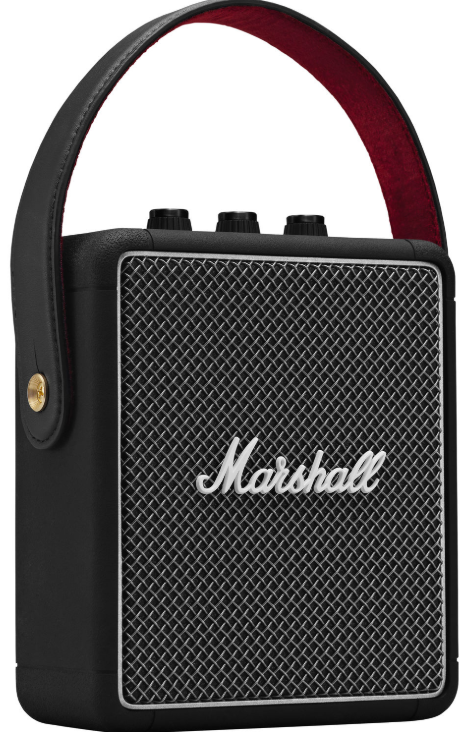
The Marshall Stockwell - Portable Stereo Loudspeaker is a compact, stylish, and powerful Bluetooth speaker designed for on-the-go music lovers who demand high-quality sound and rugged portability. Echoing the iconic Marshall rock ‘n’ roll heritage, the Stockwell delivers a unique blend of vintage-inspired design with modern audio technology, making it an ideal companion for both indoor and outdoor use.
Equipped with True Stereophonic 360° sound technology, this speaker provides a multi-directional listening experience where every spot becomes a sweet spot, immersing you fully in your favorite tunes. The Stockwell features three Class D amplifiers powering its subwoofer and front and rear tweeters, ensuring clear, loud, and distortion-free audio that can fill an average-sized room or create a lively party atmosphere with ease.
Its rugged construction includes a solid metal grille reminiscent of classic microphones and a durable silicone exterior with an IPX4 water-resistance rating, protecting it against splashes and light rain. The speaker boasts over 20 hours of portable playtime with quick charging capabilities—20 minutes of charging delivers up to 6 hours of playback, and a full charge takes approximately 5 hours.
Priced in the mid to upper range of portable Bluetooth speakers, usually around $200 to $250, the Marshall Stockwell appeals to music enthusiasts, travelers, and outdoor adventurers seeking a balance of style, sound quality, and durability. Its availability spans major retailers and the official Marshall website, making it accessible worldwide.
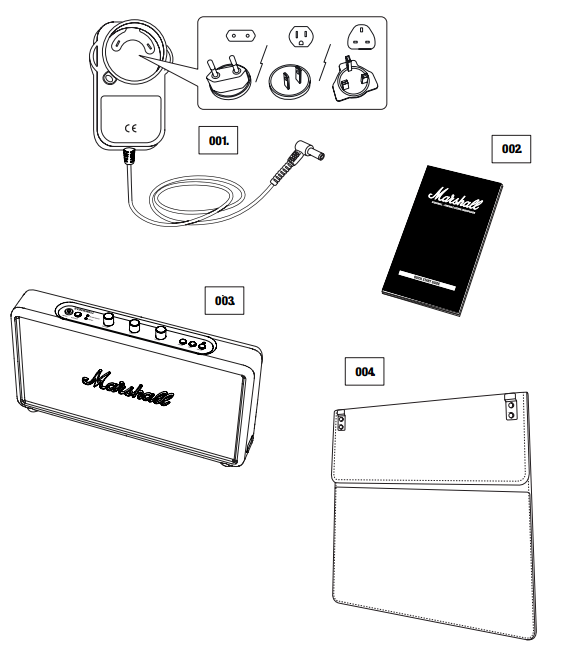
BOX CONTENTS
- POWER ADAPTER WITH A CORD AND REGION-SPECIFIC PLUGS
- QUICK START USER MANUAL AND SAFETY INFORMATION
- MARSHALL STOCKWELL ACTIVE STEREO LOUDSPEAKER
- MARSHALL FOLDABLE FLIP COVER (INCLUDED OR SOLD SEPARATELYDEPENDING ON MODEL)
DEVICE LAYOUT
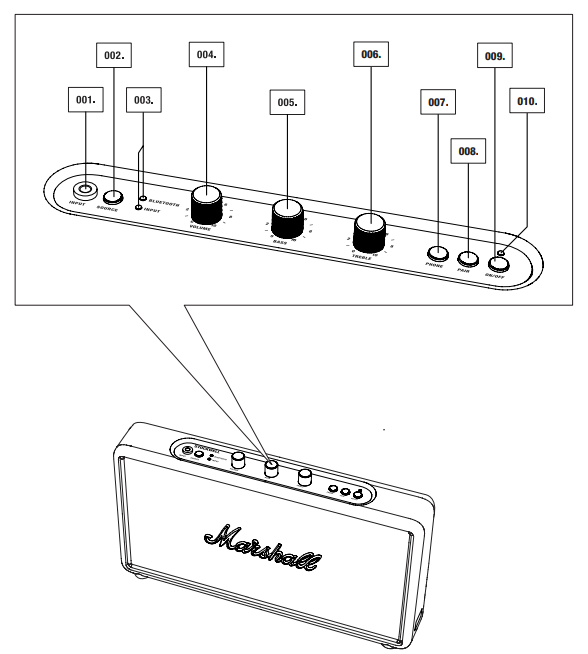
- INPUT FOR 3.5MM STEREO PLUG
- SOURCE BUTTON
- SOURCE INDICATORS
- VOLUME KNOB
- BASS KNOB
- TREBLE KNOB
- PHONE BUTTON
- PAIR BUTTON
- POWER BUTTON
- ON/OFF INDICATOR
CONNECTING VIA BLUETOOTH (PAIRING)
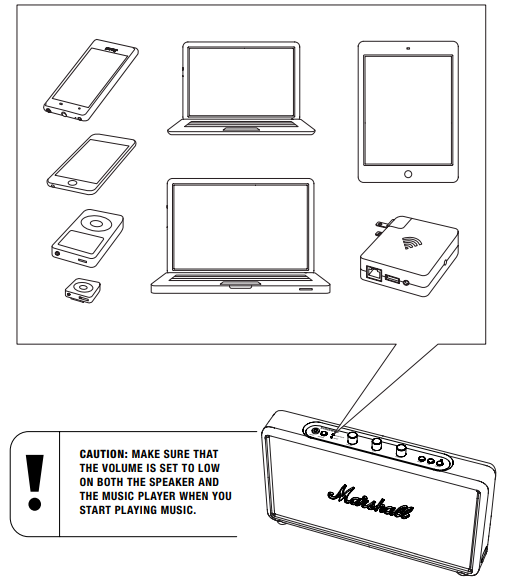
THERE ARE TWO WAYS TO CONNECT YOUR PHONE, TABLET, OR LAPTOP TO YOUR SPEAKER, WHETHER USING A PHYSICAL CORD OR VIA WIRELESS BLUETOOTH®. BELOW YOU WILL FIND MORE DETAILS ABOUT THE CONNECTION SOURCES, IN TWO CATEGORIES:
- WIRELESS CONNECTION VIA BLUETOOTH (SPEAKER PHONE MODE)
- CONNECTION VIA THE 3.5MM STEREO PLUG
USING THE STOCKWELL WITH YOUR DEVICES
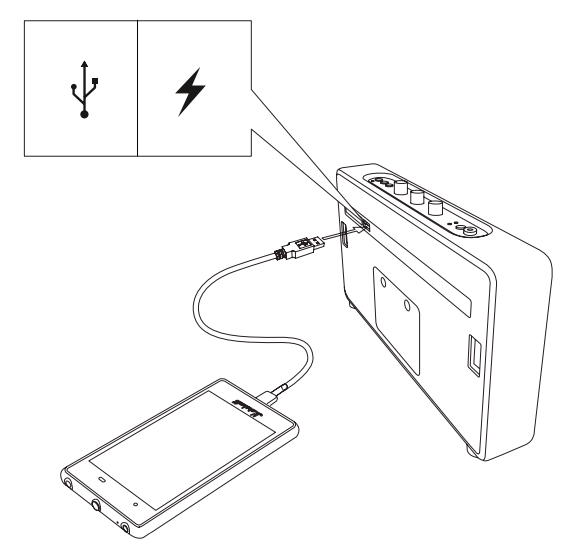
THE STOCKWELL HAS A USB POWER OUTPUT SOCKET ON THE BACK. YOU CAN PLUG IN AND CHARGE YOUR USB CHARGEABLE DEVICE. THE STOCKWELL WILL POWER YOUR USB DEVICE EVEN THOUGH IT IS PLAYING MUSIC AND RUNNING ON BATTERY POWER.
BLUETOOTH AUTO CONNECTION
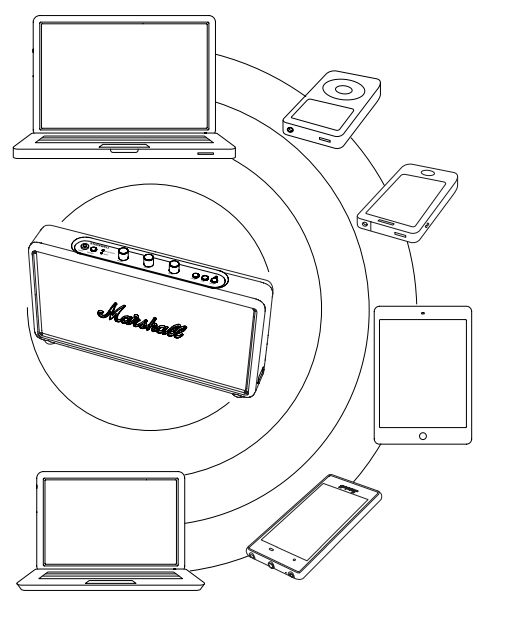
WITH THE HELP OF BLUETOOTH TECHNOLOGY,, YOU CAN EASILY CONNECT YOUR BLUETOOTH-COMPATIBLE DEVICES TO THE STOCKWELL OVER short-range RT RANGE WIRELESS CONNECTION. THIS ALLOWS YOU TO USE THE STOCKWELL AS A SPEAKER PHONE WITH YOUR BLUETOOTH-ENABLED SMARTPHONE OR CONNECT IT WITH A TABLET OR COMPUTER AND STREAM MUSIC DIRECTLY TO IT.
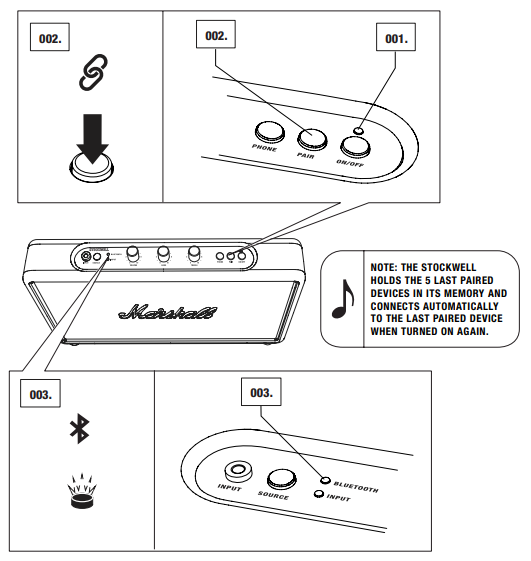
FOLLOW THESE STEPS TO PAIR THE STOCKWELL WIRELESSLY TO YOUR BLUETOOTH DEVICE.
- ENSURE THAT THE STOCKWELL IS POWERED ON.
- PUSH THE PAIR BUTTON.
- THE RED BLUETOOTH INDICATOR STARTS TO FLASH RAPIDLY.
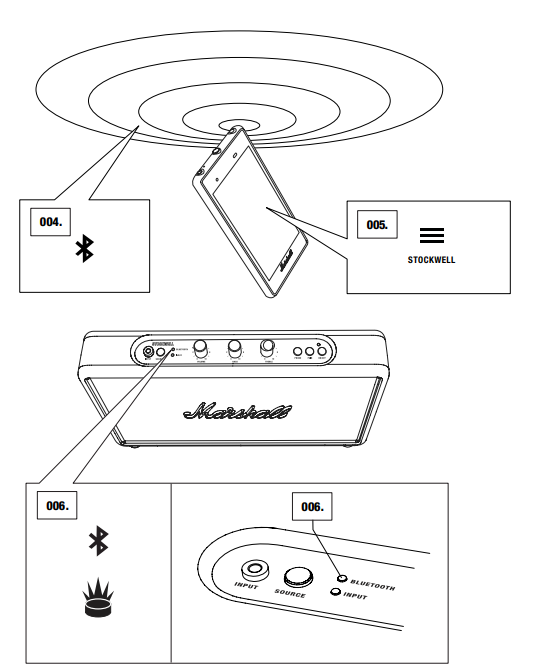
- ENABLE BLUETOOTH FUNCTIONALITY ON YOUR DEVICE. (SMARTPHONE, TABLET, COMPUTER). ON YOUR DEVICE, SELECT THE STOCKWELL FROM THE BLUETOOTH LIST AND ACCEPT PAIRING.
- THE BLUETOOTH INDICATOR ON THE STOCKWELL TURNS TO A STEADY RED, AND THE UNITS ARE NOW CONNECTED.
CONNECTING THE SOUND SOURCE BY CABLE
- IF A BLUETOOTH CONNECTED DEVICE IS MOVED OUTSIDE THE RANGE OF
- THE STOCKWELL (APPROXIMATELY 10 METRES WITHOUT OBSTACLES), IT IS DISCONNECTED. THE DEVICE IS AUTOMATICALLY CONNECTED AGAIN WHEN IT IS MOVED BACK WITHIN RANGE.
- THE SPEAKER STORES UP TO FIVE DEVICES AND TRIES TO CONNECT TO THE LAST CONNECTED BLUETOOTH DEVICE FIRST. FOR EXAMPLE, IF THE SPEAKER HAS BEEN CONNECTED TO THE DEVICES: A–B–C–D–E , DEVICE E IS GIVEN
- FIRST PRIORITY, WHILE DEVICE A IS GIVEN LAST PRIORITY. EVERY TIME THE SPEAKER STARTS UP, IT WILL DO AN AUTO CONNECTION OF DEVICES WITHIN ITS RANGE.
CONNECTING THE SOUND SOURCE BY CABLE
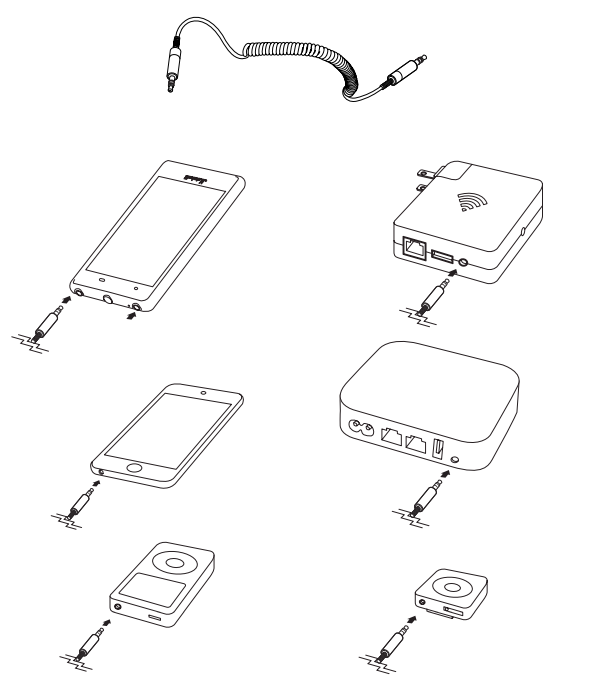
THERE IS ANOTHER WAY TO CONNECT TO YOUR STOCKWELL – THE OLD FASHIONED WAY, USING A DOUBLE-ENDED CORD AND THE 3.5MM INPUT.
USE A DOUBLE-ENDED CORD WITH 3.5MM PLUGS TO CONNECT TO AUDIO SOURCES THAT HAVE AUDIO OUTPUT, SUCH AS A MOBILE TELEPHONE, IPHONE/IPAD/IPOD, MP3 PLAYER, OR AIRPORT EXPRESS.
CONNECTING THE SOUND SOURCE BY CABLE
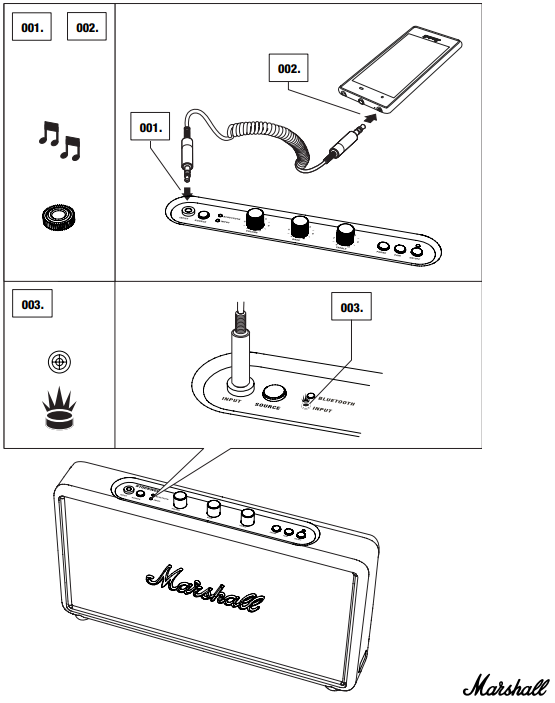
- CONNECT THE CORD WITH THE 3.5MM STEREO PLUG TO THE INPUT ON THE STOCKWELL.
- CONNECT THE CORD WITH THE 3.5MM STEREO PLUG TO THE MUSIC PLAYER.
- SELECT INPUT AS SOURCE BY PUSHING THE SOURCE BUTTON UNTIL THE INPUT INDICATOR IS LIT.
TECHNICAL INFORMATION
SOUND SPECIFICATION
- ACTIVE STEREO LOUDSPEAKER WITH BASS REFLEX SYSTEM
- TONE CONTROLS:
- BASS: 300Hz, +6dB TO -12dB
- TREBLE: 3kHz, +6dB TO -12dB
- CLASS D AMPLIFIER: 2 X 10W
- WOOFER: 2 X 2.25”
- FULL RANGE: 2 X 2.25”
- PASSIVE RADIATORS: 2 X 3.5” X 1.5”
- MAX SPL: 90dB SPL @ 1m
- FREQUENCY RANGE: 50 - 20 000Hz
CONNECTIVITY
- BLUETOOTH: STANDARD V4.0 + EDR
- INPUT - 3.5mm STEREO PLUG
TECHNICAL INFORMATION
- POWER ADAPTER: 15V/1.8A
- MAX PEAK POWER CONSUMPTION: 60W
- STANDBY POWER CONSUMPTION:
- BATTERY MODE: 150μA
- POWER ADAPTER MODE: 0.2W
- USB CHARGING OUTPUT: 5V/1A
- AUDIO OUTPUT: 27W RMS
- BATTERY TYPE: 3 X 3.7V LI-IO BATTERIES, 2200mAh
- BATTERY PLAYING TIME:
- MAX VOLUME: 10h
- MID VOLUME: 25h*
- BATTERY CHARGING TIME: 3h
- WEIGHT: 1.20kg
- SIZE: 260 X 140 X 41mm
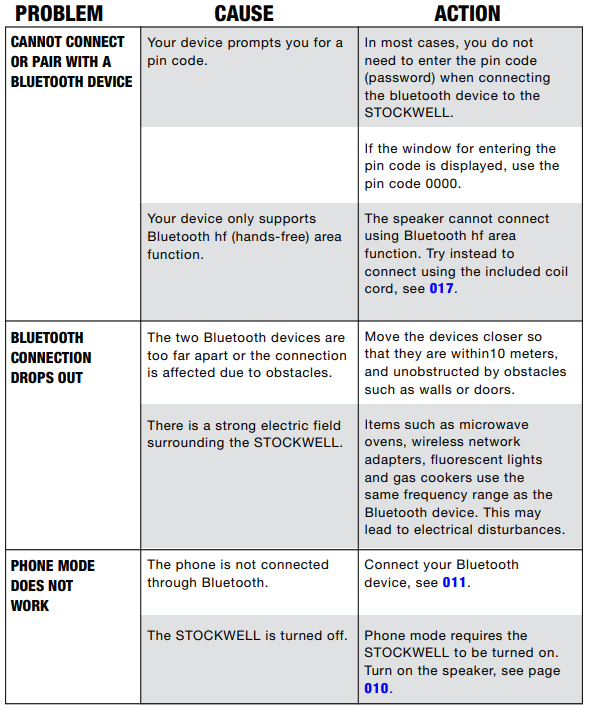
TROUBLE SHOOTING
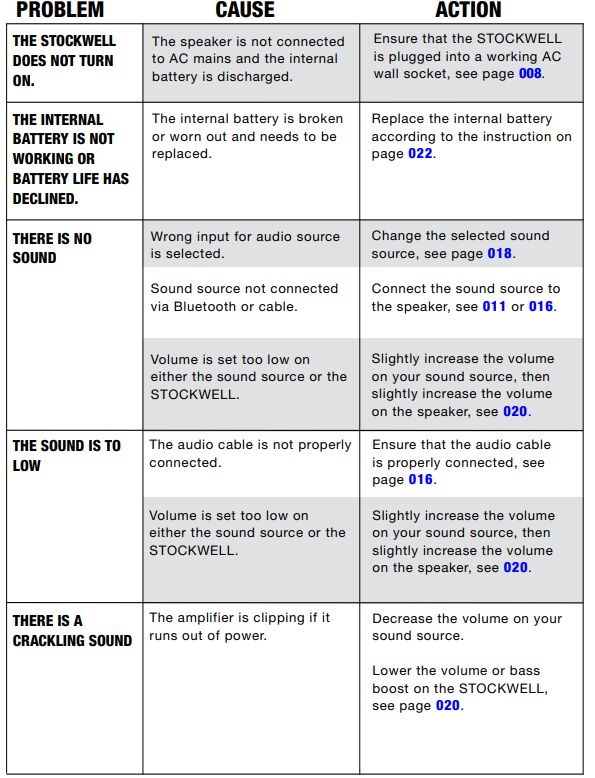
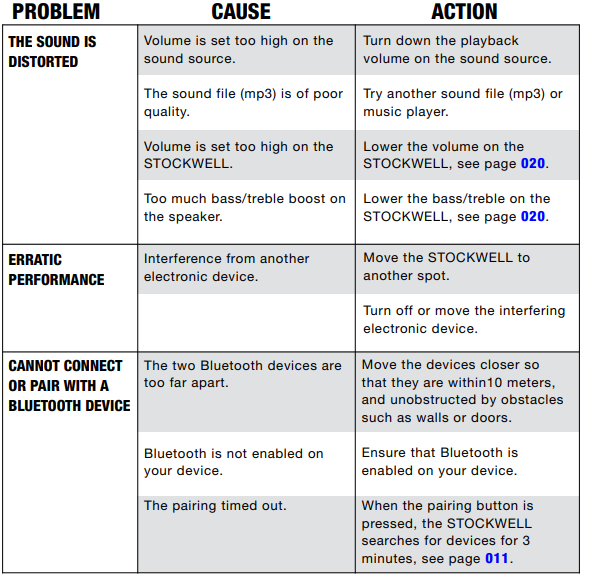
Pros & Cons of the Marshall Stockwell - Portable Stereo Loudspeaker
Pros
- Superior Sound Quality: The Stockwell provides clear, powerful sound with excellent bass response and minimal distortion, even at high volumes,, thanks to its Class D amplifiers and True Stereophonic 360° sound system.
- Long Battery Life: Over 20 hours of playtime ensures all-day use without frequent recharging, complemented by quick charge technology for convenience.
- Rugged & Stylish Design: Classic Marshall aesthetic with a durable silicone exterior and metal grille, plus an IPX4 water resistance rating for outdoor durability.
- Intuitive Analog Controls: Volume, bass, and treble adjustments via analog knobs provide precise, tactile control uncommon in portable speakers.
Cons
- Price Point: Slightly higher cost compared to some competitors, which may not suit budget-conscious buyers.
- Limited Pairing Options: Unlike some modern Bluetooth speakers, the Stockwell cannot be paired wirelessly with a second speaker for stereo separation.
- Moderate Water Resistance: An IPX4 rating protects against splashes but is not sufficient for submersion or heavy rain exposure.
- Speakerphone Quality: The hands-free speakerphone function is less impressive, with some users noting mediocre call clarity.
Customer Reviews of thMarshallll Stockwell - Portable Stereo Loudspeaker
Users generally praise the Marshall Stockwell - Portable Stereo Loudspeaker for its exceptional sound quality and robust build. Many highlight the immersive 360° sound and the tactile analog bass and treble controls as standout features, giving it a unique edge over typical Bluetooth speakers. The long battery life and quick charging capabilities receive frequent commendations, making it a reliable companion for travel and outdoor use.
Common complaints include its relatively high price and the inability to pair with another Stockwell speaker for enhanced stereo sound. Some customers also report that the speakerphone feature offers subpar call quality, suggesting it is best used primarily for music playback. Despite these minor drawbacks, most reviewers rate the product highly, awarding it between 4 to 4.5 stars out of 5 and recommending it to those who value sound fidelity and rugged design in a portable speaker.
Faqs
How do I connect my marshall Stockwell - Portable Stereo Loudspeaker to a device using Bluetooth for the first time?
Why does my marshall Stockwell - Portable Stereo Loudspeaker produce a faint hiss at low volume, and is this normal?
How long does the marshall Stockwell - Portable Stereo Loudspeaker battery last, and how can I maximize its playtime?
Can I use the marshall Stockwell - Portable Stereo Loudspeaker outdoors, and is it water-resistant?
How do I switch between Bluetooth and wired (aux) input on my marshall Stockwell - Portable Stereo Loudspeaker?
Can I pair two marshall Stockwell - Portable Stereo Loudspeakers for stereo sound, or use them as a stereo pair?
What should I do if my marshall Stockwell - Portable Stereo Loudspeaker won't turn on or charge properly?
How do I customize the sound profile on my marshall Stockwell - Portable Stereo Loudspeaker for different music genres?
More marshall manuals
- Setup: Marshall Kilburn - Portable Active Stereo Speaker User Manual
- Setup: Marshall Uxbridge With Amazon Alexa Speaker User Manual
- Usage: Marshall Mode EQ In-Ear Headphones User Manual
- Setup: Marshall Acton Multi-Room Loudspeaker User Manual
- Setup: Marshall Mid Bluetooth On-Ear Headphone User Manual
- Pairing & Usage: Marshall Woburn - Active Stereo Loudspeaker User Manual
Leave a Comment