
Setup: Marshall Mid Bluetooth On-Ear Headphone User Manual
Content
Marshall Mid Bluetooth On-Ear Headphones
Introduction
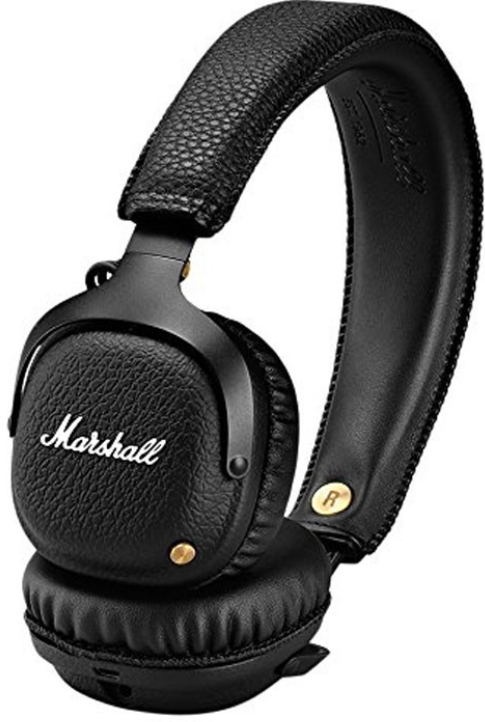
The Marshall Mid Bluetooth On-Ear Headphone combines iconic Marshall style with robust wireless performance, making it an excellent choice for music enthusiasts seeking superior sound quality on the go. With its distinctive black vinyl finish, solid metal hinges, and brass details, these headphones embody a classic rock-and-roll aesthetic while delivering modern audio technology. Designed primarily for users who value portability without compromising sound, the on-ear design features a plush headband and ergonomic 3D hinges to ensure a comfortable fit during extended listening sessions.
Equipped with Bluetooth aptX technology, the Marshall Mid offers crisp, dynamic audio with balanced clarity and impactful bass, perfect for casual listeners, commuters, and travelers alike. The headphones provide an impressive 30+ hours of wireless playtime on a single charge, allowing all-day use without frequent recharging. Additionally, the device supports wired playback through a 3.5mm jack, enhancing versatility across different devices.
Available at an estimated price range of around $170 to $200 USD or £170 in the UK market, the Marshall Mid Bluetooth On-Ear Headphone is accessible through major retailers and online platforms. Its combination of stylish design, durable build, and reliable wireless connectivity makes it a compelling option for those seeking quality Bluetooth headphones with a distinctive edge.
Specifications of Marshall Mid Bluetooth On-Ear Headphones
- Driver Size: 40mm custom dynamic drivers tuned for balanced sound and rich bass
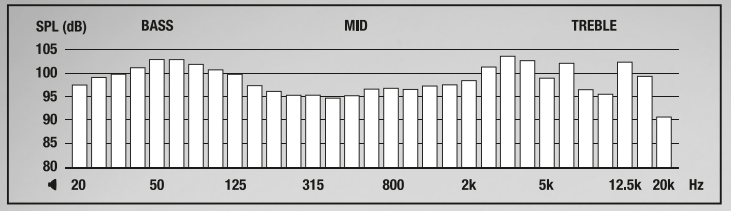
- Frequency Response: 20 Hz to 20,000 Hz, covering the full audible range
- Bluetooth: Wireless aptX codec support for high-quality audio streaming
- Battery Life: Over 30 hours of continuous wireless playback on a single charge
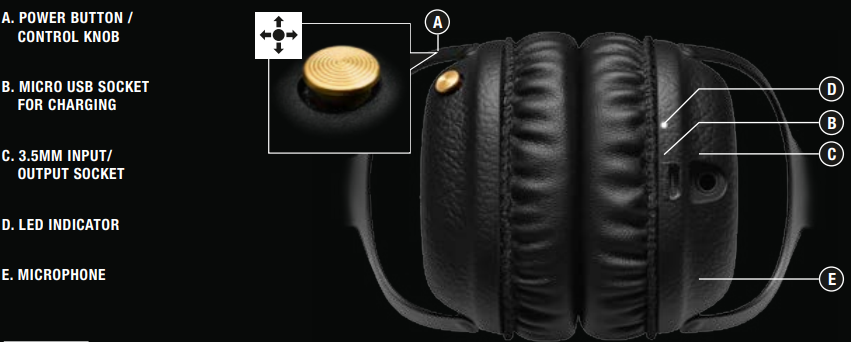
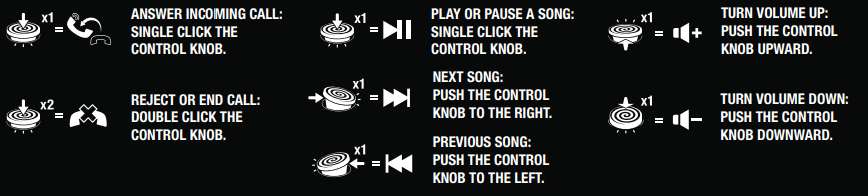
- Controls: Multi-directional control knob on the earcup for play/pause, track navigation, volume adjustment, and call handling
- Connectivity: Bluetooth wireless and 3.5mm audio jack with guitar-style coiled cable included
- Design: On-ear headphones with foldable frame, plush headband, and 3D hinges for portability and comfort
- Weight: Lightweight for extended comfortable wear
Compared to similar on-ear headphones like the Marshall Major II, the Mid offers superior battery life and aptX Bluetooth for reduced latency and better sound quality. Unlike over-ear noise-cancelling models, the Mid focuses on portability and style rather than active noise isolation, making it ideal for users prioritizing mobility and aesthetic appeal.
TECHNICAL INFO
- TRANSDUCER: 40 MM, DYNAMIC
- IMPEDANCE: 32 OHM
- FREQUENCY RANGE: 10 Hz-20 kHz
- SENSITIVITY: 100 mV @ 1 kHz = 95 dB SPL
DEVICE LAYOUT
CONTROLS
POWER ON/OFF
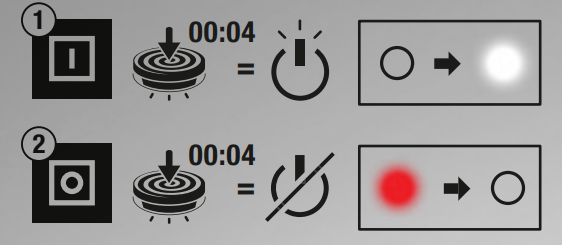
- PUSH AND HOLD THE POWER BUTTON FOR 4 SECONDS TO TURN ON.
- PUSH AND HOLD THE POWER BUTTON FOR 4 SECONDS TO TURN OFF.
NOTE: IF NOT CONNECTED TO A SOUND SOURCE, THE HEADPHONES WILL AUTOMATICALLY TURN OFF AFTER 10 MINUTES.
BLUETOOTH® PAIRING
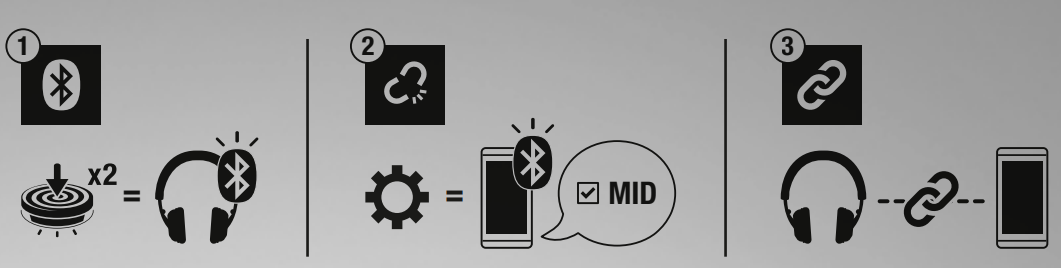
- WHEN POWERED ON, DOUBLE CLICK THE POWER BUTTON ON THE HEADPHONES.
- THE BLUETOOTH PAIRING INDICATOR STARTS FLASHING BLUE. ENABLE BLUETOOTH ON YOUR DEVICE. SELECT “MID” IN THE BLUETOOTH LIST AND ACCEPT PAIRING.
- THE INDICATOR TURNS OFF WHEN THE PAIRING IS COMPLETED.
NOTE: AFTER THE INITIAL PAIRING, THE HEADPHONES WILL AUTOMATICALLY CONNECT TO THE DEVICE WHEN TURNED ON AGAIN.
CHARGING

THE RED BATTERY INDICATOR STARTS BLINKING WHEN THE BATTERY LEVEL IS LOW.
- PLUG THE INCLUDED USB-C cable INTO THE MICRO USB SOCKET ON THE HEADPHONE.
- PLUG THE OTHER END OF THE CABLE INTO A USB POWER SOURCE. THE RED BATTERY INDICATOR STAYS LIT WHEN CHARGING.
- WHEN THE BATTERY IS FULLY CHARGED, THE BATTERY INDICATOR TURNS WHITE.
NOTE: CHARGE THE BATTERY BEFORE USING THE HEADPHONES FOR THE FIRST TIME.
3 HOURS CHARGE GIVES APPROXIMATELY 30 HOURS OF PLAYBACK AT MEDIUM VOLUME.
PHONE FUNCTIONALITY
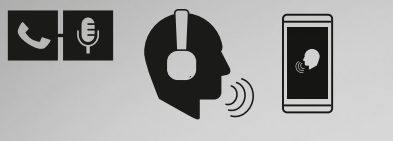
WIRELESSLY ANSWER, REJECT, OR END A CALL USING THE CONTROL KNOB.
SHARING
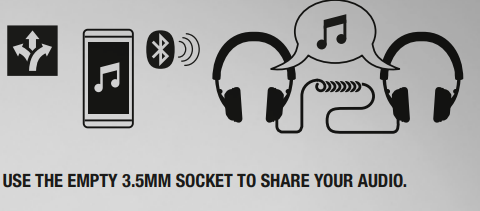
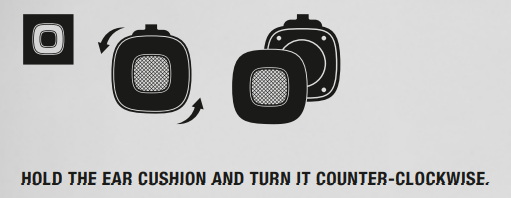
REMOVABLE EAR CUSHIONS
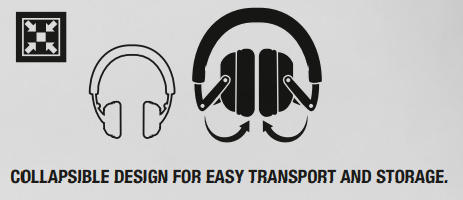
COLLAPSIBLE
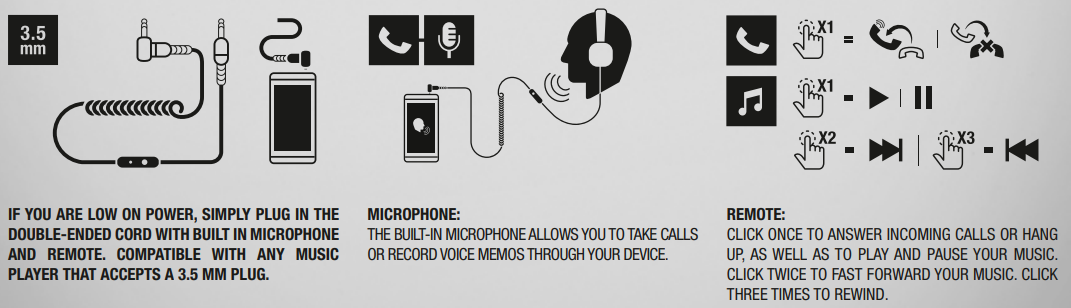
DETACHABLE 3.5 MM CORD
Troubleshooting Marshall Mid Bluetooth On-Ear Headphones
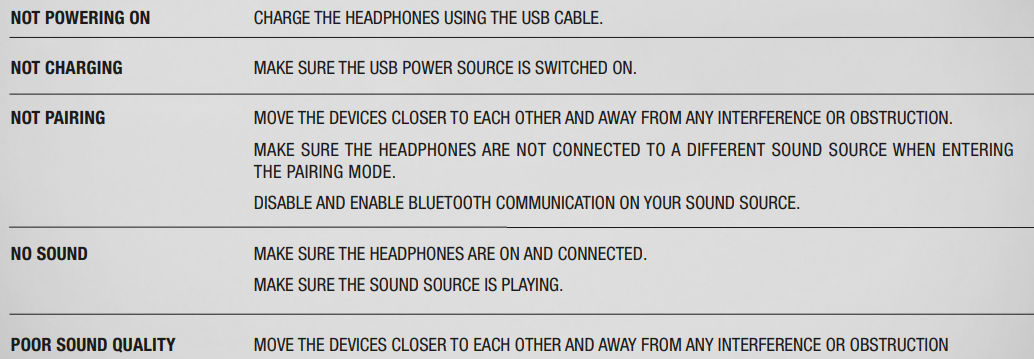
- Bluetooth Pairing Issues: Ensure the headphones are powered on and in pairing mode. Press the control knob twice quickly to initiate pairing. Remove previous Bluetooth connections on your device if the connection fails.
- No Sound or Audio Dropouts: Check battery level; recharge if low. Keep devices within 30 feet and avoid physical obstructions. Restart both the headphones and the connected device.
- Control Knob Not Responding: Reset the headphones by turning them off and on. Avoid excessive moisture or dirt around controls.
- Wired Mode Problems: Confirm the 3.5mm cable is securely plugged in. Try using the cable with another device to isolate the problem.
- Battery won't charge: Use the provided micro-USB cable. Verify the power source. If charging fails, contact Marshall support.
Preventive measures include keeping headphones clean, avoiding extreme temperatures, and storing them in a protective case during transport. The Marshall Mid Bluetooth On-Ear Headphone comes with a one-year limited warranty covering manufacturing defects. For assistance, contact Marshall support at Marshall’s official website or call +46 (0) 8-59-200-500.
Pros & Cons of Marshall Mid Bluetooth On-Ear Headphones
Pros
- Exceptional Sound Quality: Custom 40mm drivers deliver clear highs, rich mids, and deep bass with aptX Bluetooth for high-fidelity wireless listening.
- Long Battery Life: Over 30 hours of playback ensures all-day use without frequent recharging.
- Stylish, Durable Design: Classic Marshall aesthetics with metal hinges and an oldable frame for portability.
- Intuitive Controls: The multi-directional knob offers seamless control over music and calls with a single button.
- Versatile Connectivity: Use wirelessly or wired with the included 3.5mm coiled cable, ideal for devices without Bluetooth.
Cons
- Limited Sound Isolation: On-ear design allows more ambient noise in and sound leakage out, less suitable for noisy environments.
- Non-Noise Cancelling: Does not feature active noise cancellation, unlike some competitors.
- Bluetooth Range: Effective wireless range up to 30 feet, but may experience dropouts through walls or obstacles.
- Charging Port: Uses micro-USB instead of more modern USB-C, which may inconvenience some users.
Overall, the Marshall Mid Bluetooth On-Ear Headphone offers excellent value for money, balancing sound performance, style, and battery life. While not ideal for users needing robust noise isolation, it excels for everyday wireless listening and casual use compared to alternatives like the Major II or active noise-cancelling models.
Customer Reviews of Marshall Mid Bluetooth On-Ear Headphones
Users consistently praise the Marshall Mid Bluetooth On-Ear Headphone for its rich, clear sound and durable, stylish build. Many appreciate the impressive 30+ hour battery life and the convenience of on-ear controls that manage music and calls effortlessly. The included coiled 3.5mm cable also receives positive remarks for its unique guitar-inspired design and reliable wired playback option.
Common complaints center around the limited noise isolation due to the on-ear design, which allows ambient sounds to leak in during noisy commutes. Some users note occasional Bluetooth dropouts when moving between rooms or encountering obstacles. Despite these, the majority recommend the headphones for casual listeners, travelers, and those who value aesthetics combined with solid audio performance.
Typical ratings range from 4 to 4.5 stars out of 5, with testimonials highlighting the headphones’ comfort, sound quality, and long battery life as standout features.
Faqs
How do I set up my marshall Mid Bluetooth On-Ear Headphone for the first time?
What should I do if my marshall Mid Bluetooth On-Ear Headphone is not pairing with my device?
Can I use the marshall Mid Bluetooth On-Ear Headphone with a non-Bluetooth device?
How often should I clean and maintain my marshall Mid Bluetooth On-Ear Headphone?
What are the key features that make the marshall Mid Bluetooth On-Ear Headphone different?
Can I use the marshall Mid Bluetooth On-Ear Headphone for hands-free calls?
How do I optimize the sound quality of my marshall Mid Bluetooth On-Ear Headphone?
Is the marshall Mid Bluetooth On-Ear Headphone compatible with all devices that support Bluetooth?
More marshall manuals
- Setup: Marshall Minor III True Wireless Earbuds User Manual
- Usage: Marshall Mode EQ In-Ear Headphones User Manual
- Setup: Marshall Motif A.N.C True Wireless Earbuds User Manual
- Setup: Marshall Kilburn - Portable Active Stereo Speaker User Manual
- Setup: Marshall Mid A.N.C On Ear Headphones User Manual
- Setup: Marshall Stockwell - Portable Stereo Loudspeaker User Manual
Leave a Comment