
Setup: Marshall Mid A.N.C On Ear Headphones User Manual
Content
Marshall Mid A.N.C On Ear Headphones
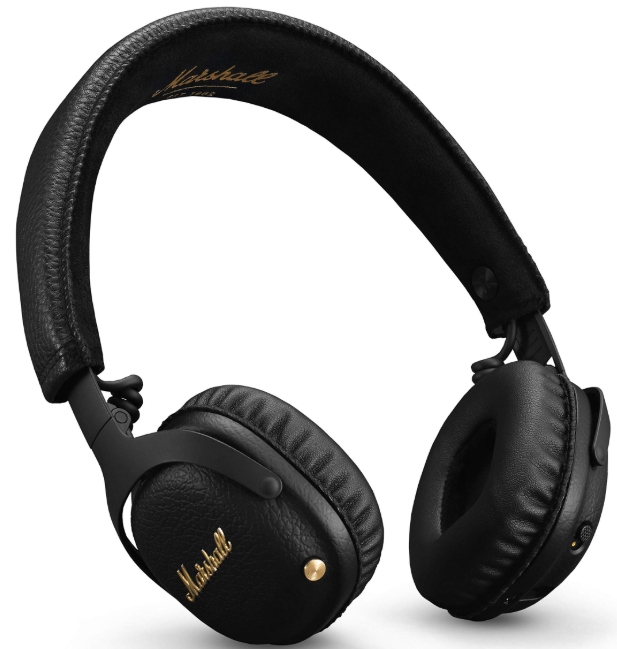
Introduction
The Marshall Mid A.N.C On-Ear Headphones are a vibrant blend of vintage style and modern technology, offering a unique listening experience with their active noise cancellation (ANC) and Bluetooth aptX capabilities. These headphones are designed for music enthusiasts seeking a balance of sound quality and style. The Marshall Mid A.N.C. is ideal for commuters, students, and anyone looking for a reliable on-ear listening solution. With a price range of around $269, they are accessible to a wide audience and are available at major electronics retailers.
Key benefits include excellent sound clarity, substantial bass levels, and a robust battery life of over 30 hours for Bluetooth playback or ANC use alone. The headphones feature a retro aesthetic with modern functionality, making them a great choice for those who value both style and performance.
Specifications
The Marshall Mid A.N.C. On-Ear Headphones boast impressive technical specifications:
- Drivers: 40mm dynamic drivers with a frequency response of 20Hz to 20kHz.
- Impedance: 32 ohms, suitable for mobile devices.
- Bluetooth: Supports aptX for high-quality wireless audio.
- Active Noise Cancellation (ANC): Reduces ambient noise effectively.
- Battery Life: Over 30 hours with ANC or Bluetooth alone, and approximately 20 hours with both features on.
- Design: On-ear design with foldable earcups for travel convenience.
- Accessories: Includes a 50" audio cable, USB charging cable, and a stylish red velvet-lined storage case.
Compared to similar products like the Beats Solo Pro Wireless, the Marshall Mid A.N.C. offers a more balanced sound and a longer battery life, though it may not match the Beats in terms of noise isolation.
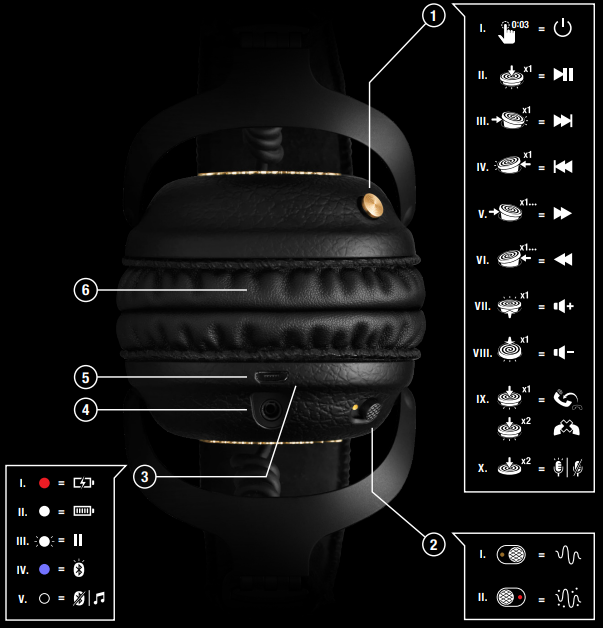
DEVICE LAYOUT
- CONTROL KNOB
- BLUETOOTH ON/OFF
PUSH AND HOLD FOR 3 SECONDS - PLAY/PAUSE
SINGLE-CLICK - NEXT SONG
PUSH TO THE RIGHT - PREVIOUS SONG
PUSH TO THE LEFT - FAST FORWARD
PUSH TO THE RIGHT AND HOLD - REWIND
PUSH TO THE LEFT AND HOLD - TURN UP THE VOLUME
PUSH UPWARDS - TURN DOWN THE VOLUME
PUSH DOWNWARDS - HANDLE CALLS
SINGLE-CLICK TO ANSWER OR END CALL
DOUBLE-CLICK TO REJECT AN INCOMING CALL - ACTIVATE/STOP SIRI
DOUBLE-CLICK
- BLUETOOTH ON/OFF
- ANC ON/OFF SWITCH
TURN ON THE ACTIVE NOISE CANCELLATION TO REDUCE THE BUZZ AND NOISES OF YOUR SURROUNDINGS. ANC CAN BE USED WHILE LISTENING TO MUSIC OR WITH BLUETOOTH OFF FOR SOME PEACE AND QUIET.- ANC ON
- ANC OFF
NOTE: MAKE SURE THAT ANC IS SET TO OFF WHEN NOT USING THE HEADPHONES TO CONSERVE BATTERY POWER.
- LED INDICATOR
- CHARGING
- FULLY CHARGED
- AUDIO PAUSED BLUETOOTH® PAIRING MODE
- BLUETOOTH OFF OR PLAYING
- 3.5 mm INPUT/OUTPUT SOCKET
SHARE YOUR AUDIO BY PLUGGING IN ANOTHER PAIR OF HEADPHONES INTO THE 3.5 mm SOCKET.
IF YOU ARE LOW ON POWER, SIMPLY USE THE DOUBLE-ENDED 3.5 mm CORD WITH BUILT-IN REMOTE AND MICROPHONE.- SINGLE-CLICK TO PLAY, PAUSE, ANSWER CALLS, OR HANG UP.
- DOUBLE-CLICK FOR NEXT SONG OR TO REJECT CALLS.
- TRIPLE-CLICK FOR PREVIOUS SONG.
- USB PORT FOR CHARGING BATTERY
- WHEN THERE IS LESS THAN 1 HOUR OF CHARGE, A BATTERY LOW ALERT WILL SOUND.
PLUG YOUR HEADPHONES TO A USB POWER SOURCE VIA THE MICRO USB CABLE TO CHARGE THE BATTERY. - A FULL BATTERY RECHARGE TAKES APPROXIMATELY 3 HOURS.
- WHEN THERE IS LESS THAN 1 HOUR OF CHARGE, A BATTERY LOW ALERT WILL SOUND.
- REMOVABLE EAR CUSHIONS
HOLD THE EAR CAP AND TURN IT COUNTER-CLOCKWISE.
OPERATING TIME
- ANC ONLY . 30+ HOURS
- BLUETOOTH ONLY. 30+ HOURS
- BLUETOOTH AND ANC. 20 HOURS
THE OPERATING TIME IS CALCULATED USING RANDOMLY SELECTED MUSIC PLAYED AT MEDIUM VOLUME.
GETTING STARTED
- PUSH AND HOLD THE CONTROL KNOB FOR 5 SECONDS UNTIL THE LED BLINKS BLUE.
- SELECT MID ANC FROM YOUR SOUND DEVICE’S BLUETOOTH® LIST. THE INDICATOR TURNS OFF WHEN PAIRING IS COMPLETE.
- PRESS PLAY, AND ENJOY YOUR NEW HEADPHONES
IT IS RECOMMENDED TO CHARGE THE BATTERY BEFORE USING YOUR HEADPHONES FOR THE FIRST TIME.
Troubleshooting
Common issues and their solutions:
- ANC Continuously Draining Battery: Ensure to turn off ANC when not in use, as it can drain the battery even when the headphones are powered off.
- Bluetooth Connectivity Issues: Restart both the headphones and the device, and ensure they are within range.
- No Sound: Check that the headphones are properly connected via Bluetooth or cable and that the volume is turned up.
For further assistance, Marshall offers a one-year limited warranty and support through their official website or customer service.
Pros & Cons
Pros
- Sound Quality: Offers a balanced sound with enhanced bass when ANC is on.
- Design: Stylish and durable with a retro aesthetic.
- Battery Life: Long-lasting for both ANC and Bluetooth modes.
- Features: Includes ANC, Bluetooth aptX, and a handy remote control.
Cons
- Soundstage: Limited soundstage due to on-ear design.
- Noise Isolation: While effective, it may not outperform competitors in all noise ranges.
- ANC Independence: Can drain battery if not turned off when not in use.
Overall, the Marshall Mid AA.N.C..offers great value for its price, especially for those prioritizing sound quality and style.
Customer Reviews
Users praise the Marshall Mid A.N.C On-Ear Headphones for their stylish design and impressive sound quality, particularly with ANC enabled. Some users note that while the noise cancellation is effective, it may not be as strong as some competitors in certain noise environments. With an average rating of 4 out of 5 stars, these headphones are highly recommended for those seeking a blend of style, sound, and functionality.
A common complaint is the lack of a dedicated app for customization, but overall, the intuitive controls and robust features make them a popular choice for music lovers.
Faqs
How do I set up my marshall Mid A.N.C On Ear Headphones for the first time with Bluetooth?
Why is the active noise cancelling (A.N.C.) on my marshall Mid A.N.C headphones draining the battery quickly?
What are the main features of the marshall Mid A.N.C On Ear Headphones that enhance sound quality?
Can I use marshall Mid A.N.C On Ear Headphones with both Android and iOS devices?
How do I control music playback and calls using the marshall Mid A.N.C headphones?
What should I do if my marshall Mid A.N.C headphones are not pairing with my device?
How do I maintain and clean my marshall Mid A.N.C On Ear Headphones to prolong their lifespan?
Can I use the marshall Mid A.N.C headphones wired while the battery is dead or Bluetooth is off?
More marshall manuals
- Setup: Marshall Kilburn III Portable Loudspeaker User Manual
- Setup: Marshall Motif A.N.C True Wireless Earbuds User Manual
- Setup: Marshall Minor IV True Wireless Earbuds User Manual
- Setup: Marshall Minor III True Wireless Earbuds User Manual
- Setup & Pairing: Marshall Monitor Bluetooth Over-Ear Headphones User Manual
- Setup: Marshall Mid Bluetooth On-Ear Headphone User Manual
Leave a Comment